How to Change Your Digital Alarm Clock for Better Sleep
Changing your digital alarm clock is one of the easiest ways to improve your sleep quality and morning routine. Whether you need to adjust the wake-up time, reset the display, or fix a common issue, this guide walks you through every step. You will learn practical tips, avoid common mistakes, and discover how the right alarm clock settings can transform your sleep habits.
Do you wake up feeling groggy every morning? The problem might not be your sleep schedule. It could be your digital alarm clock. Many people overlook how much their alarm setup affects their rest. A few small changes to your clock can lead to better mornings and deeper sleep at night.
In this guide, we will show you exactly how to change your digital alarm clock for the better. You will learn simple steps to adjust settings, fix common problems, and choose features that support healthy sleep. Whether you own a basic bedside clock or a smart alarm device, this article has you covered.
Let us be honest. Most of us do not think about our alarm clocks until they stop working or the time is wrong. But taking a few minutes to review and update your clock settings can genuinely improve your daily routine. Changing your digital alarm clock does not have to be complicated. Keep reading to find out how.
Key Takeaways
- Adjusting alarm clock settings can significantly improve your sleep quality and morning energy levels.
- Changing the time format, volume, and display brightness are simple tweaks that make a big difference.
- Common digital alarm clock problems like battery issues and display glitches are easy to fix at home.
- Choosing the right alarm clock features such as sunrise simulation and sleep tracking supports better rest.
- Replacing an old alarm clock may be the best option if it no longer meets your sleep needs.
📑 Table of Contents
- Why Changing Your Digital Alarm Clock Matters for Sleep
- How to Change Your Digital Alarm Clock Settings
- Common Digital Alarm Clock Problems and How to Fix Them
- Choosing the Right Alarm Clock Features for Better Sleep
- Tips for Using Your Alarm Clock to Improve Sleep Habits
- When to Replace Your Digital Alarm Clock
Why Changing Your Digital Alarm Clock Matters for Sleep
Your alarm clock plays a bigger role in your sleep health than you might think. It is not just about waking up on time. The way your clock is set up can affect how easily you fall asleep and how refreshed you feel in the morning.
Here are a few reasons why you should take a closer look at your alarm clock settings:
- Better wake-up timing: Adjusting your alarm to match your natural sleep cycle helps you wake up feeling less tired.
- Reduced sleep disruption: A clock with annoying beeping or bright displays can interrupt deep sleep stages.
- Improved sleep hygiene: A well-configured clock supports a consistent bedtime and wake-up routine.
- Less morning stress: When your alarm works smoothly, you start the day with less frustration and anxiety.
Think about your current sleep schedule. Do you set the alarm for the same time every day? Do you use a wake-up light or just a loud buzzer? Small changes to your clock can align your mornings with your body’s natural rhythm. This is the first step toward better sleep quality.
The Connection Between Alarm Clocks and Sleep Cycles
Your body follows a natural internal clock called the circadian rhythm. This rhythm controls when you feel sleepy and when you feel alert. An alarm clock that works with this rhythm makes waking up much easier. On the other hand, a jarring alarm at the wrong time can leave you feeling drained all day.
When you change your digital alarm clock settings, consider your personal sleep patterns. Are you a light sleeper or a heavy sleeper? Do you need more time in the morning? These questions help you decide the best clock configuration for your lifestyle.
How to Change Your Digital Alarm Clock Settings
Now let us get into the practical steps. Changing your digital alarm clock is usually straightforward. Most clocks follow a similar process, even if the buttons and menus look different.
Step 1: Locate the Control Buttons or Menu
Start by finding the buttons on your clock. Most alarm clocks have a set of buttons on the top or back. Common buttons include Alarm, Time, Set, and Mode. If your clock has a digital display with menus, look for a Settings or Menu button.
Tip: Keep your clock manual handy. It will show you exactly which buttons control which functions. If you lost the manual, try searching for the model number online.
Step 2: Change the Wake-Up Time
To adjust the alarm time, hold down the Alarm or Set button. Use the arrow buttons to move the hour and minute values up or down. Once you reach your desired wake-up time, press Set again to save the change.
Here are some quick tips for setting the wake-up time:
- Set gradual alarms: If your clock supports it, set the alarm to get slightly louder over a few minutes.
- Avoid early alarms: Waking up too early can cut short your REM sleep cycle.
- Match your routine: Pick a time that gives you enough buffer before you need to leave the house.
Step 3: Adjust the Display and Brightness
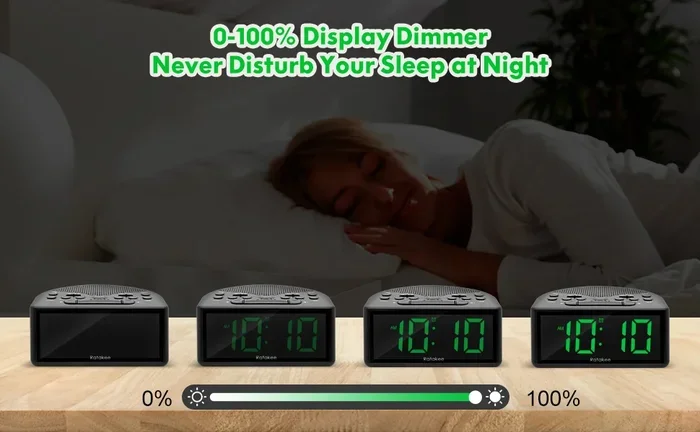
Many people do not realize that a bright clock display can affect sleep quality. If your alarm clock display glows brightly at night, it can suppress melatonin production. This is the hormone that helps you fall asleep.
To fix this, look for a Display or Brightness button. Reduce the screen brightness to the lowest comfortable level. Some clocks also offer a dimmer or auto-off feature. Use this to turn off the display after a certain hour.
Step 4: Set the Correct Time Format
Do you prefer a 12-hour or 24-hour format? Most digital clocks let you switch between them. Look for a Format or Clock button in the settings menu. Select your preferred style and save. This is a small change, but it keeps your clock reading clear and easy to understand.
Step 5: Configure Alarm Volume and Sound
The sound your alarm makes matters more than you think. A harsh, loud buzzer can spike your stress hormones right when you wake up. Instead, try setting a softer sound or a nature alarm tone. Some clocks offer gradual volume increases, which are much gentler on your body.
Also check the alarm volume settings. Make sure the volume is loud enough to wake you but not so loud that it startles you uncomfortably. If you share a room, consider using a vibrating alarm or a smartwatch alarm instead.
Common Digital Alarm Clock Problems and How to Fix Them
Even the best digital alarm clock can run into issues. Before you panic or buy a new one, try these simple fixes. Most problems have easy solutions.
Problem 1: The Clock Keeps Losing Time
If your clock resets or loses time frequently, the first thing to check is the battery. A weak or dying battery often causes time drift. Replace the battery with a fresh one and see if the problem stops.
Another common cause is a power surge or outage. When electricity returns after an outage, the clock may reset to a default time. Simply reset the clock manually after each power interruption.
Problem 2: The Alarm Does Not Go Off
Missed alarms can be stressful. If your alarm is not ringing, check a few things first:
- Is the alarm actually turned on? Look for an alarm indicator icon on the display.
- Is the volume turned up? Some clocks have separate volume controls for the alarm.
- Did you accidentally set the alarm for PM instead of AM? This is a common mistake.
If none of these work, try resetting the clock to factory settings. This clears any glitches in the alarm clock reset process. Refer to your manual for the exact reset steps.
Problem 3: The Display Is Flickering or Dim
A flickering or dim display can be hard to read. Usually, this means the battery is low or the display needs cleaning. Try replacing the battery first. If the display still flickers, gently clean the screen with a soft, dry cloth.
Avoid using liquid cleaners on digital displays. They can damage the internal components. If the problem persists after these steps, the clock may need a full replacement.
Problem 4: The Clock Will Not Connect to Wi-Fi (Smart Clocks)
Smart alarm clocks often rely on Wi-Fi for features like automatic time updates and sleep tracking. If your clock will not connect, try these steps:
- Check your internet wifi password and make sure you are entering it correctly.
- Restart your router and the alarm clock.
- Move the clock closer to the router to improve signal strength.
- Reset the Wi-Fi connection in the clock’s settings menu.
For more help with Wi-Fi connection issues, you can visit our guide on how to change your internet wifi password if you need to update your network credentials.
Choosing the Right Alarm Clock Features for Better Sleep
Not all alarm clocks are created equal. If your current clock is basic and outdated, upgrading can make a real difference. Here are the alarm clock features you should look for to support better sleep.
Sunrise Simulation and Wake-Up Lights
A wake-up light mimics the natural sunrise by gradually increasing light in your room. This gentle approach helps your body wake up naturally instead of jolting you with sound. Research shows that sunrise alarms can improve morning alertness and mood.
When choosing a clock with this feature, look for adjustable light intensity and color temperature. Warm light tones are gentler and more effective for waking up. Some clocks also offer sunset simulation, which helps you wind down in the evening.
Sleep Tracking and Smart Features
Modern smart alarm clocks go far beyond just ringing an alarm. Many include sleep tracking technology that monitors your sleep stages. They wake you up during your lightest sleep phase, which makes mornings feel much easier.
Other smart features to consider include:
- Sleep sounds: White noise, rain sounds, or ambient music to help you fall asleep.
- Nap timers: Perfect for short power naps during the day.
- Voice control: Set alarms and check the time hands-free using smart assistants.
- USB charging ports: Charge your phone while you sleep, reducing bedroom clutter.
Battery Backup and Reliability
A reliable digital clock should keep working even during power outages. Look for clocks with battery backup as a standard feature. This ensures your alarm settings and time are never lost when the power goes out.
For travelers or anyone who moves clocks frequently, battery backup is essential. It keeps your sleep schedule consistent no matter where you are.
Tips for Using Your Alarm Clock to Improve Sleep Habits
Having the right clock is only half the battle. How you use it matters just as much. Here are practical tips to build better sleep habits with your alarm clock.
Create a Consistent Bedtime Routine
Your body thrives on consistency. Try to go to bed and wake up at the same time every day, even on weekends. This reinforces your natural circadian rhythm and makes falling asleep easier each night.
Use your alarm clock to set both a bedtime reminder and a wake-up alarm. This dual approach helps you build a balanced morning routine and a calming evening ritual.
Keep Clocks Out of Direct Sight
Watching the clock while you lie in bed can increase anxiety and make it harder to fall asleep. Position your alarm clock so the display faces away from you or use a dimmer setting. This small change reduces the temptation to check the time during the night.
Use Multiple Alarm Strategies
If you struggle to wake up, try combining your alarm with other cues. Place the clock across the room so you must get out of bed to turn it off. You can also pair your alarm with a wake-up light or a gentle vibration device.
Just be careful not to set too many alarms. Multiple alarms can fragment your sleep and leave you feeling more tired. One well-timed alarm is usually enough.
Limit Screen Brightness Before Bed
The blue light from screens can interfere with your body’s production of melatonin. While your digital alarm clock is not a phone or tablet, a bright display still emits some light. Keep the brightness low and consider covering the display with a small cloth if needed.
When to Replace Your Digital Alarm Clock
Sometimes, no matter how many settings you adjust, an old clock just does not cut it anymore. Knowing when to replace your digital alarm clock saves you from ongoing frustration.
Here are signs it is time for a new clock:
- The display is cracked, flickering, or unreadable even after battery replacement.
- The alarm sound is distorted or no longer works reliably.
- The clock frequently resets itself or loses time despite fresh batteries.
- You need features your current clock does not offer, like sleep tracking or sunrise simulation.
- The clock is more than five to seven years old and technology has advanced significantly.
When shopping for a new clock, consider your sleep needs carefully. If you are a heavy sleeper, look for clocks with loud alarms and vibrating pads. If you prefer a gentle wake-up experience, choose a clock with a wake-up light and gradual sound features.
Remember, investing in a good alarm clock is investing in your sleep health. Quality rest affects every part of your day, from productivity to mood to physical health. Take the time to find the right clock and set it up properly.
Final Thoughts on Changing Your Digital Alarm Clock
Changing your digital alarm clock for better sleep is simpler than most people realize. From adjusting the wake-up time and display brightness to choosing smart features like sunrise simulation and sleep tracking, every small change adds up. The key is to be intentional about your setup and to treat your alarm clock as a tool for better rest, not just a noisy necessity.
Take a few minutes today to review your clock settings. Make the adjustments that feel right for your lifestyle. You might be surprised at how much better your mornings feel with just a few simple changes. Better sleep starts the night before, and your alarm clock plays a bigger role in that than you probably thought.
Whether you tweak your current clock or invest in a new one, the goal is the same: wake up feeling refreshed, energized, and ready to take on the day. Your future self will thank you for it.
Frequently Asked Questions
How do I change the alarm time on my digital alarm clock?
Hold down the Alarm or Set button on your clock. Use the up and down arrows to adjust the hour and minute. Press Set again to save the new alarm time. The exact steps may vary slightly depending on your clock model, so check your manual if needed.
Why does my digital alarm clock keep losing time?
The most common reason is a weak or dead battery. Replace the battery with a fresh one and reset the time. Power outages and surges can also cause clocks to reset. If the problem continues, the clock’s internal clock mechanism may need replacement.
Can a digital alarm clock improve my sleep quality?
Yes, absolutely. A well-configured alarm clock helps you maintain a consistent sleep schedule and reduces morning stress. Features like sunrise simulation, adjustable volume, and dim displays all contribute to better sleep quality and easier waking.
What features should I look for in a new digital alarm clock?
Look for sunrise simulation, sleep tracking, adjustable brightness, battery backup, and customizable alarm sounds. If you want smart features, consider clocks with Wi-Fi connectivity and voice control. Choose features based on your personal sleep needs and preferences.
Is it better to use a wake-up light instead of a sound alarm?
Many people find wake-up lights gentler and more effective than sound alarms. A sunrise simulation gradually increases light intensity, which aligns with your body’s natural waking process. You can use both together for the best results, especially if you are a heavy sleeper.
How often should I replace my digital alarm clock?
Most digital alarm clocks last five to seven years with proper care. Replace yours sooner if the display becomes unreadable, the alarm stops working reliably, or you need features that your current clock does not offer. Regular maintenance like battery replacement can extend the clock’s lifespan.
=== CONCLUSION ===
Changing your digital alarm clock is one of the simplest yet most overlooked ways to improve your sleep. From basic time adjustments to choosing advanced features like wake-up lights and sleep tracking, every step you take brings you closer to better rest. Do not underestimate the power of a well-set alarm clock. It shapes your morning, influences your energy, and supports your overall health.
Take action today. Review your current clock settings, fix any issues, and consider upgrading if your clock is outdated. Small changes lead to big results. Better sleep is just one adjustment away.