Can I Use My Phone As A Sound Amplifier For Music Lovers
Yes, you can use your phone as a sound amplifier for music. With the right settings, apps, and accessories, your smartphone can deliver surprisingly powerful audio. This guide covers everything from built-in tricks to external tools that will help you amplify music phone without spending a fortune.
Key Takeaways
- Built-in phone settings can boost volume significantly without any extra apps or tools.
- Volume booster apps are a free and easy way to turn your phone into a portable sound amplifier.
- DIY acoustic amplifiers like paper cones can enhance sound using simple household items.
- Bluetooth speakers and external accessories offer the best quality when you need real amplification.
- Common mistakes like covering speakers can reduce your phone’s sound output without you knowing.
- Expert tips on speaker placement can make a huge difference in how loud and clear your music sounds.
- Phone sound amplifier solutions exist for every budget from free apps to premium gear.
📑 Table of Contents
- Can I Use My Phone As A Sound Amplifier For Music Lovers
- Understanding How Phone Speakers Work
- Built-In Settings To Boost Your Phone Volume
- Free Apps That Turn Your Phone Into A Sound Amplifier
- DIY Tricks To Amplify Phone Sound Without Apps
- External Accessories For Better Phone Sound
- Common Mistakes That Reduce Your Phone Sound
- Expert Tips For The Best Phone Sound Experience
- When To Consider A Dedicated Speaker Instead
- Conclusion
Can I Use My Phone As A Sound Amplifier For Music Lovers
You are sitting on your couch, phone in hand, and the music just is not loud enough. You want to fill the room with your favorite playlist, but your phone sound amplifier setup feels weak. So, can you actually use your phone as a sound amplifier for music?
The short answer is yes. Your phone already has built-in tools and settings that can boost volume. Add a few free apps and some simple tricks, and you will be amazed at how much louder your music can get. This guide walks you through every method, from easy fixes to advanced setups. Whether you are a casual listener or a dedicated music fan, you will find practical steps that work right now.
Let us be real for a second. Phones are not designed to replace big speakers. But they can do a lot more than most people realize. With the right knowledge, you can turn your pocket device into a portable sound amplifier that fills any room with rich, clear audio. No expensive gear required. Just smart, simple techniques that anyone can use today.
Why Your Phone Sound Matters More Than You Think
Music is a big part of daily life. You listen while cooking, working, exercising, or relaxing. The quality and volume of your phone’s audio directly affect your experience. A weak sound can ruin a great song. A boosted, clear sound can make you feel like you are at a live concert in your own living room.
Many people do not realize that their phone’s speaker is capable of more than they think. Manufacturers design phone speakers to conserve battery and fit inside slim devices. That means the factory settings often limit volume on purpose. But those limits can be pushed. Understanding how your phone produces sound is the first step toward unlocking its full potential.
Understanding How Phone Speakers Work
Before you try to boost your sound, it helps to know what you are working with. Phone speakers are tiny but cleverly designed. They use digital-to-analog converters to turn digital music files into sound waves. Those waves move through a small diaphragm, creating the noise you hear.
The size of your phone’s speaker limits how much air it can move. Bigger speakers move more air, which means louder and richer sound. Since phone speakers are small, they naturally struggle with deep bass and high volume. But there are ways to work around these limits. You can use acoustic tricks, software boosts, and external tools to get much better results.
The Role of Digital Audio in Phone Sound
Every song you play on your phone starts as a digital file. Your phone’s processor reads that file and converts it into an analog signal. That signal goes to the speaker, which vibrates to create sound. The quality of this conversion process affects how clear and loud your music plays.
Higher quality audio files like FLAC or lossless formats give your phone more data to work with. This means better sound output even without amplification. On the other hand, compressed files like MP3 may sound flat when you push the volume up. So, the type of music file you use matters more than you might think when trying to amplify music phone style.
Built-In Settings To Boost Your Phone Volume
You do not need to download anything to get started. Your phone already has settings that can increase volume beyond what you normally use. These built-in tools are the easiest first step toward a louder listening experience.
Adjusting Media Volume Limits
On most phones, the media volume slider has a hidden maximum. You can often push it past the default limit. On Android devices, look for a setting called “Media Volume Limiter” in your sound settings. Turn it off or raise the cap. On iPhones, check the volume limit in Music settings and slide it to the highest position.
This simple change can make your music noticeably louder. It is one of the fastest ways to improve your phone speaker volume without any extra tools. Try it right now and see the difference.
Using Equalizer Settings For Better Sound
Equalizers let you adjust the frequencies your phone outputs. Boosting the mid and high frequencies can make music sound louder and clearer, even if the raw volume number does not change much. Most phones have a built-in equalizer in their sound or audio settings.
On Android, look for “Equalizer” or “Sound Enhancement” in your audio settings. On iPhone, check the “EQ” options in Music settings. Try presets like “Late Night” or “Treble Boost” for louder, clearer sound. These settings work great as a starting point before you add any external tools.
Disabling Noise Cancellation And Audio Reduction
Some phones have smart features that reduce volume in certain situations. For example, noise cancellation or adaptive sound settings may lower your media volume automatically. These features are helpful for calls, but they can limit your music listening experience.
Go through your sound settings and disable any features that reduce volume unnecessarily. This includes “Absolute Volume” on some Android phones, which syncs media volume across connected devices and can cap your output. Turning these off gives you full control over your smartphone audio enhancer experience.
Free Apps That Turn Your Phone Into A Sound Amplifier
If built-in settings are not enough, apps can help. There are many free volume booster apps available for both Android and iPhone. These apps work by increasing the digital gain on your audio output. They push your phone’s speaker beyond its normal limits.
Best Volume Booster Apps To Try
Here are some of the most popular and effective apps for boosting phone sound:
- Volume Booster (Android): This app increases your media volume by up to 200 percent. It is simple to use and works with most music apps. Just open it, adjust the slider, and enjoy louder sound.
- Boomplay Music (Android/iOS): This is a music player with a built-in equalizer and loudness boost. It enhances audio quality while playing your songs.
- Equalizer FX (Android): A powerful equalizer that also includes a volume booster. You can customize your sound profile and push your speaker louder.
- Boom 3D (iOS): This app offers a 3D surround sound effect along with volume boosting. It makes your music feel bigger and more immersive.
- Viper4Android (Android): An advanced audio effects engine for power users. It gives you deep control over your phone’s audio output.
Are Volume Booster Apps Safe?
This is a common concern, and the answer is mostly yes. Most reputable volume booster apps are safe to use. However, pushing your speaker too hard for too long can cause damage over time. The speaker diaphragm can overheat or wear out faster than normal.
To stay safe, use booster apps in moderation. Do not run them at maximum volume for hours. Give your phone’s speaker time to cool down. Think of these apps as tools to enhance your listening, not to replace proper speakers for long sessions.
DIY Tricks To Amplify Phone Sound Without Apps
Not every solution requires an app or extra gear. Some of the oldest tricks in the book still work amazingly well. These DIY methods use simple physics to make your phone sound louder and clearer.
The Paper Cone Trick
This classic trick has been around for decades. Take a piece of paper or thin cardboard and roll it into a cone shape. Place the small end over your phone’s speaker. The cone shapes the sound waves and directs them forward, making the music louder and more focused.
You can decorate the cone or keep it simple. The key is to make sure the small end fits snugly over the speaker without blocking it. This is one of the easiest acoustic amplifier methods you can try at home. It costs nothing and works surprisingly well for casual listening.
Using A Bowl Or Cup As A Speaker Enclosure
Place your phone inside a empty bowl or cup with the speaker facing down. The curved shape of the bowl reflects sound outward and amplifies it naturally. This works especially well with ceramic or glass bowls.
Try different sizes to find the best sound. Smaller bowls create a tighter, louder sound. Larger bowls spread the sound wider but may not be as intense. This trick is perfect for kitchen cooking sessions or small gatherings where you need a quick volume boost.
Placing Your Phone Against A Wall
Sound bounces off hard surfaces. Placing your phone against a wall or in a corner naturally amplifies the sound. The wall reflects the audio waves back toward you, making the music feel louder without any extra effort.
This is one of the simplest speakerphone amplifier tricks you can use anywhere. Try it in your bathroom, where tiles create even more reflection. You will notice the difference immediately. It is a free, instant fix that works every time.
External Accessories For Better Phone Sound
When DIY tricks and apps are not enough, external accessories offer the best solution. These tools are designed specifically to boost and improve phone audio output. They range from simple and affordable to more advanced and premium.
Bluetooth Speakers The Easiest Upgrade
A good Bluetooth speaker is the most popular way to amplify phone sound. These small devices connect wirelessly to your phone and deliver much louder, clearer audio than any phone speaker. You can find quality Bluetooth speakers for as little as 15 to 30 dollars.
Look for speakers with good battery life and water resistance if you plan to use them outdoors. Some popular options include JBL Go, Anker Soundcore, and Ultimate Ears Wonderboom. These are perfect for picnics, beach trips, and parties where you want music streaming loud and clear.
Acoustic Horns And Phone Amplifiers
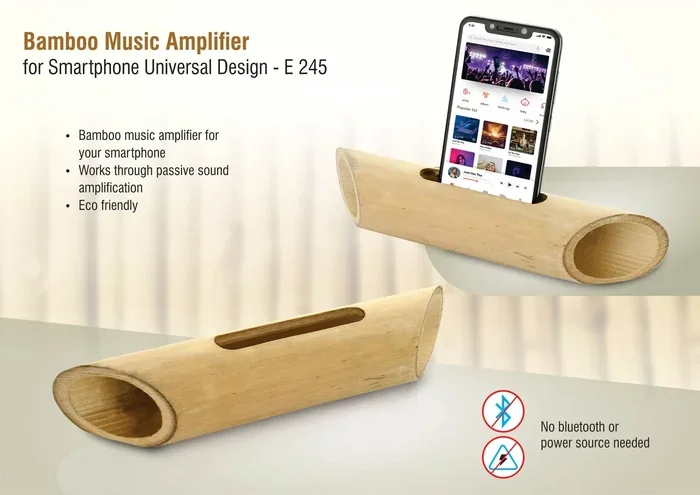
Acoustic horns are physical devices that shape and amplify sound using a horn-shaped chamber. You place your phone inside the horn, and the sound comes out much louder and richer. These devices work without any batteries or Bluetooth. They use pure physics to boost your audio.
You can buy portable acoustic horns for under 20 dollars online. They are lightweight, easy to carry, and work with any phone. These are a great option if you want a portable sound amplifier that does not need charging or pairing.
Wired Earphones With Built-In Amplification
If you prefer listening with earphones, look for models with built-in amplification. Some earphones have small drivers that boost the audio signal before it reaches your ears. This gives you louder, clearer sound without draining your phone’s battery.
Over-ear headphones with active noise cancellation can also make your music feel louder by blocking outside noise. You do not need to turn the volume up as high, which protects your hearing and your phone’s speaker. This is a smart approach for daily earphone amplifier use.
Comparison Table: Phone Amplification Methods
| Method | Cost | Ease Of Use | Sound Quality | Best For |
|---|---|---|---|---|
| Built-In Settings | Free | Very Easy | Moderate | Quick volume boost |
| Volume Booster Apps | Free | Easy | Good | App-based boosting |
| DIY Paper Cone | Free | Easy | Fair | Instant fun, zero cost |
| Bowl Or Cup Trick | Free | Very Easy | Fair | Quick boost at home |
| Bluetooth Speaker | 15-100 dollars | Easy | Excellent | Best overall quality |
| Acoustic Horn | 10-25 dollars | Easy | Good | No battery needed |
| Wired Amplified Earphones | 20-80 dollars | Easy | Very Good | Personal listening |
Common Mistakes That Reduce Your Phone Sound
Sometimes the problem is not that your phone is too quiet. Sometimes you are accidentally making it quieter without realizing it. Here are common mistakes that reduce your phone’s sound output and how to fix them.
Covering The Speaker Grills
Phone speakers are often located at the bottom or back of the device. If your phone case covers these grills, your sound will be muffled and quiet. Remove your case or choose a case with speaker cutouts that do not block the audio output.
This is one of the most overlooked reasons for poor phone speaker volume. Check your phone right now and make sure nothing is blocking the speaker openings. A simple case change can make a big difference.
Keeping Your Phone In A Pocket Or Bag
Fabric and soft materials absorb sound waves. When your phone is in your pocket or inside a bag, the sound gets trapped and muffled. The music may seem quieter even though the volume is set high.
Always place your phone on a hard, flat surface when playing music. A table, desk, or countertop lets the sound travel freely. This is an easy fix that instantly improves your audio output phone experience.
Using Damaged Or Clogged Speakers
Over time, dust, lint, and debris can build up around your phone’s speaker grills. This blockage reduces sound quality and volume. Clean your speaker openings regularly with a soft brush or compressed air.
If your speaker still sounds weak after cleaning, it may be damaged. Water damage is a common cause of speaker problems. If you suspect damage, consider a phone speaker replacement to restore your audio quality.
Expert Tips For The Best Phone Sound Experience
Getting the most out of your phone as a sound amplifier is about combining multiple techniques. Here are expert tips that make a real difference in how your music sounds and how loud it plays.
Place Your Phone On A Hard Surface
Hard surfaces reflect sound waves and make them louder. Soft surfaces absorb them. When you play music, place your phone on a wooden table, glass surface, or countertop. Avoid fabric, cushions, and carpets. The surface you choose affects your sound more than you might expect.
Angle Your Phone For Better Sound Direction
The direction your phone faces changes how sound travels. Angle your phone toward the room or toward where you are sitting. Pointing the speaker upward can create a fuller sound because the sound bounces off the ceiling before reaching your ears.
Experiment with different angles to find what works best in your space. This small adjustment can make your sound boost app efforts much more effective.
Keep Your Phone Cool
Phone speakers can lose volume when the device gets warm. Heat affects the speaker’s performance and can cause distortion at high volumes. If your phone feels hot while playing music, take a break and let it cool down. This keeps your phone sound amplifier working at its best.
Use High-Quality Audio Files
The quality of your music files affects how they sound when amplified. Use high-quality formats like FLAC or WAV for the best results. These files contain more audio data, which means clearer sound even when you push the volume up. Compressed files like MP3 may sound harsh or distorted at high volumes.
When To Consider A Dedicated Speaker Instead
Using your phone as a sound amplifier works great for casual listening and small gatherings. But there are times when a dedicated speaker is the better choice. If you host frequent parties, need sound for large outdoor spaces, or want deep bass that phones cannot deliver, a dedicated speaker is the way to go.
Good speakers also protect your phone’s speaker from damage caused by prolonged high-volume use. Your phone is a multi-purpose device. You rely on it for calls, photos, browsing, and so much more. Overworking the speaker can reduce its lifespan. A dedicated speaker lets you enjoy loud music while keeping your phone in top condition for everything else.
That said, for everyday use, your phone can handle most amplification needs. The methods in this guide give you everything you need to get louder, clearer sound from your device. You can enjoy rich music anywhere without carrying extra gear.
Conclusion
Using your phone as a phone sound amplifier is not only possible, it is easy and affordable. From built-in settings and free apps to DIY tricks and external accessories, you have many options to boost your music volume and quality. The key is to experiment and find the combination of methods that works best for you.
Start with the built-in settings. Try a volume booster app. Test the paper cone trick. If you want more, invest in a Bluetooth speaker or acoustic horn. Each method adds something to your listening experience. Combine them, and you will be surprised at how powerful your phone audio can become.
Music is meant to be enjoyed. Do not let weak phone sound hold you back. Use the tips in this guide and turn your phone into the portable sound amplifier you have always wanted. Your ears will thank you, and your music will sound better than ever before.
Frequently Asked Questions
Can I damage my phone speaker by using volume booster apps?
Using volume booster apps occasionally is generally safe. However, running them at maximum volume for extended periods can overheat and wear out your speaker. Use these apps in moderation and give your phone time to cool down between loud listening sessions.
What is the best free volume booster app for Android?
Volume Booster and Equalizer FX are two of the most popular and effective free options for Android. Both apps increase your media volume beyond the default limit and offer equalizer features for better sound quality. They are easy to use and do not require any special technical skills.
Does the paper cone trick really make phone sound louder?
Yes, the paper cone trick works by directing sound waves in one direction instead of letting them spread out. This creates a focused, louder sound. It is not as powerful as a Bluetooth speaker, but it is a fun and effective zero-cost trick that works surprisingly well.
Can I use my phone as a sound amplifier for a party?
Your phone can work for small gatherings, but it may not be loud enough for a large party. For bigger events, a Bluetooth speaker or portable amplifier is a better choice. You can still use your phone as the music source while the external speaker handles the amplification.
Are acoustic horns worth buying for phone sound amplification?
Yes, acoustic horns are a great investment if you want louder sound without batteries or Bluetooth. They use natural physics to amplify your phone’s audio. They are affordable, portable, and work with any phone model. They are especially useful for outdoor picnics and travel.
How can I improve my phone sound quality without making it louder?
Use your phone’s built-in equalizer to adjust frequencies. Boost the mid and treble ranges for clearer sound. Also, try using high-quality audio files and placing your phone on a hard surface. These steps improve sound quality without pushing the volume to maximum.