How Do I Use My Samsung Watch 5 For Fitness and Workouts
The Samsung Watch 5 is a powerful fitness companion that helps you track workouts, monitor health metrics, and reach your goals with ease. This guide covers everything from setting up exercise modes to using the Samsung Health app for complete fitness tracking. You will learn how to make the most of heart rate monitoring, body composition analysis, GPS tracking, and more to transform your workouts.
You bought a Samsung Watch 5 because you want to get fitter, healthier, and more active. But maybe you are not sure where to start. The good news is that this smartwatch is packed with features designed to help you track workouts, monitor your health, and stay motivated every single day.
Whether you are a beginner just starting your fitness journey or a seasoned athlete looking for better data, the Samsung Watch 5 for fitness has something for you. In this guide, we will walk you through everything you need to know. By the end, you will feel confident using every fitness feature your watch has to offer.
Let us dive right in and explore how to turn your Samsung Watch 5 into the ultimate fitness tool.
Key Takeaways
- Easy Setup: Getting started with fitness tracking on the Samsung Watch 5 is simple and fast.
- Multiple Exercise Modes: The watch offers dozens of workout modes for running, swimming, cycling, and more.
- Advanced Health Tracking: Features like the BIA sensor, heart rate monitor, and sleep tracking give you a full picture of your wellness.
- Samsung Health Integration: The Samsung Health app syncs seamlessly with the watch for detailed fitness insights.
- Smart Features: Fitness challenges, goal tracking, and recovery scores keep you motivated and on track.
📑 Table of Contents
- Why the Samsung Watch 5 Is a Great Fitness Companion
- Setting Up Your Samsung Watch 5 for Fitness Tracking
- Best Workout Modes and How to Use Them
- Tracking Health Metrics Beyond Workouts
- Using the Samsung Health App with Your Watch
- Tips to Get the Most Out of Your Samsung Watch 5 for Fitness
- Conclusion
Why the Samsung Watch 5 Is a Great Fitness Companion
The Samsung Watch 5 stands out in the crowded world of fitness trackers. It combines style, smart features, and powerful health tools in one sleek package. But what makes it truly special for fitness enthusiasts?
First, the watch comes with a built-in BIA sensor, which measures your body composition. This means you can check your body fat percentage, muscle mass, and body water right from your wrist. No need for expensive scales or gym equipment.
Second, the Samsung Watch 5 has an advanced heart rate monitor that tracks your pulse 24 hours a day. It uses both optical and electrical sensors to give you accurate readings during rest and exercise alike.
Third, the watch supports GPS tracking for outdoor activities. You do not need to carry your phone on a run or hike. The watch maps your route and tracks your distance independently.
Finally, the Samsung Health app ties everything together. It gives you a complete view of your fitness data, from daily steps to sleep quality. The app also lets you set fitness goals and join challenges to keep you moving.
Who Is the Samsung Watch 5 Best For?
The Samsung Watch 5 works well for a wide range of people. Here are some examples of who benefits most:
- Casual walkers who want to track daily steps and stay active.
- Runners and cyclists who need accurate GPS and heart rate data.
- Gym-goers who want to log workouts and monitor recovery.
- Health-conscious users who care about sleep, body composition, and overall wellness.
- Fitness beginners who need motivation and simple tracking tools.
Setting Up Your Samsung Watch 5 for Fitness Tracking
Before you start sweating, you need to set up your watch correctly. The setup process is quick, but getting it right makes a big difference in accuracy.
Step 1: Pair Your Watch with the Samsung Health App
Download the Samsung Health app on your phone if you have not already. Open the app and follow the prompts to pair your Samsung Watch 5. Make sure Bluetooth is turned on and the watch is charged.
During pairing, the app will ask for permissions. Allow access to your location, health data, and notifications. These permissions help the watch and app work together smoothly.
Step 2: Enter Your Personal Fitness Profile
Go to the Samsung Health app and fill out your profile. Enter your age, height, weight, and gender. This information helps the Samsung Watch 5 calculate accurate calorie burn and heart rate zones.
You can also set your fitness goals here. Choose a daily step target, active minutes goal, or calorie goal. The watch will remind you when you are close to hitting these targets.
Step 3: Wear the Watch Correctly
This might sound obvious, but wearing the watch the right way improves accuracy. Place the band snugly about two finger-widths above your wrist bone. Make sure the sensor on the back of the watch sits flush against your skin.
For the best heart rate monitor readings, tighten the band slightly during workouts. A loose band can cause inaccurate data, especially during high-intensity exercises.
Quick Tips for Setup
- Keep your watch firmware updated for the latest fitness features.
- Restart your watch once a week to keep it running smoothly.
- Charge your watch nightly so it is always ready for morning workouts.
- Enable continuous heart rate monitoring in the watch settings.
Best Workout Modes and How to Use Them
The Samsung Watch 5 offers a wide range of exercise modes to match almost any activity you do. Each mode tracks specific metrics tailored to that workout. Let us look at the most popular ones.
Running and Walking
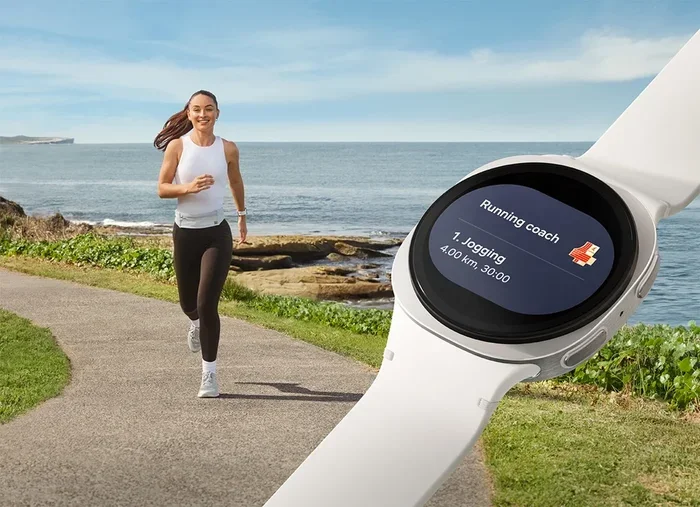
Running is one of the most popular uses for the Samsung Watch 5. When you start a run, the watch uses GPS tracking to map your route. It also tracks your pace, distance, and heart rate zones in real time.
For walking, the watch counts your steps and calculates the calorie burn based on your personal profile. You can set pace goals and the watch will vibrate when you reach them.
Cycling
The cycling mode on the Samsung Watch 5 tracks your speed, distance, and elevation gain. It also monitors your heart rate to help you stay in the right zone. If you ride outdoors, GPS tracking kicks in automatically to map your route.
Swimming
The Samsung Watch 5 is water-resistant up to 50 meters, making it great for swimmers. The swim mode tracks your laps, stroke type, and swim efficiency. You can use it in both pools and open water.
One thing to note: the GPS tracking does not work underwater. But the watch still records your distance based on stroke count and lap detection.
Strength Training and Gym Workouts
You can use the Samsung Watch 5 for gym sessions too. The strength training mode lets you log sets, reps, and rest times. It also tracks your heart rate throughout the workout to measure intensity.
For a full-body session, select the workout routines option and choose from preset programs. The watch will guide you through each exercise with rest timers and performance metrics.
Other Exercise Modes Worth Trying
- Yoga: Tracks your session duration and stress levels.
- HIIT: Monitors heart rate intervals and recovery time.
- Rowing: Tracks strokes per minute and calorie burn.
- Hiking: Uses GPS and elevation data for trail tracking.
- Dancing: Counts active minutes and movement intensity.
Common Mistakes During Workout Tracking
Avoid these common errors to get the most accurate data from your Samsung Watch 5:
- Starting a workout before you begin moving. Always start the timer when the activity begins.
- Wearing the watch too loosely during cardio. This causes inaccurate heart rate readings.
- Forgetting to enable GPS before outdoor workouts. Always check that GPS is active.
- Not syncing the watch after your workout. Sync promptly to save all your data.
Tracking Health Metrics Beyond Workouts
The Samsung Watch 5 does so much more than count your steps. It tracks a wide range of health metrics that give you a complete picture of your wellness. Let us explore the most useful ones.
Body Composition with the BIA Sensor
The BIA sensor (Bioelectrical Impedance Analysis) is one of the standout features of the Samsung Watch 5. It sends a tiny, harmless electrical current through your body to measure composition.
You can track:
- Body fat percentage
- Muscle mass
- Body water percentage
- Bone mass
- Basal metabolic rate (BMR)
To get a reading, open the body composition section on the watch, place your fingers on the side buttons, and stay still for about 30 seconds. For the most consistent results, measure at the same time each day, preferably in the morning.
Heart Rate Monitoring and Zones
The heart rate monitor on the Samsung Watch 5 is always on when you enable it. It tracks your resting heart rate, active heart rate, and heart rate variability (HRV).
The watch divides your heart rate into zones:
- Resting zone: Below 60% of your max heart rate.
- Fat burn zone: 60 to 70% of max heart rate.
- Cardio zone: 70 to 85% of max heart rate.
- Peak zone: Above 85% of max heart rate.
Training in different zones helps you target specific fitness outcomes. For endurance, spend more time in the cardio zone. For fat loss, focus on the fat burn zone.
Sleep Tracking
Sleep tracking on the Samsung Watch 5 is surprisingly detailed. The watch monitors your sleep stages, including light sleep, deep sleep, and REM sleep. It also tracks your total sleep time and wake-ups during the night.
Each morning, you get a sleep score that summarizes your rest quality. Use this data to adjust your bedtime routine and improve recovery. Good sleep is essential for fitness performance and muscle recovery.
Stress and Recovery
The watch measures your stress levels using heart rate variability. When stress is high, you can use the built-in breathing exercise to calm down. The recovery score tells you how ready your body is for the next workout.
If your recovery score is low, consider taking a rest day or doing light stretching. Pushing too hard without proper recovery can lead to burnout and injury.
Using the Samsung Health App with Your Watch
The Samsung Health app is the brain behind your fitness tracking. It collects all the data from your Samsung Watch 5 and presents it in an easy-to-understand format.
Dashboard Overview
When you open the app, the dashboard shows your daily activity at a glance. You will see your step count, active minutes, calorie burn, and heart rate. Scroll down to see sleep data, body composition, and workout history.
Setting and Adjusting Goals
Tap on any metric to set or adjust your goals. Want to walk 10,000 steps a day? Set that goal and the watch will nudge you when you are close. Want to hit 30 active minutes daily? The app tracks this automatically.
You can also set weekly and monthly goals for a bigger picture view. This helps you see trends over time rather than just day-to-day numbers.
Joining Fitness Challenges
One of the most motivating features of the Samsung Health app is fitness challenges. You can join challenges with friends, family, or the global community.
Challenges might include walking a certain distance, hitting daily step goals, or completing a number of workouts. Leaderboards and badges add a fun competitive element that keeps you coming back.
Expert Insights: How to Use the App for Better Results
Fitness experts recommend checking the Samsung Health app at least twice a day. Review your morning summary to see how your sleep and recovery looked. Then check your evening summary to review your activity and calorie burn for the day.
Over time, this habit helps you spot patterns. Maybe you sleep better on days you exercise. Or perhaps your calorie burn drops when you are stressed. These insights help you make smarter decisions about your workout routines and lifestyle.
Comparison: Samsung Watch 5 Fitness Features
| Feature | What It Tracks | Best For |
|---|---|---|
| Heart Rate Monitor | Pulse, heart rate zones, HRV | Cardio training and recovery |
| BIA Sensor | Body fat, muscle mass, body water | Body composition goals |
| GPS Tracking | Distance, pace, route mapping | Outdoor running, cycling, hiking |
| Sleep Tracking | Sleep stages, duration, quality score | Recovery and wellness |
| Step Counter | Daily steps, active minutes | General daily activity |
| Calorie Burn Tracker | Active and resting calories | Weight management |
| VO2 Max Estimator | Cardiovascular fitness level | Athletic performance tracking |
Tips to Get the Most Out of Your Samsung Watch 5 for Fitness
Now that you know the features, here are some practical tips to help you get the most out of your Samsung Watch 5 for fitness.
1. Keep Your Watch Charged
Battery life fitness tracking can drain your watch faster than normal use. To avoid running out of juice mid-workout, charge your watch every night. A full charge typically lasts about two days with regular fitness tracking enabled.
2. Use Auto-Detect Workouts
The Samsung Watch 5 can auto-detect certain workouts like walking, running, and cycling. Enable this feature in the settings so the watch starts tracking automatically when you begin moving.
3. Sync Regularly
Make it a habit to sync your watch with the Samsung Health app after every workout. This ensures all your data is backed up and available for analysis on your phone.
4. Explore the Fitness Index
The Samsung Health app includes a Fitness Index that gives you a holistic score based on your activity, sleep, and body composition. Check it weekly to see how your overall fitness is improving over time.
5. Customize Your Watch Face
Choose a watch face that displays your most important fitness metrics at a glance. Having your heart rate, step count, and active minutes visible without scrolling makes it easier to stay on track during workouts.
6. Join a Community
Connect with other Samsung Watch 5 users through the Samsung Health community. Share your progress, join challenges, and find workout partners. Community support is one of the best ways to stay consistent with your fitness goals.
7. Update Your Watch Regularly
Samsung releases firmware updates that improve fitness tracking accuracy and add new features. Check for updates regularly to make sure you are getting the best performance from your watch.
Common Mistakes to Avoid
- Ignoring sleep data: Sleep is just as important as exercise for overall fitness.
- Not calibrating GPS: Walk 10 meters in a figure-eight pattern to calibrate your GPS for better accuracy.
- Overlooking body composition trends: Focus on long-term changes rather than daily fluctuations.
- Skipping warm-ups: The watch tracks better data when you include warm-up and cool-down periods.
Conclusion
The Samsung Watch 5 is more than just a timepiece. It is a complete fitness toolkit that fits right on your wrist. From workout tracking and heart rate monitoring to body composition analysis and sleep tracking, it covers every aspect of your health journey.
By following the tips in this guide, you can unlock the full potential of your Samsung Watch 5 for fitness. Set up your goals, explore the different exercise modes, and use the Samsung Health app to track your progress over time.
Remember, the best fitness tool is the one you actually use. Wear your watch consistently, sync your data, and stay curious about your numbers. Small, consistent improvements lead to big results over time. Start today, and let your Samsung Watch 5 guide you toward a healthier, fitter you.
Frequently Asked Questions
Can I use the Samsung Watch 5 for swimming workouts?
Yes, the Samsung Watch 5 is water-resistant up to 50 meters and includes a dedicated swim mode. It tracks laps, stroke type, and swim efficiency in both pools and open water. Just note that GPS does not work underwater, so the watch uses stroke detection to estimate distance.
How accurate is the heart rate monitor on the Samsung Watch 5?
The heart rate monitor on the Samsung Watch 5 is quite accurate for most activities. It uses both optical and electrical sensors for reliable readings. During high-intensity workouts, make sure the band is snug for the best accuracy.
Does the Samsung Watch 5 track sleep automatically?
Yes, sleep tracking is automatic on the Samsung Watch 5. The watch monitors your sleep stages, duration, and quality throughout the night. You can view your sleep score and trends in the Samsung Health app each morning.
How long does the battery last when using fitness features?
With regular fitness tracking enabled, the Samsung Watch 5 battery lasts about two days. Using GPS continuously during long workouts may reduce battery life. To extend battery life, disable always-on display and reduce background sync frequency.
Can I use the Samsung Watch 5 without my phone during workouts?
Yes, the Samsung Watch 5 has built-in GPS tracking and can store music, so you do not need your phone for outdoor workouts. However, you will need your phone to sync data and view detailed analytics afterward.
What fitness goals can I set on the Samsung Watch 5?
You can set goals for daily steps, active minutes, calorie burn, and exercise minutes. The watch and Samsung Health app let you customize these goals based on your fitness level and preferences. The watch will notify you when you are close to reaching your targets.
=== CONCLUSION ===
The Samsung Watch 5 for fitness is a versatile and powerful tool that can transform the way you approach your health and workouts. By setting up your watch correctly, exploring all the exercise modes, and using the Samsung Health app to track your progress, you gain valuable insights into every aspect of your fitness journey.
Use the BIA sensor for body composition, rely on the heart rate monitor for training zones, and leverage GPS tracking for outdoor activities. Do not forget the importance of sleep tracking and recovery scores in your overall wellness.
Follow the tips and avoid the common mistakes outlined in this guide. Stay consistent, stay curious, and let your Samsung Watch 5 be the partner that keeps you motivated every step of the way.