How Can I Listen To Internet Radio In My Car Right Now
Listening to internet radio in your car is easier than you think. You can use Bluetooth, Android Auto, Apple CarPlay, or an FM transmitter to stream online stations while driving. This guide covers every method so you can start listening right now.
Key Takeaways
- Multiple options exist: You can use Bluetooth, Android Auto, Apple CarPlay, FM transmitters, or a dedicated car Wi-Fi hotspot to access internet radio.
- Bluetooth is the simplest: Most modern cars and phones support Bluetooth, making it the easiest way to stream online radio stations.
- Android Auto and Apple CarPlay offer the best experience: These systems give you a safe, screen-based interface for streaming and controlling your favorite stations.
- FM transmitters work in older cars: If your car lacks smart features, an FM transmitter can send internet radio from your phone to your stereo.
- A mobile hotspot keeps you connected: Using your phone or a dedicated hotspot ensures you have internet access for streaming anywhere.
- Data usage matters: Streaming radio uses data, so keep an eye on your plan or connect to Wi-Fi when available.
📑 Table of Contents
- Why Listen to Internet Radio in Your Car?
- Methods to Listen to Internet Radio in Your Car
- Choosing the Right Internet Radio Apps for Your Car
- Setting Up a Mobile Hotspot for Car Internet Radio
- Improving Your Internet Radio Signal in the Car
- Common Mistakes to Avoid
- Expert Insights on Car Internet Radio
- Final Thoughts
Why Listen to Internet Radio in Your Car?
Internet radio has changed the way we listen to music and talk shows. Unlike traditional FM or AM stations, internet radio gives you access to thousands of stations from around the world. You can explore genres, cultures, and voices you never knew existed.
Driving used to mean settling for whatever local station was playing. Now, your car can become a personal radio studio. Whether you love jazz, rock, news, or podcasts, the internet has something for everyone. The best part? You do not need expensive equipment to get started.
Many people also enjoy streaming music while driving because it keeps them alert and entertained on long trips. Internet radio often includes live DJs, interactive features, and song requests that regular radio simply cannot match. It makes every drive feel more personal and fun.
If you are wondering how to bring this experience into your vehicle, you are in the right place. This guide walks you through every practical method. You will learn what works best for different car types and budgets. Let us dive in.
Methods to Listen to Internet Radio in Your Car
Method 1: Bluetooth Connection
Bluetooth is the most common way to wirelessly stream music from your phone to your car. Almost every car made after 2010 has Bluetooth built in. If your car has it, you are already halfway there.
Here is how to set it up:
- Turn on Bluetooth on your phone.
- Go to your car’s settings and look for available devices.
- Select your phone when it appears.
- Open your internet radio app on your phone.
- Play the station and enjoy.
The sound quality is usually good. Bluetooth 5.0 and newer versions offer even better audio. One thing to keep in mind is that Bluetooth uses a small amount of battery on your phone. So if you are on a long trip, keep your phone charged.
Also, some older cars may not support the latest Bluetooth versions. In that case, a Bluetooth receiver can help. These small devices plug into your car’s audio input and add modern wireless capability. They are cheap and very effective.
Method 2: Android Auto
Android Auto is Google’s system for connecting your phone to your car. It puts a simplified, driver-friendly interface on your car’s screen. You can access internet radio apps like TuneIn, iHeartRadio, and Pandora directly from the dashboard.
To use Android Auto, you need:
- A phone running Android 6.0 or newer.
- A car that supports Android Auto (most models from 2016 onward).
- A USB cable or a wireless connection.
Once connected, your phone’s internet radio apps appear on the car screen. You can browse stations, see song info, and control playback with voice commands. This keeps your eyes on the road and hands on the wheel.
Android Auto also supports many popular streaming radio apps. You can search for stations by genre, location, or popularity. The experience feels smooth and natural. If you have an Android phone, this is one of the best options available.
Method 3: Apple CarPlay
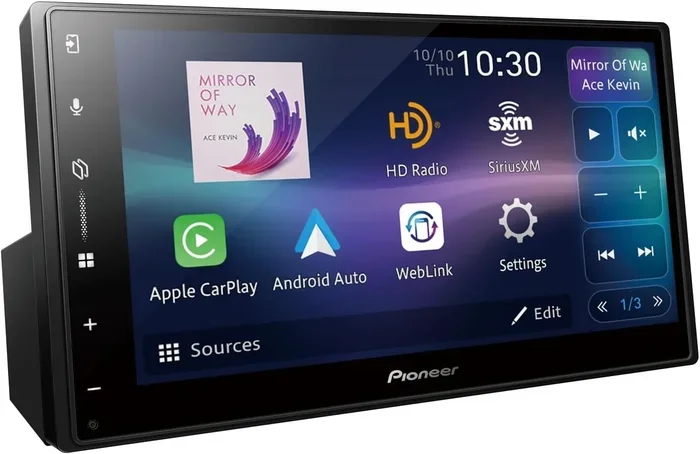
If you use an iPhone, Apple CarPlay is your best friend. It works just like Android Auto but is designed for Apple devices. CarPlay lets you access internet radio apps on your car’s display screen.
Here is what you need to get started:
- An iPhone running iOS 13 or newer.
- A car that supports Apple CarPlay.
- A Lightning or USB-C cable (or wireless connection on newer models).
Once connected, you can open apps like Spotify, iHeartRadio, and TuneIn right from the car screen. Siri voice control lets you change stations without touching your phone. Just say “Hey Siri, play jazz radio” and it happens.
Apple CarPlay also shows album art and song information on the big screen. It makes the whole experience feel polished and professional. If you have an iPhone and a compatible car, CarPlay is a fantastic way to enjoy online radio stations while driving.
Method 4: FM Transmitter
Not every car has Bluetooth or smart features. That is where an FM transmitter comes in handy. This small device plugs into your car’s cigarette lighter or power outlet. It sends audio from your phone to an unused FM frequency on your car radio.
Here is how it works:
- Plug the FM transmitter into your car’s power outlet.
- Tune your car radio to an empty FM frequency (like 88.1 or 107.9).
- Connect your phone to the FM transmitter via Bluetooth or aux cable.
- Open your internet radio app and play.
The sound quality is decent for most situations. FM transmitters are very affordable, usually under $30. They work in almost any car, even very old models. This makes them a great budget option for car audio upgrade on a tight budget.
One downside is that FM signals can sometimes pick up interference. If you live in a crowded area with many radio stations, finding a clear frequency might take some trial and error. But once you lock in the right frequency, it works well.
Method 5: Built-In Car Wi-Fi and Hotspots
Some newer cars come with built-in Wi-Fi. This means your car has its own internet connection. You can connect your phone or tablet to the car’s Wi-Fi and stream internet radio directly.
Many car manufacturers now offer connected car technology as a standard or optional feature. Brands like BMW, Mercedes, and Tesla have systems that keep you online while driving. These systems often include built-in apps for internet radio.
If your car does not have built-in Wi-Fi, you can create a mobile hotspot with your phone. Just turn on the hotspot feature and connect your car’s infotainment system to it. This gives your car an internet connection anywhere you have phone signal.
Keep in mind that hotspotting uses a lot of data. A typical hour of internet radio uses about 60 to 100 MB of data. If you stream for several hours a day, this can add up quickly. Check your data plan before relying on this method full time.
Choosing the Right Internet Radio Apps for Your Car
Top Apps to Try
The app you choose makes a big difference in your listening experience. Here are some of the best options for internet radio in car:
- TuneIn Radio: Offers over 100,000 live stations from around the world. It covers music, sports, news, and podcasts. The free version is very generous.
- iHeartRadio: A great mix of live radio stations and custom channels. It is free and easy to use. Works well with both Android Auto and Apple CarPlay.
- Pandora: Creates personalized music stations based on your favorite artists. It is perfect for discovering new music on the road.
- Spotify: While known for music, Spotify also has live radio features and podcasts. The free tier works, but premium removes ads.
- SiriusXM: Offers premium satellite and internet radio with hundreds of channels. It requires a subscription but provides excellent coverage.
Most of these apps work with Bluetooth, Android Auto, and Apple CarPlay. You can try a few and see which one fits your style best. Many are free to start, so there is no risk in experimenting.
Free vs. Paid Options
Free apps are great for casual listeners. They usually include ads, but the variety is excellent. Paid subscriptions remove ads and unlock extra features like offline listening and higher audio quality.
If you drive often, a paid plan might be worth it. The ad-free experience is much smoother during long trips. But if you only drive occasionally, the free versions will serve you well.
Setting Up a Mobile Hotspot for Car Internet Radio
Sometimes you need a reliable internet connection in your car. A mobile hotspot solves this problem. Your phone acts as a mini router, sharing its data connection with your car’s devices.
Here is how to set one up:
- Open your phone’s settings.
- Go to “Hotspot” or “Tethering.”
- Turn on the mobile hotspot.
- Set a strong password for security.
- Connect your car’s system or a separate device to the hotspot.
You can also buy a dedicated car Wi-Fi adapter or a portable hotspot device. These are separate from your phone and provide a more stable connection. They are especially useful for families who share the car.
One important tip: how can I connect to Wi-Fi without security key is a common question, but you should always use a password for your car hotspot. This keeps your connection safe and prevents strangers from using your data. Security matters even in your vehicle.
Also, if you have trouble getting a strong signal at home or work, you might want to extend my Wi-Fi to 300 feet outside your home. A stronger home Wi-Fi signal means your phone has more data available before switching to cellular. This can help save your mobile data for when you are actually on the road.
Improving Your Internet Radio Signal in the Car
Boosting Wi-Fi Range
If you rely on Wi-Fi for internet radio, signal strength matters. A weak signal means buffering and poor audio quality. There are a few ways to improve your connection.
First, position your phone or hotspot near a window. Walls and metal car bodies can block signals. Second, use a Wi-Fi extender if you are connecting to a home network before driving. You can extend my Wi-Fi range with a wired connection using a simple Ethernet cable and adapter. This gives you a stronger, more stable signal to start your trip with.
Third, consider a dedicated mobile hotspot device. These often have better antennas than phones. They can pick up weaker signals and maintain a steadier connection. Brands like Netgear and Verizon offer reliable options for car use.
Reducing Data Usage
Streaming internet radio uses data, but you can manage it. Lowering the audio quality setting in your app reduces data use significantly. A standard quality stream uses about 60 MB per hour. A high-quality stream can use 150 MB or more.
Here are some quick tips to save data:
- Lower the stream quality in your app settings.
- Download stations for offline listening when connected to Wi-Fi.
- Pause streaming when you are not actively listening.
- Use Wi-Fi whenever it is available before hitting the road.
These small changes add up over time. They help you enjoy internet radio in car without worrying about running out of data.
Common Mistakes to Avoid
Even with the right setup, people sometimes make mistakes that ruin the experience. Here are a few to watch out for:
- Forgetting to update your apps: Outdated apps can crash or have bugs. Always keep your radio apps updated for the best performance.
- Ignoring data limits: Streaming for hours without checking your data plan can lead to overage charges. Monitor your usage regularly.
- Using a weak FM frequency: If you use an FM transmitter, make sure you pick a frequency with no local interference. Test several options before settling on one.
- Not charging your phone: Streaming drains battery fast. Use a car charger to keep your phone powered during long drives.
- Skipping security on hotspots: An open hotspot is a security risk. Always use a password to protect your connection.
Avoiding these simple mistakes keeps your experience smooth and enjoyable. A little preparation goes a long way.
Expert Insights on Car Internet Radio
Connected car technology is evolving fast. Car manufacturers are building better infotainment systems every year. Many new vehicles now come with 4G LTE built in. This means you can stream internet radio without ever touching your phone.
Experts also predict that wireless music streaming in cars will become even more seamless. Features like automatic station switching based on your location and mood are already in development. The future of car audio is exciting and connected.
For now, the methods in this guide work well for most drivers. Whether you have a brand-new car or a classic model, there is a way to bring internet radio into your driving experience. The key is finding the method that fits your car and your budget.
If you are also curious about other ways to get online content into your car, you might wonder, how can I connect my PC to the internet without Ethernet or how can I connect my computer to the internet without cable. These same wireless principles apply to car setups as well. Understanding your connectivity options helps you make better choices.
Final Thoughts
Listening to internet radio in your car is one of the best upgrades you can make to your daily drive. It opens up a world of music, news, and entertainment that traditional radio simply cannot match. And the best part is that it is easier than ever to set up.
You have many options to choose from. Bluetooth works for most people. Android Auto and Apple CarPlay offer the most polished experience. FM transmitters are perfect for older cars. And mobile hotspots keep you connected anywhere.
Pick the method that suits your car and your needs. Try a few different apps to find your favorites. With the right setup, every drive becomes an enjoyable listening experience. Start exploring internet radio today and transform the way you enjoy your time on the road.
Frequently Asked Questions
Do I need special equipment to listen to internet radio in my car?
Not necessarily. If your car has Bluetooth or supports Android Auto or Apple CarPlay, you only need your phone and an internet radio app. For older cars without these features, a simple FM transmitter is all you need. It costs under $30 and works with any car that has a radio.
How much data does internet radio use in the car?
A standard quality stream uses about 60 MB per hour. High-quality streams use around 150 MB per hour. If you drive for two hours a day, that is about 300 MB to 600 MB daily. Keep an eye on your data plan to avoid surprises.
Can I use internet radio offline in my car?
Some apps like Spotify allow you to download stations for offline listening. You can download content when connected to Wi-Fi and listen without using data while driving. This is a great way to save mobile data on long trips.
Is internet radio in my car safe while driving?
Yes, as long as you set up your controls before driving. Use voice commands with Android Auto or Apple CarPlay to change stations safely. Avoid tapping your phone while the car is moving. Keep your eyes on the road at all times.
What is the best internet radio app for car use?
TuneIn, iHeartRadio, and Pandora are all excellent choices. They work well with Bluetooth, Android Auto, and Apple CarPlay. Try a few to see which one has the stations and features you like best. All three have free versions to get started.
Can I listen to internet radio in my car without a smartphone?
Yes, you can use a tablet or a dedicated mobile hotspot device. Some cars with built-in Wi-Fi do not require a phone at all. You can connect the car’s system directly to the internet and use the built-in apps for streaming.