How Can I Get Whole Home Wi Fi Coverage Everywhere
Getting whole home Wi Fi coverage means no more buffering, dropped signals, or dead zones in your house. A whole home Wi Fi setup uses mesh technology, smart router placement, and extenders to blanket every room with strong wireless signal. This guide walks you through the exact steps, tools, and budget options to achieve full-home wireless coverage today.
Have you ever walked from your living room to the bedroom and watched your Wi-Fi signal drop to nothing? You are not alone. Almost every household struggles with whole home Wi Fi coverage at some point. The good news is that fixing this problem is easier and more affordable than most people think.
Whether you live in a small apartment or a multi-story house, a weak wireless signal can ruin your streaming, gaming, and video calls. The right setup gives you strong Wi-Fi coverage everywhere without dead spots. In this guide, we will walk you through every solution that actually works.
We will cover mesh networks, router placement, extenders, and even how to choose the best whole home Wi-Fi system for your budget. By the end, you will know exactly what to do to get full wireless coverage in every room of your home.
Key Takeaways
- Mesh Wi-Fi systems are the best way to achieve whole home Wi Fi coverage without dead zones.
- Router placement in a central location dramatically improves signal strength across every floor.
- Wi-Fi extenders and boosters are affordable options but may not match mesh system performance.
- Older routers often lack the range needed for large homes and should be upgraded.
- Wi-Fi 6 mesh systems offer faster speeds and better device handling for modern households.
- Physical obstacles like walls and appliances can weaken your signal and should be considered.
📑 Table of Contents
- Why Your Current Wi-Fi Does Not Cover the Whole House
- Mesh Wi-Fi Systems: The Best Solution for Whole Home Wi-Fi Coverage
- Router Placement: The Simple Fix Most People Ignore
- Wi-Fi Extenders and Boosters: Affordable Options for Better Coverage
- Upgrading Your Router for Better Home Network Coverage
- Dealing with Dead Zones and Hard-to-Reach Areas
- Common Mistakes That Hurt Your Wi-Fi Coverage
- Final Thoughts on Getting Whole Home Wi-Fi Everywhere
Why Your Current Wi-Fi Does Not Cover the Whole House
Before you buy any new gear, it helps to understand why your current setup falls short. Most people assume their router should just “work” everywhere. But physics does not care about what you want. Your wireless signal has to travel through walls, floors, furniture, and appliances. Every obstacle weakens it a little more.
Most standard routers are designed for small spaces. They send out a signal in all directions, like a light bulb. The further that light travels, the dimmer it gets. The same thing happens with your wireless signal. Rooms far from the router get weak or no signal at all.
Common Causes of Poor Coverage
- Router placement in a corner or closet limits how far the signal can reach.
- Thick concrete or brick walls block wireless signals from passing through.
- Older router hardware lacks the power and technology needed for larger homes.
- Too many connected devices slow down the network and reduce effective range.
- Interference from other electronics like microwaves and baby monitors.
- Multiple floors make vertical signal travel much harder.
If any of these sound familiar, you are dealing with a coverage problem, not an internet speed problem. Your internet plan might be fast, but your wireless signal just cannot deliver it everywhere. That is where the solutions come in.
Mesh Wi-Fi Systems: The Best Solution for Whole Home Wi-Fi Coverage
A mesh Wi-Fi system is the gold standard for whole home wireless coverage. Instead of one router trying to reach every corner, a mesh system uses multiple nodes or units placed around your home. Each node talks to the others and creates one seamless network. Your devices automatically connect to the strongest node without you even noticing.
Think of it like a team of flashlights instead of one flashlight trying to light up a whole stadium. Each unit covers its area, and together they blanket your entire home with strong signal.
How Mesh Systems Work
Here is how a mesh network actually works in simple terms. You place one main node connected to your modem. Then you place satellite nodes in other rooms. These nodes communicate with each other wirelessly. They create a single network name and password. When you walk from room to room, your phone switches between nodes smoothly.
Unlike traditional range extenders, mesh systems do not cut your speed in half. They use smart routing to send data through the fastest path between nodes. This means you get consistent speeds throughout your home, not just near the router.
Top Benefits of Mesh Wi-Fi
- Seamless roaming means no dropped connections as you move around.
- Easy setup through phone apps with step-by-step guidance.
- Self-healing networks that reroute traffic if one node goes down.
- Scalable design so you can add more nodes as your home or needs grow.
- One network name so you never have to switch between Wi-Fi networks manually.
- Better device management with built-in parental controls and prioritization features.
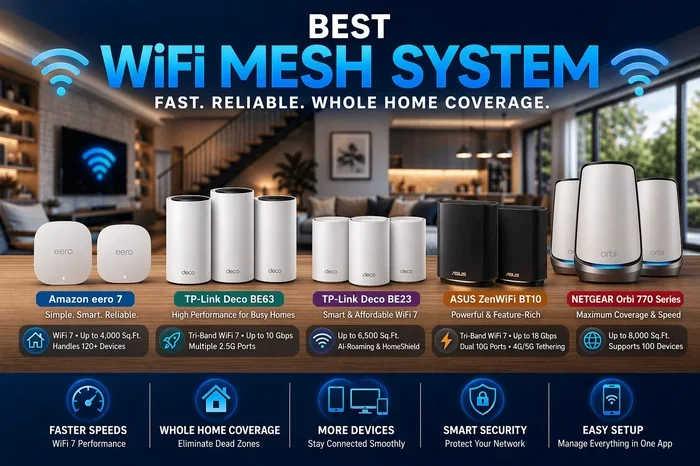
If you want the most reliable whole home Wi-Fi experience, a mesh system is the way to go. Popular brands like Google Nest, Eero, and Netgear Orbi make systems for every budget. You can also check if your current router supports mesh upgrades by looking into whether you can connect Wi-Fi 6 mesh to your existing Wi-Fi 5 router for an affordable boost.
Router Placement: The Simple Fix Most People Ignore
Before you spend a single dollar, try moving your router. Seriously. This is the easiest and cheapest way to improve your wireless coverage. Where you put your router makes a huge difference in how well your signal travels through your home.
The best spot for your router is a central location in your home. Ideally, it should be on the main floor and in an open area. Not hidden behind a TV. Not stuffed in a closet. Not sitting on the floor. The higher up and more open it is, the better your signal will spread.
Placement Tips That Actually Work
- Place the router on a shelf or table at about waist height for the best signal spread.
- Keep it away from walls and metal objects that block the signal.
- Stay away from microwaves and cordless phones that cause wireless interference.
- Point the antennas straight up or in a V-shape for the best horizontal coverage.
- Do not put it near fish tanks or large water containers that absorb wireless signals.
- Elevate the router to avoid signal absorption from furniture and carpeting.
Sometimes just moving your router from the corner of the living room to the hallway makes a noticeable difference. Try this first before buying anything new. It costs nothing and takes five minutes.
Wi-Fi Extenders and Boosters: Affordable Options for Better Coverage
If a mesh system is out of your budget, Wi-Fi extenders and boosters are a solid alternative. These small devices plug into an outlet and pick up your existing signal. They then rebroadcast it to areas that are too far from your router. They are easy to set up and widely available at most electronics stores.
Extenders work best when placed halfway between your router and the area with weak signal. They do not create a new network. Instead, they repeat your existing signal to extend the range. This makes them a good option for getting Wi-Fi in a specific room or area that is otherwise unreachable.
When to Use an Extender
- You have one or two rooms with weak signal but the rest of the house is fine.
- You rent and cannot make permanent changes to your network setup.
- You need coverage in a garage, shed, or outdoor area like a patio.
- You want a quick fix without investing in a full mesh system.
Keep in mind that extenders can sometimes slow down your speed because they use the same radio to receive and send data. For the best results, place your extender where it still gets a strong signal from the main router. You can also look into whether your internet provider offers a Wi-Fi signal booster for outdoor or edge-of-home coverage.
Upgrading Your Router for Better Home Network Coverage
Sometimes the problem is simply that your router is too old or too weak for your home. If you bought your router more than five years ago, it probably does not support modern wireless standards. Upgrading to a newer router can dramatically improve your coverage and speed.
Look for routers that support Wi-Fi 6 or Wi-Fi 6E. These are the latest wireless standards and they offer much better range, speed, and device handling than older models. Wi-Fi 6 routers also handle multiple connected devices much better, which matters in homes with smart TVs, phones, tablets, and smart home gadgets.
What to Look for in a New Router
- Dual-band or tri-band support for handling multiple devices without slowdowns.
- Wi-Fi 6 certification for the latest speed and efficiency improvements.
- Multiple antennas for better signal direction and range.
- Built-in mesh capability so you can add nodes later if needed.
- Easy management app for monitoring and controlling your home network.
If you want to avoid monthly rental fees, you can buy your own router outright. Many people do not know that you can buy a Wi-Fi router and not pay monthly to your internet provider. This saves you money over time and gives you much more control over your home network.
You should also check if you need to change your Wi-Fi router to one that better fits your home size. A simple router swap can solve many coverage issues without any other changes to your setup.
Dealing with Dead Zones and Hard-to-Reach Areas
Every home has at least one dead zone. Maybe it is the basement. Maybe it is the upstairs bedroom at the far end of the hall. Maybe it is the back porch or the garage. These areas are frustrating because no matter what you do, the signal just does not reach.
The solution depends on the cause of the dead zone. If it is caused by thick walls, a mesh node placed nearby can solve the problem. If it is caused by distance, an extender might be enough. For outdoor areas, you may need a weatherproof extender or a dedicated outdoor access point.
Fixing Dead Zones Step by Step
Start by identifying exactly where your dead zones are. Walk around your home with your phone and note where the signal drops. Then try these solutions in order.
- Move your router to a more central position first.
- Add a Wi-Fi extender in the area between your router and the dead zone.
- Install a mesh node in the room where coverage is weakest.
- Use powerline adapters that send internet through your home’s electrical wiring.
- Run an Ethernet cable to a second router for the most reliable wired backhaul.
For spaces like sheds or detached garages, you can also extend your Wi-Fi to your shed using a dedicated outdoor extender or a mesh node placed near the structure. This is a great solution for homeowners who want connectivity in their workshop or backyard office.
Common Mistakes That Hurt Your Wi-Fi Coverage
Even with the best equipment, some common mistakes can sabotage your whole home Wi-Fi setup. Avoiding these pitfalls will help you get the most out of your network.
Mistake 1: Hiding Your Router
People love to hide their routers behind furniture or inside cabinets. This looks neat but it kills your signal. Wireless signals need open space to travel. Keep your router out in the open where air can flow around it.
Mistake 2: Putting Everything on One Band
Most modern routers have two bands: 2.4 GHz and 5 GHz. The 2.4 GHz band travels further but is slower. The 5 GHz band is faster but has shorter range. Putting all your devices on one band creates congestion. Let your devices use the band that works best for their location.
Mistake 3: Ignoring Firmware Updates
Router manufacturers release updates that improve performance and fix bugs. If you never update your router’s firmware, you are missing out on better coverage and security. Check your router app or settings page regularly for updates.
Mistake 4: Overloading One Network
Too many devices on one network can slow everything down. Consider creating a guest network for visitors and smart home devices. This keeps your main network fast for the devices that matter most.
By avoiding these mistakes and following the solutions in this guide, you will be well on your way to getting whole home Wi-Fi coverage that actually works. Whether you choose a mesh system, an extender, or simply better router placement, the key is to take action today.
Final Thoughts on Getting Whole Home Wi-Fi Everywhere
Getting whole home Wi-Fi coverage is not a luxury anymore. It is a necessity. We stream movies, work from home, game, and stay connected through wireless devices in every room. A weak signal in just one room can disrupt your entire day.
The best approach is to start simple. Try moving your router to a central location. If that does not fix the problem, consider a mesh Wi-Fi system for seamless whole-home coverage. For budget-conscious users, a quality extender can make a big difference in the areas that need it most.
Remember that every home is different. What works for your neighbor might not work for you. Test different solutions and find the combination that fits your space, your budget, and your needs. The goal is simple: strong, reliable wireless signal in every room so you can browse, stream, and connect without thinking about it.
Take the time to set up your network right. Once you have whole home Wi-Fi coverage everywhere, you will wonder how you ever lived without it. Your movies will buffer less. Your video calls will be clearer. And your smart home devices will work exactly as they should.
Frequently Asked Questions
What is the best mesh Wi-Fi system for a large house?
The best mesh system for a large house depends on your budget and the number of devices you have. Systems like Netgear Orbi, Google Nest WiFi, and Eero Pro are all excellent choices. Look for a tri-band system with Wi-Fi 6 support for the best performance in larger homes with many connected devices.
Can I use a Wi-Fi extender and a mesh system together?
Yes, you can use a Wi-Fi extender alongside a mesh system, but it is usually not necessary. Mesh systems are designed to cover entire homes on their own. If you still have a dead spot, adding an extender can help. However, make sure the extender is compatible with your mesh system to avoid performance issues.
How many mesh nodes do I need for my home?
As a general rule, you need one node for every 1,000 to 1,500 square feet. A typical two-story home of 2,000 square feet usually needs two or three nodes. Start with the number recommended by the manufacturer and add more if you still experience weak spots after setup.
Does a whole home Wi-Fi system slow down my internet speed?
A good whole home Wi-Fi system should not slow down your speed. In fact, it often improves speeds in distant rooms by providing a stronger, more direct signal. Cheap or poorly placed extenders can reduce speed, but mesh systems use smart routing to maintain fast connections throughout your home.
Can I install a whole home Wi-Fi system myself?
Absolutely. Most mesh systems are designed for easy DIY setup. You plug in the main unit, connect it to your modem, and then place the satellite nodes around your home. The setup app walks you through everything step by step. No professional installation is required for most systems.
Why does my Wi-Fi signal get worse at night?
Your Wi-Fi signal may get worse at night because more devices are using the network simultaneously. Streaming, gaming, and browsing all compete for bandwidth. This network congestion slows down your connection. A mesh system or a router upgrade can help manage multiple devices more efficiently during peak usage times.