Does SDI Carry Audio Signal Everything You Need To Know
Yes, SDI does carry audio signal. SDI (Serial Digital Interface) is a professional video standard that embeds audio directly into the video signal, allowing both video and audio to travel through a single cable. Understanding how SDI handles audio helps you set up reliable broadcast, live event, and production systems without extra wiring.
This is a comprehensive guide about Does Sdi Carry Audio Signal.
Key Takeaways
- SDI embeds audio: SDI carries both video and audio in one signal stream, eliminating the need for separate audio cables.
- Multiple audio channels: SDI supports up to 16 audio channels embedded within the video signal for professional use.
- Different SDI versions matter: SD-SDI, HD-SDI, 3G-SDI, and 12G-SDI each have varying audio capabilities and bandwidth.
- Embedded audio is standard: Most professional video equipment uses embedded audio over SDI for clean, synchronized signal transmission.
- Common issues are fixable: Audio sync problems and dropouts in SDI setups can often be resolved with proper cabling and equipment.
- SDI vs. HDMI: Both carry audio, but SDI is built for long-distance, professional-grade signal integrity.
[FEATURED_IMAGE_PLACEHOLDER]
Does SDI carry audio signal is a question that comes up a lot in video production, broadcasting, and live event setups. If you work with professional video gear, you have probably seen SDI cables everywhere. They connect cameras, switchers, monitors, and recorders. But the real question is whether those cables also handle sound. The short answer is yes. SDI was designed to carry both video and audio together. This makes it a powerful and convenient standard for anyone working in video production or broadcast.
In this guide, we will break down everything you need to know about SDI audio. We will cover how it works, which SDI versions support audio, and how it compares to other connection types. You will also learn about common audio issues and how to fix them. Whether you are a beginner setting up your first studio or a seasoned pro, this article has practical tips for you.
If you are exploring different video signal standards, you might also want to check how HDMI to RCA audio conversion works for consumer setups. Understanding different signal paths helps you make better decisions.
## What Is SDI and Why Does It Matter?
SDI stands for Serial Digital Interface. It is a standard for transmitting digital video and audio over a single coaxial cable. The Society of Motion Picture and Television Engineers (SMPTE) developed SDI for professional use. It became the go-to standard in broadcast studios, live events, and post-production houses around the world.
The main reason SDI matters is reliability. Unlike consumer cables, SDI was built to handle long cable runs without losing signal quality. A single SDI cable can carry a video signal hundreds of feet without needing a repeater. This makes it ideal for large studios, stadiums, and outdoor shoots.
SDI also supports high bandwidth. This means it can handle high-resolution video formats like 1080p, 4K, and even 8K. Because audio is embedded in the same signal, you do not need separate audio runs. This simplifies cabling and reduces potential points of failure.
### How SDI Differs From Consumer Connections
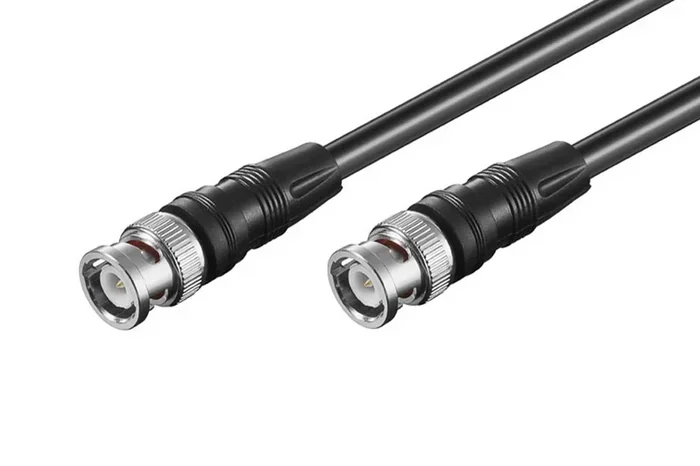
Consumer connections like HDMI and VGA were designed for home use. They work well for short distances. But they are not built for the demands of professional environments. SDI cables use BNC connectors, which lock securely in place. This prevents accidental disconnections during live broadcasts.
HDMI cables also carry audio and video together. But HDMI has a maximum reliable length of about 50 feet without a signal booster. SDI cables can run much farther. For professional setups where distance matters, SDI has a clear advantage.
## Does SDI Carry Audio Signal? The Short Answer
The answer is a definitive yes. SDI carries audio signal embedded within the video stream. This means the audio is not sent as a separate signal. Instead, it is woven into the same digital data stream as the video. The receiving equipment then extracts the audio and plays it back in sync with the picture.
This embedded audio approach has several benefits. First, it reduces cable clutter. You only need one cable for both video and sound. Second, it ensures perfect synchronization between audio and video. Since they travel together, there is no risk of audio lag or drift. Third, it simplifies the signal chain. Fewer cables mean fewer things that can go wrong.
### How Many Audio Channels Does SDI Support?
SDI can carry multiple audio channels within the embedded stream. The standard supports up to 16 channels of uncompressed audio. This is more than enough for most professional setups. A typical setup might use 2 channels for stereo audio or 8 channels for a multi-mic interview setup.
The exact number of channels depends on the SDI version and the audio format being used. We will dive deeper into this in the next section. For now, just know that SDI gives you plenty of room for complex audio setups.
## How Audio Embeds Into SDI Signals
Understanding how audio embeds into SDI signals helps you troubleshoot problems and optimize your setup. The process is called audio embedding. It takes place inside the SDI transmitter and receiver hardware.
During transmission, the SDI signal breaks data into horizontal lines. Each line has a specific time slot. Some of these time slots carry video data, while others carry audio data. The receiver reads these time slots and reconstructs both the video and audio signals. This happens so fast that you never notice any delay.
### Audio Format and Sample Rate
SDI supports several audio formats. The most common format is linear PCM (Pulse Code Modulation). PCM is uncompressed audio, which means it preserves the full quality of the original sound. This is important for broadcast-quality audio.
The standard sample rate for SDI audio is 48 kHz. The bit depth is typically 24 bits. These settings match the requirements of professional broadcast standards. Some equipment also supports 96 kHz or 32-bit audio, but 48 kHz at 24-bit remains the industry norm.
### Embedded Audio vs. Discrete Audio
Embedded audio travels inside the SDI video signal. Discrete audio travels through a separate cable, like an XLR or AES/EBU cable. Both approaches have their place in professional audio.
Embedded audio is simpler and more convenient. You run one cable instead of two. It also guarantees perfect sync between audio and video. Discrete audio offers more flexibility and can sometimes provide better quality for complex audio setups. Many professionals use a combination of both depending on the project.
## SDI Versions and Their Audio Capabilities
Not all SDI is the same. Different SDI versions offer different bandwidths and capabilities. Each version supports audio, but the way they handle it can vary. Let us look at the main SDI versions and what they mean for audio.
### SD-SDI (Standard Definition SDI)
SD-SDI is the original SDI standard. It handles standard definition video at up to 525 or 625 lines. The bandwidth is 270 Mbps. SD-SDI supports up to 4 channels of embedded audio at 48 kHz. This was the standard for early digital broadcasting and is still used in some legacy systems.
If you are working with older equipment, SD-SDI is worth knowing about. Many broadcast facilities still have SD-SDI infrastructure in place. The audio quality is perfectly fine for voice and standard programming.
### HD-SDI (High Definition SDI)
HD-SDI handles high definition video at 1080i or 720p. The bandwidth is 1.485 Gbps. HD-SDI supports up to 16 channels of embedded audio. This gives you much more flexibility for complex audio setups.
HD-SDI became the workhorse of broadcast television for many years. If you work with HD cameras and switchers, you are likely using HD-SDI. The audio capabilities are more than sufficient for most production needs.
### 3G-SDI and 12G-SDI
3G-SDI handles 1080p video at 3 Gbps. It supports the same 16 audio channels as HD-SDI. 12G-SDI handles 4K video at 12 Gbps and also supports up to 16 audio channels. These newer standards are becoming more common as 4K production grows.
The audio capabilities remain consistent across these newer versions. If you are upgrading to 4K equipment, your audio workflow will not change. The same embedded audio standards apply.
## Comparing SDI Audio With Other Connection Types
When setting up a video system, you often have choices about how to connect audio and video. Let us compare SDI audio with some other common connection types. This will help you decide which is best for your needs.
### SDI vs. HDMI Audio
Both SDI and HDMI carry embedded audio and video. However, they serve different markets. HDMI is the standard for consumer electronics like TVs, gaming consoles, and home theater systems. SDI is the standard for professional broadcast and production environments.
HDMI cables are limited in length. A standard HDMI cable works well up to about 50 feet. Beyond that, you need active cables or signal boosters. SDI cables can run much longer without signal loss. For a large venue or studio, SDI is the better choice.
HDMI also supports consumer audio formats like Dolby Digital and DTS. SDI uses professional PCM formats. If you are building a professional setup, SDI’s audio standard is more reliable and consistent.
### SDI vs. XLR Audio
XLR cables carry audio only, not video. They are the standard for professional microphones and audio interfaces. XLR cables provide excellent audio quality and can run long distances.
The advantage of SDI audio over XLR is simplicity. With SDI, you need fewer cables overall. But XLR gives you more control over individual audio channels. Many professional setups use both. SDI carries the main audio mix, while XLR connects specific microphones or instruments.
### SDI vs. AES/EBU Audio
AES/EBU is a digital audio standard that uses XLR cables. It carries high-quality digital audio but no video. Like XLR, it is used for discrete audio channels. AES/EBU is common in professional audio studios and broadcast facilities.
SDI audio and AES/EBU audio each have their strengths. SDI is simpler for combined audio and video runs. AES/EBU is better when you need multiple separate audio channels with precise control.
## Common SDI Audio Issues and How to Fix Them
Even with a well-designed setup, SDI audio problems can happen. Let us look at the most common issues and how to solve them.
### Audio and Video Sync Problems
One of the most common issues is audio drifting out of sync with video. This can happen when the audio and video travel through different paths or equipment. In an SDI setup, this should not happen because the audio and video are embedded together.
If you are experiencing sync issues, check your signal chain. Make sure you are not splitting the SDI signal and re-embedding audio separately. Each split or conversion can introduce timing discrepancies. Use a proper SDI distribution amplifier to keep the signal clean.
### Audio Dropouts or No Sound
If you have no audio through SDI, the first thing to check is your equipment settings. Many devices have a setting to enable or disable embedded audio. Make sure embedded audio is turned on at both the source and the display.
Another common cause is a faulty cable or connection. SDI uses BNC connectors, and a loose connection can cause signal loss. Check all connectors and make sure they are tight. Replace any cables that show visible damage.
### Audio Quality Issues
If your audio sounds distorted or has noise, check the sample rate settings. Mismatched sample rates between devices can cause quality problems. All devices in your signal chain should use the same sample rate, typically 48 kHz.
Also, check the bit depth settings. If one device is set to 16-bit and another to 24-bit, there could be a mismatch. Set all devices to the same format for the best results.
## Expert Tips for SDI Audio Setup
Setting up SDI audio properly makes a big difference in your production quality. Here are some expert tips to help you get the best results.
### Use High-Quality Cables
Not all SDI cables are created equal. Cheap cables can introduce signal loss and noise. Invest in well-made SDI cables with proper shielding. Look for cables rated for the SDI version you are using. A good cable will last for years and keep your signal clean.
### Label Your Audio Channels
In a multi-channel setup, it is easy to lose track of which audio channel is which. Use labels or a spreadsheet to document your audio routing. This saves time during setup and troubleshooting. It also helps other crew members understand your system.
### Test Your Audio Before Going Live
Always do a sound check before any live broadcast or recording. Play test tones through each audio channel. Listen for any distortion, noise, or dropouts. Fixing problems before going live is much easier than fixing them on air.
### Keep Your Signal Chain Simple
Every piece of equipment in your signal chain is a potential point of failure. Use the fewest cables and adapters possible. If you need to convert signals, use high-quality converters. A simpler signal chain means fewer problems and better reliability.
### Match Equipment Settings
Make sure all your equipment uses the same audio settings. This includes sample rate, bit depth, and channel count. Mismatched settings are one of the leading causes of audio problems in SDI setups. Take a few minutes to verify settings on every device.
## Key Takeaways
Key Takeaways
- SDI carries audio: SDI embeds audio directly into the video signal, allowing both to travel through one cable.
- Up to 16 audio channels: SDI supports multiple audio channels, making it suitable for complex production setups.
- Different SDI versions: SD-SDI, HD-SDI, 3G-SDI, and 12G-SDI all carry audio, with increasing bandwidth for higher resolutions.
- Embedded audio ensures sync: Because audio and video travel together, there is no risk of audio lag or drift.
- SDI outperforms HDMI for distance: SDI cables can run much longer than HDMI cables without signal loss.
- Common issues are fixable: Sync problems, dropouts, and quality issues can usually be resolved with proper setup and cabling.
## Frequently Asked Questions
Can SDI carry uncompressed audio?
Yes, SDI carries uncompressed PCM audio within the embedded stream. This is one of the reasons SDI is preferred for professional broadcast and production. The uncompressed format ensures full audio quality without any loss during transmission.
Does SDI support surround sound audio?
Yes, SDI can support surround sound formats. With up to 16 audio channels available, you can route surround sound audio through SDI. This makes it suitable for cinema, broadcast, and immersive audio applications that require multiple audio channels.
Can I use SDI audio with a home theater system?
SDI is designed for professional use and is not common in home theater setups. Most home theater systems use HDMI, which also carries embedded audio. If you need SDI audio in a home environment, you will need an SDI-to-HDMI converter to extract the audio for your home system.
What is the maximum distance for SDI audio and video transmission?
A standard SDI cable can transmit signal up to 300 feet (about 100 meters) without any amplification. With active repeaters or fiber optic SDI converters, you can extend that distance to several thousand feet. This makes SDI ideal for large venues and long cable runs.
Do all SDI cables carry audio automatically?
Yes, all SDI cables carry embedded audio by default. The audio is part of the signal standard. However, the equipment at both ends must be configured to use embedded audio. If embedded audio is disabled on the source or display, you will not hear any sound even though the signal is present.
Is SDI audio better than HDMI audio?
SDI audio and HDMI audio both use embedded PCM formats. The audio quality is comparable. The main difference is in reliability and distance. SDI is built for professional environments with long cable runs and interference resistance. HDMI is better suited for consumer and short-distance applications.
## Conclusion
SDI does carry audio signal, and it does so reliably and efficiently. The embedded audio design means you get both video and sound through a single cable, which simplifies any professional setup. Whether you are working with SD-SDI, HD-SDI, or the latest 12G-SDI standards, audio is always part of the package.
Understanding how SDI handles audio helps you make smarter decisions about your production workflow. You can choose the right SDI version for your needs, troubleshoot common problems, and set up your equipment with confidence. The key is to match your settings, use quality cables, and keep your signal chain clean.
If you are building or upgrading a professional video setup, SDI remains one of the most reliable choices available. Its long track record in broadcast and production environments speaks for itself. With proper setup and attention to detail, your SDI audio will sound clear, stay in sync, and perform flawlessly every time.
If you are also dealing with wireless audio setups in your production environment, you might want to learn about whether Alexa requires Wi-Fi for password setup as it relates to smart audio device connectivity in modern production spaces.
Frequently Asked Questions
What is Does Sdi Carry Audio Signal?
Does Sdi Carry Audio Signal is an important topic with many practical applications.