Can I Convert Hdmi To Rca For Audio With These Tips
Can I convert HDMI to RCA for audio? Yes, you can use an HDMI to RCA audio extractor or a simple adapter to get analog sound from a digital HDMI source. This guide walks you through the easiest methods, step-by-step setup, and common pitfalls to avoid for the best audio quality.
Have you ever wanted to hook up a newer device to an older stereo system? Maybe you have a streaming box, a game console, or a Blu-ray player with only HDMI output. And your classic receiver or soundbar only has RCA inputs. You might wonder, can I convert HDMI to RCA for audio? The answer is a clear yes. You just need the right tool and a little know-how.
Converting HDMI to RCA for audio is simpler than most people think. You do not need to be a tech expert. With the right HDMI to RCA audio converter, you can pull the sound out of an HDMI cable and send it to your old stereo. This guide will show you exactly how. I will walk you through the methods, the gear you need, and the mistakes to avoid.
In this article, you will learn the different ways to get audio from HDMI into RCA. I will explain how each method works, give you a step-by-step setup guide, and share tips to keep your sound crisp. Whether you want to connect a laptop to a vintage amp or a cable box to a home theater receiver, you will find the solution here. Let us dive in.
Key Takeaways
- You can convert HDMI to RCA for audio using an extractor, splitter, or AV receiver.
- HDMI to RCA audio extractors are the simplest and most affordable solution.
- RCA cables carry analog stereo sound, so you will get two-channel audio.
- Avoid common mistakes like using passive cables that do not convert signals.
- Check your devices for HDMI output and RCA input compatibility.
- Expert tip: Use a powered extractor for the clearest digital-to-analog conversion.
- Bottom line: You can easily connect modern HDMI devices to older stereo systems.
📑 Table of Contents
- Why You Might Need to Convert HDMI to RCA for Audio
- How HDMI to RCA Audio Conversion Works
- The Best Methods to Convert HDMI to RCA for Audio
- Step-by-Step Guide to Setting Up HDMI to RCA Audio
- Common Mistakes to Avoid When Converting HDMI to RCA
- Expert Tips for the Best Audio Quality
- Frequently Asked Questions
- Final Thoughts on Converting HDMI to RCA for Audio
Why You Might Need to Convert HDMI to RCA for Audio
Many modern devices use HDMI for both video and audio. It is a single cable that carries digital signals. But a lot of older audio gear only accepts analog connections. RCA connectors have been around for decades. They use red and white cables for stereo sound. Your old stereo, amplifier, or powered speakers likely have these inputs.
So what happens when you want to use a new device with old gear? You need a bridge. That bridge is an HDMI to RCA audio conversion tool. It takes the digital HDMI signal and turns it into an analog audio signal. Then you can run that sound through RCA cables into your amplifier or speakers. This lets you keep using your favorite old audio equipment while still enjoying modern content.
Here are a few common situations where this conversion comes in handy:
- You have a soundbar or AV receiver with only RCA inputs and want to connect a streaming stick.
- You own a classic stereo system and want to play audio from a Blu-ray player or game console.
- You use an older home theater setup and need to add a new HDMI source without replacing all your gear.
- You want to record HDMI audio onto a device that only accepts analog RCA input.
In each case, converting HDMI to RCA for audio solves the problem. It keeps your old gear in the loop and saves you money. You do not have to buy a brand new amplifier just because your source device changed.
How HDMI to RCA Audio Conversion Works
To understand the process, it helps to know a little about signals. HDMI carries digital audio. RCA cables carry analog audio. Digital signals are made of ones and zeros. Analog signals are continuous electrical waves. A converter box changes digital data into an analog waveform. This is called digital-to-analog conversion, or DAC for short.
Digital Audio vs. Analog Audio
Digital audio from HDMI is very clean. It does not lose quality over distance. But it cannot plug directly into an RCA input. The RCA jacks expect a low-voltage analog signal. So the converter box has a tiny chip inside that does the translation. It reads the digital audio stream and outputs a matching analog stereo signal on the red and white RCA jacks.
Most HDMI to RCA audio extractors handle this conversion automatically. You plug in the HDMI cable from your source. Then you plug in the RCA cables from the extractor into your stereo. The box powers on and does the rest. Some extractors also pass through the HDMI video signal, so you can send the picture to a TV while sending the audio to your stereo. That is a big plus.
The Role of RCA Connectors
RCA connectors are simple and reliable. The red cable carries the right audio channel. The white cable carries the left channel. They are often color-coded to match the back of your stereo. You just push them into the matching jacks. They are not shielded like some audio cables, but for short runs inside a home, they work great. Keep your RCA cables short and away from power cords to avoid any hum or interference.
The Best Methods to Convert HDMI to RCA for Audio
There are three main ways to get audio from HDMI into RCA. Each has its own pros and cons. I will break them down so you can pick the right one for your setup.
Using an HDMI to RCA Audio Extractor
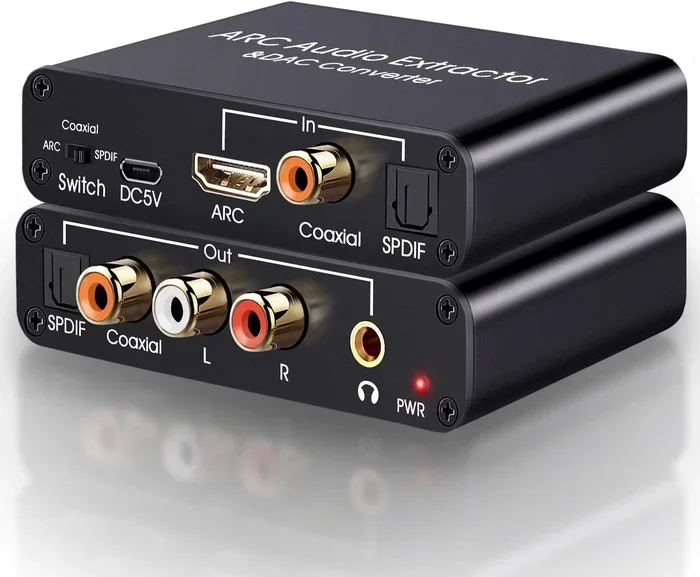
This is the most popular and user-friendly method. An HDMI to RCA audio extractor is a small box that sits between your HDMI source and your TV or stereo. You connect the HDMI cable from the source into the extractor. Then you run an HDMI cable from the extractor to your TV. At the same time, you plug RCA cables from the extractor’s audio output into your stereo. The box extracts the audio and converts it to analog.
Most extractors are passive or powered. A powered extractor plugs into a wall outlet and gives you a stronger, cleaner signal. A passive extractor draws power from the HDMI connection and works fine for short distances. For the best sound, I recommend a powered HDMI to RCA audio converter.
HDMI Splitter with Audio Output
An HDMI splitter copies the HDMI signal and sends it to multiple displays. Some splitters also have a dedicated audio output. You can find splitters with optical or RCA audio out. If your splitter has RCA out, you can run those cables directly to your stereo. This method is great if you also want to split video to two TVs. Just make sure the splitter supports audio extraction.
However, not all splitters are created equal. Cheap splitters might not pass audio properly or might cause handshake issues. Look for a splitter that explicitly lists RCA audio output and supports the HDMI version of your source device.
Connecting HDMI Directly to an AV Receiver
If your stereo system is an AV receiver with HDMI inputs, you might not need an extractor at all. Many receivers have both HDMI and RCA inputs. You can plug the HDMI cable straight from your source into the receiver. Then use the receiver’s HDMI-to-RCA processing internally. This is the cleanest setup because the receiver handles the conversion and amplification in one box.
But if your receiver only has RCA inputs, you can still use an external HDMI to RCA audio adapter before the receiver. This keeps the signal chain simple and avoids extra boxes.
Comparison Table: Which Method Is Right for You?
| Method | Pros | Cons |
|---|---|---|
| HDMI to RCA Audio Extractor | Simple, affordable, separates audio and video, works with most devices | Extra box, may need power, adds a small delay |
| HDMI Splitter with RCA Out | Splits video to multiple screens, good for multi-room setups | More expensive, can have sync issues, limited features |
| AV Receiver with HDMI Input | All-in-one solution, best sound quality, no extra cables | Requires a receiver with HDMI, higher cost |
For most people, an HDMI to RCA audio extractor is the go-to choice. It is cheap, easy to set up, and gets the job done. If you already have a receiver with HDMI, that is even better. You can skip the extra box entirely.
Step-by-Step Guide to Setting Up HDMI to RCA Audio
Setting up your HDMI to RCA for audio conversion is quick. Here is a simple walkthrough you can follow in minutes.
- Gather your cables. You need an HDMI cable, two RCA cables (red and white), and your extractor or splitter. Make sure the RCA cables have the same color-coded plugs.
- Connect the HDMI source. Plug one end of the HDMI cable into your device (like a streaming stick or Blu-ray player). Plug the other end into the HDMI input on your extractor.
- Connect the RCA cables. Take the red and white RCA cables from the extractor’s audio output. Plug the red plug into the red RCA jack on your stereo. Plug the white plug into the white jack.
- Connect the HDMI output. If your extractor has an HDMI pass-through, plug another HDMI cable from the extractor to your TV. This lets you see the video while listening to the audio on your stereo.
- Power on the extractor. If it is a powered model, plug it into a wall outlet. Turn it on. Your stereo should now receive the analog audio signal.
- Select the input on your stereo. Use the stereo’s knob or button to switch to the RCA input you used. You should hear sound.
- Adjust the volume. Start with the source device volume at about 75%. Then use your stereo’s volume knob to set the level. This prevents distortion.
That is it. You are now listening to HDMI audio through your old RCA stereo. If you do not hear sound, double-check that the RCA cables are firmly seated and that the correct input is selected on your stereo.
Common Mistakes to Avoid When Converting HDMI to RCA
Even though the process is simple, people often run into trouble. Here are the mistakes to watch out for.
- Using a passive HDMI-to-RCA cable. A simple cable with an HDMI plug on one end and RCA plugs on the other does not convert the signal. It will not work. You need an active extractor or converter box with a built-in DAC.
- Ignoring the audio format. Some HDMI sources send surround sound formats like Dolby Digital. Most basic extractors only output stereo PCM. If you need surround, you need an extractor that supports encoded audio pass-through or an AV receiver.
- Running long RCA cables. RCA cables are not meant for long runs. Keep them under 25 feet. Longer runs can pick up interference and lose signal strength.
- Forgetting to power the extractor. Some extractors need external power. If you do not plug it in, it might not work or might produce poor sound.
- Mixing up the red and white cables. It sounds obvious, but plugging the red cable into the white jack and vice versa can cause phase issues. The sound might feel hollow or off-center.
- Not updating firmware. Some HDMI extractors have firmware that can be updated. Outdated firmware can cause compatibility issues with newer HDMI 2.0 or 2.1 devices. Check the manufacturer’s website if you run into problems.
Avoiding these mistakes will save you time and frustration. A little care goes a long way in getting clean, reliable audio.
Expert Tips for the Best Audio Quality
Want to get the most out of your HDMI to RCA audio conversion? Follow these practical tips from audio enthusiasts.
Tip 1: Use a powered extractor for critical listening. A powered unit has a better DAC chip. It can handle digital audio streams more accurately. You will hear clearer highs and deeper bass compared to a passive converter.
Tip 2: Keep your RCA cables short and straight. Long cables act like antennas. They can pick up hum from power cables or radio interference. Run your RCA cables in a straight line, away from power cords and Wi-Fi routers.
Tip 3: Set the source device to stereo output. If your HDMI source has an audio setting, choose stereo or PCM. This ensures the extractor gets a simple two-channel signal it can easily convert. If you leave it on auto or bitstream, the extractor might not decode it correctly.
Tip 4: Ground loop isolator can help with hum. If you hear a 60Hz hum, it is often a ground loop issue. A small ground loop isolator can be inserted between the extractor and the stereo. It breaks the electrical path that causes the hum without affecting the audio signal.
Tip 5: Check your stereo’s input sensitivity. Some old stereos have very sensitive inputs. If the volume is too high, the signal can distort. Start with the stereo volume low and slowly bring it up. You want a clean, comfortable listening level.
Tip 6: Use quality RCA cables. Not all RCA cables are the same. Look for cables with gold-plated connectors and thick shielding. They make a small but noticeable difference in sound clarity and durability.
Tip 7: Consider an HDMI audio extractor with optical output. If your stereo has a digital optical input, you can use an extractor that outputs TOSLINK. This gives you a fully digital signal path, which can sound even better than analog RCA. Your stereo would need a built-in DAC for this to work, though.
These tips will help you get the cleanest, most reliable sound from your HDMI to RCA audio conversion. A little effort in setup pays off in a much better listening experience.
Frequently Asked Questions
Can I convert HDMI to RCA for audio without a separate box?
No, you cannot. HDMI carries a digital signal, and RCA expects an analog signal. You need an active converter, such as an HDMI to RCA audio extractor, to change the signal type. A simple cable without a built-in DAC will not work.
Will I lose audio quality when converting HDMI to RCA for audio?
You might lose a small amount of quality because the conversion is digital to analog. However, a good powered extractor with a quality DAC will preserve the sound very well. You will not notice a difference in everyday listening. The biggest factor is the quality of the extractor itself.
Can I send video through RCA as well as audio?
No. RCA connectors for video are a different type (yellow composite) and carry a separate signal. An audio-only extractor separates the audio from the HDMI signal. The video continues through the HDMI output to your TV. You cannot send HDMI video over standard audio RCA cables.
Do I need special RCA cables for HDMI to RCA audio conversion?
You do not need special cables. Standard red and white RCA audio cables work fine. Just make sure they are in good condition and have secure connections. Gold-plated connectors can help prevent corrosion and ensure a solid connection over time.
Can I use an HDMI to RCA converter with a soundbar that only has RCA input?
Yes, that is a common use case. You connect the HDMI source to the converter, then run the RCA output to the soundbar’s RCA input. Make sure the soundbar supports analog stereo input. Some soundbars only have optical or auxiliary inputs, so check your model first.
What is the difference between an HDMI splitter and an HDMI audio extractor?
An HDMI splitter copies the HDMI signal to multiple displays. It may or may not have audio outputs. An audio extractor is designed specifically to pull the audio out of the HDMI signal and convert it to analog RCA. Some devices combine both functions, offering HDMI pass-through to a TV and RCA audio out to a stereo.
Final Thoughts on Converting HDMI to RCA for Audio
Converting HDMI to RCA for audio is a practical and affordable way to bridge the gap between modern devices and classic stereo systems. Whether you choose an HDMI to RCA audio extractor, a splitter with RCA out, or a direct connection to an AV receiver, the process is straightforward. You just need the right gear and a few minutes to set it up.
Remember to avoid passive cables that do not convert signals. Pick a powered extractor for the clearest sound. Keep your RCA cables short and well-connected. And always double-check your input selections on the stereo. With these steps, you will enjoy crisp, clear audio from your HDMI sources through your trusted old stereo.
The technology may be decades apart, but they work together beautifully. You do not have to replace your audio gear just because your video source changed. A simple converter box brings them into harmony. So go ahead, plug in that HDMI cable, and let your classic speakers play the music you love.