Does Feit Electric Work Without Wifi for Smart Home Setup
Does Feit Electric work without WiFi? The short answer is yes — many Feit Electric smart bulbs and devices can still function in offline mode using Bluetooth or local controls. You can operate your smart lighting, plugs, and switches even when your internet is down. This guide covers everything you need to know about Feit Electric without WiFi, including setup options, limitations, and smart home alternatives.
You just got home after a long day. You want to turn on your smart lights, but your WiFi is down. Frustrating, right? If you have Feit Electric smart bulbs, you might still be in luck. Many people assume that smart home devices are useless without an internet connection. But the truth is more nuanced.
Does Feit Electric work without WiFi? Yes, it can. Depending on the model and your setup, Feit Electric devices offer Bluetooth connectivity, local controls, and offline modes that keep your lights working. In this guide, we will walk you through everything you need to know. We will cover how Feit Electric without WiFi actually works, what you can and cannot do, and how to set up your smart home for maximum reliability.
Whether you live in an area with spotty internet or you just want a backup plan, this article has you covered. Let us dive in.
Key Takeaways
- Feit Electric smart bulbs support Bluetooth: Many models connect directly to your phone without needing a WiFi network.
- Offline mode has limits: You lose remote access, scheduling, and voice control when WiFi is unavailable.
- A smart hub bridges the gap: Devices like the Feit Smart Hub keep your system running even during internet outages.
- Mesh WiFi extenders help: Tools like Deco mesh devices as WiFi extenders can improve coverage for all your smart home gadgets.
- Setting up offline is simple: The Feit Electric app walks you through Bluetooth pairing in just a few minutes.
- Voice control needs WiFi: Google Home and Alexa require an active internet connection to manage Feit devices remotely.
- Plan for redundancy: Always have a backup control method for critical smart home devices.
📑 Table of Contents
- What Is Feit Electric and Why Does WiFi Matter?
- Does Feit Electric Work Without WiFi?
- How to Set Up Feit Electric Without WiFi
- Using a Smart Hub for Offline Reliability
- Comparing WiFi vs Bluetooth for Feit Electric Devices
- Common Mistakes When Using Feit Electric Without WiFi
- Expert Tips for a Reliable Smart Home Setup
- Final Thoughts on Feit Electric and WiFi-Free Operation
What Is Feit Electric and Why Does WiFi Matter?
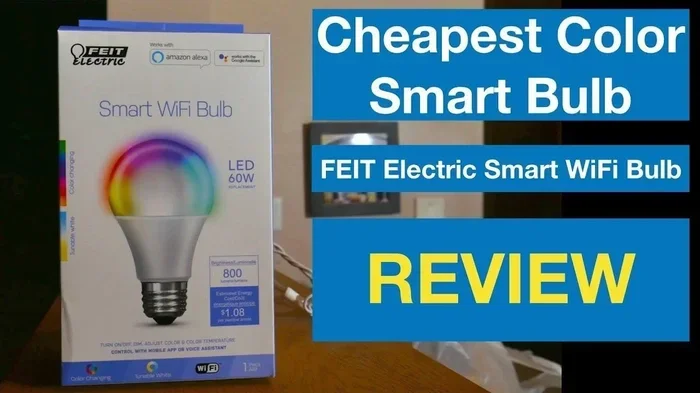
Feit Electric is a well-known brand in the smart lighting space. They make LED bulbs, smart plugs, switches, and more. Their products are popular because they are affordable and easy to use. Most Feit devices connect to your home network through WiFi or Bluetooth.
WiFi matters because it is the backbone of most smart home setups. When your bulbs connect to WiFi, they can talk to your phone from anywhere. You can turn lights on while you are at work. You can set schedules and timers. You can integrate them with voice assistants like Alexa and Google Home.
But what happens when that connection drops? That is where the question of offline functionality becomes important. Understanding how Feit Electric smart bulbs handle connectivity helps you make smarter buying decisions.
How Feit Electric Devices Connect
Feit Electric uses a few different connection methods. Let us break them down:
- WiFi: The primary connection for most smart bulbs and plugs. Requires a 2.4GHz network.
- Bluetooth: A short-range wireless connection that works without internet. Available on many Feit models.
- Smart Hub: Some Feit systems use a hub that connects to your router. The hub manages all devices locally.
- Zigbee: A few Feit devices support Zigbee, a low-power wireless protocol that does not rely on WiFi directly.
Each connection type has its own strengths. WiFi gives you the most features, but Bluetooth keeps you going when the internet is out. A smart hub adds reliability and local control. Knowing which method your device uses is the first step to mastering your setup.
Does Feit Electric Work Without WiFi?
This is the big question. And the answer is yes — with some important caveats. Many Feit Electric smart bulbs can connect directly to your phone via Bluetooth. This means you do not need WiFi to turn them on, off, or dim them. You just need the Feit Electric app and a working Bluetooth connection on your phone.
However, Bluetooth has a limited range. You need to be within about 30 feet of the bulb. You also lose access to remote controls, scheduling, and voice commands. So while your lights will work, the full smart home experience is reduced.
If you want to know more about using Feit smart bulbs without WiFi, check out our detailed guide on can Feit smart bulbs work without WiFi. It covers specific models and their offline capabilities in depth.
What Works Without WiFi
Here is what you can still do with Feit Electric devices when your WiFi is down:
- Turn lights on and off: Use the Bluetooth connection through the Feit app.
- Dim bulbs: Adjust brightness levels directly from your phone.
- Change colors: On color-changing models, you can still pick and apply colors.
- Use physical switches: If you have Feit smart switches, they work locally without any network.
- Manual control: Smart bulbs still work like regular bulbs when you flip the wall switch.
These offline features are surprisingly useful. They mean your lights are never completely dead, even during an internet outage. For basic lighting needs, Bluetooth connectivity gets the job done.
What Does Not Work Without WiFi
On the flip side, there are things you lose when WiFi goes down:
- Remote access: You cannot control your lights from outside your home.
- Scheduling and timers: Automated routines stop working without an internet connection.
- Voice control: Alexa, Google Assistant, and Siri all need WiFi to process commands.
- Cloud-based automation: Any smart routines that rely on cloud servers will pause.
- Firmware updates: Your devices cannot receive updates over Bluetooth alone.
This is why many smart home enthusiasts invest in backup solutions. A local hub or a mesh network can keep your system running even when your main internet goes down.
How to Set Up Feit Electric Without WiFi
Setting up Feit Electric without WiFi is straightforward. You will need a smartphone with Bluetooth enabled and the Feit Electric app. Here is a step-by-step walkthrough.
Step 1: Download the Feit Electric App
Go to the App Store or Google Play Store. Search for the Feit Electric app and install it. Make sure your phone has Bluetooth turned on. You do not need WiFi for this step.
Step 2: Create Your Account
Open the app and create an account. You can skip the WiFi setup during initial registration. The app will detect your Bluetooth connection and let you proceed with device pairing.
Step 3: Pair Your Bulb
Turn on your Feit smart bulb. In the app, tap the “Add Device” button. The app will search for nearby Bluetooth devices. Select your bulb when it appears. Follow the on-screen prompts to complete pairing.
Step 4: Test Your Connection
Once paired, try turning the bulb on and off from the app. Adjust the brightness and color if your model supports it. Make sure you are within Bluetooth range for the best experience.
Quick Tips for Offline Setup
- Keep your phone close: Bluetooth range is limited. Stay within 30 feet of the bulb during setup.
- Turn off other Bluetooth devices: Reduce interference by minimizing nearby Bluetooth connections.
- Check battery levels: Make sure your phone is charged before starting the pairing process.
- Reset the bulb if needed: Hold the power switch for 5 seconds to reset a bulb that will not pair.
Once your device is paired via Bluetooth, you have full local control. You do not need to reconnect to WiFi unless you want to restore full smart features.
Using a Smart Hub for Offline Reliability
One of the best ways to keep your Feit Electric devices running without WiFi is to use a smart hub. A hub acts as a local brain for your smart home. It stores your routines and device settings locally, so they do not depend on an internet connection.
Some Feit Electric systems come with their own hub. The Feit Smart Hub connects to your router when WiFi is available. But it can also manage devices through local protocols even when the internet goes down. This gives you the best of both worlds.
If you want to extend your network coverage so your hub and devices stay connected, consider learning how to extend your WiFi to outbuildings like a shed. Better coverage means fewer dead zones and more reliable smart home performance.
Benefits of a Smart Hub
- Local processing: Routines run on the hub, not in the cloud.
- Faster response: Commands execute instantly without waiting for cloud servers.
- Offline automation: Schedules and scenes continue working during internet outages.
- Better range: Hubs often use Zigbee or Z-Wave, which penetrate walls better than WiFi.
- Device management: One hub can control dozens of Feit devices simultaneously.
Investing in a smart hub is one of the smartest moves you can make for your smart home. It adds a layer of resilience that WiFi-only setups simply cannot match.
Comparing WiFi vs Bluetooth for Feit Electric Devices
Not sure which connection method is right for you? Let us compare WiFi and Bluetooth for Feit Electric devices side by side.
| Feature | WiFi | Bluetooth |
|---|---|---|
| Range | Whole home (depends on router) | Up to 30 feet |
| Remote Access | Yes, from anywhere | No, phone must be nearby |
| Voice Control | Yes (Alexa, Google) | No |
| Scheduling | Yes, cloud-based | Limited, local only |
| Works Without Internet | No | Yes |
| Setup Complexity | Moderate | Simple |
| Power Consumption | Higher | Lower |
As you can see, each connection type has trade-offs. WiFi gives you the full smart home experience. Bluetooth keeps you going when the internet is down. The best approach is to use both, so you always have a backup.
Many users pair their Feit devices with a Deco mesh WiFi system connected to an existing router to ensure strong, reliable coverage throughout the home. This minimizes the chances of losing your smart home connection in the first place.
Common Mistakes When Using Feit Electric Without WiFi
Even though offline setup is simple, people still make avoidable mistakes. Here are the most common ones:
Assuming All Features Work Offline
The biggest mistake is assuming everything works the same way without WiFi. Voice control, remote access, and cloud automation all go offline. Accept these limitations upfront so you are not surprised later.
Ignoring Bluetooth Range
Bluetooth is short-range. If you try to control a bulb in the basement from your bedroom, it might not connect. Stay within range or use a smart hub to bridge the gap.
Forgetting to Update Firmware
When you do have WiFi, update your device firmware. Outdated firmware can cause connectivity issues and reduce offline performance. Set a reminder to check for updates monthly.
Not Having a Backup Plan
Relying solely on WiFi for your smart home is risky. Internet outages happen. Having a Bluetooth backup or a smart hub ensures your lights never go completely dark.
Overcomplicating the Setup
Keep it simple. If you just need basic on-and-off control, Bluetooth pairing is all you need. You do not need a hub, a mesh network, or any fancy equipment for basic offline operation.
Expert Tips for a Reliable Smart Home Setup
Want to make your Feit Electric setup bulletproof? Here are expert-backed tips that real smart home users swear by.
Use a Mesh WiFi System
A mesh WiFi system replaces your single router with multiple nodes. These nodes spread WiFi coverage throughout your home. This means fewer dead zones and more reliable connections for all your smart devices. If you are worried about signal strength, learn how to extend your WiFi to hard-to-reach areas for better whole-home coverage.
Keep a Phone Hotspot Ready
If your home WiFi goes down, you can use your phone as a hotspot. This temporarily restores internet access and lets you reconnect your smart devices. It is a quick fix that every smart home owner should know about.
Group Your Devices Locally
Create device groups within the Feit app. This lets you control multiple bulbs at once, even when offline. It is a small step that makes a big difference in daily convenience.
Label Your Smart Switches
If you have Feit smart switches, label them clearly. When the internet is down and you are using physical switches, knowing which switch controls which room saves you frustration.
Consider a Hybrid Setup
The most reliable smart homes use a hybrid approach. Combine WiFi bulbs with Bluetooth-capable devices and a smart hub. This way, you always have at least one control method available, no matter what happens with your internet.
Change WiFi Settings for All Smart Devices
When you do need to update your WiFi network name or password, make sure you change WiFi settings for all your Google Home devices and smart home gadgets at the same time. This prevents devices from getting disconnected and needing manual re-pairing.
Final Thoughts on Feit Electric and WiFi-Free Operation
Does Feit Electric work without WiFi? Absolutely. With Bluetooth connectivity, local controls, and smart hub support, Feit Electric devices are designed to keep working even when your internet is down. You may not get the full remote access and voice control experience, but your lights will still turn on with a tap on your phone.
The key takeaway is preparation. Set up Bluetooth pairing before you need it. Consider a smart hub for local automation. Keep your devices updated. These simple steps ensure your smart home stays functional no matter what.
Feit Electric has built a solid ecosystem that works both online and offline. Whether you are dealing with a temporary outage or living in an area with unreliable internet, you have options. Embrace the flexibility of Feit Electric without WiFi and enjoy a smarter, more resilient home.
Take some time today to explore your device settings. Try the Bluetooth pairing process. Test your offline controls. The more you know about your setup, the more confident you will be when the WiFi goes down. Your smart home should work for you, not the other way around.
Frequently Asked Questions
Can I control Feit Electric bulbs without any internet connection?
Yes, you can. Many Feit Electric smart bulbs support Bluetooth connectivity, which allows you to turn them on, off, and dim them directly from the Feit Electric app on your phone. You do not need WiFi or any internet connection for this basic functionality. Just make sure your phone’s Bluetooth is turned on and you are within range of the bulb.
Will my Feit smart plugs work without WiFi?
Feit smart plugs that support Bluetooth can be controlled locally without WiFi. You can turn connected devices on and off through the app. However, features like scheduling, remote access, and voice control will not work until WiFi is restored. Check your specific plug model to confirm its Bluetooth capabilities.
Do I need a smart hub to use Feit Electric without WiFi?
No, you do not need a smart hub for basic Bluetooth control. However, a smart hub significantly improves your offline experience by enabling local automation, faster response times, and broader device management. If you want the most reliable offline setup, a hub is highly recommended.
Can I use voice assistants with Feit Electric when WiFi is down?
No, voice assistants like Alexa and Google Assistant require an active internet connection to process commands. When WiFi is unavailable, you cannot use voice control. This is one of the main limitations of offline smart home operation. Always have a manual or app-based backup control method ready.
How far can I control Feit bulbs using Bluetooth?
Bluetooth range for Feit Electric bulbs is typically up to 30 feet in open space. Walls, furniture, and other obstacles can reduce this range. If you need control from farther away, consider using a smart hub or extending your WiFi network with a mesh system to maintain connectivity throughout your home.
What should I do if my Feit bulb will not connect via Bluetooth?
First, make sure Bluetooth is enabled on your phone and you are within range of the bulb. Try resetting the bulb by turning the wall switch on and off three times quickly. Then reopen the Feit Electric app and attempt pairing again. If the issue persists, check for app updates or contact Feit Electric support for troubleshooting guidance.