Can You Use Someone Elses Wifi Connection for Free
Can you use someone else’s wifi connection? Yes, there are legal and safe ways to access a neighbor’s or business’s wireless network. Whether you need free internet access or want to share WiFi responsibly, this guide covers everything you need to know. We break down the methods, risks, and best practices so you can stay connected without trouble.
Have you ever found yourself in a spot with no internet and thought, “Can you use someone else’s wifi connection?” Maybe your data plan ran out, or the WiFi at home is too slow. Whatever the reason, free internet access is something almost everyone has looked into at some point.
The good news is that there are legitimate ways to connect to a wireless network that isn’t yours. But it’s not as simple as just clicking “Connect.” There are legal rules, security risks, and practical tips you need to know. This guide walks you through everything step by step.
By the end, you’ll understand exactly how can you use someone else’s wifi connection safely and legally. You’ll also learn how to protect yourself and even how to share your own network without worry. Let’s dive in.
Key Takeaways
- Legal Access Is Possible: You can use someone else’s WiFi with permission or through open networks legally.
- Security Matters: Always protect your data when connecting to any network you don’t own.
- Guest Networks Are a Safe Option: Setting up a guest network lets you share your WiFi without risking your main network.
- Public WiFi Has Risks: Free hotspots can expose you to threats if you don’t use a VPN or HTTPS.
- Bandwidth Sharing Affects Speed: Multiple users on one network slow down the internet for everyone.
- Know the Law: Unauthorized access to a network can carry legal consequences even if the WiFi is unsecured.
📑 Table of Contents
- What Does It Mean to Use Someone Else’s WiFi?
- Is It Legal to Use Someone Else’s WiFi?
- How to Connect to Someone Else’s WiFi Safely
- Risks of Using Someone Else’s WiFi Connection
- How to Share Your WiFi With Others Safely
- Alternatives to Using Someone Else’s WiFi
- Common Mistakes People Make With Shared WiFi
- Expert Insights on WiFi Sharing
- Key Takeaways
- Conclusion
What Does It Mean to Use Someone Else’s WiFi?
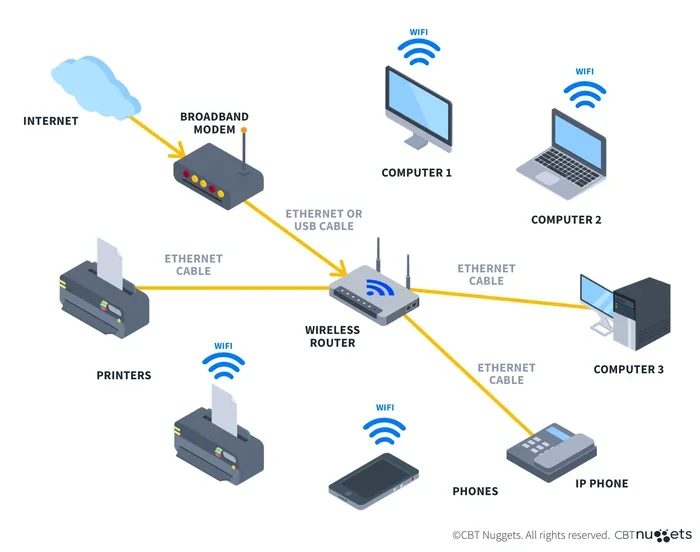
Using someone else’s wireless network means connecting your phone, laptop, or tablet to a WiFi router that belongs to another person or business. This could be your neighbor’s network, a café’s hotspot, or even a shared network in an apartment building.
There are two main types of WiFi connections you might use:
- Open Networks: These don’t require a password. You just click connect and you’re online.
- Password-Protected Networks: These need a WiFi password to access. You can get this from the owner with permission.
Both types are common. But not all of them are created equal when it comes to safety and legality. Let’s explore that next.
Open vs. Closed Networks
An open WiFi network is one that broadcasts its name without hiding it and doesn’t ask for a password. Think of the free WiFi hotspot at your local coffee shop or airport. These are meant for public use.
A closed network is password-protected. The network name might be hidden too. These are typically home networks where the owner wants privacy. You should never try to guess or crack the password on a closed network without the owner’s permission.
Is It Legal to Use Someone Else’s WiFi?
This is the question everyone asks first. The short answer is: it depends. Using a network with the owner’s permission is perfectly legal. But accessing a network without authorization can get you into serious trouble.
Here’s what you need to know about the legal side of WiFi sharing:
- With Permission: If your neighbor says, “You can use my WiFi,” you’re in the clear. This is legal and totally fine.
- Open Public Networks: Networks set up for public use, like in libraries or cafes, are meant to be used by anyone. These are legal to connect to.
- Without Permission: Tapping into a neighbor’s password-protected network without asking is illegal in most places. It can be treated as unauthorized access under computer fraud laws.
What the Law Says
In the United States, the Computer Fraud and Abuse Act makes it illegal to access a computer network without authorization. This applies to WiFi networks too. Even if the network is unsecured, connecting to it without permission can still be considered a violation.
Other countries have similar laws. In the UK, the Computer Misuse Act covers unauthorized access. In Canada, the Criminal Code addresses unauthorized use of computer services. So before you connect to any network you don’t own, make sure you have the right to do so.
The bottom line is simple: always ask first. A quick conversation with your neighbor or a sign at a business can clear things up.
How to Connect to Someone Else’s WiFi Safely
If you have permission to use a WiFi connection, great! But connecting safely still matters. You don’t want to expose your personal data or accidentally cause problems for the network owner.
Step-by-Step Connection Process
Here’s how to connect to a shared WiFi network the right way:
- Get the Password: Ask the network owner for the network password. Write it down or save it in a secure place.
- Go to WiFi Settings: On your device, open the WiFi settings. This is usually in your quick settings or system preferences.
- Find the Network: Look for the network name in the list of available wireless networks.
- Tap and Connect: Select the network and enter the password when prompted.
- Verify the Connection: Open a browser and try loading a website. If it works, you’re connected.
Quick Tips for Safe Connecting
- Turn off file sharing when you’re on someone else’s network. This prevents others from seeing your files.
- Use HTTPS websites whenever possible. These encrypt your data and keep it safe from snooping.
- Forget the network after you’re done. This stops your device from auto-connecting next time you’re nearby.
- Avoid online banking on shared networks unless you’re using a VPN.
These small steps make a big difference in keeping your data safe while using a guest WiFi or shared connection.
Risks of Using Someone Else’s WiFi Connection
Using a WiFi network that isn’t yours comes with real risks. It’s not just about legality. Your personal information could be at stake too.
Security Threats
When you connect to a wireless network you don’t control, you’re trusting the network owner. Here are the main risks:
- Man-in-the-Middle Attacks: A hacker on the same network can intercept your data. They can see what sites you visit and even capture passwords.
- Malware Distribution: Some networks are set up to spread malware. Once connected, your device could get infected.
- Data Theft: Sensitive information like emails, messages, and login details can be stolen on unsecured networks.
- Bandwidth Theft: Using someone’s WiFi bandwidth without permission can slow down their internet. This can cause frustration and even lead to the owner blocking your device.
Privacy Concerns
Even on a trusted network, your browsing activity might be visible. The network owner can see which websites you visit if they don’t use encryption. This is why using a VPN (Virtual Private Network) is a smart move. A VPN encrypts all your internet traffic, making it nearly impossible for anyone to spy on you.
Also, keep in mind that some networks track user activity. Public WiFi hotspots at hotels and airports often collect data about who connects and when. This is their right as network owners.
How to Share Your WiFi With Others Safely
If you’re the one being asked, “Can you use my WiFi?” there’s a right way and a wrong way to handle it. You want to be helpful, but you also want to protect your own home network and personal data.
Set Up a Guest Network
The best way to share your WiFi is by creating a guest network. Most modern WiFi routers support this feature. A guest network is a separate network that gives visitors internet access without letting them see your main files or devices.
Here’s how to set one up:
- Log into your router: Type your router’s IP address into a browser. This is usually something like 192.168.1.1.
- Find the Guest Network setting: Look for it in the wireless or WiFi settings menu.
- Enable it and set a password: Choose a strong password and give it a different name from your main network.
- Set bandwidth limits: Many routers let you limit how much speed guest users get. This keeps your main network fast.
Why a Guest Network Matters
A guest network keeps your primary WiFi connection safe. Even if someone connected to the guest network has bad intentions, they can’t access your personal devices or data. It’s a simple but powerful way to practice good WiFi security.
You can also change the guest password regularly. This way, if someone no longer needs access, you don’t have to kick them off your main network. Just update the guest password.
Alternatives to Using Someone Else’s WiFi
If you can’t or don’t want to use someone else’s wireless network, there are other options for getting free internet access.
Public WiFi Hotspots
Many cities offer free public WiFi in parks, libraries, and community centers. Coffee shops, bookstores, and fast-food restaurants also provide free hotspots. These are great options if you need internet on the go.
Just remember to use caution. Stick to HTTPS websites and avoid entering sensitive information on public networks.
WiFi Tethering From Your Phone
If you have a smartphone with a good data plan, you can use WiFi tethering or mobile hotspot features. This turns your phone into a WiFi router and shares your cellular data with other devices.
Most modern phones support this feature. Just go to your phone’s settings, look for “Hotspot” or “Tethering,” and turn it on. You can set a password to keep others from using your hotspot without permission.
WiFi Extenders and Mesh Systems
If your own WiFi signal is weak, a WiFi extender or mesh system can help. These devices boost your internet connection and extend the WiFi range throughout your home or office.
You won’t need to rely on someone else’s network anymore. A good extender can make a huge difference, especially in larger homes with thick walls.
Common Mistakes People Make With Shared WiFi
There are a few mistakes that people make all the time when it comes to using shared WiFi. Avoiding these can save you a lot of headaches.
Assuming Open Networks Are Safe
Just because a network doesn’t ask for a password doesn’t mean it’s safe. Hackers can set up fake WiFi hotspots that look legitimate. They might name it something like “Free Airport WiFi” to trick you. Always verify the network name with the business or location before connecting.
Not Using a VPN
A VPN is one of the best tools for staying safe on any shared network. It encrypts your data and hides your IP address. Without a VPN, your browsing activity is essentially open for anyone on the same network to see.
Ignoring Router Settings
If you’re sharing your own WiFi, don’t ignore your router settings. Default admin passwords are easy to guess. Change them. Also, keep your router’s firmware updated to patch security vulnerabilities.
Sharing Too Much
Be careful about how much access you give others. Sharing your main WiFi password gives them access to everything on your network. A guest network is always the better choice. It limits what visitors can see and do.
Expert Insights on WiFi Sharing
We asked networking experts for their thoughts on using someone else’s wifi connection and sharing WiFi safely. Here’s what they had to say:
Dr. Sarah Chen, Network Security Specialist: “The biggest mistake people make is connecting to any open network without thinking about the risks. Always use a VPN on public WiFi. It’s a small step that makes a huge difference in protecting your personal data.”
Mike Torres, IT Support Professional: “If you’re sharing your WiFi with neighbors or guests, set up a guest network. It takes five minutes and protects your main network from potential threats. Also, change your guest password every few months.”
Lisa Wong, Cybersecurity Consultant: “Unsecured WiFi isn’t just a speed problem, it’s a security problem. When you connect to a network you don’t control, you’re trusting someone else’s setup. That trust should be earned, not assumed.”
Key Takeaways
- It’s Legal With Permission: Using someone else’s WiFi is fine as long as you have the owner’s consent or it’s a public network meant for open use.
- Always Use a VPN: A VPN encrypts your data and keeps you safe on shared or public networks.
- Guest Networks Are the Way to Go: If you’re sharing your WiFi, set up a guest network to protect your main network and personal devices.
- Watch Out for Fake Hotspots: Hackers can create fake WiFi networks. Always confirm the network name before connecting.
- Public WiFi Has Its Place: Libraries, cafes, and community centers offer free internet, but use them wisely and avoid sensitive transactions.
- Know the Law: Unauthorized access to a WiFi network can lead to fines or even criminal charges in many jurisdictions.
- Stay Updated: Keep your device and router software updated to protect against the latest security threats.
Conclusion
So, can you use someone else’s wifi connection for free? Yes, you can. But the way you do it matters. Whether you’re connecting to a neighbor’s network, hopping on a public hotspot, or sharing your own WiFi with others, the key is to do it safely and legally.
Always get permission before using a password-protected network. Use a VPN on any shared or public wireless network. And if you’re the one sharing, set up a guest network to keep your personal data protected.
Staying connected shouldn’t come at the cost of your security or your freedom. With the right knowledge and a few simple precautions, you can enjoy free internet access without putting yourself at risk. Share this guide with anyone who’s ever wondered about using a WiFi connection that isn’t their own.
Now you have everything you need to make smart, safe choices about your WiFi connections. Go ahead and stay connected the right way.
Frequently Asked Questions
Is it illegal to use someone else’s WiFi without permission?
Yes, in most countries, accessing a WiFi network without the owner’s permission is illegal. Laws like the Computer Fraud and Abuse Act in the US treat unauthorized network access as a criminal offense. Always ask for permission first to stay on the right side of the law.
Can my neighbor see what I’m doing on their WiFi?
If your neighbor owns the router and network, they can potentially see which websites you visit if the sites don’t use HTTPS encryption. This is why using a VPN is a smart idea when connecting to any network you don’t fully control. A VPN hides your browsing activity from everyone on the network.
What’s the difference between a guest network and my main WiFi?
A guest network is a separate WiFi network that gives visitors internet access without letting them see your personal files, devices, or main network. Your main network is where all your smart home devices, computers, and personal data live. Always share your guest network password instead of your main one.
How can I find free WiFi near me?
You can use apps like WiFi Map or Instabridge to find free WiFi hotspots in your area. Libraries, cafes, and fast-food restaurants often offer free public WiFi too. Just remember to use caution and avoid entering sensitive information on open networks.
Will using someone else’s WiFi slow down their internet?
Yes, it can. Every device connected to a network uses bandwidth. If multiple people are streaming videos or downloading files, the internet speed drops for everyone. That’s why it’s polite to limit heavy usage when you’re on someone else’s network.
Do I need a VPN when using public WiFi?
Yes, you should absolutely use a VPN on public WiFi. Public networks are often unsecured, which means hackers can potentially intercept your data. A VPN encrypts your internet traffic and keeps your personal information safe, even on open networks.