Does Directv Have A Wireless Option You Need To Know
Yes, DirecTV does offer a wireless option through its Genie wireless adapter and streaming capabilities. You can cut the cords and enjoy satellite TV without running cables throughout your home. This guide covers everything you need to know about the DirecTV wireless setup, from equipment requirements to troubleshooting tips.
Key Takeaways
- DirecTV Wireless Exists: DirecTV offers a wireless Genie adapter that eliminates the need for coaxial cables between your receiver and dishes.
- Easy Setup: The wireless setup process is straightforward and does not require professional installation in most cases.
- Multiple Device Support: You can connect multiple TVs wirelessly using the Genie system.
- Internet Dependency: Some wireless features require a stable home internet connection for streaming and on-demand content.
- Not 100% Cable-Free: You still need a satellite dish and power connections, but the in-home cabling is greatly reduced.
- Common Issues Exist: Wireless signal interference and range limitations can affect performance in larger homes.
📑 Table of Contents
What Is DirecTV’s Wireless Option?
So, does DirecTV have a wireless option? The short answer is yes. DirecTV has evolved over the years to offer wireless solutions that reduce the need for messy cables running through your walls and ceilings. The main piece of equipment that makes this possible is the DirecTV Genie wireless adapter.
Traditionally, DirecTV required coaxial cables to connect your satellite receiver to each television in your home. This meant drilling holes, running cables along baseboards, and dealing with an unsightly mess of wires. The wireless option changes all of that. It sends the satellite signal from your main Genie receiver to additional receivers wirelessly, using your home’s existing wireless frequency bands.
The wireless setup is particularly appealing for people who love cord-cutting and want a cleaner, more modern home entertainment setup. Instead of running cables through every room, you simply plug in the wireless adapter, pair it with your main receiver, and you are good to go.
It is important to understand that DirecTV wireless does not mean you are cutting ties with satellite TV entirely. You still need a satellite dish on your roof or balcony to receive the signal from space. What the wireless option does is eliminate the need for in-home wiring between your receivers and your TVs.
Many people wonder if this is the same as DirecTV streaming. It is not exactly the same. DirecTV streaming refers to watching DirecTV content over the internet using apps and smart devices. The wireless option we are discussing here is about the in-home wireless connection between your satellite equipment and your televisions.
How the Genie Wireless Adapter Works
The Genie wireless adapter is a small device that plugs into your main Genie receiver. It communicates with smaller receivers, called Genie Mini clients, in other rooms of your house. The adapter sends the satellite signal over a wireless TV signal rather than through a physical cable. This means you can have TVs in multiple rooms without running a single wire between them.
The adapter uses a dedicated wireless frequency, which helps reduce interference from your home WiFi network. This is a smart design choice because it keeps your TV signal separate from your internet traffic. The result is a more stable and reliable connection for your television viewing.
How Does Wireless DirecTV Work?
Understanding how wireless DirecTV works can help you make a better decision about whether it is right for your home. The process is simpler than most people think, and you do not need to be a tech expert to set it up.
Here is how the system works in plain terms. Your satellite dish on the roof captures the TV signal from DirecTV satellites in space. That signal travels down a single coaxial cable to your main Genie receiver in your home. The Genie receiver processes the signal and then sends it out wirelessly to Genie Mini clients in other rooms. Each Mini client connects to a TV, and you can watch different channels on each TV at the same time.
The wireless connection between the Genie receiver and the Mini clients typically works within a range of about 50 to 100 feet. This covers most homes easily. However, very large homes or homes with thick walls might experience some signal challenges.
One thing to keep in mind is that the wireless adapter needs to be connected to a power source. It plugs into a wall outlet near your main receiver. The Genie Mini clients also need power, so each room with a TV will need a nearby electrical outlet.
Some users also connect their devices to the internet for on-demand content and streaming apps. In those cases, having a stable home internet connection becomes important. If you are wondering about getting internet without a traditional phone line, you might want to check out options for getting internet in your home without a phone line.
The Role of Your Home WiFi Network
While the Genie wireless adapter uses its own dedicated frequency, your home WiFi network still plays a role. If you want to use streaming apps like Netflix, Hulu, or YouTube on your DirecTV receiver, you need a good WiFi connection. The wireless TV signal for satellite channels is separate from your WiFi, but the internet features rely on your home network.
Many people also use their phones or tablets to control their DirecTV experience. The DirecTV app works over WiFi, so a strong home network makes the whole system smoother. You can also project your phone to a TV wirelessly if you have compatible devices, which adds another layer of convenience to your setup.
DirecTV Wireless vs Wired Setup
Let us compare the two approaches so you can see which one fits your needs better. Both have pros and cons, and the right choice depends on your home and your viewing habits.
| Feature | Wireless Setup | Wired Setup |
|---|---|---|
| Cable Clutter | Minimal wires needed | Coaxial cables run through walls |
| Installation Ease | Simple plug-and-play | May require professional help |
| Signal Stability | Good, but can be affected by interference | Very stable and consistent |
| Range | Up to 50-100 feet | Limited only by cable length |
| Cost | Wireless adapter required | Standard cabling included |
| Multi-Room Support | Yes, through Genie Mini clients | Yes, through additional cables |
The wireless setup wins when it comes to aesthetics and ease of installation. You do not have to drill holes or run cables through your attic. Just plug in the adapter, pair the Mini clients, and you are watching TV. This is a huge advantage for renters or anyone who does not want to modify their walls.
The wired setup still has an edge in signal reliability. Physical cables do not suffer from interference, and the signal is always consistent. If you live in a very large home or an area with a lot of wireless congestion, a wired connection might give you fewer headaches.
Many people also ask whether a satellite TV signal can be split to serve multiple TVs without extra equipment. The answer is yes, but splitting the signal has its limitations, and the wireless Genie system is often a better solution for multi-room setups.
Which Option Should You Choose?
If you value a clean, cable-free look and easy installation, go with the wireless setup. It is perfect for most homes and does not require any technical expertise. If you prioritize absolute signal reliability and have the ability to run cables during construction or renovation, the wired setup might be the better bet.
Some people choose a hybrid approach. They use wireless for the main living areas and wired connections for home theaters or offices where signal quality matters most. This gives you the best of both worlds.
Setting Up DirecTV Wireless At Home
Setting up your DirecTV wireless system is easier than you might think. You do not need to be a tech wizard, and most people can complete the setup in under an hour. Here is a step-by-step guide to get you started.
What You Will Need
- A DirecTV Genie receiver (the main unit)
- A DirecTV Genie wireless adapter
- Genie Mini clients for each additional TV
- A satellite dish properly installed and aimed
- A power outlet near your main receiver
- A stable internet connection for streaming features
Step-by-Step Setup Process
- Install your satellite dish. This is the one step that usually requires professional help. The dish needs to be pointed at the correct satellite in the sky for the best signal.
- Connect the Genie receiver. Plug the coaxial cable from your dish into the Genie receiver. Connect the receiver to your main TV using an HDMI cable.
- Plug in the wireless adapter. Insert the Genie wireless adapter into the USB port or Ethernet port on your Genie receiver. Plug the adapter into a power outlet.
- Pair the Genie Mini clients. Place the Mini clients in the rooms where you want TV access. Follow the on-screen prompts to pair each Mini client with the main Genie receiver.
- Connect your TVs. Run an HDMI cable from each Mini client to a TV in that room. Power on the TVs and switch to the correct input source.
- Test your connection. Check that all TVs are receiving the satellite signal and can access on-demand content through your WiFi network.
The whole process is designed to be user-friendly. DirecTV provides clear instructions, and the system guides you through each step. If you run into any issues, the DirecTV support team is available to help troubleshoot.
Tips for the Best Wireless Performance
- Place your Genie receiver in a central location in your home for the best wireless coverage.
- Keep the wireless adapter away from thick walls and large metal objects that can block the signal.
- Make sure your WiFi network is not overcrowded. Too many devices on the same network can slow things down.
- If you have a very large home, consider adding a WiFi range extender to boost the signal to distant rooms.
- Keep your Genie software updated for the best performance and security.
Some users also wonder about using other wireless devices alongside their DirecTV setup. For example, can you use a microphone through USB with your setup for voice commands or karaoke? The answer depends on your specific equipment, but many modern receivers support USB accessories.
Common DirecTV Wireless Issues and How to Fix Them
No wireless system is perfect, and DirecTV wireless is no exception. Here are some of the most common issues people face and how to solve them.
Wireless Signal Drops or Interference
If your wireless signal keeps dropping, the first thing to check is the placement of your wireless adapter. Thick walls, microwaves, baby monitors, and other electronic devices can all cause interference. Try moving the adapter to a different outlet or a more central location in your home.
Another common cause is too many wireless devices competing for the same frequency band. If your home has a lot of WiFi devices, the Genie wireless adapter might experience some congestion. In most cases, simply restarting your equipment fixes the issue.
Genie Mini Client Not Connecting
If a Genie Mini client refuses to connect, try these steps. First, make sure the Mini client is powered on and within range of the main receiver. Then, restart both the Mini client and the main Genie receiver by unplugging them for 30 seconds and plugging them back in.
If that does not work, you may need to re-pair the Mini client. Go to the Settings menu on your main receiver, navigate to the wireless setup, and follow the prompts to re-pair the device. This usually resolves connection issues.
Slow Streaming or Buffering
Slow streaming is usually a sign of a weak internet connection rather than a problem with the wireless TV signal. Check your WiFi speed using a phone or computer. If your internet speed is slow, try moving your router closer to the Genie receiver or using a wired Ethernet connection for the main receiver.
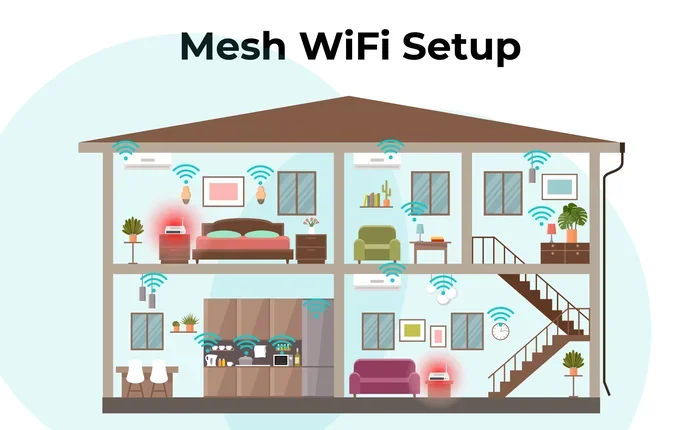
You might also want to check if your internet plan is fast enough for HD or 4K streaming. Most streaming services recommend at least 25 Mbps for 4K content. If you are still having trouble, consider upgrading your internet plan or using a mesh WiFi system to improve coverage throughout your home.
When to Call a Professional
If you have tried all the troubleshooting steps and still have issues, it might be time to call in a professional. DirecTV offers professional installation services, and a technician can check your satellite dish alignment, signal strength, and wireless setup to make sure everything is working correctly.
Also, if your equipment is old, it might be time for an upgrade. Sometimes an older receiver simply cannot support the latest wireless features. Checking if your printer or equipment is too old to use can be a helpful analogy for satellite equipment as well. Technology moves fast, and what worked five years ago might not work as well today.
Is Wireless DirecTV Right For Your Home?
Now that you know how DirecTV wireless works, the big question is whether it is right for you. Let us break down who benefits most from this option and who might want to stick with a traditional setup.
The wireless option is ideal for people who want a clean, cable-free home entertainment setup. If you are renting an apartment or a home, you do not want to drill holes in the walls. The wireless Genie system is perfect for this situation. You get all the benefits of satellite TV without the installation headaches.
Families with multiple TVs also benefit greatly. The Genie system lets you watch different channels on different TVs simultaneously, and the wireless connection means you do not need to run cables to every room. This is a huge convenience for households with three or more TVs.
On the other hand, if you live in a very large home with thick walls or multiple floors, you might experience some wireless signal challenges. In those cases, a wired setup or a hybrid approach might work better. You could also explore whether a coaxial cable can be converted to HDMI for certain connections in your setup, which can help bridge the gap between wireless and wired components.
Another factor to consider is your internet usage. If you plan to use streaming apps heavily on your DirecTV receiver, a strong and reliable WiFi connection is essential. Without good internet, you will experience buffering and slow load times that can ruin your viewing experience.
Finally, think about your budget. The wireless adapter and Genie Mini clients add to the overall cost of your DirecTV setup. Make sure you weigh the convenience and aesthetics against the additional expense. For many people, the benefits far outweigh the costs, but it is always good to do the math before committing.
The Future of DirecTV Wireless
DirecTV continues to invest in wireless technology and streaming capabilities. The trend in the industry is clearly moving toward wireless and streaming-first solutions. As satellite TV providers compete with streaming services like Netflix and Disney+, features like wireless connectivity and app integration are becoming more important.
Some experts believe that in the near future, satellite TV setups will be almost entirely wireless, with the dish on the roof and everything else connecting through WiFi or dedicated wireless protocols. This would make the setup even simpler and more appealing to cord-cutters.
For now, the current wireless option is already a big step forward from the old days of running cables through every room. It gives you the freedom to place your TVs wherever you want without worrying about wires.
Final Thoughts
So, does DirecTV have a wireless option? Absolutely. The Genie wireless adapter system makes it easy to enjoy satellite TV without the clutter of cables running through your home. It is a great solution for renters, families with multiple TVs, and anyone who values a clean, modern setup.
The wireless option does come with some trade-offs, like potential signal interference in larger homes and the need for a stable WiFi connection for streaming features. But for most households, the benefits of a wireless DirecTV setup far outweigh these minor drawbacks.
If you are considering switching to DirecTV or upgrading your current setup, the wireless option is definitely worth exploring. It is easy to set up, convenient to use, and keeps your home looking tidy. Give it a try, and you might just wonder how you ever lived with all those cables.
Frequently Asked Questions
Can I use DirecTV wireless without an internet connection?
Yes, the basic satellite TV channels work without internet. The wireless adapter sends the satellite signal to your TVs over a dedicated wireless frequency. However, you will not be able to access on-demand content, streaming apps, or interactive features without an internet connection.
How many TVs can I connect wirelessly with DirecTV Genie?
You can connect up to 15 Genie Mini clients wirelessly with a single Genie receiver. This means you can have up to 15 TVs watching different channels at the same time, though most homes do not need that many.
Does the DirecTV wireless adapter work with all Genie receivers?
The wireless adapter is compatible with most modern Genie receivers. However, older models may not support wireless connectivity. Check your specific receiver model or contact DirecTV customer support to confirm compatibility before purchasing.
Can I use my smart TV antenna with DirecTV wireless?
A smart TV antenna picks up over-the-air broadcast channels and is separate from your DirecTV satellite service. You can use both together if you want access to local broadcast channels in addition to your satellite channels. The antenna connects directly to your TV, not to the DirecTV receiver.
What is the range of the DirecTV wireless signal?
The Genie wireless adapter typically covers a range of about 50 to 100 feet. This works well for most homes. However, thick walls, multiple floors, and large distances can reduce the effective range. Placing the adapter in a central location helps maximize coverage.
Is DirecTV wireless as reliable as a wired connection?
For most homes, the wireless connection is very reliable and comparable to a wired setup. However, wireless signals can be affected by interference from other electronic devices and physical obstacles like walls. A wired connection provides the most consistent signal, but the wireless option is more than adequate for everyday viewing.