Does Boost Have Wifi Service Everything You Need to Know
Boost Mobile does offer WiFi service through hotspot tethering, WiFi calling, and compatible devices. You can share your cellular data as a mobile hotspot, make calls over WiFi, and even extend your wireless coverage at home. This guide covers everything you need to know about Boost WiFi plans, setup, and troubleshooting.
Does Boost have WiFi service? If you have been asking yourself this question, you are in the right place. Many people assume that Boost Mobile only offers basic cellular plans. But the truth is that Boost Mobile provides several WiFi-related features that can make your life easier. From hotspot tethering to WiFi calling, there is a lot to explore.
In this guide, we will break down everything you need to know about Boost WiFi service. You will learn how it works, what plans are available, and how to get the most out of your connection. Whether you are at home, on the road, or just trying to improve your signal, this article has you covered.
Let us dive right in and explore the world of Boost Mobile WiFi in simple, easy-to-understand terms.
Key Takeaways
- Boost Mobile supports WiFi hotspot tethering on most plans, letting you share your data with other devices.
- WiFi Calling is available on Boost Mobile, which helps improve call quality in areas with weak cellular signal.
- You can use a WiFi extender or mesh system to improve your Boost WiFi coverage at home.
- Boost WiFi plans vary in price and data limits, so choosing the right one matters.
- Setting up WiFi on Boost devices is simple and does not require advanced technical skills.
- Common Boost WiFi issues like slow speeds or dropped connections can usually be fixed with basic troubleshooting.
📑 Table of Contents
- What Is Boost Mobile WiFi Service?
- How Does Boost Mobile WiFi Work?
- Boost Mobile WiFi Hotspot and Tethering
- WiFi Calling with Boost Mobile
- How to Set Up WiFi on Your Boost Mobile Device
- Boost Mobile WiFi Plans and Pricing
- Common Boost WiFi Issues and How to Fix Them
- Quick Tips for Getting the Most Out of Boost WiFi
- Final Thoughts
What Is Boost Mobile WiFi Service?
Boost Mobile WiFi service refers to the WiFi-related features offered by Boost Mobile. Unlike traditional internet providers, Boost Mobile is a wireless carrier. This means it uses cellular networks to deliver internet and calling services. But that does not mean you cannot use WiFi with Boost Mobile.
In fact, Boost Mobile supports several WiFi features:
- WiFi Hotspot Tethering – Share your cellular data with other devices over WiFi.
- WiFi Calling – Make and receive phone calls using a WiFi network instead of cellular towers.
- WiFi Connectivity – Connect your Boost Mobile phone to any available WiFi network.
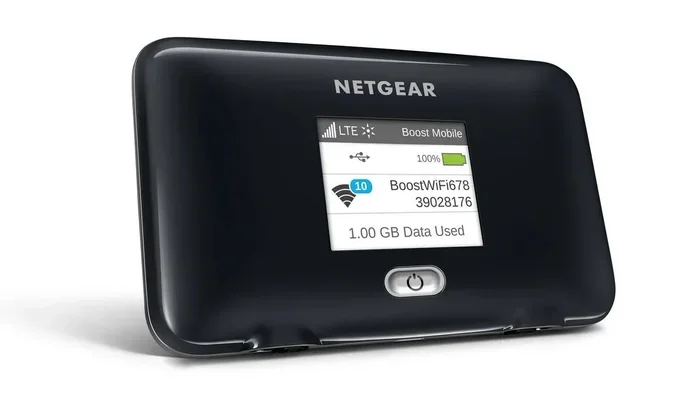
- Mobile Hotspot – Turn your phone into a portable internet source for laptops, tablets, and more.
So yes, Boost Mobile does have WiFi service. It may not be a traditional home internet provider, but the WiFi features it offers are powerful and practical. Many users rely on Boost WiFi hotspot capabilities to stay connected at home, at work, or on the go.
How Does Boost Mobile WiFi Differ from Home Internet?
It is important to understand the difference between Boost Mobile WiFi and a home internet connection. A home WiFi plan from a provider like Comcast or AT&T gives you a dedicated broadband connection. You get a router, a set speed, and unlimited or capped data depending on your plan.
Boost Mobile WiFi, on the other hand, uses your cellular data plan to create a WiFi signal. When you turn on your hotspot, your phone shares its cellular data connection with nearby devices. The devices then connect to your phone as if it were a WiFi router.
This is different from a fixed home internet connection. But for many people, it works just as well. Especially if you already have a generous data plan on Boost Mobile.
How Does Boost Mobile WiFi Work?
Understanding how Boost Mobile WiFi works is simpler than you might think. Let us walk through the process step by step.
When you activate the hotspot feature on your Boost Mobile phone, your phone starts broadcasting a WiFi signal. Other devices, like laptops or tablets, can detect this signal and connect to it. Once connected, those devices use your phone’s cellular data to access the internet.
Here is how the process works in practice:
- Make sure your Boost Mobile plan includes hotspot data.
- Go to your phone’s Settings and find the Hotspot or Tethering option.
- Turn on the Mobile Hotspot feature.
- Set a hotspot name and password for security.
- On your other device, search for WiFi networks and connect to your hotspot.
- Start browsing, streaming, or working online.
That is it. Your phone becomes a WiFi router. The speed you get depends on your cellular signal strength and your data plan. If you are in an area with strong 4G or 5G coverage, your Boost WiFi speeds can be quite impressive.
What Devices Can Connect to Boost WiFi Hotspot?
Almost any WiFi-enabled device can connect to a Boost Mobile hotspot. This includes:
- Laptops and Chromebooks
- Tablets like iPads and Android tablets
- Gaming consoles with WiFi capability
- Smart TVs with built-in WiFi
- Other smartphones and e-readers
The number of devices you can connect at once depends on your phone’s hardware. Most modern phones support five to ten simultaneous connections. Keep in mind that connecting too many devices may slow down your speeds.
Boost Mobile WiFi Hotspot and Tethering
One of the most popular Boost WiFi features is hotspot tethering. This allows you to share your cellular data with other devices. It is a great solution when you need internet access but do not have a home WiFi connection.
Boost Mobile includes hotspot data on most of its plans. The amount of hotspot data varies depending on which plan you choose. Some plans offer a few gigabytes of hotspot data, while others provide unlimited hotspot usage.
How Much Hotspot Data Do You Need?
The right amount of hotspot data depends on how you use the internet. Here is a quick guide:
- Light use (1-2 GB): Checking email, browsing websites, and sending messages.
- Medium use (3-5 GB): Streaming music, light video calls, and social media browsing.
- Heavy use (5+ GB or unlimited): Streaming videos, video conferencing, online gaming, and large file downloads.
If you plan to use your Boost WiFi hotspot frequently, you should choose a plan with generous hotspot data. Running out of hotspot data mid-month can be frustrating. So always check your plan details before committing.
Can You Boost Your WiFi Hotspot Signal?
Yes, you can improve your Boost WiFi hotspot signal in several ways. First, stay in an area with strong cellular coverage. Your hotspot speed is directly tied to your cellular signal strength.
Second, consider using a WiFi extender if you are trying to share your hotspot over a larger area. You might also want to check out whether you can boost my Wi-Fi signal outside for better coverage in outdoor spaces.
Third, keep your phone charged and in a central location. Placing your phone near a window or on a higher surface can improve signal strength. These small changes can make a big difference in your Boost WiFi experience.
WiFi Calling with Boost Mobile
WiFi Calling is another excellent feature offered by Boost Mobile. With WiFi calling, you can make and receive phone calls over a WiFi network instead of relying solely on cellular towers. This is especially useful in areas with weak cellular coverage.
When WiFi calling is enabled, your phone automatically routes calls through the nearest available WiFi network. This means you can still make calls even if the cellular signal is poor. As long as you have a stable WiFi connection, your calls should go through clearly.
How to Enable WiFi Calling on Boost Mobile
Setting up WiFi calling on your Boost Mobile device is straightforward. Here is what to do:
- Open the Settings app on your Boost Mobile phone.
- Look for the “Network” or “Connections” section.
- Find the “WiFi Calling” option and toggle it on.
- Follow any on-screen prompts to complete the setup.
- Test by making a call while connected to WiFi.
Most modern Boost Mobile phones support WiFi calling out of the box. If you do not see the option, check for a software update. Sometimes the feature is hidden until you update your phone’s operating system.
Benefits of WiFi Calling
There are several great reasons to use WiFi calling with Boost Mobile:
- Better call quality in areas with weak cellular signal.
- Lower battery usage compared to searching for cellular towers.
- Free domestic calls – WiFi calling does not cost extra on most Boost plans.
- Works indoors where cellular signals may struggle to reach.
- Seamless handoff – Your call switches between WiFi and cellular without dropping.
WiFi calling is a game-changer for Boost Mobile users. It fills in the gaps where cellular coverage falls short. If you have ever experienced dropped calls or poor audio quality, WiFi calling can help solve those problems.
How to Set Up WiFi on Your Boost Mobile Device
Setting up WiFi on a Boost Mobile device is easy. Whether you are connecting to a home network or using your phone as a hotspot, the process is similar across most Android and iPhone devices.
Connecting to a Home WiFi Network
If you have a home WiFi router and want to connect your Boost Mobile phone, follow these steps:
- Open the Settings app on your phone.
- Tap on “WiFi” or “Network & Internet.”
- Make sure WiFi is turned on.
- Select your home network from the list of available networks.
- Enter the WiFi password and tap Connect.
Once connected, your phone will use the home WiFi network for internet access. This helps save your cellular data for times when you really need it. Connecting to WiFi at home is one of the simplest ways to manage your data usage.
Setting Up a Home Mesh WiFi System with Boost Mobile
If you want better WiFi coverage throughout your home, you might consider a mesh WiFi system. Many Boost Mobile users pair their service with a mesh network for whole-home coverage.
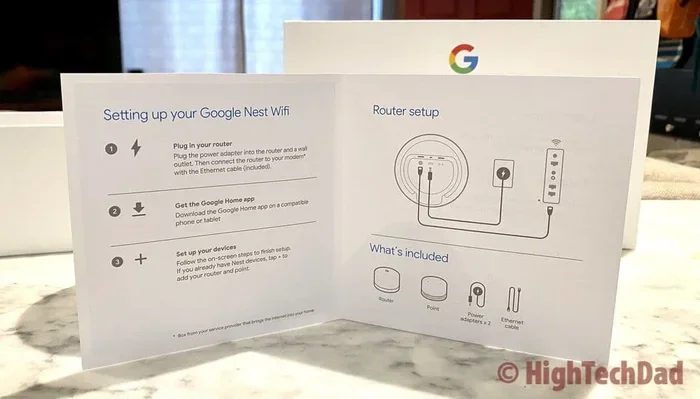
You can connect a Deco mesh WiFi system to an existing router to extend your coverage. Mesh systems like TP-Link Deco, Google Nest WiFi, and Netgear Orbi work well with Boost Mobile hotspots and WiFi calling.
A mesh WiFi system places multiple nodes around your home. Each node creates a strong WiFi signal in its area. This eliminates dead zones and ensures consistent connectivity throughout your space.
Some users also wonder if they can use a Deco unit as a WiFi extender. The answer is yes, many Deco devices can work as extenders to boost your existing WiFi signal. This is a great option if you want to improve coverage without buying a whole new system.
Boost Mobile WiFi Plans and Pricing
Boost Mobile offers several plans that include WiFi hotspot data. The right plan for you depends on your data needs, budget, and how often you use the hotspot feature.
Here is a quick look at what to expect from Boost Mobile plans:
- Unlimited Plans: Most Boost Mobile unlimited plans include a set amount of hotspot data. After that data is used, speeds may be reduced.
- Prepaid Plans: Prepaid Boost plans often come with hotspot data included. These are great for budget-conscious users.
- Data Add-Ons: You can sometimes purchase extra hotspot data if you run out during the month.
When choosing a Boost Mobile WiFi plan, consider how many devices you need to connect and what you use the internet for. If you stream a lot of video or work from home, you will want a plan with plenty of hotspot data.
It is also worth noting that you can cancel your WiFi plan at any time if you find it does not meet your needs. Always review the terms of your plan before signing up.
Comparing Boost Mobile WiFi Plans
Here is a simple comparison of what you might expect from Boost Mobile WiFi plans:
Plan Type: Unlimited with Hotspot | Hotspot Data: 15-50 GB | Speed After Limit: Reduced | Best For: Heavy users who need reliable hotspot access
Plan Type: Prepaid with Hotspot | Hotspot Data: 5-15 GB | Speed After Limit: Reduced | Best For: Moderate users who want budget-friendly options
Plan Type: Basic Plan | Hotspot Data: 1-5 GB | Speed After Limit: Reduced | Best For: Light users who only need occasional hotspot access
Keep in mind that plan details change over time. Always check the Boost Mobile website or contact customer service for the latest plan information and pricing.
Common Boost WiFi Issues and How to Fix Them
Like any WiFi service, Boost Mobile WiFi can sometimes have issues. The good news is that most problems are easy to fix. Here are some common issues and their solutions.
Slow WiFi Speeds on Hotspot
If your Boost WiFi hotspot is running slow, try these fixes:
- Move closer to a window to improve cellular signal.
- Reduce the number of connected devices.
- Restart your phone and hotspot.
- Check for network congestion in your area.
- Update your phone’s software to the latest version.
WiFi Calling Not Working
If WiFi calling is not working on your Boost Mobile device, try these steps:
- Make sure WiFi calling is enabled in your settings.
- Check that your phone is connected to a stable WiFi network.
- Restart your phone and try again.
- Verify that your plan supports WiFi calling.
- Contact Boost Mobile support if the issue persists.
Hotspot Not Showing Up for Other Devices
If other devices cannot see your Boost Mobile hotspot, try the following:
- Make sure your hotspot is turned on and visible.
- Check that your hotspot password is correct.
- Restart your phone’s hotspot feature.
- Forget the network on the connecting device and try again.
- Update your phone’s firmware or operating system.
Most WiFi issues with Boost Mobile can be resolved with simple troubleshooting. If you are still having problems, reaching out to Boost Mobile customer support is always a good next step.
Quick Tips for Getting the Most Out of Boost WiFi
Want to get the best experience from your Boost Mobile WiFi service? Here are some quick tips:
- Always use a strong password for your hotspot to prevent unauthorized use.
- Monitor your hotspot data usage regularly to avoid surprises.
- Use WiFi calling whenever possible to save cellular minutes.
- Keep your phone’s software up to date for the best performance.
- Consider a mesh WiFi system if you need coverage in multiple rooms.
- Turn off your hotspot when you are not using it to conserve battery and data.
- Place your phone in a central location for the best hotspot coverage.
These small habits can make a big difference in your Boost WiFi experience. They help you get more value from your plan and stay connected when it matters most.
Final Thoughts
So, does Boost have WiFi service? Absolutely. Boost Mobile offers a range of WiFi features that make it easy to stay connected. From hotspot tethering to WiFi calling, there are plenty of tools at your fingertips.
Whether you need to share your data with other devices, make calls over WiFi, or improve your coverage at home, Boost Mobile has you covered. The key is to choose the right plan, set up your WiFi properly, and troubleshoot any issues that come up.
Boost WiFi service is a practical and affordable way to stay connected in today’s world. With the right setup and a little know-how, you can get the most out of every Boost Mobile plan. Start exploring your Boost WiFi options today and enjoy a stronger, smarter connection.
Frequently Asked Questions
Does Boost Mobile include WiFi hotspot data on all plans?
Most Boost Mobile plans include hotspot data, but the amount varies by plan. Some plans offer a few gigabytes while others provide unlimited hotspot usage. Always check your specific plan details to confirm how much hotspot data you receive each month.
Can I use Boost WiFi calling for free?
Yes, WiFi calling on Boost Mobile is typically free for domestic calls. It uses your WiFi network instead of cellular towers, so it does not cost extra. However, international calls made over WiFi may still incur standard charges depending on your plan.
How many devices can connect to my Boost Mobile hotspot?
Most Boost Mobile phones support five to ten simultaneous hotspot connections. The exact number depends on your phone model and hardware. Connecting too many devices at once may reduce your speeds and performance.
Can I use a WiFi extender with Boost Mobile?
Yes, you can use a WiFi extender with Boost Mobile to improve your hotspot coverage. You can also connect a Deco mesh WiFi system to your existing router for better whole-home coverage. Extenders help eliminate dead zones and boost your signal in areas where it is weak.
Is Boost Mobile WiFi the same as home internet WiFi?
No, Boost Mobile WiFi is not the same as traditional home internet WiFi. Boost Mobile WiFi uses your cellular data plan to create a WiFi signal. Home internet WiFi uses a dedicated broadband connection. However, both allow your devices to connect to the internet wirelessly.
What should I do if my Boost WiFi hotspot keeps disconnecting?
If your Boost WiFi hotspot keeps disconnecting, try restarting your phone and turning the hotspot off and back on. Check for software updates and ensure your phone has a strong cellular signal. If the problem continues, contact Boost Mobile customer support for further assistance.