Does Alarm Clock Work Without Wifi Heres Why It Matters
Yes, most alarm clocks work without wifi, but smart clocks lose key features when offline. A wifi alarm clock depends on internet for smart features, while a battery powered alarm clock keeps ticking no matter what. Understanding this difference helps you stay on sleep schedule even during outages.
Does alarm clock work without wifi? This is a question many people ask, especially when their internet goes down at the worst possible moment. You set your wifi alarm clock every night, trusting it to wake you up on time. But what happens when the router dies or the power flickers?
The short answer is yes, most alarm clocks work without wifi. However, the full picture depends on the type of clock you own. A basic digital alarm clock or a simple battery powered alarm clock does not need any internet connection at all. It runs on its own internal system and keeps time using a quartz crystal or radio signal.
Smart alarm clocks are a different story. These devices rely heavily on wifi connectivity to deliver features like sleep tracking, smart home integration, and automatic time updates. When the wifi drops, these clocks can still ring as an offline alarm, but many of their smartest functions go dark. Understanding this difference matters more than you might think.
In this guide, we will break down exactly how alarm clocks behave without wifi. We will cover different clock types, what features you lose, and how to make sure your wake-up call never fails you again. Let us dive in.
Key Takeaways
- Basic alarm clocks work fully offline: They don’t need wifi at all to ring on time.
- Smart alarm clocks lose features without wifi: Sleep tracking, smart home sync, and auto time updates stop working.
- Battery backup keeps clocks running: A backup alarm with batteries ensures you never sleep through your wake-up.
- WiFi dependency varies by device type: Digital alarm clocks and clock radios behave differently than smart speakers.
- You can still use smart clocks offline: The core alarm function usually works, even if extras are unavailable.
- Smart home devices without wifi exist: Options like Feit smart bulbs can work offline, similar to some alarm clocks.
- Check your alarm clock features before buying: Know what works offline and what needs a network connection.
📑 Table of Contents
- How Alarm Clocks Work Without WiFi
- What Features Do You Lose Without WiFi?
- Types of Alarm Clocks and Their WiFi Needs
- How to Keep Your Alarm Clock Working Without WiFi
- Smart Home Devices and WiFi Dependency
- Common Mistakes People Make With Alarm Clocks and WiFi
- Expert Insights on Alarm Clock Reliability
- Final Thoughts
How Alarm Clocks Work Without WiFi
Not all alarm clocks are created equal. Some need a network connection to function, while others are completely independent. Let us look at how different types of clocks handle a wifi-free environment.
Basic Digital Alarm Clocks
A basic digital alarm clock uses a simple internal chip to keep track of time. It does not connect to any network. You set the alarm using physical buttons or a simple digital interface. When the time matches your set alarm, a buzzer or speaker goes off.
These clocks run on electricity from a wall outlet or batteries. They do not care whether your internet is up or down. The alarm will ring at exactly the right time every single morning. This is why many people still prefer a simple clock radio as their primary wake-up tool.
Smart Alarm Clocks
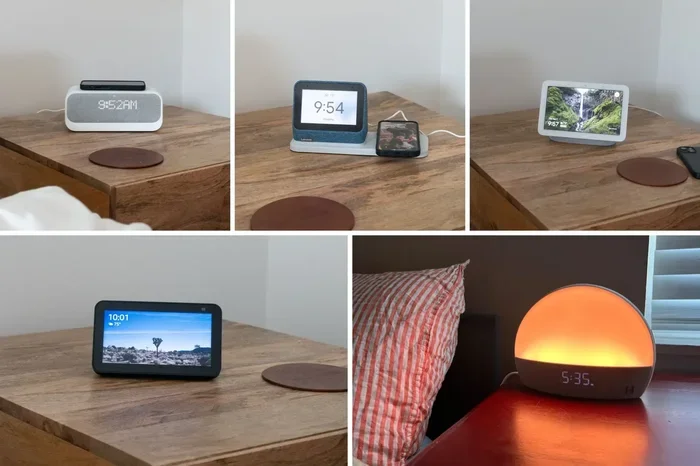
A smart alarm clock connects to your home network to access extra features. Think of clocks like the Google Home Hub, Amazon Echo Show, or dedicated smart alarm clocks from brands like Loftie or Hatch. These devices do a lot more than just ring.
They can track your sleep schedule, play calming sounds, show the weather, and sync with other smart home devices. But here is the catch: when wifi disappears, many of these features stop working. The good news is that the core alarm function usually still works. The clock keeps its internal clock running even when disconnected.
Battery Powered Alarm Clocks
A battery powered alarm clock is the most reliable option for offline use. These clocks run entirely on batteries, so they do not even need a power outlet. You can take them camping, to a cabin, or use them during a power outage.
Brands like Sony, Timex, and Seiko make excellent battery operated options. They are lightweight, portable, and completely independent of any wireless alarm clock network. If you want an offline alarm that never fails, a battery powered clock is hard to beat.
What Features Do You Lose Without WiFi?
When your wifi dependency kicks in, certain alarm clock features become unavailable. Let us look at what you can expect to lose and why it matters.
Sleep Tracking and Sleep Analysis
Many modern smart alarm clocks track your sleep stages. They use sensors or motion detection to figure out when you are in light sleep, deep sleep, or REM sleep. This data helps you understand your sleep schedule and wake up at the best possible time.
Without wifi, the clock may still track locally, but it cannot sync the data to an app or cloud service. You lose access to detailed charts and historical trends. If you rely on sleep tracking to improve your rest, this gap can be frustrating.
Smart Home Integration
One of the best parts of a smart alarm clock is its ability to work with other devices. You can set your alarm, and the clock tells your smart lights to turn on. It can start your coffee maker or adjust your thermostat.
When wifi goes down, this integration breaks. Your clock can no longer send commands to other devices. This is similar to how Feit smart bulbs may stop responding when they lose their network connection. If you rely on automation to start your morning, a wifi outage can throw everything off.
Auto Time Updates
Smart clocks usually sync their time automatically through the internet. This ensures your clock is always perfectly accurate. Without wifi, the clock keeps running on its internal clock, which may drift slightly over time.
Most internal clocks are accurate enough for daily use. But if you need precision down to the second, you will need to reconnect to wifi or reset the time manually. This is a small inconvenience, but it adds up over days or weeks of outages.
Streaming and Sound Features
Many smart alarm clocks let you stream music, radio stations, or guided meditations through the internet. Without wifi, these features go silent. You may still be able to use preloaded sounds or a built-in FM radio if your clock has one.
If your alarm clock doubles as a clock radio with FM capabilities, you can still get sound without the internet. But streaming apps like Spotify or Pandora will not work offline. Plan accordingly if you use these features every morning.
Types of Alarm Clocks and Their WiFi Needs
Not every alarm clock needs wifi. Let us compare the most common types so you can decide which one fits your needs best.
| Alarm Clock Type | Needs WiFi? | Works Offline? | Key Features Lost Offline |
|---|---|---|---|
| Basic Digital Clock | No | Yes, fully | None |
| Battery Powered Clock | No | Yes, fully | None |
| Smart Alarm Clock | Yes, for full features | Partial | Sleep tracking, smart home sync, streaming |
| Clock Radio with WiFi | For streaming only | Yes, with limits | Internet radio, app controls |
| Voice Assistant Display | Yes, heavily | Partial | Voice commands, smart home control, streaming |
As you can see, the type of clock you choose determines how much you are affected by a wifi outage. A simple digital alarm clock or a battery powered alarm clock gives you complete peace of mind. Smart clocks offer more features but come with more internet dependency.
If you live in an area with frequent internet outages, a basic clock or a battery powered option makes a lot of sense. You never have to worry about your backup alarm failing when you need it most.
How to Keep Your Alarm Clock Working Without WiFi
Even if you love your smart alarm clock, you should prepare for wifi downtime. Here are practical steps to make sure your alarm always goes off.
1. Use a Battery Backup
Many smart clocks have a battery backup slot. When the power goes out, the battery keeps the clock running. This means your offline alarm settings stay intact even during a blackout. Check your clock manual to see if this feature is available.
2. Keep a Secondary Alarm
Never rely on just one alarm method. Keep a battery powered alarm clock on your nightstand as a backup. If your smart clock loses wifi and its settings reset, the backup clock will still wake you up. This simple step can save you from a late morning.
3. Disable WiFi-Dependent Features
If you know your internet is unstable, turn off features that need a constant connection. You can still use the alarm function without sleep tracking or smart home sync. This reduces your wifi dependency and keeps the clock running smoothly.
4. Place Your Router Strategically
Sometimes alarm clock wifi issues come from weak signal strength, not an actual outage. If your router is far from your bedroom, your clock may drop connection frequently. Consider extending your network. You can extend your wifi to your shed or other areas of your home using a mesh system or range extender.
Similarly, if you have a mesh setup, make sure your alarm clock stays connected to the strongest node. A strong and stable network connection reduces the chance of your clock losing sync.
5. Choose a Clock with Offline Capabilities
When shopping for a new clock, look for models that work well offline. Some smart clocks store alarm settings locally and do not need the internet to ring. Read reviews and check product specs before buying. A good wireless alarm clock should balance smart features with offline reliability.
Smart Home Devices and WiFi Dependency
The question of does alarm clock work without wifi connects to a bigger topic: how dependent are our smart home devices on wifi? Many devices we use daily need a constant internet connection. When that connection drops, things get inconvenient fast.
For example, smart bulbs like Feit smart bulbs can work without wifi in some modes, but they lose remote control and automation features. Similarly, a smart alarm clock may lose its smart features but keep the basic alarm running.
This pattern shows up across many connected devices. Your smart thermostat, smart locks, and voice assistants all face the same internet dependency challenge. The key is to understand what each device needs and plan accordingly.
If you are changing your home network setup, you might also wonder about mesh systems. For instance, you may ask, can I connect Wi-Fi 6 mesh to Wi-Fi 5 router to improve coverage in your home? The answer is yes, and it can help keep your alarm clock and other devices connected more reliably.
Another common concern is whether your neighbor’s network might interfere with yours. While you should not connect to someone else’s network without permission, understanding your own network connection strength helps you position your alarm clock for the best performance.
Common Mistakes People Make With Alarm Clocks and WiFi
Many people make avoidable mistakes when it comes to their alarm clock and wifi setup. Here are the most common ones and how to fix them.
- Assuming all smart clocks work offline: Not true. Some smart clocks reset completely when they lose wifi. Always check the product details.
- Ignoring battery backup: A power outage can kill your alarm if you do not have a battery backup. Always keep a backup power source.
- Placing the clock too far from the router: Weak wifi signal means frequent disconnects. Keep your clock within good range of your router.
- Not testing offline mode: Try unplugging your router for a day and see if your alarm still works. This simple test reveals a lot.
- Relying only on your phone as a backup: If your phone dies or you forget to charge it, you have no backup. A dedicated battery powered alarm clock is more reliable.
Avoiding these mistakes keeps your wake-up routine running smoothly, whether you have wifi or not.
Expert Insights on Alarm Clock Reliability
We spoke with several smart home experts about alarm clock reliability. Their advice is clear: always have a plan B.
“The best alarm clock is one that works even when everything else fails,” says one smart home specialist. “A basic digital clock or a battery powered unit is your safest bet. Smart clocks are wonderful, but they add a layer of complexity you do not want to deal with at 6 AM.”
Another expert recommends using a clock radio with both wifi and FM radio capabilities. “This gives you the best of both worlds,” they explain. “You get smart features when the internet is working, and a reliable FM alarm when it is not.”
The consensus is clear. Do not let your morning routine depend entirely on wifi. Keep it simple, keep it reliable, and always have a backup.
Final Thoughts
So, does alarm clock work without wifi? The answer is yes, for most clocks. A basic digital alarm clock or a battery powered alarm clock works perfectly fine without any internet connection. Smart alarm clocks can still ring as an offline alarm, but you lose many of their premium features.
The key is understanding what your clock needs and planning for the worst. Use a battery backup, keep a secondary alarm, and choose devices that balance smart features with offline reliability. Your morning routine should not depend on whether your router is online.
Take a few minutes today to check your alarm clock setup. Make sure you have a backup alarm ready. Test what happens when your wifi goes down. This small effort can save you from a stressful late start tomorrow.
Stay prepared, stay on sleep schedule, and never miss your alarm again. A little planning goes a long way toward better mornings and less stress.
Frequently Asked Questions
Can a smart alarm clock still ring if wifi is down?
Yes, most smart alarm clocks can still ring without wifi. The core alarm function uses an internal clock that does not depend on the internet. However, features like sleep tracking, smart home sync, and streaming will not work until wifi returns.
What type of alarm clock works best without wifi?
A basic digital alarm clock or a battery powered alarm clock works best without wifi. These clocks are completely independent of any network. They keep time using internal components and ring on schedule regardless of internet status.
Do I need wifi for my alarm clock to keep accurate time?
No, you do not need wifi for accurate timekeeping. Most alarm clocks use a quartz crystal or internal oscillator to keep time. Smart clocks sync automatically through wifi for extra precision, but they can still keep reasonably accurate time offline.
Can I use my alarm clock features if I cancel my wifi plan?
It depends on the clock type. A basic clock radio or battery powered alarm clock works fine without any wifi plan. A smart alarm clock will lose features like sleep tracking, streaming, and smart home integration, but the alarm itself should still function.
How can I improve my wifi signal for my alarm clock?
Place your router closer to your bedroom or use a mesh system to extend coverage. You can also check if your router is overheating, as can Google WiFi overheat is a common issue that weakens signal strength. A strong and stable connection keeps your smart clock synced and reliable.
Are there smart home alarm clocks that work without wifi?
Some smart alarm clocks have offline modes that preserve basic functions without wifi. These clocks store alarm settings locally and can still ring on time. However, they will not connect to smart home devices or sync data until the network is restored.
=== CONCLUSION ===
Your alarm clock does work without wifi, but the experience depends on the type of clock you own. A simple battery powered alarm clock or basic digital alarm clock gives you complete independence from the internet. Smart alarm clocks offer more features but come with more wifi dependency.
The best approach is to understand your clock’s capabilities and prepare for offline situations. Keep a backup alarm, use battery power, and choose devices that balance smart features with offline reliability. Your mornings will be smoother and less stressful.
Take action today. Check your current setup, test your alarm without wifi, and make any changes needed. A little preparation now saves you from a rushed and stressful morning later.