Do You Really Need A 4k Projector For Movie Nights
A 4k projector delivers stunning ultra hd detail that transforms any room into a cinematic space. But whether you truly need one depends on your room size, budget, and viewing habits. This guide covers every factor so you can make a confident decision.
There is something magical about a big screen in your living room. Whether you are hosting friends for the latest blockbuster or enjoying a quiet evening with your favorite film, a projector can make any space feel like a theater. But with so many options on the market, the big question remains. Do you really need a 4k projector for movie nights, or will a standard model do the job just fine?
The answer is not as simple as yes or no. A 4k projector brings incredible detail and clarity, but it also comes with a higher price tag and specific setup requirements. In this guide, we will walk through everything you need to know. By the end, you will have a clear picture of whether upgrading to ultra hd makes sense for your home entertainment setup.
Key Takeaways
- 4k resolution offers four times the detail of standard hd, making images incredibly sharp on large screens.
- Movie nights benefit most from 4k when you have a dark room and a screen size of 100 inches or more.
- 1080p projectors still deliver excellent quality and cost significantly less than their 4k counterparts.
- Brightness and contrast matter just as much as resolution for a great viewing experience.
- Streaming content in true 4k requires a fast internet connection and compatible apps.
- Setup matters — even the best projector won’t impress if the room lighting and screen placement are wrong.
📑 Table of Contents
- What Makes A 4k Projector Different
- When A 4k Projector Is Worth It
- When A 4k Projector Is Overkill
- Key Features To Consider When Choosing A Projector
- 4k Projector vs 1080p Projector: A Side-by-Side Comparison
- Setting Up Your Movie Night Projector
- Common Mistakes People Make With Projectors
- Expert Tips For The Best Movie Night Experience
- Conclusion
What Makes A 4k Projector Different
Before we dive into whether you need one, let us understand what sets a 4k projector apart. The term 4k refers to a resolution of about 4,000 pixels across the screen. Specifically, most home projectors use a resolution of 3840 by 2160 pixels. This is called ultra hd or uhd for short.
Compare that to a standard 1080p projector, which has 1920 by 1080 pixels. A 4k projector packs four times as many pixels into the same screen space. The result is sharper images, finer detail, and smoother gradients. Text looks crisper, skin tones look more natural, and small details in dark scenes become visible.
Resolution And Pixel Density
Pixel density is how tightly packed those pixels are on your screen. When you project a large image, pixels become more visible. A 1080p projector on a 120-inch screen can look slightly pixelated up close. A 4k projector on the same screen keeps everything smooth and detailed. This matters most when you sit relatively close to the screen or when you have a very large display.
If you love watching nature documentaries or action movies with lots of fine detail, the extra resolution really shines. You will notice individual leaves on trees, fabric textures on costumes, and subtle background elements that a lower resolution simply cannot render.
HDR And Color Accuracy
Most modern 4k projectors also support hdr, which stands for high dynamic range. Hdr expands the range of colors and brightness levels your projector can display. This means deeper blacks, brighter highlights, and a wider color gamut. The effect is a much more lifelike image.
Not all 4k projectors are equal when it comes to hdr support. Some models handle hdr beautifully, while others struggle to produce true blacks. When shopping, look for models that advertise hdr10 or dolby vision support. These certifications ensure the projector can display the full range of hdr content.
When A 4k Projector Is Worth It
Not everyone needs a 4k projector, but certain situations make it a fantastic investment. Here are the scenarios where a 4k projector truly earns its place.
You Have A Dedicated Home Theater Room
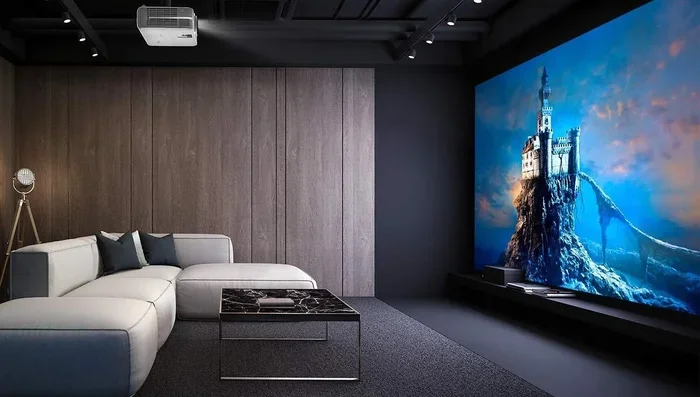
If you have a room specifically set up for watching movies, a 4k projector makes a huge difference. A dedicated theater room usually has controlled lighting, quality speakers, and a large screen. In this environment, the extra resolution becomes very apparent. Every detail in every frame looks stunning.
Think about the difference between watching a movie on a small tablet versus a 100-inch screen. Now imagine that 100-inch screen in true ultra hd. The experience is completely immersive. You feel like you are inside the movie.
You Watch A Lot Of Streaming 4k Content
Streaming services like Netflix, Disney Plus, and Amazon Prime offer a growing library of 4k content. If you already subscribe to these platforms and watch in ultra hd regularly, your projector should be able to keep up. A 1080p projector will downscale the 4k signal, which wastes the quality of the original content.
For the best experience, you also need a fast and stable internet connection. Streaming 4k content typically requires at least 25 megabits per second. If your Wi-Fi is slow, consider a wired ethernet connection or a mesh Wi-Fi system to keep your stream buffer-free.
You Love Gaming On A Big Screen
Gaming is another area where 4k resolution makes a noticeable impact. Modern gaming consoles like the PlayStation 5 and Xbox Series X support 4k output. When you connect one of these consoles to a 4k projector, games look incredibly sharp and detailed.
Even if you do not own a current-gen console, a 4k projector can future-proof your setup. As more games and content move toward higher resolutions, having a projector that can keep up saves you from upgrading again in a few years.
When A 4k Projector Is Overkill
On the flip side, there are plenty of situations where a 4k projector is simply not necessary. Understanding these scenarios can save you a significant amount of money.
You Watch Mostly Standard HD Content
If most of your viewing consists of cable TV, older movies, or content streamed in 1080p, a 4k projector will not provide much of a visible upgrade. The projector will still display the content, but it cannot add detail that is not there in the original source. It is like putting premium fuel in a car that does not have a high-performance engine.
You Have A Small Room Or Short Throw Distance
Projector resolution benefits become less noticeable on smaller screens. If your projector throws an image of 80 inches or less, the difference between 1080p and 4k is hard to spot from a normal viewing distance. In these cases, a quality 1080p projector will serve you just as well.
Similarly, if you have a very bright room, the image quality can suffer regardless of resolution. Ambient light washes out the details that make 4k so impressive. In bright environments, investing in a brighter projector or better light control often delivers better results than chasing higher resolution.
You Are On A Tight Budget
4k projectors cost significantly more than their 1080p counterparts. A good 1080p projector can be found for a few hundred dollars, while a solid 4k projector often starts at over a thousand dollars. If you are just getting into projector-based movie nights, starting with a 1080p model is a smart and budget-friendly choice.
Key Features To Consider When Choosing A Projector
Whether you choose a 4k projector or a 1080p model, several key features will determine your overall experience. Here is what to look for.
Brightness Measured In Lumens
Brightness is measured in lumens. For a dark room, a projector with 1,500 to 2,000 lumens works well. For a room with some ambient light, aim for 2,500 lumens or more. A brighter projector does not always mean better picture quality, but it does mean you have more flexibility with your room setup.
Contrast Ratio
Contrast ratio measures the difference between the brightest whites and the darkest blacks. A higher contrast ratio produces more depth and dimension in the image. Look for a projector with a contrast ratio of at least 10,000:1 for a satisfying viewing experience.
Throw Distance And Lens Shift
Throw distance is how far the projector needs to be from the screen to produce a focused image. Short throw projectors can produce a large image from a few feet away. This is great for smaller rooms. If you want flexibility, look for models with lens shift, which lets you adjust the image without moving the projector itself.
Connectivity Options
Make sure your projector has the right ports for your devices. HDMI is the most important connection for projectors. Look for at least two HDMI inputs so you can connect a streaming device and a gaming console without constantly swapping cables. Some modern projectors also offer wireless connectivity, allowing you to stream content directly without extra hardware.
4k Projector vs 1080p Projector: A Side-by-Side Comparison
Still not sure which resolution is right for you? Here is a quick comparison of the two options.
| Feature | 4K Projector | 1080p Projector |
|---|---|---|
| Resolution | 3840 x 2160 pixels | 1920 x 1080 pixels |
| Detail Level | Extremely sharp and detailed | Good, but less fine detail |
| Price Range | $800 to $5,000+ | $200 to $1,500 |
| Best Screen Size | 100 inches and above | 80 to 120 inches |
| Ideal Room | Dark, dedicated theater room | Any room size |
| Content Compatibility | 4K streaming, gaming, Blu-ray | HD streaming, gaming, Blu-ray |
| Future Proofing | Excellent | Good for now |
As you can see, each option has its strengths. A 4k projector is the clear winner for detail and future-proofing, while a 1080p projector offers better value for casual viewers and smaller budgets.
Setting Up Your Movie Night Projector
Once you have your projector, proper setup makes all the difference. Even the most expensive 4k projector will disappoint if the room and screen are not optimized.
Controlling Room Light
The biggest enemy of projector image quality is ambient light. Heavy curtains or blackout blinds can dramatically improve your picture. If you cannot block all light, consider a projector screen with a high-gain surface that reflects more light back to the viewers.
Some people wonder if they can use blackout curtains as a projector screen. While it is possible in a pinch, dedicated projector screens deliver much better results. The surface is designed to evenly distribute light and produce a sharp, uniform image.
Choosing The Right Screen
Your screen choice affects everything. A wrinkled bedsheet will not give you the same results as a proper projector screen. If you want a quick and affordable option, a pull-down screen or an inflatable screen works great for casual movie nights. For a permanent setup, a fixed-frame screen provides the best image quality.
Remember that not any projector works for every situation. Your screen size, throw distance, and room dimensions all need to match. Before buying, measure your room and calculate the ideal projector placement.
Connecting Your Devices
For the simplest setup, connect a streaming device like a Roku or Apple TV to your projector via HDMI. This gives you access to all your favorite apps without needing extra cables. If you want to project Netflix from your laptop to your projector, you can use an HDMI cable or a wireless casting adapter.
For a wireless experience, some projectors support screen mirroring from phones and tablets. Just keep in mind that wireless connections can introduce slight delays or lower image quality compared to a wired connection. For the best movie night experience, a direct HDMI connection is hard to beat.
Common Mistakes People Make With Projectors
Avoiding common pitfalls can save you frustration and money. Here are mistakes to watch out for.
- Ignoring room lighting. Even a top-of-the-line 4k projector looks washed out in a bright room. Control light first, then worry about resolution.
- Choosing resolution over brightness. A bright 1080p projector often looks better than a dim 4k projector in a room with any ambient light.
- Using the wrong cable. Cheap or old HDMI cables may not support 4k resolution at higher frame rates. Invest in a high-speed HDMI cable rated for 4k.
- Forgetting about speaker quality. Most built-in projector speakers are mediocre. A simple soundbar or external speakers transform the entire experience.
- Not matching the projector to the screen size. A projector that is too weak for a large screen produces a dim, blurry image. Always check the recommended screen size for your model.
One mistake people often make is assuming they need the most expensive model. The truth is, the best projector is the one that fits your specific needs and room. If you are just starting out, a solid 1080p projector can deliver an amazing experience at a fraction of the cost.
Expert Tips For The Best Movie Night Experience
Want to get the most out of your projector? Here are a few tips from home theater enthusiasts.
- Watch in a dark room. This is the single biggest factor in image quality. Dim all lights, close curtains, and let the projector do its job.
- Calibrate your settings. Most projectors come with preset modes. The “cinema” or “movie” mode usually provides the most accurate colors and the best contrast.
- Use a sound system. A projector handles visuals, but sound brings the experience to life. Even an affordable soundbar makes a huge difference.
- Keep your projector clean. Dust can accumulate on the lens and reduce image clarity. Clean the lens gently with a microfiber cloth every few weeks.
- Replace the lamp when needed. Over time, projector lamps dim. When your image starts looking faded, it might be time for a replacement.
If you enjoy watching movies on the go or in different rooms, you might wonder if a portable projector could work. Some compact models can even turn your phone into a projector using simple accessories. While these are not true replacements for a full-size 4k projector, they are fun for casual viewing and outdoor screenings.
Conclusion
So, do you really need a 4k projector for movie nights? The honest answer is that it depends on your setup, your budget, and how much you value image quality. If you have a dedicated room, a large screen, and you watch a lot of ultra hd content, a 4k projector is absolutely worth the investment. The level of detail and immersion it provides is unmatched.
However, if you are watching in a bright room, on a smaller screen, or on a tighter budget, a quality 1080p projector will still deliver a fantastic experience. The most important thing is to set up your equipment correctly and control your room lighting. A well-set-up 1080p projector can outperform a poorly set-up 4k projector every single time.
Start by identifying what matters most to you. Consider your room, your content sources, and your budget. Once you know your priorities, the right choice becomes clear. Whether you go with 4k or stick with 1080p, the goal is the same — to make every movie night an unforgettable experience.
Take your time, do your research, and enjoy the process of building your perfect home theater. The best projector is the one that brings you and your family together for those special moments on the big screen.
Frequently Asked Questions
Can I use a projector in a room with windows during the day?
It is possible, but ambient light will reduce image quality significantly. You can still watch content, but colors will look washed out and details will be harder to see. Using blackout curtains or blinds helps a lot. If your room has lots of natural light, consider a brighter projector with at least 3,000 lumens for the best results.
Is a 4k projector worth it for watching sports?
Yes, especially if you have a large screen. The extra resolution makes player movements and field details look incredibly sharp. Fast-moving sports benefit from higher refresh rates too, so look for a projector with low input lag and a high refresh rate for the smoothest viewing experience.
How far should I sit from a 4k projector screen?
For the best experience, sit about 1.5 to 2 times the diagonal screen size away from the projector. So if your screen is 100 inches, aim for a seating distance of 12 to 17 feet. Sitting too close may make you aware of the pixel structure, while sitting too far can reduce the sense of immersion.
Do I need a special screen for a 4k projector?
A dedicated projector screen is recommended for the best results. A proper screen evenly reflects light and maintains the resolution quality. You do not need an expensive screen, but avoid using makeshift surfaces like white walls or bedsheets, which can create uneven brightness and reduce detail.
Can I connect my phone wirelessly to a 4k projector?
Many modern projectors support wireless screen mirroring or casting. You can mirror your phone screen to the projector using built-in Wi-Fi or a casting adapter. Keep in mind that wireless connections may have slight latency, so for gaming or fast action content, a wired HDMI connection provides the best experience.
What is the lifespan of a 4k projector lamp?
Most projector lamps last between 2,000 and 5,000 hours depending on usage and brightness settings. If you watch movies for a few hours each evening, a lamp can last several years. LED and laser projectors offer even longer lifespans, often lasting 20,000 hours or more, which means less frequent replacements and lower maintenance costs.