Do Wifi Routers Cost Monthly Fees Or Are They Free
Do wifi routers cost monthly? The answer depends on whether you rent from your ISP or buy your own equipment. Most internet providers charge a monthly router rental fee of $10 to $15, but you can eliminate this cost by purchasing your own wireless router outright. This guide breaks down every cost scenario so you can make the smartest decision for your home network setup and internet bill.
This is a comprehensive guide about Do Wifi Routers Cost Monthly.
Key Takeaways
- ISP Rental Fees Are Real: Most internet providers charge $10 to $15 per month to rent their router equipment.
- Buying Your Own Router Saves Money: A one-time purchase of $80 to $200 can eliminate monthly fees and pay for itself within a year.
- Modem Router Combos Add Hidden Costs: Many ISPs bundle modem and router functions, making it harder to see the true rental charge.
- Mesh Systems Offer Better Coverage: Systems like Deco mesh wifi can improve your wifi signal range without increasing monthly costs.
- Check Your Contract: Some plans lock you into equipment leases that make it harder to cancel your wifi plan or switch equipment.
- Warranty and Support Matter: Owning your router means you handle repairs, but you also keep full control of your home network setup.
[FEATURED_IMAGE_PLACEHOLDER]
Do Wifi Routers Cost Monthly? The Full Breakdown
Let us get straight to the point. Do wifi routers cost monthly? Yes and no. It all comes down to how you get your equipment. If you rent a router from your internet service provider, you will pay a monthly fee for as long as you use that device. But if you buy your own router, the cost stops at the checkout counter. Simple, right?
Most people never think about this because the fee is buried in their internet bill. They just pay it every month without questioning it. But over a year, that rental fee adds up fast. We are talking about $120 to $180 per year for a device that you could own outright. That is real money going toward something you do not actually possess.
The good news is that you have options. You can buy a wifi router and not pay monthly, switch to a different provider, or even use a mesh system to boost your wifi coverage without paying extra. Let us walk through every scenario so you can figure out what works best for your wallet and your home network setup.
How ISP Router Rentals Work
When you sign up for internet service, your provider often gives you a router. Sometimes it is a standalone router, and sometimes it is a modem router combo that handles both tasks. Either way, they usually charge you a monthly fee for the equipment. This is called a rental fee or an equipment lease.
Here is how it typically breaks down:
- Basic Routers: $10 to $12 per month. These are standard units that handle average home use.
- Advanced Routers: $15 to $20 per month. These offer faster speeds and better wifi signal range.
- Mesh Systems: $15 to $25 per month. Some providers rent out full mesh setups for larger homes.
Now, you might think that paying $12 a month is not a big deal. And on its own, it is not. But here is the thing. That fee never goes away as long as you stay with that provider. Over two years, you have paid $288 for a router you do not own. Over five years, that number jumps to $720 or more. That is enough to buy a high quality wireless router and still have money left over.
Also, many providers do not make it easy to opt out. They want you to keep renting. If you try to return the equipment, they might push back or make the process confusing. This is why it is important to understand your options before you sign up for any broadband connection.
What Is Included in the Rental Fee?
When you pay the monthly rental, you usually get the router unit itself and sometimes a modem too. Some providers also include basic technical support. If your equipment breaks, they will replace it at no extra charge. But the trade off is that you are locked into their ecosystem. You cannot upgrade freely, and you do not own the hardware.
On the flip side, owning your own router means you get to choose the model, the brand, and the features. You can pick a mesh wifi system that covers every corner of your home, or a powerful single unit that handles fast speeds for multiple devices. The choice is yours.
Can You Buy a Wifi Router Without Paying Monthly Fees?
The short answer is absolutely yes. When you purchase a router outright, there is no monthly charge tied to the equipment. You pay once, and it is yours. This is the most common way people save money on their wifi router cost over the long run.
If you are wondering whether you can buy a wifi router and not pay monthly, the answer is a clear yes. You simply go to a retailer, pick up a router, and set it up at home. No contract, no lease, no recurring fee for the hardware. You still pay for your internet plan to your provider, but the equipment cost is a one time thing.
Here are some popular options people choose when they decide to own their router:
- Budget Routers: $50 to $80. Great for small homes with light usage.
- Mid Range Routers: $80 to $150. Good for most families and wifi coverage needs.
- High End Routers: $150 to $300. Ideal for large homes, gamers, and smart home setups.
- Mesh Systems: $100 to $400. Best for whole home wifi signal range and eliminating dead zones.
One thing to keep in mind is that buying your own router means you are responsible for setup and troubleshooting. Most modern routers are easy to configure, but if you run into issues, you will need to handle them yourself or call your provider for support (which they may charge for if you are not renting from them).
What About Modem Router Combos?
Many ISPs offer a modem router combo unit that handles both your internet connection and your wireless network. These are convenient because you only have one device to manage. But they also come with a rental fee, and that fee can be higher than a standalone router rental.
If you want to ditch the monthly charge, you can buy your own modem and your own router separately. This gives you more control over your internet speed and network performance. Just make sure your modem is compatible with your provider before you buy. You can usually find a list of approved models on your ISP website.
Hidden Costs of Free Routers
You might hear providers say they offer a free router. And technically, they do. But nothing is really free. The cost of that router is baked into your monthly internet bill. You pay for it through the rental fee, and you never build any equity in the equipment.
Here are some hidden costs people often overlook:
- Contract Locks: Some providers tie your equipment to a service contract. If you want to cancel your wifi plan early, you may face early termination fees.
- Equipment Return Fees: If you cancel service and forget to return the router, you could be charged a replacement fee of $50 to $200.
- Outdated Technology: Provider routers often lag behind the latest standards. You may be stuck with slower wireless router technology while newer options exist on the market.
- Limited Features: Rented routers usually have basic features. You get what the provider gives you, with no room for customization.
These hidden costs add up over time. A router that seems free on day one can end up costing you hundreds of dollars more than buying your own equipment. That is why so many people are now choosing to invest in their own home network setup from the start.
Mesh Wifi Systems and Monthly Costs
Mesh wifi systems have become incredibly popular. They offer seamless wifi coverage throughout your home by using multiple nodes or units placed in different rooms. Brands like Deco, Eero, and Nest Wifi make these systems easy to set up and manage.
Now, here is the important question. Do mesh systems cost monthly? If you buy a mesh system outright, the answer is no. You pay for the hardware once and use it forever. However, some providers rent mesh units as part of their service package. In those cases, you would pay a monthly rental fee just like with a standard router.
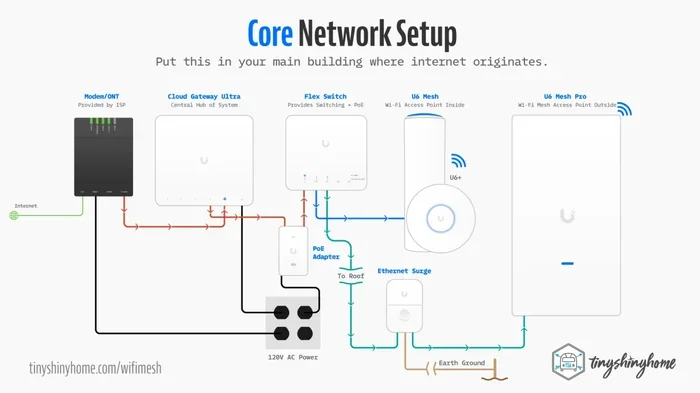
If you want to set up a mesh system on your own, you can buy a Deco mesh wifi unit and connect it to your existing router. This is a great way to boost your wifi signal range without paying any extra monthly fees. You simply connect the Deco unit to your router, and it extends your network to areas that need better coverage.
For example, if you have a large property or a backyard workspace, you might want to extend wifi to your shed using a mesh node. This keeps your connectivity strong across the entire property without any additional monthly charges.
Can You Use a Deco Unit as an Extender?
Yes, many mesh units can double as extenders. If you already have a router and want to improve coverage in a specific area, you can add a Deco node and configure it as an extender. This works well for extending wifi to a shed, a garage, or a second floor. The setup is usually straightforward through the brand app, and you do not need to pay any monthly fee for the added unit.
Just keep in mind that not all mesh systems work with all routers. If you are using a provider rented router, check whether the mesh unit is compatible. Some providers lock their equipment to specific brands, which can make it harder to mix and match. This is another reason why owning your own gear gives you more flexibility.
How to Choose the Right Router for Your Needs
Choosing a router is not one size fits all. Your best choice depends on your home size, the number of devices you use, and your internet speed plan. Here is a simple guide to help you decide.
Small Apartments or Condos: A single budget router handles this just fine. You do not need a mesh system if you live in a small space. Look for a router that supports at least Wi-Fi 5 or Wi-Fi 6 standards for solid performance.
Medium to Large Homes: If you have multiple floors or thick walls, a mesh system is your best bet. It eliminates dead zones and gives every room strong wifi signal range. You can even connect a mesh node to your existing router using simple setup steps.
Heavy Users and Gamers: If you stream 4K video, game online, or work from home, invest in a high end router. Look for features like MU MIMO, beamforming, and dual band or tri band support. These technologies help your home network setup handle many devices at once without slowing down.
Smart Home Owners: If you have dozens of smart devices, your router needs to handle the load. Choose a model with strong processing power and enough bandwidth to keep everything running smoothly.
| Home Size | Best Option | Approx Cost | Monthly Fee |
|---|---|---|---|
| Small Apartment | Single Router | $50 – $80 | $0 (if purchased) |
| Medium Home | Mid Range Router | $80 – $150 | $0 (if purchased) |
| Large Home | Mesh System | $150 – $400 | $0 (if purchased) |
| Any Size (Rented) | ISP Router | $0 upfront | $10 – $25/month |
As you can see, buying your own router saves you money in the long run. Even the most expensive mesh system pays for itself within a year or two compared to paying a monthly rental fee. And you get better performance and more features to boot.
Common Mistakes People Make With Router Costs
There are a few mistakes that many people make when it comes to wifi router cost and monthly fees. Avoiding these can save you a lot of money and headaches.
Mistake 1: Never Checking Your Bill. Many people do not realize they are paying a rental fee. They just pay the bill every month without reading the line items. Take a minute to review your bill and see if there is an equipment rental charge. If there is, you have the power to remove it.
Mistake 2: Keeping Rented Equipment Too Long. Some people stick with rented routers for years, paying the fee month after month. They tell themselves they will switch eventually, but they never do. If you have been renting for more than a year, it is time to seriously consider buying your own equipment.
Mistake 3: Buying the Wrong Router. Not all routers are created equal. Buying the cheapest model might save you money upfront, but it could give you poor wifi coverage and slow speeds. Do your research before you buy. Read reviews, check specs, and make sure the router fits your needs.
Mistake 4: Ignoring Compatibility. If you switch from a rented router to your own, make sure it works with your ISP. Some providers use specific broadband connection standards that require compatible hardware. A quick call to your ISP can confirm what models work with your service.
Mistake 5: Forgetting About Return Fees. If you decide to switch to your own router and return the rented one, make sure you do it properly. Follow your provider return process to the letter. If the equipment gets lost in the mail or arrives damaged, you could end up paying a replacement fee.
Expert Insights: What the Pros Recommend
We spoke with networking experts about the best approach to router costs, and the advice was consistent. Buy your own equipment whenever possible. The savings are real, and the performance is usually better than what ISPs provide.
Tip from the pros: Look for a router that supports the latest Wi-Fi 6 standard. It offers faster speeds, better efficiency, and improved handling of multiple devices. Even if your current internet plan does not max out the speed, a Wi-Fi 6 router future proofs your setup for years to come.
Another expert tip is to check whether your provider allows you to use your own modem. If they do, you can buy a compatible modem and skip the modem rental fee too. This can save you an additional $5 to $10 per month. Combined with your router savings, you could be cutting $20 or more from your monthly bill.
One more thing to consider is router warranty. When you own your router, it comes with a manufacturer warranty that typically lasts one to two years. Some premium models offer longer coverage. This means if something goes wrong, you are covered without paying extra. Rented routers are usually covered by the provider, but their support can be slow and frustrating.
Key Takeaways
- ISP Rental Fees Add Up: Paying $10 to $15 per month for a rented router costs $120 to $180 per year. Over time, this is a significant expense.
- Buying Saves Money: A one time purchase of $80 to $200 for your own router eliminates monthly fees permanently.
- Mesh Systems Are Worth It: A mesh system improves wifi coverage and wifi signal range without any recurring cost when you own it.
- Read Your Bill Carefully: Many people miss the rental fee line item. Review your bill to see if you are paying for equipment you do not own.
- Compatibility Matters: Before buying your own router or modem, confirm it works with your ISP to avoid setup headaches.
- Future Proof Your Investment: Choose a router with the latest standards like Wi-Fi 6 to get the best performance for years to come.
Frequently Asked Questions
Can I use my own router with any internet provider?
Most internet providers allow you to use your own router, but you should check compatibility first. Call your ISP or visit their website to see a list of approved routers. Using your own wireless router can save you the monthly rental fee and give you more control over your home network setup.
How long does it take for a router to pay for itself?
If your ISP charges $12 per month for router rental, a $120 router pays for itself in 10 months. After that, you are saving money every month. Over two years, you would save $120 compared to renting. The payback period depends on your rental fee and the cost of the router you choose.
Do mesh wifi systems have any monthly fees?
If you buy a mesh system like a Deco mesh wifi unit, there are no monthly fees. You own the hardware and use it indefinitely. However, if your ISP rents you a mesh system as part of your plan, you will pay a monthly fee for it. Always check whether the system is rented or owned before you commit.
What happens if I return my rented router?
When you return your rented router, the monthly rental fee stops. Your internet bill will reflect the change. Make sure you follow your provider return process carefully to avoid any replacement fees. Some providers also require you to return all cables and accessories that came with the equipment.
Is Wi-Fi 6 worth the extra cost?
Yes, Wi-Fi 6 is worth the investment for most users. It offers faster speeds, better performance with multiple devices, and improved efficiency. If you have a smart home with many connected devices, a Wi-Fi 6 router can make a noticeable difference in your daily wifi coverage and speed.
Can I extend my wifi network without paying extra?
You can extend your wifi signal range by buying a mesh node or a wifi extender without any monthly cost. Simply purchase the hardware, set it up, and it will expand your network coverage. For example, adding a mesh unit can help you extend wifi to a shed or outbuilding at no recurring cost.
Final Thoughts: Take Control of Your Wifi Costs
The truth about do wifi routers cost monthly is simple. They do not have to. You have the power to switch from renting to owning and start saving money right away. Whether you live in a small apartment or a large home, there is a router or mesh system that fits your needs and your budget.
Stop letting your ISP charge you a monthly router rental fee for equipment you never actually own. Take a look at your bill, explore your options, and make the switch. Your home network setup will be better, your internet speed will improve, and your wallet will thank you.
Remember, the best time to buy your own router is today. Every month you continue renting is a month of wasted money. Invest in your equipment, take control of your broadband connection, and enjoy a faster, stronger, and more affordable wifi experience at home.
Frequently Asked Questions
What is Do Wifi Routers Cost Monthly?
Do Wifi Routers Cost Monthly is an important topic with many practical applications.