Do Wifi Cameras Slow Down Internet Speed at Your Home
Do wifi cameras slow down internet? The short answer is yes—they can, especially if you have multiple cameras or a weak router. Wireless security cameras use your wifi bandwidth to stream video, which adds network traffic and can reduce internet speed for other devices. Understanding how much bandwidth your cameras need and how to optimize your setup helps keep your home network running smoothly.
Have you ever noticed your wifi slowing down right after setting up a new security camera? You’re not alone. Many homeowners ask the same question: do wifi cameras slow down internet? The answer is more nuanced than a simple yes or no. Several factors determine how much your internet speed takes a hit, including the number of cameras, their resolution, and the strength of your wifi signal.
Wireless security cameras have become incredibly popular. They let you keep an eye on your home from anywhere using your phone. But convenience comes with a trade-off. These cameras constantly send and receive data over your home network. That means they share the same bandwidth as your laptops, phones, and smart TVs. When too many devices compete for the same resources, network congestion can slow everything down.
In this article, we’ll break down exactly how wifi cameras affect your internet speed. We’ll look at what causes slowdowns, how different camera types compare, and what you can do to fix the problem. Whether you have one camera or ten, this guide will help you get the most out of your wireless camera system without sacrificing your network performance.
Key Takeaways
- Wifi cameras do use bandwidth: Every camera streams video data, which consumes your upload and download speed.
- Multiple cameras impact performance more: The more cameras you add, the greater the strain on your wifi network.
- Resolution matters a lot: Higher resolution cameras like 4K use far more data than 1080p or 720p models.
- Your router plays a big role: An older or underpowered router struggles more with network congestion from camera traffic.
- Mesh systems help distribute the load: Setting up a mesh network can improve connection stability across all devices.
- Simple fixes exist: Adjusting camera settings, using wired connections, and upgrading your plan can solve most speed issues.
📑 Table of Contents
- How Wifi Cameras Use Your Internet
- Do Wifi Cameras Slow Down Internet on Different Network Types
- Factors That Determine How Much Your Internet Slows Down
- Common Problems Caused by Wifi Cameras
- How to Prevent Wifi Cameras From Slowing Down Your Internet
- Quick Tips for Optimizing Camera Performance
- Expert Insights on Camera Network Impact
- Key Takeaways
- Conclusion
How Wifi Cameras Use Your Internet
To understand whether wifi cameras slow down internet, you need to know how they work. Every wireless camera sends video data from the camera to your router, and then to the cloud or your phone. This process uses both upload speed and download speed. Most people focus on download speed, but upload speed matters just as much for cameras.
Upload vs. Download Speed
Download speed is how fast your network receives data. Think of streaming a movie or browsing a website. Upload speed is how fast your network sends data out. When a wireless security camera streams live video, it’s uploading that video to the cloud or your device. If your upload speed is low, the camera will struggle, and other devices on your network will feel the impact.
Most internet plans offer much slower upload speeds than download speeds. For example, a plan might advertise 300 Mbps download but only 10 Mbps upload. That 10 Mbps has to serve all your upload needs, including cameras, video calls, and cloud backups. When a camera is actively recording or streaming, it eats into that limited bandwidth.
How Much Data Do Cameras Use?
The data usage depends heavily on the camera’s resolution and settings. A 1080p camera typically uses about 1 to 2 Mbps per camera. A 4K camera can use 4 to 6 Mbps or more. If you have four cameras running at 1080p, that’s 4 to 8 Mbps of continuous upload usage. That might not sound like much, but it adds up fast when you consider other devices on your network.
Continuous recording uses more data than motion-activated recording. If your cameras record 24/7, they’ll consume significantly more network traffic than cameras that only record when they detect movement. This is an important distinction when evaluating how your cameras affect your internet speed.
Do Wifi Cameras Slow Down Internet on Different Network Types
Not all networks handle camera traffic the same way. The type of router and wifi standard you use makes a big difference in how well your network manages multiple cameras.
Single Router vs. Mesh Network
A single router handles all devices in your home. If that router is old or underpowered, adding wifi cameras can quickly overwhelm it. The router has to manage data for every device at once. When a camera starts streaming, it demands a steady stream of data. Other devices have to wait their turn, which causes delays and slower speeds.
A mesh network spreads the load across multiple nodes. This means your cameras can connect to a dedicated node, reducing strain on the main router. If you’re struggling with connection stability after adding cameras, a mesh system might be the solution. You can even connect a Deco mesh system to your existing router to improve coverage without replacing your entire setup.
2.4 GHz vs. 5 GHz Bands
Most modern routers broadcast on two frequency bands: 2.4 GHz and 5 GHz. The 2.4 GHz band has a longer range but slower speeds. The 5 GHz band offers faster speeds but shorter range. Cameras connected to the 2.4 GHz band can slow down because that band is often crowded with other devices like smart plugs, baby monitors, and Bluetooth devices.
Connecting your cameras to the 5 GHz band frees up space on the 2.4 GHz band. This reduces network congestion and keeps your internet speed more consistent for all devices. If your camera supports dual-band, always try the 5 GHz band first.
Factors That Determine How Much Your Internet Slows Down
The impact of wifi cameras on your internet speed varies from home to home. Several key factors determine how much slowdown you’ll experience.
Number of Cameras
This one’s obvious but important. One camera might barely affect your network. Five cameras streaming simultaneously can cause noticeable slowdowns. Each camera adds to the total bandwidth usage. If your internet plan doesn’t have enough speed to handle the extra load, your network will feel sluggish.
Think of it like a highway. One car doesn’t cause traffic. But fifty cars on the same road creates a bottleneck. The same principle applies to your home network. Every camera is another vehicle competing for space on the data highway.
Camera Resolution and Frame Rate
Higher resolution means more data. A 4K camera sends much more information than a 720p camera. Similarly, a camera set to 60 frames per second (fps) uses more bandwidth than one set to 15 or 30 fps. These settings directly affect how much network traffic your cameras generate.
For most home security needs, 1080p at 15 to 30 fps is more than enough. This strikes a good balance between video quality and bandwidth usage. If you don’t need ultra-sharp footage, lowering these settings can significantly reduce the strain on your wifi network.
Your Internet Plan Speed
A 10 Mbps internet plan will feel very different from a 300 Mbps plan when cameras are added. If your plan has limited speed, every device matters more. People on slower plans notice the impact of cameras much more than those on faster plans. Before adding cameras, check your plan’s upload speed and make sure it can handle the extra load.
Distance from the Router
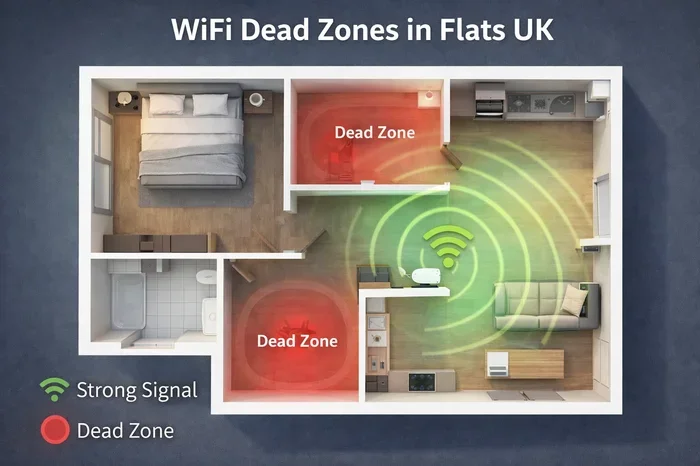
The farther a camera is from your router, the weaker the signal. A weak signal means the camera has to work harder to maintain a connection. This can cause buffering, lag, and dropped frames. It also means the camera uses more time to transmit the same amount of data, which ties up your bandwidth longer.
If your camera is far from the router, consider using a wifi extender or mesh node to boost the signal. You might also explore whether you can extend your wifi to a shed or outbuilding where cameras are often placed.
Common Problems Caused by Wifi Cameras
When cameras slow down your network, you’ll notice specific problems. Recognizing these issues early helps you fix them before they become major headaches.
Buffering During Live Viewing
If you open your camera app and the video stutters or buffers, your network is likely overloaded. This happens when the camera can’t upload video fast enough to keep up with the stream. Other devices on the network may also slow down at the same time.
Delayed Notifications
Motion alerts should arrive instantly. If you notice a delay between actual motion and the alert on your phone, your network might be struggling. The camera has to process the video, detect motion, and send the notification. Heavy network traffic from other cameras or devices can delay this process.
Slow Internet for Other Devices
This is the most common complaint. You’re watching a show, and it keeps buffering. Or your video call keeps freezing. Meanwhile, your security camera is running in the background. The camera is quietly consuming bandwidth without you realizing it. This is especially common with continuous recording cameras that never stop uploading data.
Router Overheating
Heavy network usage can cause your router to overheat. When a router gets too hot, it slows down or even crashes. This affects every device on your network. Some routers handle camera traffic better than others. If you suspect your router is struggling, you can read about whether Google WiFi can overheat to understand how router heat affects performance.
How to Prevent Wifi Cameras From Slowing Down Your Internet
The good news is that you don’t have to choose between security cameras and fast internet. Several practical steps can minimize the impact of cameras on your home network.
1. Use a Dedicated Network for Cameras
Many modern routers let you create a separate network, often called a guest network or VLAN. Put your cameras on their own network. This keeps their traffic separate from your main devices. Even if the cameras use a lot of bandwidth, they won’t slow down your streaming, browsing, or gaming.
2. Lower Camera Resolution When Possible
You don’t always need 4K footage. For general security monitoring, 1080p is usually more than enough. Lowering the resolution to 720p can cut the data usage in half. This is one of the easiest ways to reduce network congestion without giving up security coverage.
3. Switch to Motion-Activated Recording
Continuous recording sends a constant stream of data 24 hours a day. Motion-activated recording only sends data when something happens. This dramatically reduces the total data usage of your cameras. Most modern cameras offer this setting, and it’s usually easy to enable through the camera’s app.
4. Upgrade Your Router
An old router can’t handle modern demands. If your router is more than a few years old, it might be time for an upgrade. Look for routers that support the latest wifi standards like WiFi 6. These routers handle multiple devices much better and reduce network congestion. You can also buy your own router instead of renting one from your internet provider, which often gives you better performance and more features.
5. Use Wired Connections When Available
Not every camera needs to be wireless. If you have a camera near an ethernet port, use a wired connection. Wired cameras don’t use your wifi bandwidth at all. They free up your wireless network for other devices. This is especially helpful for cameras that stream constantly or record in high resolution.
6. Upgrade Your Internet Plan
If you’ve tried everything and your network still struggles, it might be time to upgrade your plan. Look for plans with higher upload speeds, not just faster download speeds. Upload speed is what matters most for security cameras. A plan with at least 50 Mbps upload speed can handle several cameras comfortably.
Quick Tips for Optimizing Camera Performance
- Restart your router weekly to clear cached data and refresh connections.
- Place your router centrally in your home for the best wifi signal coverage.
- Update camera firmware regularly to ensure optimal performance.
- Limit the number of cameras on one band to prevent overcrowding.
- Use a surge protector for your router to prevent damage and maintain consistent performance.
Expert Insights on Camera Network Impact
Networking experts agree that the key to handling multiple cameras is planning. Before buying cameras, assess your current network capacity. Count how many devices are already connected. Then estimate how much bandwidth the cameras will add. This gives you a clear picture of whether your current setup can handle the load.
Experts also recommend checking your actual speeds, not just what your plan advertises. Run a speed test with and without cameras active. The difference tells you exactly how much impact your cameras have. If the slowdown is significant, one of the fixes above should help.
Key Takeaways
- Wifi cameras do use bandwidth: Every camera streams video data, which consumes your upload and download speed.
- Multiple cameras impact performance more: The more cameras you add, the greater the strain on your wifi network.
- Resolution matters a lot: Higher resolution cameras like 4K use far more data than 1080p or 720p models.
- Your router plays a big role: An older or underpowered router struggles more with network congestion from camera traffic.
- Mesh systems help distribute the load: Setting up a mesh network can improve connection stability across all devices.
- Simple fixes exist: Adjusting camera settings, using wired connections, and upgrading your plan can solve most speed issues.
Conclusion
So, do wifi cameras slow down internet? Yes, they can—but only if your setup isn’t optimized for them. The impact depends on your camera count, resolution settings, router quality, and internet plan speed. A single 1080p camera on a fast network might cause zero noticeable slowdown. Five 4K cameras on an older router? That’s a different story entirely.
The good news is that most slowdowns are preventable. You can use a dedicated network, lower resolution settings, switch to motion-activated recording, or upgrade your equipment. Taking these steps ensures your cameras protect your home without compromising your internet speed for everything else.
Before you add more cameras to your setup, take a moment to evaluate your network capacity. A little planning goes a long way. Your home network will stay fast, your cameras will deliver clear footage, and you’ll get the best of both worlds.
Frequently Asked Questions
Do wifi cameras slow down internet on their own?
A single camera usually won’t cause noticeable slowdowns on a modern network with good speeds. But when you add multiple cameras or have a slower internet plan, the combined bandwidth usage starts to affect other devices. The more cameras you have, the more likely you are to experience slower speeds across your network.
How much internet speed does a wifi camera use?
A 1080p camera typically uses 1 to 2 Mbps, while a 4K camera can use 4 to 6 Mbps or more. Continuous recording uses more data than motion-activated recording. To find your camera’s exact usage, check the manufacturer’s specifications or test it with a network monitoring tool.
Can I run wifi cameras and still stream Netflix smoothly?
Yes, you can. The key is ensuring your internet plan has enough speed for all your devices. Netflix needs about 5 Mbps for HD streaming. If your plan has 50 Mbps or more and you only have one or two cameras, you should have no problem. Using a mesh network or a separate network for cameras helps keep streaming smooth.
Will a mesh wifi system help with camera slowdowns?
Absolutely. A mesh system distributes the network load across multiple nodes, reducing congestion on any single point. This means your cameras can connect to a dedicated node, leaving your main router free for other devices. If you’re already using mesh, make sure your cameras connect to the strongest node for the best connection stability.
Do wired cameras affect wifi speed at all?
No, wired cameras use ethernet connections and don’t consume any wifi bandwidth. This makes them ideal for homes where the wireless network is already stretched thin. If you have a camera near an ethernet outlet, a wired connection is always the better choice for maintaining fast internet speed.
Should I worry about network security with wifi cameras?
Yes, security matters. Make sure your cameras are on a separate network or guest network to limit access to your main devices. Use strong passwords and enable two-factor authentication on your camera accounts. Keeping your router firmware updated also helps protect your home network from vulnerabilities.