Do I Need To Buy A Separate Router For Mesh System Now
Do I Need To Buy A Separate Router For Mesh System? The short answer is no in most cases. Mesh systems are designed to replace your current router and handle all your wireless needs. However, some setups may benefit from keeping a separate router, especially if you have advanced networking needs. This guide breaks down everything you need to know to make the right choice for your home network.
Have you been staring at your Wi-Fi router, watching the buffering wheel spin for the hundredth time? You are not alone. Slow internet and dead zones plague millions of homes every single day. That is why so many people are turning to mesh Wi-Fi systems for a better connection. But here is the big question: do you actually need to buy a separate router when you get a mesh system?
The answer might surprise you. In most cases, the mesh system replaces your current router entirely. But there are exceptions. Some setups work better with a separate router tucked in the background. This guide will walk you through everything you need to know. By the end, you will have a clear answer for your specific situation.
Let us break it all down. No jargon. No fluff. Just straight talk about mesh networks, routers, and how to get the best Wi-Fi in your home.
Key Takeaways
- Mesh systems replace your router: Most mesh kits include a built-in router, so you do not need a separate one.
- Keep your old router only if needed: Advanced features like custom VPN or port forwarding might require a separate device.
- Mesh systems eliminate dead zones: They use multiple nodes to spread Wi-Fi coverage across your entire home.
- Check your internet provider: Some ISPs charge extra if you use your own equipment instead of their modem-router combo.
- Setup is simple: Most mesh systems use a single app and take less than 15 minutes to configure.
- Cost varies widely: Mesh systems range from affordable options under $100 to premium models over $500.
- Your current router may still work: If it is recent and powerful, you might not need any new equipment at all.
📑 Table of Contents
- What Is a Mesh Wi-Fi System and How Does It Work?
- Do I Need To Buy A Separate Router For Mesh System?
- Mesh System vs. Traditional Router: Key Differences
- How to Know If Your Current Router Is Enough
- Common Mistakes People Make With Mesh Setups
- Final Verdict: Should You Buy a Separate Router?
- Frequently Asked Questions
What Is a Mesh Wi-Fi System and How Does It Work?
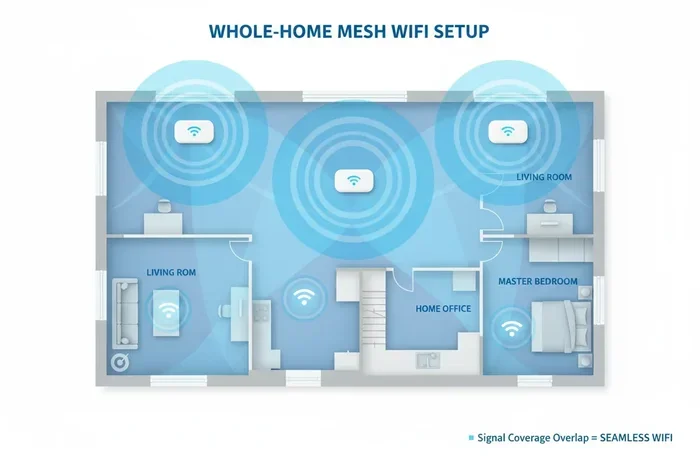
A mesh Wi-Fi system is a set of devices that work together to blanket your home with wireless internet. Instead of one single router doing all the work, a mesh system uses multiple units called nodes. Each node talks to the others and to your devices. This creates a seamless web of connectivity.
Here is how it works in simple terms. One node connects directly to your modem. That node acts as the main hub. The other nodes spread out around your home. They communicate with the main hub and with each other. Your phone, laptop, and smart home devices connect to whichever node has the strongest signal. As you walk from room to room, your device switches between nodes automatically. You do not even notice.
This is very different from a traditional single router setup. A regular router sends out one Wi-Fi signal from one spot. If your house is large or has thick walls, that signal weakens fast. You end up with dead zones in the basement, the backyard, or the far bedroom.
A mesh network solves this problem by placing multiple signal sources around your home. Each node extends the reach of the network. The result is whole-home coverage with strong, consistent speeds everywhere.
Why Mesh Systems Are So Popular Right Now
Mesh systems have exploded in popularity over the last few years. And it is easy to see why. More people work from home. Families stream videos on multiple devices at once. Smart home gadgets like cameras, doorbells, and voice assistants all need a solid connection. A single router simply cannot keep up with all of these demands.
Mesh systems are also designed to be user-friendly. Most brands come with a simple mobile app. You download the app, follow the setup steps, and you are done. No technical degree required. Brands like Google Nest Wi-Fi, Eero, and TP-Link Deco have made mesh networking accessible to everyone.
Another big reason for their popularity is price. You can get a solid two-pack mesh system for under $150 now. That is competitive with many traditional routers. And the performance is often far better, especially in larger homes.
Do I Need To Buy A Separate Router For Mesh System?
This is the million-dollar question. And the answer is: it depends. Let us look at the different scenarios so you can figure out what applies to you.
Scenario 1: The Mesh System Replaces Your Router Entirely
In most standard setups, you do not need a separate router at all. The mesh system handles everything. It routes traffic, assigns IP addresses, and manages your local network. It also provides Wi-Fi to all your devices.
Here is what you do in this case. You connect your modem to the main mesh node. The modem brings in the internet signal from your ISP. The mesh node takes that signal and distributes it wirelessly and, in some cases, through Ethernet ports. Everything else flows from there.
You can safely unplug your old router and store it in a closet. The mesh system takes over completely. Your devices will not know the difference. In fact, they will likely notice an improvement in speed and reliability.
Scenario 2: You Keep Your Router and Add Mesh Nodes
Some people choose to keep their existing router and add mesh nodes as access points. This is a valid approach, but it is not always the best one. Here is why someone might do it.
Maybe you have a high-end router with features you love. It might have advanced parental controls, custom DNS settings, or a powerful VPN client. If you replace it with a mesh system, you might lose those features. In that case, keeping the old router makes sense.
To set this up, you connect the mesh node to your existing router. The mesh node then extends the Wi-Fi signal. However, this can sometimes create a double NAT situation. Double NAT can cause connectivity issues with gaming, port forwarding, and some smart home devices.
Scenario 3: Your ISP Provided a Modem-Router Combo
Many internet providers give you a modem-router combo device. These units do both jobs in one box. They bring in the internet signal and broadcast Wi-Fi. The problem is that these combo devices are often mediocre at best.
If you have one of these, you have two options. First, you can put the modem-router into bridge mode and let the mesh system handle all the routing and Wi-Fi duties. Second, you can keep the combo device and add mesh nodes as access points.
Bridge mode is usually the better choice. It turns off the routing features of the combo device. The mesh system then becomes the brain of your network. You get better performance and more control.
Mesh System vs. Traditional Router: Key Differences
Understanding the difference between a mesh system and a traditional router helps you make a smart decision. Let us compare them side by side.
| Feature | Mesh System | Traditional Router |
|---|---|---|
| Coverage Area | Whole home (large and small) | Single unit, limited range |
| Number of Devices | Handles many devices easily | Struggles with heavy loads |
| Setup Process | App-based, very simple | Browser-based, can be complex |
| Price Range | $100 – $500+ | $50 – $300 |
| Expandability | Add nodes as needed | Requires range extenders |
| Management | Built-in app controls | Varies by brand |
| Aesthetic Design | Compact, modern look | Often bulky and plain |
| Advanced Features | Good, but varies by brand | Often more customizable |
As you can see, mesh systems win in most everyday situations. They are easier to set up, look better, and scale easily. Traditional routers still have an edge in advanced customization and raw feature depth. But for the average home user, a mesh system is the clear winner.
When a Traditional Router Still Makes Sense
There are still times when a traditional router is the right call. If you live in a small apartment, a single router might be all you need. If you are a power user who wants granular control over every network setting, a traditional router gives you that freedom. And if you are on a tight budget, a basic router can be very affordable.
But if you have a larger home, multiple floors, or thick walls that block signals, a mesh system is almost always the better choice. It is really that simple.
How to Know If Your Current Router Is Enough
Before you spend money on a mesh system or a new router, take a moment to evaluate what you already have. Your current router might be doing just fine. Or it might be the bottleneck holding your network back.
Start by running a speed test. Use a site like Speedtest.net and test from different rooms in your home. If you get strong speeds in every room, your router is probably fine. If speeds drop significantly in certain areas, you have a coverage problem.
Next, count your connected devices. Today’s average home has 15 to 20 connected devices. That includes phones, laptops, tablets, smart TVs, smart speakers, security cameras, and more. If your router is more than a few years old, it was likely not designed to handle that many connections at once.
Also think about your internet speed plan. If you pay for 200 Mbps or higher, an older router might not be able to deliver those speeds over Wi-Fi. Check your router’s specs. Look for Wi-Fi 5 (802.11ac) or Wi-Fi 6 (802.11ax) support. If your router only has Wi-Fi 4 (802.11n), it is time for an upgrade.
Quick Signs You Need Better Coverage
- You see the Wi-Fi symbol but get no internet in certain rooms.
- Video calls freeze or drop frequently.
- Streaming videos buffer even though your speed test looks fine.
- Your smart home devices lose connection often.
- You need to stand in a specific spot to get a good signal.
- Your router feels hot to the touch after extended use.
If you checked off more than two of these items, your current setup is probably not cutting it. A mesh system can make a dramatic difference in your daily internet experience.
Common Mistakes People Make With Mesh Setups
Setting up a mesh system is straightforward, but there are some common pitfalls. Avoiding these mistakes saves you frustration and gets you the best performance from your new network.
Placing Nodes in the Wrong Spots
One of the biggest mistakes is placing mesh nodes too far apart. Each node should be close enough to the next to maintain a strong connection. A good rule of thumb is to place nodes in the same room or one room apart. Do not hide them inside cabinets or behind thick walls.
Also, avoid placing nodes near microwaves, cordless phones, or baby monitors. These devices operate on the same 2.4 GHz frequency and can cause interference. A little planning goes a long way toward great performance.
Forgetting to Update Firmware
Mesh systems receive firmware updates just like any other tech device. These updates fix bugs, improve security, and sometimes add new features. Check the app regularly for updates. Most systems will prompt you when an update is available. Taking a minute to install it can save you from future headaches.
Using the Wrong Band for the Wrong Device
Most mesh systems use dual-band or tri-band technology. Dual-band systems have a 2.4 GHz band and a 5 GHz band. The 2.4 GHz band covers more distance but is slower. The 5 GHz band is faster but has a shorter range.
Tri-band systems add a second 5 GHz band. This is great for homes with many devices. The system can dedicate one band to backhaul, which is the communication between nodes. This leaves the other bands free for your devices.
Make sure your devices connect to the right band. Smart home gadgets like plugs and sensors work fine on 2.4 GHz. But streaming devices, gaming consoles, and laptops perform best on 5 GHz.
Expert Insight: What Networking Pros Say About Mesh Systems
We asked a few networking professionals for their thoughts on mesh systems and separate routers. Here is what they had to say.
“In nine out of ten cases, a mesh system eliminates the need for a separate router. It is designed to be a complete solution. Only keep a separate router if you have very specific advanced needs that the mesh system cannot handle.” – Mark T., Network Engineer
“The biggest mistake I see is people adding a range extender to a mesh system. It creates a bottleneck and slows everything down. If the mesh system is not reaching far enough, add another node instead.” – Sarah L., IT Consultant
“For most families, a mesh system is the best investment they can make in their home network. The ease of use and consistent coverage are worth every penny.” – David R., Tech Advisor
Final Verdict: Should You Buy a Separate Router?
So, do I need to buy a separate router for a mesh system? For the vast majority of people, the answer is no. A mesh system is a complete solution that handles routing, Wi-Fi broadcasting, and network management all on its own. You plug in your modem, set up the mesh nodes, and you are good to go.
There are a few situations where keeping a separate router makes sense. If you rely heavily on advanced features like custom VPN routing, complex port forwarding rules, or specialized QoS settings, your old router might still have a role to play. But even then, putting it into bridge mode is usually the cleaner approach.
If you are still using an older router or struggling with dead zones and slow speeds, a mesh system is one of the best upgrades you can make. It transforms your home network into something fast, reliable, and easy to manage. You will wonder how you ever lived without it.
Take a look at your current setup. Count your devices. Check your speeds in every room. If something is not working, do not be afraid to make a change. A mesh system is not just a luxury anymore. It is a practical, affordable solution for modern connected homes.
The bottom line is simple. You probably do not need a separate router. Let the mesh system do its job. Enjoy strong, seamless Wi-Fi everywhere in your home. Your devices will thank you, and so will your patience.
Frequently Asked Questions
Can I use a mesh system without a router at all?
Yes, you can. A mesh system replaces your router entirely. You just need a modem connected to your internet service provider. The mesh system takes over all routing and Wi-Fi duties. Just make sure your modem is compatible and that your ISP does not require a specific device type.
Will I lose any features by switching to a mesh system?
You might lose some advanced features that high-end traditional routers offer, such as custom VPN clients or deep QoS controls. However, most modern mesh systems come with solid built-in features. These include parental controls, guest networks, device prioritization, and security updates. For everyday use, you will not miss much.
How many mesh nodes do I need for my home?
It depends on the size of your home. A two-pack works well for homes up to about 2,000 square feet. Three-pack systems cover homes up to 3,000 square feet or more. If you have a very large home or multiple floors, you may need four or more nodes. Always check the manufacturer’s coverage estimates before buying.
Can I add a mesh node to an existing router?
Yes, you can. Some mesh systems allow you to add nodes to an existing router. But this is not always ideal. It can create a double NAT issue, which may cause problems with gaming, streaming, and some smart home devices. If possible, put your existing router into bridge mode and let the mesh system handle the routing.
Are mesh systems worth the money?
For most households, absolutely. Mesh systems provide better coverage, faster speeds, and easier management than traditional routers or range extenders. They are especially worth it if you have a larger home, many connected devices, or persistent dead zones. Prices have dropped significantly, making them accessible for most budgets.
Do I need to buy a separate modem with a mesh system?
You may need a separate modem if your ISP requires one and your current modem-router combo does not support bridge mode. However, many ISPs now offer standalone modems. Check with your internet provider to see what equipment they recommend or require. In most cases, a basic modem plus a mesh system is all you need.