Do Hdmi Converters Work Here Is The Full Truth Revealed
Do HDMI converters work? The short answer is yes, but results depend on the type of converter, your devices, and the quality of the adapter you buy. Many people buy cheap HDMI adapters only to deal with blurry images, no sound, or devices that won’t recognize the connection. This guide reveals the full truth about how HDMI signal conversion works, which converters actually perform well, and how to avoid common buying mistakes that waste your money.
You just bought a new monitor, a vintage projector, or a gaming setup that does not have a full HDMI port. So you search online for an HDMI converter. You find dozens of options. Some cost five dollars. Others cost fifty. And you are left wondering, do HDMI converters really work?
The answer is more nuanced than a simple yes or no. HDMI adapters work in many situations, but they also fail in others. The difference usually comes down to the type of converter, the quality of the adapter, and whether your devices are compatible. Let us break down the full truth about HDMI signal conversion so you never waste money on a dongle that lets you down.
Every day, millions of people rely on HDMI adapters to connect laptops, gaming consoles, streaming boxes, and cameras to displays that do not have matching ports. Whether you need to plug a modern laptop into an older projector or connect a PC with DisplayPort to an HDMI monitor, these small devices carry a lot of responsibility. They convert digital signals, handle audio, and maintain picture quality across different connection types.
Key Takeaways
- HDMI converters do work: They successfully convert HDMI signals to and from other formats like VGA, DisplayPort, and DVI when you choose the right one.
- Quality matters enormously: Cheap, unbranded adapters often cause signal loss, audio issues, and resolution drops that frustrate users.
- Active vs passive converters differ: Active adapters need power and handle complex conversions, while passive ones simply reroute signals between compatible formats.
- Resolution and refresh rate depend on the converter: Not all HDMI adapters support 4K, 1080p, or high refresh rates, so check specs before buying.
- Compatibility is not guaranteed: HDCP copy protection, device drivers, and port types all affect whether a converter will work with your setup.
- Common mistakes cause failure: Using the wrong cable, ignoring firmware updates, or plugging into the wrong port are the top reasons converters seem not to work.
- Trusted brands deliver better results: Brands like Cable Matters, StarTech, and UGREEN consistently produce reliable HDMI adapters that perform as advertised.
📑 Table of Contents
- What Exactly Is an HDMI Converter
- Do HDMI Converters Actually Work
- Common Types of HDMI Converters and How Well They Work
- What Makes an HDMI Converter Work Properly
- Quick Tips for Getting the Best Results
- Common Mistakes That Make HDMI Converters Fail
- Expert Insights on HDMI Adapter Performance
- Comparison Table: HDMI Converter Types
- The Bottom Line
What Exactly Is an HDMI Converter
An HDMI converter is a small adapter or device that changes an HDMI signal into another format or vice versa. The most common conversions include HDMI to VGA, HDMI to DisplayPort, HDMI to DVI, and HDMI to USB-C. Some converters also split a single HDMI signal into multiple outputs, which is where HDMI splitters come in.
Here is the basic idea. Your source device, like a laptop or a Blu-ray player, sends a digital audio and video signal through an HDMI cable. The converter takes that signal and translates it into a format your display can understand. If your monitor only has a VGA input, the converter changes the digital HDMI signal into an analog VGA signal. That translation process is where things can get tricky.
Active vs Passive HDMI Converters
Not all HDMI adapters are built the same way. There are two main types you should know about.
Passive converters simply reroute a signal from one port type to another without changing the signal itself. For example, an HDMI to DVI passive adapter works because both cables carry the same digital signal. No conversion actually happens. These adapters are cheap and reliable because they do almost no real work.
Active converters do the heavy lifting. They actively convert the signal from one format to another. An HDMI to VGA converter is always active because HDMI is digital and VGA is analog. These adapters need power, usually from a USB port, to process the signal properly. They also include a chip that handles the digital to analog conversion, which is why they cost more and can sometimes introduce quality issues.
Do HDMI Converters Actually Work
The honest answer is yes, HDMI converters work in most cases. But the word “most” is important. A high-quality converter from a trusted brand will perform exactly as promised. A cheap no-name adapter from an unknown seller might give you a black screen, no sound, or a blurry picture.
Here are the situations where HDMI adapters work great:
- Connecting a laptop to a monitor with a different port type. If your laptop has HDMI and your monitor has DisplayPort, a simple passive or active adapter handles the job easily.
- Using a modern device with an older display. HDMI to VGA converters let you connect newer laptops to old projectors in classrooms and conference rooms.
- Setting up dual monitor displays. Many professionals use HDMI splitters and adapters to run multiple screens from a single output.
- Gaming setups. Converters allow you to plug consoles into monitors or projectors that do not have native HDMI inputs.
Here are the situations where HDMI signal conversion becomes tricky:
- 4K and high refresh rate content. Not all converters support 4K resolution or refresh rates above 60Hz. Cheap adapters often cap output at 1080p.
- HDCP copy protection. Some content, like Netflix and Blu-ray movies, uses HDCP encryption. If your converter does not support HDCP, you will get a blank screen or error message.
- Audio passthrough. Some converters only carry video and drop the audio signal entirely. If you need sound, check the product specs carefully.
- Long cable runs. The longer the cable run after the converter, the more signal degradation you can expect, especially with analog outputs like VGA.
Common Types of HDMI Converters and How Well They Work
The market is full of different HDMI adapters designed for specific use cases. Let us look at the most popular types and how reliable they really are.
HDMI to VGA Converters
These are the most common active converters people buy. They let you connect a device with an HDMI output to a display with a VGA input. Schools, offices, and event venues still use plenty of VGA projectors, so these adapters remain very popular.
They work well for presentations and basic tasks. But because VGA is an older analog standard, you will never get the same crisp image quality as a pure digital connection. The converter does its best, but the analog signal is inherently less sharp than HDMI or DisplayPort.
HDMI to DisplayPort Adapters
These adapters are extremely useful for PC users. Many modern monitors come with DisplayPort inputs, while laptops and consoles use HDMI. A good HDMI to DisplayPort adapter handles the conversion cleanly and supports high resolutions.
One thing to watch for is directionality. Some adapters only work in one direction. Make sure you buy an HDMI to DisplayPort adapter if your source is HDMI and your display is DisplayPort. The reverse direction requires a different adapter.
HDMI Splitters
An HDMI splitter takes one HDMI input and splits it into two or more outputs. This is handy when you want to send the same signal to multiple TVs or monitors. Most splitters work well and maintain full signal quality, but cheap splitters can introduce input lag or reduce resolution.
USB-C to HDMI Adapters
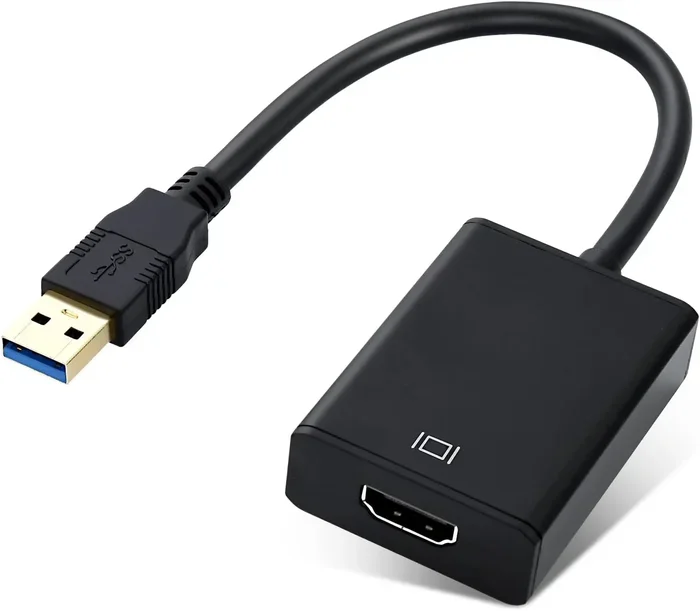
With the rise of laptops that only have USB-C or Thunderbolt ports, USB-C to HDMI adapters have become essential. These small dongles work very reliably for most users. They support video output from laptops, tablets, and even some smartphones to HDMI displays. The key is to make sure your USB-C port supports video output, not just data charging.
What Makes an HDMI Converter Work Properly
Not every HDMI adapter will work in every situation. Several factors determine whether your converter will deliver a solid experience.
Signal Quality and Bandwidth
Higher resolutions like 4K and 8K require more bandwidth than 1080p. A converter that only supports older HDMI standards (like HDMI 1.4) may not handle 4K content at all, or it may limit you to 30Hz instead of 60Hz. Always check what HDMI version the adapter supports.
HDCP Compatibility
HDCP, or High-bandwidth Digital Content Protection, is a copy protection system built into HDMI. If you try to play protected content through a converter that does not support HDCP, the screen will go black or display an error. This is a common frustration for people trying to watch movies or use streaming apps through a converter.
Power Supply
Active converters need power to process signals. Most draw power from the USB port of your computer or device. If your USB port does not provide enough power, the converter may not work at all, or it may disconnect randomly. Some active adapters come with a USB power cable that plugs into a wall adapter for reliable power.
Driver and Firmware Support
Some HDMI adapters, especially USB-C to HDMI models, need drivers or firmware updates to work correctly with certain operating systems. Windows, macOS, and Chrome OS all handle adapters differently. Always check the manufacturer’s website for the latest driver support before buying.
Quick Tips for Getting the Best Results
Want your HDMI converters to work flawlessly every time? Follow these practical tips.
- Buy from reputable brands. Companies like Cable Matters, StarTech, UGREEN, and Sabrent have proven track records with their adapters.
- Check your device specs. Before buying an adapter, confirm what resolutions and refresh rates your source and display support.
- Test with a known working setup first. If possible, test the converter with a simple connection before using it for important presentations or gaming.
- Use high quality cables. A great converter with a cheap HDMI cable will still give you poor results. Invest in good cables rated for the resolution you need.
- Update drivers and firmware. Especially for USB-C adapters, keep your device drivers up to date for the best compatibility.
- Avoid extension chains. Do not plug an adapter into another adapter. Each connection point introduces potential signal loss.
- Read reviews carefully. Look for reviews that mention the specific resolution and setup you plan to use, not just general impressions.
Common Mistakes That Make HDMI Converters Fail
Many people blame the converter when the real problem is something simple. Here are the most common mistakes that make HDMI adapters seem broken.
- Buying a passive adapter for an active conversion. You cannot use a passive HDMI to VGA adapter because it requires active signal conversion. Always check if the adapter is active or passive.
- Ignoring HDCP requirements. If your screen goes black when playing streaming content, HDCP incompatibility is the likely culprit.
- Using the wrong direction. Some adapters only work one way. An HDMI to DisplayPort adapter is not the same as a DisplayPort to HDMI adapter.
- Plugging into the wrong USB port. Not all USB ports provide enough power for active converters. Use a USB port directly on your computer, not a unpowered hub.
- Expecting 4K from a 1080p adapter. If your adapter only supports HDMI 1.4, it cannot output 4K. Check the specifications before expecting high resolution.
- Ignoring audio settings. Some converters drop audio entirely. Go into your device sound settings and make sure the correct output device is selected.
Expert Insights on HDMI Adapter Performance
Technology reviewers and AV professionals have tested hundreds of HDMI converters over the years. Their consensus is clear. The adapter itself is rarely the problem when things go wrong. The real issues usually stem from three areas.
First, people buy the wrong type of adapter for their specific setup. Second, they expect a twenty-dollar adapter to perform like a two-hundred-dollar professional piece of equipment. Third, they skip the simple troubleshooting steps that would solve the problem in minutes.
Professional AV technicians recommend spending a little more on a quality adapter. The small savings from a cheap no-name converter are not worth the frustration of a setup that does not work. A reliable HDMI adapter from a known brand will save you time, headaches, and the hassle of returns.
Another expert insight is about future-proofing. If you plan to use a converter long term, make sure it supports the latest standards. Look for adapters that support HDMI 2.0 or HDMI 2.1 for 4K at 60Hz or higher. Investing in a slightly more expensive adapter now saves you from buying another one in a year or two.
Comparison Table: HDMI Converter Types
| Converter Type | Signal Type | Needs Power? | Supports 4K? | Best For |
|---|---|---|---|---|
| HDMI to VGA | Digital to Analog | Yes | No (usually 1080p max) | Old projectors and monitors |
| HDMI to DisplayPort | Digital to Digital | Sometimes | Yes (with HDMI 2.0+) | PC monitors and laptops |
| HDMI to DVI | Digital to Digital | No (passive) | Yes (with HDMI 2.0+) | Older DVI monitors |
| USB-C to HDMI | Digital to Digital | Sometimes | Yes (with USB-C Alt Mode) | Modern laptops and tablets |
| HDMI Splitter | Digital Pass-through | Sometimes | Depends on model | Multiple display setups |
As you can see from the table, the type of HDMI converter you need depends entirely on what devices you are connecting. There is no one-size-fits-all solution. But with the right adapter for your specific setup, you will get reliable performance every time.
The Bottom Line
So do HDMI converters work? Absolutely. They are practical, useful, and essential for anyone who connects different types of devices to displays. The key is to understand what you need, buy the right type of adapter, and choose a quality product from a trusted brand.
Whether you need a simple HDMI to DVI passive adapter or a powered HDMI to VGA converter for your classroom projector, there is a solution that works. Just avoid the trap of buying the cheapest option without checking specifications. A few extra dollars spent on a reliable HDMI adapter pays for itself in hassle-free connectivity.
Take a moment to identify your specific connection needs. Check your device ports. Confirm the resolution and features you require. Then pick a converter that matches those requirements. Follow the quick tips in this guide, and you will set up your display connection with confidence.
The truth about HDMI signal conversion is simple. It works when you choose the right tool for the job. Now you have the knowledge to make that choice with clarity and certainty.
Frequently Asked Questions
Do HDMI converters work with 4K resolution?
Yes, but only if the converter supports HDMI 2.0 or higher. Many cheap adapters only support HDMI 1.4, which caps output at 1080p or 4K at 30Hz. Check the product specifications carefully before buying if you need full 4K at 60Hz support.
Why does my HDMI converter show no sound?
Some HDMI adapters only carry video and drop the audio signal. This is common with older VGA converters and certain USB-C adapters. Check your device sound settings to make sure the correct output is selected, and verify the adapter specs support audio passthrough.
Can I use an HDMI splitter to connect multiple TVs?
Yes, an HDMI splitter lets you send one HDMI signal to multiple displays. However, all connected TVs will show the same content. Make sure your splitter supports the resolution and HDCP requirements of your content source for the best results.
Do HDMI converters cause input lag for gaming?
Most quality HDMI adapters introduce negligible input lag. However, very cheap or poorly made converters can add noticeable delay. If you are a competitive gamer, invest in a converter from a reputable brand that specifically mentions low latency or gaming support in its specs.
Why does my HDMI converter keep disconnecting?
Loose connections are the most common cause. Try a different port, clean the connector pins, and make sure the adapter is firmly seated. If you are using an active converter, it may not be getting enough power from the USB port. Try a powered USB hub or a wall-mounted USB charger.
Are expensive HDMI converters worth the money?
Generally, yes. More expensive converters from trusted brands tend to offer better build quality, higher resolution support, HDCP compliance, and more reliable performance. The small extra cost is usually worth avoiding the frustration of a converter that fails when you need it most.
=== CONCLUSION ===
Do HDMI converters work? The full truth is that they absolutely do, as long as you pick the right one for your setup. HDMI signal conversion is a proven technology that millions of people rely on every day for work, gaming, and entertainment. The key takeaways are simple. Know your connection types, check the specs before buying, choose quality over price, and avoid the common mistakes that trip up most users.
With the right HDMI adapter, you can connect any device to any display without headaches. Whether you need a basic passive adapter or a powered active converter, the market has you covered. Just stay informed, buy smart, and your HDMI converters will work exactly as they should.