Can You Test An Hdmi Cable With A Multimeter At Home
You can test an HDMI cable with a multimeter at home to check continuity and resistance. This simple method saves money and time compared to buying a new cable. Can You Test An Hdmi Cable With A Multimeter? Yes, with the right steps and a basic digital multimeter. You’ll learn to spot broken pins, short circuits, and signal loss without a TV.
HDMI cables carry high-definition video and audio every day. Yet they often fail without warning. You might notice a blank screen or no sound. Before you rush to buy a new one, consider a simple test. Can You Test An Hdmi Cable With A Multimeter? Absolutely. A digital multimeter gives you real data in seconds.
Testing with a multimeter helps you see if a wire is broken or if pins are shorted. This saves money and reduces e-waste. Many people throw away good cables because they assume they are dead. A quick continuity test can change that. You’ll know exactly what is wrong.
In this guide, I’ll show you exactly how to do it. You’ll learn what a multimeter can and cannot check. I’ll share step-by-step instructions, common mistakes, and alternative methods. By the end, you’ll feel confident testing any HDMI cable at home. Let’s get started.
Key Takeaways
- Multimeter Testing Works: You can check HDMI cable continuity and resistance at home.
- No Special Tools Needed: A basic digital multimeter is enough for most tests.
- Know the Limitations: A multimeter can’t verify digital signal quality or audio/video performance.
- Follow Step-by-Step: Proper setup and pin identification prevent false readings.
- Combine Methods: Use a multimeter alongside a TV test or HDMI checker for full diagnosis.
- Replace When Needed: If continuity fails or pins are bent, a new cable is the fix.
📑 Table of Contents
What Is an HDMI Cable and Why Test It?
An HDMI cable sends uncompressed digital signals. It carries both video and audio through a single connector. The cable has multiple pins inside the plug. Each pin has a specific job. Pin 1 carries video data. Pin 2 carries another video channel. Pins 3 and 4 handle audio. Pins 5 through 19 manage clock signals, ground, and power. When one of these paths breaks, your picture or sound fails.
How HDMI Signals Travel
The signal travels as tiny electrical pulses. These pulses represent the 1s and 0s of digital data. A high-speed HDMI cable can move this data very fast. The cable must keep each wire intact. If a copper strand breaks, the signal drops. That is why cable integrity matters so much. A continuity test checks if the path is complete.
Common HDMI Problems
People often see a black screen. Or they get no sound. Sometimes the picture shows sparkles or lines. These issues can come from a bad cable. The HDMI handshake might also fail. This is when the source and display talk to each other. A broken wire can stop that handshake. Testing the cable first rules out the simplest cause.
Can You Test an HDMI Cable With a Multimeter?
The short answer is yes. A digital multimeter can test the electrical paths inside an HDMI cable. It checks if each pin connects to its mate on the other end. It also measures resistance. This tells you if a wire is broken or too thin. Can You Test An Hdmi Cable With A Multimeter at home? You sure can. You just need the right settings and a little patience.
What a Multimeter Can Check
- Continuity: Does electricity flow through the wire? The multimeter beeps if it does.
- Resistance: How much does the wire block the flow? Low resistance means a good path.
- Short Circuits: Are two pins touching when they shouldn’t? The multimeter shows near-zero resistance.
- Open Circuits: Is a wire completely broken? The multimeter shows no continuity.
Limitations of Multimeter Testing
A multimeter cannot test digital signal quality. It can’t tell you if the video picture is perfect. It only checks the basic electrical paths. Signal loss or timing errors won’t show up. You also can’t test the HDMI handshake with a multimeter. For that, you need a live TV or a dedicated HDMI checker. Keep this in mind when you test.
Step-by-Step: Testing HDMI Cable With a Multimeter
Follow these steps carefully. Work on a flat, dry surface. Unplug the cable from all devices first.
Preparing Your Multimeter
- Turn the multimeter dial to the continuity setting. Look for the sound wave symbol.
- Plug the black probe into the COM port.
- Plug the red probe into the VΩ port.
- Touch the probes together. You should hear a beep. This confirms the tool works.
Testing Continuity
Now you will check each pin. Look at the male HDMI plug. The flat side faces you. Pin 1 is the top left. You can find a full HDMI pinout diagram online. Match the pin numbers to your probes.
- Place the red probe on Pin 1 of one end.
- Place the black probe on Pin 1 of the other end.
- Listen for a beep. No beep means a break in that wire.
- Repeat this for every pin from 1 to 19.
Checking Resistance
Switch your multimeter to resistance mode (ohms symbol Ω). This gives a number instead of a beep.
- Touch the probes to the same pin pair.
- A good wire shows low resistance, usually under 1 ohm.
- A high reading or OL (over limit) means the wire is broken.
- Near-zero resistance between different pins means a short circuit.
Other Ways to Test an HDMI Cable
A multimeter is just one tool. You can use other methods too. Each method checks something different.
Using a TV or Display
The simplest test is to plug the cable into a TV. Play a video. If the picture looks good and the sound is clear, the cable works. This test checks the full digital signal. It also tests the HDMI handshake. A multimeter can’t do this.
HDMI Cable Tester Tool
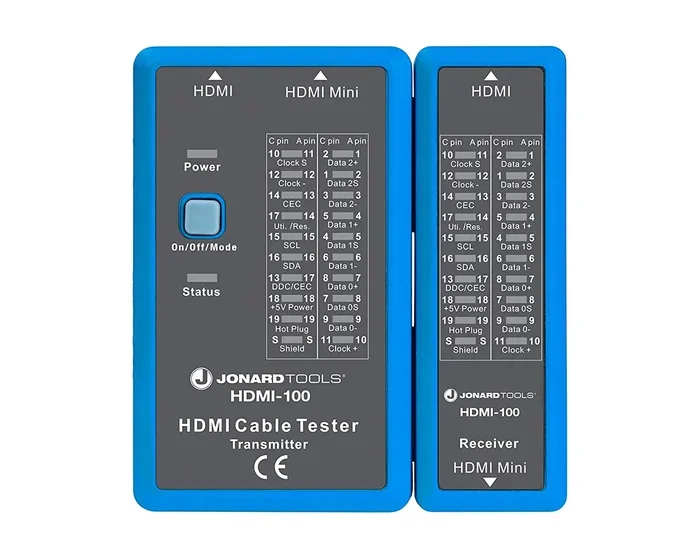
An HDMI checker is a small box with a screen. It sends a test signal through the cable. It checks all 19 pins at once. It can spot timing errors. These tools cost around $10 to $30. They are great for quick checks.
Visual Inspection
Look closely at the connectors. Are any pins bent or missing? Is the plastic shell cracked? A damaged connector often causes problems. You can fix a bent pin with a small tool. But a cracked shell means the cable needs replacement.
| Method | What It Checks | Pros | Cons |
|---|---|---|---|
| Multimeter | Continuity, resistance, shorts | Cheap, fast, no power needed | Cannot test signal quality |
| TV Test | Full video and audio signal | Real-world result, easy | Needs a working TV |
| HDMI Checker | All pins and timing | Detailed, quick | Costs extra money |
| Visual Inspection | Physical damage | No tools needed | Misses internal breaks |
Quick Tips for Accurate Testing
- Always test on a flat surface. A wobbly connection gives false readings.
- Clean the pins first. Use a dry cloth or a cotton swab. Dirt can block the signal.
- Test both ends. A break might be near plug A or plug B.
- Use the right multimeter mode. Continuity mode beeps. Resistance mode shows numbers.
- Take photos of the pinout. This helps you remember which pin is which.
- Test a known-good cable too. This gives you a baseline to compare against.
Common Mistakes to Avoid
- Testing while the cable is plugged in. This can damage your multimeter. Always unplug first.
- Forgetting to check all 19 pins. One bad pin can ruin the whole signal.
- Shaking the cable during the test. Movement can cause a loose connection to show as good.
- Ignoring bent pins. A bent pin might still pass continuity but cause intermittent issues.
- Assuming a multimeter test is 100% final. A cable can pass continuity but still fail under load.
When to Replace Instead of Repair
Most HDMI cable problems need a new cable. If a wire is broken inside, soldering is very hard. The wires are tiny and packed tight. A bent pin can sometimes be straightened with tweezers. But if the plastic shell is cracked, the cable is done. Also, if the cable passes all tests but still gives a blank screen, replace it. New high-speed HDMI cables are affordable. A good one costs under $15.
Key Takeaways
- Multimeter Testing Works: You can check HDMI cable continuity and resistance at home.
- No Special Tools Needed: A basic digital multimeter is enough for most tests.
- Know the Limitations: A multimeter can’t verify digital signal quality or audio/video performance.
- Follow Step-by-Step: Proper setup and pin identification prevent false readings.
- Combine Methods: Use a multimeter alongside a TV test or HDMI checker for full diagnosis.
- Replace When Needed: If continuity fails or pins are bent, a new cable is the fix.
Conclusion
So, can you test an HDMI cable with a multimeter? Yes, you can. It is a simple, effective way to find breaks and shorts. You don’t need expensive gear. A basic digital multimeter gives you clear answers. You now know how to check continuity, resistance, and shorts. You also know when to use other methods like a TV test or HDMI checker.
Remember, a multimeter checks the path, not the picture. It tells you if the wires are intact. It does not measure video quality. Use this tool as your first step in troubleshooting HDMI issues. If the cable fails the test, replace it. If it passes, try the next possible cause. You just saved yourself a trip to the store and maybe a new cable cost.
Go ahead and test that suspicious cable on your desk. With the steps above, you have the power to diagnose HDMI cable faults at home. Share this guide with a friend who always blames the TV. A little knowledge goes a long way. Happy testing!
Frequently Asked Questions
Can a multimeter test HDMI signal quality?
No, a multimeter only checks electrical continuity and resistance. It can’t measure digital data signals or video quality. For signal testing, you need a TV or an HDMI checker tool.
What multimeter setting should I use for HDMI cable testing?
Use the continuity mode (look for the sound wave symbol) or resistance mode (the ohms symbol Ω). Continuity beeps if a wire is connected. Resistance shows the value in ohms. Both help find breaks or shorts.
How do I identify HDMI pins on a connector?
Look at the male HDMI plug with the flat side facing you. Pin 1 is the top left. You can find a full HDMI pinout diagram online. Match the pin numbers to your multimeter probes carefully.
Is it safe to test an HDMI cable with a multimeter while it’s plugged in?
No, always unplug the cable from both ends before testing. Testing live cables can damage your multimeter or the connected devices. Safety should always come first.
Can I repair a broken HDMI cable myself?
Minor issues like a bent pin can sometimes be fixed. But most internal wire breaks require soldering or replacement. For most users, buying a new cable is simpler and safer than attempting a repair.
How much does a basic multimeter cost?
A decent digital multimeter costs between $15 and $40. You can find them at hardware stores or online. It’s a great investment for testing cables and other electronics at home.