What Is the Difference Between Optical and Magnetic Storage
The difference between optical and magnetic storage comes down to how data is read and written. Optical storage uses lasers to read and write data on discs like CDs, DVDs, and Blu-ray. Magnetic storage relies on magnetic fields to record data on platters inside hard disk drives. Both technologies serve different needs, and understanding their strengths helps you choose the right storage medium for your tasks.
Key Takeaways
- Optical storage uses laser light to read and write data on discs like CDs, DVDs, and Blu-ray.
- Magnetic storage relies on magnetic fields and read/write heads on spinning platters inside hard disk drives.
- Optical discs are great for archival storage and long-term data persistence, while magnetic drives excel at fast data retrieval.
- Magnetic storage offers higher storage capacity and faster access speed compared to most optical media.
- Optical media is more durable against magnetic interference and physical wear in certain conditions.
- Cost per gigabyte differs significantly between the two, making each better suited for different use cases.
- Both technologies remain relevant today, serving niche and mainstream needs in modern data storage.
📑 Table of Contents
What Is Optical Storage?
Optical storage is a data storage technology that uses laser light to read and write information on a disc. You have probably used optical media before. CDs, DVDs, and Blu-ray discs are all examples of this type of storage medium. The term “optical” comes from the way light interacts with the surface of the disc to retrieve or record data.
The basic idea is simple. A laser beam shines onto the surface of the disc. The disc has tiny bumps and flat areas called pits and lands. These patterns represent binary data — ones and zeros. A sensor reads these patterns and converts them into digital information. This process is called data retrieval.
Optical storage became popular in the 1980s with the introduction of the compact disc. Since then, the technology has evolved. Today, Blu-ray discs offer much higher storage capacity than the original CDs. Optical media is still widely used for music, movies, software distribution, and long-term archival storage.
How Optical Storage Works
Here is how optical storage works in plain terms. A laser emits a focused beam of light. This beam hits the surface of the optical disc. The disc surface has a reflective layer underneath a protective coating. When the laser hits a pit, the light scatters. When it hits a land, the light reflects back. A photodetector reads these reflections and turns them into electrical signals. Those signals become the data your computer understands.
For writing data, the process works differently. A stronger laser heats the disc surface and changes its reflectivity. This creates new pits and lands. Some optical discs are rewritable. These use a phase-change material that can switch between reflective states when heated. This allows you to erase and rewrite data multiple times.
Common Types of Optical Discs
There are several types of optical discs you should know about. Each one offers different storage capacity and performance.
- CD (Compact Disc): Stores up to 700 MB of data. Great for music and small software files.
- DVD (Digital Versatile Disc): Holds 4.7 GB on a single layer and 8.5 GB on a dual layer. Widely used for movies and backups.
- Blu-ray Disc: Offers 25 GB on a single layer and 50 GB on a dual layer. Used for high-definition video and large data files.
- HD DVD: A now-discontinued format that competed with Blu-ray. It held up to 15 GB on a single layer.
- Ultra HD Blu-ray: The newest format, supporting up to 100 GB. Designed for 4K ultra-high-definition content.
What Is Magnetic Storage?
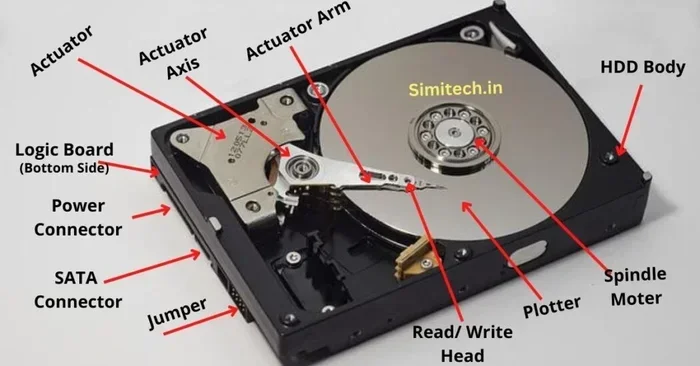
Magnetic storage is one of the oldest and most widely used data storage technologies. It works by using magnetic fields to encode data on a storage medium. The most common example is the hard disk drive, or HDD. You will find magnetic storage inside most desktop computers, laptops, servers, and external drives.
Inside a hard disk drive, there are circular discs called platters. These platters are coated with a thin magnetic material. A read/write head floats just above the surface of the platter. As the platter spins at high speed, the head moves across it to access different areas. The head changes the magnetic orientation of tiny regions on the platter to represent binary data.
Magnetic storage has been around since the 1950s. Over the decades, it has improved dramatically. Today, a single hard disk drive can store several terabytes of data. That is enough to hold millions of photos, thousands of hours of video, or entire libraries of documents.
How Magnetic Storage Works
Magnetic storage relies on the principles of magnetic recording. Each tiny region on the platter is called a magnetic domain. In its default state, the domain has no net magnetic charge. When the read/write head applies a magnetic field, the domain becomes either positively or negatively charged. These two states represent the binary values of one and zero.
To read data, the head detects the magnetic orientation of each domain. It converts these patterns into electrical signals. The drive controller then translates these signals into usable data. Writing data is the reverse process. The head creates a magnetic field in the correct direction to set each domain to the right state.
One important thing to note is that magnetic storage is sensitive to strong external magnetic fields. A very powerful magnet placed near the drive could potentially corrupt the data. However, everyday magnets are not strong enough to cause damage.
Common Types of Magnetic Media
Magnetic storage comes in several forms. Here are the most common ones you will encounter.
- Hard Disk Drive (HDD): The most common magnetic storage device. Uses spinning platters and a moving read/write head. Available in sizes from 500 GB to 20 TB or more.
- Floppy Disk: An older magnetic storage medium. Held only 1.44 MB of data. Largely obsolete today but once very popular.
- Magnetic Tape: Used for backup and archival storage. Offers very high capacity at a low cost per gigabyte. Commonly used in data centers.
- Zip Disk: A removable magnetic medium from the 1990s. Held 100 MB to 750 MB of data.
- Magnetic Stripe Cards: Used for credit cards and ID cards. Not for digital data storage in the traditional sense, but still magnetic recording.
Key Differences Between Optical and Magnetic Storage
Understanding the difference between optical and magnetic storage is essential for making the right choice. Both technologies store digital data, but they do it in completely different ways. One uses light, and the other uses magnetism. These differences lead to distinct strengths and weaknesses.
Let us break down the main differences. We will look at speed, capacity, durability, cost, and best use cases. By the end, you will have a clear picture of which technology fits your needs.
Comparison Table
| Feature | Optical Storage | Magnetic Storage |
|---|---|---|
| Reading Method | Laser light | Magnetic read/write head |
| Writing Method | Laser changes disc surface | Magnetic field alters platter domains |
| Common Media | CD, DVD, Blu-ray | Hard disk drive, magnetic tape |
| Typical Capacity | 700 MB to 100 GB | 500 GB to 20+ TB |
| Access Speed | Slower | Faster |
| Durability | Resistant to magnets | Sensitive to strong magnets |
| Cost per GB | Higher for large volumes | Lower for large volumes |
| Portability | Highly portable | Less portable (HDDs are bulky) |
| Lifespan | 20-100 years (if stored properly) | 5-10 years (HDDs) |
| Best Use Case | Archival, distribution, backups | Everyday computing, large data storage |
Speed and Access Time
When it comes to access speed, magnetic storage wins. A hard disk drive can read and write data much faster than an optical disc. The read/write head on an HDD can access different parts of the platter very quickly. Modern drives spin at 5,400 to 7,200 RPM, with enterprise drives going even faster.
Optical discs spin much slower. A Blu-ray drive reads data at a fraction of the speed of an HDD. This makes optical storage less suitable for tasks that require quick data retrieval, like running applications or editing large files. However, for simple tasks like playing a movie or installing software from a disc, the speed difference is acceptable.
Storage Capacity
Magnetic storage offers far higher capacity than optical media. A single modern hard disk drive can hold 20 terabytes of data. That is 200 times more than a Blu-ray disc. Magnetic tape can store even more, with some cartridges holding over 30 TB.
Optical discs have a much lower ceiling. Even the newest Ultra HD Blu-ray format maxes out at 100 GB. For most consumers, this is enough for movies and backups. But for businesses and professionals who need to store massive amounts of data, magnetic storage is the clear winner.
Durability and Longevity
Optical discs are surprisingly durable when stored correctly. A CD or DVD kept in a cool, dry place can last 20 to 100 years. The data is physically etched into the disc surface, so it does not degrade easily under normal conditions. Optical media is also immune to magnetic interference, which is a big plus.
Magnetic storage has a shorter lifespan. Hard disk drives typically last 5 to 10 years. The mechanical parts wear out over time. The read/write head can fail, and the platters can become scratched. Magnetic media is also vulnerable to strong magnetic fields, which can erase data entirely.
How Each Technology Reads and Writes Data
The way optical and magnetic storage handles data is fundamentally different. Let us look at each process in detail. This will help you understand why one is faster and the other is more durable.
The Role of Lasers in Optical Storage
Laser technology is at the heart of optical storage. The laser in an optical drive is very precise. It can focus on incredibly small spots on the disc surface. This precision is what allows Blu-ray discs to hold so much data in such a small space.
When you insert a disc into a drive, the laser activates immediately. It scans the surface and reads the pattern of pits and lands. The drive controller interprets this pattern as data. For writing, a more powerful laser creates new marks on the disc. In rewritable discs, the laser heats specific spots to change their reflectivity.
One limitation of laser-based reading is that the disc surface must be clean and unscratched. Scratches can scatter the laser beam and cause read errors. This is why it is important to handle optical discs carefully and store them in protective cases.
The Role of Magnetic Fields in Data Writing
Magnetic storage uses a completely different approach. Instead of light, it uses magnetic fields. The read/write head is a tiny electromagnet. When current flows through it, it creates a magnetic field. This field aligns the magnetic domains on the platter surface.
The read/write head does not touch the platter surface. It floats on a thin cushion of air generated by the spinning disc. This flying height is incredibly small — just a few nanometers. Even a tiny particle of dust can cause a head crash, which can destroy both the head and the data on the platter.
Because magnetic storage is mechanical, it is more prone to physical failure than optical storage. Moving parts wear out over time. This is why hard disk drives have a shorter lifespan than optical discs. However, modern HDDs are built with advanced error correction and shock resistance to improve reliability.
Pros and Cons of Optical Storage
Every storage type has its strengths and weaknesses. Optical storage is no different. Let us look at what makes it great and where it falls short.
Advantages of Optical Media
- Low cost per disc: A blank DVD costs just a few dollars. This makes optical media affordable for small-scale backups and distribution.
- Long lifespan: Properly stored optical discs can last decades. This makes them excellent for archival storage.
- Immune to magnets: You can store optical discs near magnets without any risk of data loss.
- Highly portable: A stack of Blu-ray discs is easy to carry around. They do not need a power source to store data.
- Wide compatibility: Almost every computer and entertainment system can read CDs and DVDs.
- No moving parts (in the disc): The disc itself has no mechanical components that can fail during storage.
Disadvantages of Optical Media
- Slow data access: Optical drives are much slower than hard disk drives and solid-state drives.
- Limited capacity: Even Blu-ray discs cannot compete with modern hard drives in terms of storage capacity.
- Prone to scratches: Scratches on the disc surface can cause read errors or make the disc unreadable.
- Declining hardware support: Fewer computers come with optical drives built in. You may need an external USB optical drive.
- Environmental sensitivity: Heat, humidity, and direct sunlight can degrade optical discs over time.
Pros and Cons of Magnetic Storage
Magnetic storage dominates the consumer and enterprise storage market. But it is not perfect. Here is a balanced look at what magnetic storage offers.
Advantages of Magnetic Media
- High storage capacity: Modern HDDs can store up to 20 TB or more. This is ideal for large data sets and media libraries.
- Fast data retrieval: Magnetic drives offer quick read and write speeds compared to optical media.
- Low cost per gigabyte: The price of magnetic storage has dropped significantly over the years. It remains the most affordable option for large volumes of data.
- Rewritable: You can erase and rewrite data on a magnetic drive unlimited times without any degradation.
- Widely available: Hard disk drives are easy to find and replace. They are supported by virtually every computer.
- Proven technology: Magnetic storage has been refined for over 70 years. It is a mature and reliable technology.
Disadvantages of Magnetic Media
- Mechanical failure risk: Moving parts mean there is always a risk of physical failure. A drop or shock can damage an HDD.
- Shorter lifespan: Hard disk drives typically last 5 to 10 years. They are not ideal for long-term archival storage.
- Sensitive to magnets: Strong magnetic fields can erase data on magnetic media. Keep drives away from powerful magnets.
- Higher power consumption: HDDs use more power than optical drives or solid-state drives because they need to spin platters.
- Noise and vibration: Spinning platters and moving heads create noise and vibration during operation.
Which Storage Type Is Right for You?
Choosing between optical and magnetic storage depends on your specific needs. There is no one-size-fits-all answer. Let us look at some common scenarios to help you decide.
If you need to store large amounts of data for everyday use, magnetic storage is the way to go. A hard disk drive gives you fast access, high capacity, and a low price per gigabyte. It is perfect for storing photos, videos, documents, and applications on your computer.
If you want to archive data for the long term, optical storage has a clear advantage. A Blu-ray disc stored in a cool, dry place can preserve your data for decades. This makes it a great choice for important documents, family photos, and irreplaceable files that you want to keep safe over time.
For distributing software or media, optical discs are still relevant. Many software installers, movies, and music albums are still distributed on discs. The low cost of optical media makes it practical for mass distribution.
Here are some quick tips to help you decide.
- Need fast access to large files? Choose magnetic storage.
- Need to archive data for 20+ years? Choose optical storage.
- On a tight budget for large volumes? Magnetic storage wins on cost per gigabyte.
- Need portable, durable media? Optical discs are small, light, and resistant to magnetic fields.
- Running a business with critical data? Use a combination of both for redundancy and peace of mind.
Common Mistakes to Avoid
Many people make mistakes when choosing between these two storage types. Here are the most common ones to watch out for.
- Assuming optical discs last forever: They do not. Poor storage conditions can significantly shorten their lifespan. Always store discs in a cool, dry, dark place.
- Ignoring the decline of optical drives: Many new laptops and desktops no longer include optical drives. Make sure your device has one before relying on optical media.
- Trusting magnetic storage for long-term backups: HDDs can fail without warning. Always maintain multiple backup copies of important data.
- Overlooking solid-state alternatives: Both optical and magnetic storage are being supplemented by flash memory and solid-state drives. Consider all your options before deciding.
- Using scratched or damaged discs: A scratched optical disc may not read properly and could become completely unreadable over time. Replace damaged discs promptly.
Expert Insights
According to data storage experts, the future of both optical and magnetic storage lies in niche applications. Magnetic storage will continue to dominate for high-capacity, everyday data needs. Optical storage will remain relevant for archival and distribution purposes.
Some experts predict that new optical formats will emerge with even higher capacities. Meanwhile, magnetic recording technology continues to advance with technologies like heat-assisted magnetic recording (HAMR) and microwave-assisted magnetic recording (MAMR). These innovations promise to push the limits of magnetic storage even further.
The key takeaway is that neither technology is going away anytime soon. Both serve important roles in the broader data storage ecosystem. Understanding their differences empowers you to make smarter decisions about how you store and protect your data.
Conclusion
The difference between optical and magnetic storage comes down to the underlying technology and the intended use case. Optical storage uses lasers and discs for data retrieval, making it ideal for archival storage and media distribution. Magnetic storage relies on magnetic fields and spinning platters, offering fast access speed and massive storage capacity for everyday computing.
Both optical and magnetic storage have unique strengths. Optical media excels in durability, portability, and long-term data persistence. Magnetic storage wins on speed, capacity, and cost efficiency. The best approach is often to use both technologies together, leveraging the strengths of each for different purposes.
As data continues to grow in volume and importance, understanding these storage technologies becomes more valuable every day. Whether you are backing up family photos, archiving business records, or distributing software, knowing the difference between optical and magnetic storage helps you make the right choice. Take the time to evaluate your needs, and you will find the perfect storage solution for your data.
Frequently Asked Questions
What is the main difference between optical and magnetic storage?
Optical storage uses laser light to read and write data on discs like CDs and Blu-ray. Magnetic storage uses magnetic fields and read/write heads on spinning platters inside hard disk drives. The two technologies differ in speed, capacity, durability, and best use cases.
Is optical storage faster than magnetic storage?
No, magnetic storage is significantly faster. Hard disk drives can read and write data much more quickly than optical drives. Optical discs spin slowly and have lower data transfer rates compared to magnetic media.
Can magnets damage optical discs?
No, optical discs are completely immune to magnetic fields. Since they store data using physical patterns read by lasers, magnets have no effect on them. This makes optical storage a safe choice near magnetic equipment.
Which has a longer lifespan, optical or magnetic storage?
Optical storage generally has a longer lifespan. Properly stored optical discs can last 20 to 100 years. Magnetic hard disk drives typically last 5 to 10 years due to mechanical wear and tear on moving parts.
Is magnetic storage still relevant today?
Yes, magnetic storage remains highly relevant. Hard disk drives are still the go-to choice for large-capacity, affordable data storage. They are used in computers, servers, NAS devices, and external drives worldwide.
Should I use optical or magnetic storage for backups?
It depends on your backup strategy. Use magnetic storage for frequent, fast-access backups. Use optical storage for long-term archival backups that you rarely need to access. For best results, follow the 3-2-1 backup rule and use multiple storage types.