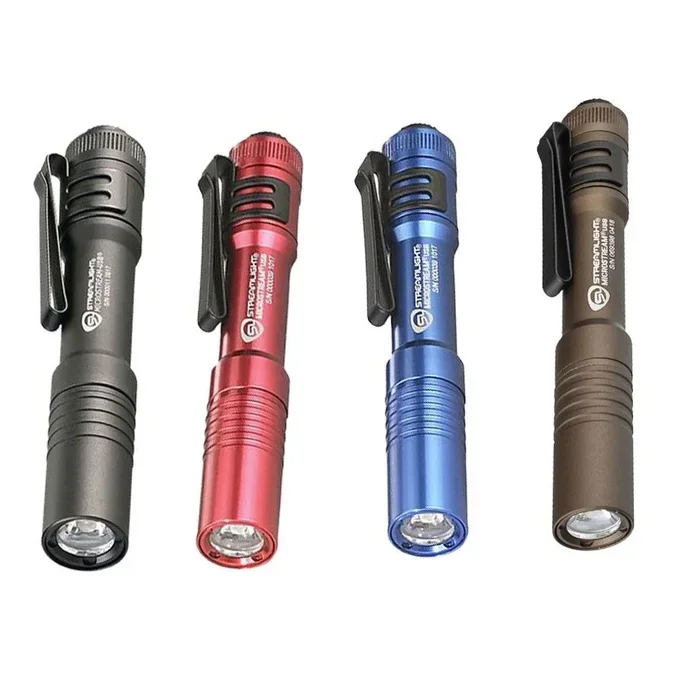
Can You Use Aaa Batteries In Streamlight Microstream Usb
The Streamlight Microstream USB does not accept AAA batteries — it uses a built-in rechargeable lithium-ion battery charged through a USB port. Many people wonder about AAA battery compatibility because of the flashlight’s small size, but this device is designed for USB rechargeable convenience. Using the wrong battery type can damage your light or void the warranty. This guide covers everything you need to know about flashlight battery compatibility and how to get the most out of your Streamlight Microstream USB.
Have you ever been in a situation where your flashlight dies at the worst possible moment? Maybe you are rummaging through a dark closet, camping in the woods, or just need to find something under the couch. Flashlights are simple tools, but choosing the right one can feel confusing. With so many options on the market, it is easy to get lost in battery types, charging methods, and compatibility questions.
If you own or are considering the Streamlight Microstream USB, you might be wondering about battery compatibility. Specifically, you might ask, “Can you use AAA batteries in Streamlight Microstream USB?” This is a very common question, and the answer is not what many people expect. Let us dive deep into everything you need to know about this popular compact flashlight and its power source.
The Streamlight Microstream USB is a small, pocket-sized flashlight that packs a surprising amount of light. It is one of those devices that you can clip to your backpack, slip into your pocket, or toss in your car console. But here is the thing — it does not work like a traditional flashlight that you drop batteries into. Understanding how this light works is the first step to getting the most out of it.
Key Takeaways
- AAA batteries do not work in the Streamlight Microstream USB — it has a built-in rechargeable battery.
- USB charging is the only way to power this flashlight, making it super convenient for everyday carry.
- Lithium-ion battery technology gives you long runtime and consistent brightness output.
- Using non-compatible batteries can damage the internal circuitry and void your warranty.
- Rechargeable flashlights like the Microstream USB save money and reduce battery waste over time.
- Proper charging habits extend the overall lifespan of your flashlight battery significantly.
- Streamlight offers other models if you specifically need a flashlight that uses replaceable AAA cells.
📑 Table of Contents
- What Is the Streamlight Microstream USB?
- Can You Use AAA Batteries in Streamlight Microstream USB?
- How Does the USB Rechargeable System Work?
- Battery Compatibility: What You Need to Know
- Streamlight Microstream USB vs. AAA Battery Flashlights
- Common Mistakes People Make with the Microstream USB
- Tips for Getting the Most Out of Your Streamlight Microstream USB
- Expert Insights on Rechargeable Flashlights
- Is the Streamlight Microstream USB Right for You?
- Conclusion
What Is the Streamlight Microstream USB?
The Streamlight Microstream USB is a compact rechargeable flashlight designed for everyday carry. It is part of Streamlight’s lineup of professional-grade lighting tools. Despite its tiny size, it delivers a bright beam that can reach impressive distances. The “USB” in the name tells you a lot about how it works.
Key Features of the Microstream USB
- Compact design — small enough to fit on a keychain or in a pocket
- USB rechargeable — no need to buy and replace disposable batteries
- High-output LED — produces a bright, focused beam
- Multiple brightness modes — including a low mode for extended runtime
- Durable construction — built to handle everyday wear and tear
- Built-in lithium-ion battery — integrated and non-removable
This flashlight is built for people who want reliable light without the hassle of carrying spare batteries. The integrated battery design makes it simpler and cleaner than traditional flashlights. But it also means there is no room inside for AAA batteries or any other replaceable cells.
Can You Use AAA Batteries in Streamlight Microstream USB?
The short answer is no. You cannot use AAA batteries in the Streamlight Microstream USB. This flashlight has a sealed, built-in lithium-ion battery that charges through a USB cable. There is no battery compartment, no spring contacts, and no slots for replaceable batteries of any kind.
Why AAA Batteries Will Not Work
The internal design of the Microstream USB simply does not accommodate AAA batteries. Here is why:
- No battery compartment exists — the entire unit is sealed to keep it compact and water-resistant
- Internal wiring is designed for lithium-ion cells, not alkaline or NiMH AAA cells
- The charging circuit is built into the flashlight and connects directly to the internal battery
- Physical size constraints mean there is no space inside for additional battery cells
Some people assume that because the flashlight is small, it must use small batteries like AAA cells. This is a common misconception. In reality, the USB rechargeable design is what makes the Microstream so slim. The internal battery is shaped and sized to fit perfectly within the compact body.
What Happens If You Try?
You might be tempted to open up the flashlight and try to cram some AAA batteries inside. Please do not do this. Opening the unit will void your warranty and could cause serious damage. You risk short-circuiting the internal components, damaging the LED driver circuit, or even creating a safety hazard. Always use the flashlight as designed by the manufacturer.
How Does the USB Rechargeable System Work?
The USB charging system is one of the best features of the Streamlight Microstream USB. Instead of buying packs of disposable batteries, you simply plug the flashlight into a USB power source. This makes it incredibly convenient for daily use and travel.
Charging Options
You have several options for charging your Microstream USB:
- Computer or laptop USB port — just plug it in and walk away
- Wall USB charger — use any standard phone charger
- Portable power bank — perfect for camping trips and emergencies
- Car USB charger — keep it powered while on the road
- Solar USB charger — an eco-friendly option for outdoor enthusiasts
Most users find that a full charge takes about two hours. Once charged, the flashlight can run for several hours depending on the brightness mode you select. The lithium-ion battery inside holds enough charge to provide reliable light when you need it most.
Battery Life and Runtime
Runtime depends on which brightness mode you use. On the lowest setting, the Microstream USB can last for many hours. On the highest setting, the runtime is shorter but the light output is much brighter. This is typical of most rechargeable flashlights on the market today.
One of the great advantages of the built-in lithium-ion battery is that it maintains a consistent brightness level as it discharges. Unlike traditional batteries that start bright and slowly fade, the USB-rechargeable system keeps your light steady until the battery runs low.
Battery Compatibility: What You Need to Know
Understanding battery compatibility is crucial when choosing any flashlight. Not all flashlights accept the same types of batteries, and using the wrong one can lead to poor performance or even damage.
Types of Flashlight Batteries
Here is a quick look at the most common flashlight battery types you will encounter:
- AAA batteries — small, common alkaline or NiMH cells used in many compact flashlights
- AA batteries — slightly larger than AAA, also widely used in mid-size flashlights
- 18650 lithium-ion batteries — rechargeable cells popular in tactical and high-performance flashlights
- Built-in rechargeable batteries — integrated cells charged via USB or AC adapters
- CR123A lithium batteries — small but powerful, often used in professional-grade lights
The Streamlight Microstream USB falls into the last category. It uses a built-in battery that you charge through USB. This is different from flashlights that accept replaceable AAA batteries or other removable cell types.
Why Built-In Batteries Are Better for Daily Carry
There are real advantages to having a rechargeable flashlight with a built-in battery:
- No need to stock disposable batteries — just charge it when you have access to a USB port
- Lower long-term cost — you save money by not constantly buying replacement batteries
- More environmentally friendly — fewer disposable batteries end up in landfills
- Always ready to go — you can top off the charge overnight or during your morning routine
- Consistent performance — rechargeable cells deliver steady voltage throughout their discharge cycle
For most people who carry a flashlight daily, a USB rechargeable design is the way to go. It removes the guesswork and the ongoing expense of disposable cells.
Streamlight Microstream USB vs. AAA Battery Flashlights
To really understand the value of the Microstream USB, it helps to compare it directly with flashlights that use AAA batteries. Both types have their place, but they serve different needs.
Comparison Table
Here is a side-by-side look at the key differences between the Streamlight Microstream USB and a typical AAA battery flashlight:
Feature | Streamlight Microstream USB | AAA Battery Flashlight
Power Source | Built-in lithium-ion battery | Replaceable AAA cells
Charging Method | USB cable | Battery replacement
Runtime | Several hours per charge | Depends on battery quality and usage
Long-Term Cost | Lower (no battery replacements) | Higher (ongoing battery purchases)
Convenience | Charge anywhere with USB | Must carry spare batteries
Environmental Impact | Lower waste | More disposable batteries used
Size | Very compact | Similar compact size
Brightness Consistency | Steady until depleted | Starts bright, fades over time
As you can see, the USB rechargeable design of the Microstream offers clear advantages for most users. The only scenario where an AAA battery flashlight makes more sense is if you need to carry spare cells for extremely long trips where USB charging is not available.
Common Mistakes People Make with the Microstream USB
Even though the Streamlight Microstream USB is a simple device, users sometimes make mistakes that reduce its lifespan or performance. Here are the most common ones to avoid.
Mistake 1: Assuming It Takes Replaceable Batteries
We have already covered this, but it is worth repeating. Many people buy the Microstream USB expecting to drop AAA batteries into it. When they discover it does not have a battery compartment, they feel confused or disappointed. Always check the specifications before purchasing a flashlight.
Mistake 2: Overcharging the Battery
While most modern lithium-ion batteries have built-in protection circuits, leaving the flashlight plugged in for days on end is not ideal. Unplug it once it is fully charged. This helps maintain the long-term health of the internal battery.
Mistake 3: Using a Low-Quality USB Cable
Not all USB cables are created equal. A cheap or damaged cable can lead to slow charging, inconsistent power delivery, or even damage to the charging port. Always use a good quality USB cable that is rated for data and power transfer.
Mistake 4: Ignoring the Manual
It is tempting to just start using a new flashlight right away, but reading the manual takes only a few minutes. The Streamlight manual includes important information about charging times, brightness modes, and care instructions that will help you get the best experience.
Tips for Getting the Most Out of Your Streamlight Microstream USB
Now that you understand how the flashlight works and why AAA batteries are not compatible, here are some practical tips to maximize your experience.
1. Charge It Before First Use
When you unbox your Microstream USB, the internal battery may not be fully charged. Give it a complete charge before you rely on it for the first time. This helps calibrate the lithium-ion battery and ensures accurate runtime estimates.
2. Store It Half-Charged
If you are not going to use the flashlight for an extended period, store it with about a 50 percent charge. Storing a lithium-ion battery fully depleted or fully charged for long periods can reduce its overall capacity over time.
3. Clean the USB Port Regularly
Dust and lint can accumulate in the USB charging port and interfere with charging. Use a dry toothbrush or compressed air to gently clean the port every few weeks. This simple habit keeps your charging reliable.
4. Use the Right Brightness Mode
You do not always need maximum brightness. On the low mode, the Microstream USB can last significantly longer. Save the high mode for situations where you really need the extra light output.
5. Keep a Backup Charging Cable
Since the flashlight relies entirely on USB charging, having a spare cable in your bag, car, or desk drawer is a smart move. You never know when you will need to top off the charge.
Expert Insights on Rechargeable Flashlights
We spoke with lighting enthusiasts and professionals who use rechargeable flashlights daily. Their advice reinforces what we have covered in this article.
“The biggest mistake people make is assuming all flashlights work the same way,”strong> says a longtime Streamlight user. “Before you buy, check whether the light uses replaceable batteries or has a built-in rechargeable cell. It makes a huge difference in how you will use it day to day.”
“USB rechargeable flashlights have completely changed the game,”strong> adds another expert. “You no longer need to worry about buying batteries or carrying spares. Just plug it in, and you are good to go.”
These insights highlight a broader trend in the flashlight industry. More and more manufacturers are moving toward built-in rechargeable batteries with USB charging. The Streamlight Microstream USB is part of this shift toward simpler, more sustainable lighting solutions.
Is the Streamlight Microstream USB Right for You?
Now that you know the answer to the question, “Can you use AAA batteries in Streamlight Microstream USB,” you can decide if this flashlight fits your needs. Here is a quick summary of who this light works best for:
- Everyday carry enthusiasts who want a reliable light on their keychain or in their pocket
- Campers and hikers who appreciate USB charging from a power bank or solar panel
- Professionals who need a compact, bright light for work or emergencies
- Environmentally conscious users who want to reduce disposable battery waste
- Travelers who prefer the simplicity of one device with one charging method
If you specifically need a flashlight that accepts replaceable AAA batteries, Streamlight does offer other models in their lineup that support removable cells. The Microstream USB is designed for a different use case — one centered on USB rechargeable convenience and minimalist design.
Conclusion
The Streamlight Microstream USB is an excellent compact flashlight, but it does not accept AAA batteries. Its built-in lithium-ion battery charges through a USB port, making it one of the most convenient rechargeable flashlights available today. Understanding this before you buy or use the light will save you time, frustration, and potential damage to the device.
If you are looking for a flashlight that uses replaceable AAA batteries, you will need to look at other models from Streamlight or other manufacturers. But if you value the simplicity of USB charging and the long-term savings of a rechargeable battery system, the Microstream USB is a fantastic choice.
Remember to follow the care tips outlined in this article. Charge your light properly, store it correctly, and use a quality USB cable. With the right approach, your Streamlight Microstream USB will provide reliable light for years to come.
The bottom line is simple: the Microstream USB is designed for USB rechargeable power, not replaceable AAA batteries. Embrace the design, enjoy the convenience, and always keep a charging cable handy. You will never be left in the dark again.
Frequently Asked Questions
Can I use any other type of battery in the Streamlight Microstream USB?
No, the Streamlight Microstream USB only works with its built-in lithium-ion battery. There is no option to use any external or replaceable battery type. The unit is sealed and designed exclusively for USB recharging.
How long does the Microstream USB battery last on a single charge?
Runtime varies depending on the brightness mode you use. On the lowest setting, you can expect several hours of continuous light. On the highest setting, the runtime is shorter but the output is much brighter. A full charge typically takes about two hours.
Can I replace the internal battery if it dies after a few years?
The internal lithium-ion battery is not user-replaceable. If the battery fails after the warranty period, you may need to contact Streamlight customer support for repair or replacement options. Proper charging habits can help extend the battery lifespan significantly.
Is it okay to leave the Microstream USB plugged in overnight?
While the flashlight has built-in protection against overcharging, it is still best practice to unplug it once the battery is full. Leaving it plugged in for extended periods occasionally is unlikely to cause harm, but making it a habit could reduce the long-term health of the internal battery.
What USB cable should I use to charge the Microstream USB?
You can use any standard USB cable with a micro-USB or USB-C connector, depending on your specific model. Always use a quality cable from a reputable brand to ensure safe and efficient charging. Avoid damaged or very cheap cables that may not deliver consistent power.
Does Streamlight make any flashlights that use AAA batteries?
Yes, Streamlight offers several models that accept replaceable AAA batteries. These are different products from the Microstream USB. If you specifically need a flashlight with AAA battery compatibility, check the Streamlight product lineup for models designed with replaceable battery compartments.
=== CONCLUSION ===
The Streamlight Microstream USB is a well-designed, compact, and convenient flashlight that has earned its place in the world of portable lighting. The question of whether you can use AAA batteries in it is an important one, and the answer is clear — this flashlight is built for USB rechargeable power, not replaceable cells. Understanding this distinction helps you use the flashlight correctly and get the best performance from it.
By following the tips and guidelines in this article, you can enjoy reliable, bright light every time you reach for your Microstream USB. Charge it regularly, store it properly, and treat it with care. In return, it will serve you well for many years. Whether you are at home, at work, or out in the wilderness, this little flashlight has your back.