Can You Use A Usb C To Headphone Adapter Without Issues
Yes, you can use a USB C to headphone adapter without issues in most cases. These small adapters let you connect your favorite wired headphones to modern laptops, phones, and tablets that have dropped the traditional headphone jack. USB C to headphone adapters are affordable, portable, and widely compatible, making them a reliable bridge between your audio gear and newer devices.
Have you ever grabbed your favorite wired headphones only to realize your new phone or laptop has no headphone jack? You are not alone. Millions of people face this problem every day. The shift to USB C ports has left many users searching for a simple solution. That is where a USB C to headphone adapter comes in.
But can you actually use a USB C to headphone adapter without issues? The short answer is yes. The longer answer is that it depends on a few factors. In this guide, we will walk you through everything you need to know. We will cover how these adapters work, common problems you might face, and how to pick the right one for your needs.
Whether you are a music lover, a gamer, or someone who just wants to use your wired headphones with a new device, this article has you covered. Let us dive in.
Key Takeaways
- Wide Compatibility: USB C to headphone adapters work with most modern devices that feature USB C ports, including smartphones, laptops, and tablets.
- Simple Plug and Play: Most adapters require no drivers or software, making setup quick and hassle free.
- Audio Quality Varies: The quality of sound depends on the adapter build and your headphones, not just the port type.
- Common Issues Are Fixable: Problems like no sound or static noise usually have simple solutions.
- Choose the Right Adapter: Look for features like DAC support, build quality, and device compatibility before buying.
- Internal Resource Links: For related connectivity topics, explore our guides on how baby monitors connect to Wi Fi and alternatives to Dish Network and DirectTV for broader device connectivity insights.
📑 Table of Contents
- What Is a USB C To Headphone Adapter?
- Who Needs a USB C To Headphone Adapter?
- Common Issues and How to Fix Them
- How to Choose the Right USB C Headphone Adapter
- Tips for Getting the Best Audio Quality
- USB C Headphone Adapters vs Bluetooth Headphones
- Can You Use A USB C To Headphone Adapter Without Issues?
- Final Thoughts
What Is a USB C To Headphone Adapter?
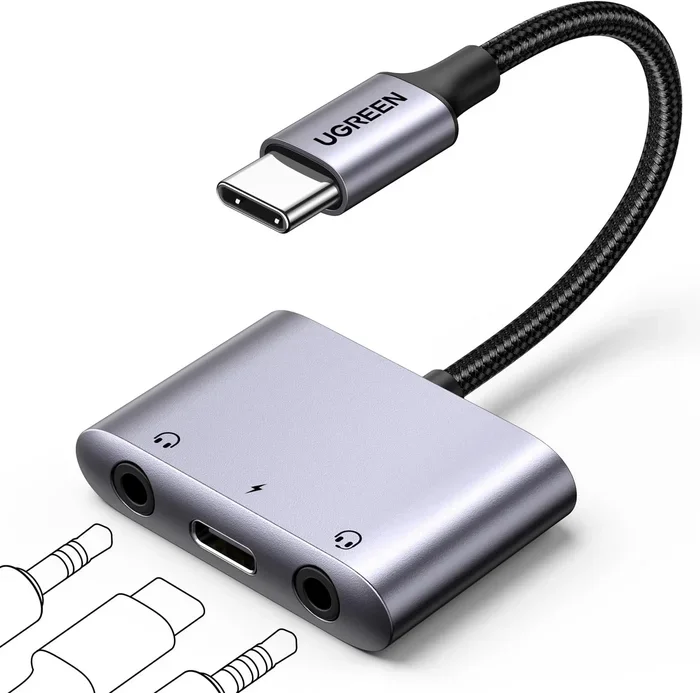
A USB C to headphone adapter is a small device that plugs into a USB C port on your laptop, phone, or tablet. On the other end, it has a standard 3.5mm headphone jack. This lets you use your old wired headphones with a new device that only has USB C ports.
Think of it as a translator. Your device speaks USB C, and your headphones speak 3.5mm analog audio. The adapter bridges that gap. It converts the digital signal from the USB C port into an analog signal your headphones can understand.
These adapters come in different shapes and sizes. Some are tiny and barely add any bulk to your device. Others are bulkier but offer better audio performance. You can find them online or at most electronics stores for just a few dollars.
How Do They Work?
Inside every USB C headphone adapter, there is a tiny chip called a DAC, which stands for digital to analog converter. When your phone sends audio through the USB C port, it sends a digital signal. The DAC in the adapter converts that digital signal into an analog one. Your headphones then receive that analog signal and produce sound.
Some adapters have better DAC chips than others. This is one reason why audio quality can vary from one adapter to another. A cheap $5 adapter might sound okay, but a $20 adapter with a quality DAC will sound much better.
Who Needs a USB C To Headphone Adapter?
You might need a USB C to headphone adapter if any of these situations sound familiar to you.
- You bought a new phone without a headphone jack. Many modern smartphones, including the iPhone and several Android models, have removed the 3.5mm jack entirely.
- Your laptop only has USB C ports. Newer laptops from brands like Apple, Dell, and HP often ditch the headphone jack in favor of USB C.
- You love your wired headphones. Some people prefer the sound quality and comfort of wired headphones over Bluetooth options.
- You travel a lot. A small adapter is easier to carry than charging a pair of Bluetooth headphones every day.
- You game on a laptop. Wired headphones often give you lower latency, which matters for competitive gaming.
If any of these apply to you, a USB C audio adapter is a simple and affordable fix. It brings back the headphone jack you miss.
Common Issues and How to Fix Them
Using a USB C to headphone adapter is usually smooth sailing. But sometimes, things go wrong. Here are the most common issues and how to solve them.
No Sound at All
This is the most frustrating problem. You plug everything in and hear nothing. Before you panic, try these steps:
- Check the volume. Sounds obvious, but it happens all the time. Make sure your device volume is turned up.
- Try a different pair of headphones. Your headphones might be the problem, not the adapter.
- Replug the adapter. Sometimes the connection is loose. Unplug it and plug it back in firmly.
- Restart your device. A quick reboot can fix many audio glitches.
Static or Crackling Noise
If you hear a buzzing or crackling sound, the issue is usually interference. USB C ports carry both power and data. Cheap adapters sometimes pick up electrical noise from the device.
Here is what you can do:
- Try a different adapter. A higher quality USB C dongle with a built in DAC often solves this.
- Avoid using your device while charging. Power draw can cause interference.
- Check for loose connections. Even a tiny gap can cause static.
Adapter Not Recognized
Some devices do not recognize certain adapters right away. This is more common with Windows laptops than phones.
Try these fixes:
- Unplug the adapter and wait a few seconds before plugging it back in.
- Go to your sound settings and make sure the USB C audio output is selected.
- Update your audio drivers. On Windows, go to Device Manager and check for updates.
Adapter Keeps Falling Out
Some USB C ports are loose, and the adapter wiggles free easily. This can be annoying during calls or while listening to music.
Consider buying an adapter with a locking design or a cable that attaches to the adapter. This gives you a more secure connection.
How to Choose the Right USB C Headphone Adapter
Not all adapters are created equal. Here is what to look for when shopping for a USB C to headphone adapter.
Built in DAC
An adapter with a built in DAC will give you much better sound quality. The DAC handles the digital to analog conversion, and a good one makes a real difference. Look for adapters that mention a DAC chip by name, like the Sabre or ESS chip.
Build Quality
Cheap plastic adapters break easily. Look for ones made from metal or durable materials. A sturdy adapter will last longer and give you a more secure connection.
Compatibility
Most USB C audio adapters work with any device that has a USB C port. But always double check. Some adapters work better with Android phones than with iPhones, and vice versa. Read the product description before you buy.
Extra Features
Some adapters come with extra features that add real value:
- Microphone support. Lets you use your headphones for calls and voice chat.
- USB C passthrough charging. Lets you charge your device while using the adapter.
- Multiple port options. Some adapters also have USB A ports or SD card readers.
Price Range
You can find basic adapters for under $10. Mid range options with better DACs run from $15 to $30. Premium adapters with top notch audio quality can cost $50 or more. For most users, a $15 to $25 adapter hits the sweet spot between price and performance.
| Feature | Budget Adapter | Mid Range Adapter | Premium Adapter |
|---|---|---|---|
| Price | Under $10 | $15 to $30 | $30 to $50+ |
| DAC Quality | Basic | Good | Excellent |
| Build Quality | Plastic | Mixed | Metal |
| Mic Support | Sometimes | Usually | Always |
| Passthrough Charging | Rare | Sometimes | Usually |
Tips for Getting the Best Audio Quality
Want to get the most out of your USB C to headphone adapter? Follow these simple tips.
- Use good headphones. The adapter is only one part of the equation. Quality headphones make a big difference in sound.
- Keep your adapter clean. Dust and lint can build up in the USB C port and the adapter. Use a soft brush or compressed air to clean it regularly.
- Avoid cheap knockoffs. A $2 adapter from an unknown brand might damage your device or sound terrible. Stick with reputable brands.
- Update your device software. Sometimes audio issues come from outdated software. Keep your device updated.
- Use short cables. Longer cables can cause signal loss. A short, direct connection gives you the best audio quality.
USB C Headphone Adapters vs Bluetooth Headphones
You might wonder if you even need an adapter at all. Why not just use Bluetooth headphones? Both options have pros and cons.
USB C adapters win on:
- Audio quality. Wired connections deliver cleaner, more detailed sound.
- Latency. There is no delay with a wired connection. This matters for gaming and video editing.
- Battery life. You do not need to charge an adapter. It draws no power from your device.
- Cost. A good adapter costs less than most Bluetooth headphones.
Bluetooth headphones win on:
- Convenience. No adapters or cables to worry about.
- Mobility. You can move around freely without being tethered.
- Multi device use. You can switch between devices easily.
At the end of the day, your choice depends on what matters most to you. If sound quality is your top priority, a USB C audio adapter with wired headphones is hard to beat.
Can You Use A USB C To Headphone Adapter Without Issues?
Let us answer the big question directly. Can you use a USB C to headphone adapter without issues? Yes, in the vast majority of cases. These adapters are simple devices that work reliably with most modern equipment.
The key is to buy a quality adapter from a trusted brand. Avoid the cheapest options you find online. A well made adapter will give you clear sound, a secure connection, and no headaches.
Keep your adapter clean, make sure your device software is up to date, and use headphones that are in good condition. Follow these simple steps, and you will barely notice the adapter is even there.
If you run into any problems, the fixes are usually quick and easy. Most issues come down to loose connections, dirty ports, or outdated software. A little troubleshooting goes a long way.
For more on device connectivity and how different devices communicate, you might find our article on are baby monitors connected to Wi Fi helpful. And if you are exploring connectivity alternatives across different platforms, check out alternatives to Dish Network and DirectTV for broader insights on device options.
Final Thoughts
A USB C to headphone adapter is one of the most useful and affordable accessories you can own. It brings back the headphone jack your device lost and lets you keep using the headphones you already love.
The technology is simple, the adapters are cheap, and the setup takes seconds. You do not need to be tech savvy to use one. Just plug it in and start listening.
So yes, you can absolutely use a USB C headphone adapter without issues. Pick a good one, take care of it, and it will serve you well for years to come. Happy listening.
Frequently Asked Questions
Do USB C to headphone adapters work with all phones?
Most USB C to headphone adapters work with any device that has a USB C port, including Android phones, tablets, and laptops. However, iPhones with USB C (like the iPhone 15 and 16 models) may need adapters that support specific audio protocols. Always check compatibility before buying.
Does a USB C headphone adapter affect audio quality?
A cheap adapter might reduce audio quality slightly, but a good quality adapter with a built in DAC will not. In many cases, a quality USB C adapter can even improve sound compared to a weak built in headphone jack.
Can I charge my phone while using a USB C headphone adapter?
It depends on the adapter. Some adapters support passthrough charging, which means you can plug in your charger at the same time. Look for adapters that specifically mention this feature if it matters to you.
Do I need to install drivers for a USB C headphone adapter?
Most adapters work plug and play with no drivers needed. However, some Windows laptops may require you to update audio drivers or select the correct output device in your sound settings.
Why does my USB C headphone adapter keep falling out?
This usually happens when the USB C port is loose or the adapter is too small for a snug fit. Look for adapters with a locking clip or a cable that attaches to the adapter for a more secure connection.
Can I use a USB C headphone adapter with gaming headphones?
Yes, you can. In fact, using wired gaming headphones with a USB C adapter can give you lower latency than Bluetooth. This is especially important for competitive gaming where every millisecond counts.
=== CONCLUSION ===
Using a USB C to headphone adapter is simple, affordable, and works without issues for most people. Whether you are connecting wired headphones to a new phone, a laptop with only USB C ports, or a tablet on the go, these little adapters solve a big problem. Pick a quality adapter, follow the tips in this guide, and you will enjoy your favorite music and calls without any hassle.