Can You Plug Anything Into HDMI ARC Without Issues
You cannot plug just any device into an HDMI ARC port. HDMI ARC has specific rules for what works and what does not. This guide explains exactly which devices are compatible, what to avoid, and how to fix common HDMI ARC issues. Learn the simple steps to get great TV audio every time.
You bought a new soundbar or home theater system. You plug it into your TV. But the audio does not come through. Sound familiar? This happens to a lot of people. The culprit is often the HDMI ARC port. Many folks assume any HDMI port will do the job. But that is not true. HDMI ARC has specific rules. Not every device plays nice with it. In this guide, we will answer the big question: can you plug anything into HDMI ARC without running into problems?
The short answer is no. You cannot just plug anything into an HDMI ARC port and expect it to work. The ARC port is designed for specific types of devices. It handles audio in a special way. Understanding how it works saves you time and frustration. It also saves you money from buying the wrong cables or gadgets. This article breaks it all down in simple terms. You will learn what works, what does not, and how to fix common issues.
Key Takeaways
- Not all HDMI ports support ARC: Only ports labeled ARC or eARC work with audio return channel features.
- Soundbars and AV receivers are the best matches: These devices are designed to work seamlessly with HDMI ARC on most TVs.
- Older devices may need an optical cable instead: Devices without HDMI ARC support will not work through this port.
- HDMI-CEC must be enabled for full control: This setting lets you control audio devices with your TV remote.
- eARC offers better audio quality than standard ARC: It supports newer formats like Dolby Atmos and uncompressed audio.
- Cable quality matters: Using a high-speed HDMI cable prevents audio dropouts and sync issues.
- Simple fixes solve most HDMI ARC problems: Power cycling, cable swaps, and settings checks fix most issues quickly.
📑 Table of Contents
- What Is HDMI ARC and Why Does It Matter?
- Can You Plug Anything Into HDMI ARC Without Issues?
- What Devices Work Best With HDMI ARC?
- Common HDMI ARC Problems and How to Fix Them
- HDMI ARC vs eARC: What Is the Difference?
- Quick Tips for Getting the Most Out of HDMI ARC
- Common Mistakes People Make With HDMI ARC
- Expert Insights on HDMI ARC Compatibility
- Key Takeaways
- Conclusion
What Is HDMI ARC and Why Does It Matter?
HDMI ARC stands for Audio Return Channel. It is a special feature built into certain HDMI ports. It lets your TV send audio back to a soundbar or receiver. Before ARC, you needed two cables. One cable carried video from your TV to a device. Another cable sent audio back. ARC changed all that. Now, one HDMI cable handles both directions.
This matters because it keeps your setup clean. You do not need a tangle of cables behind your TV. One cable does the work of two. It also improves audio quality. Your TV can send high-quality sound to external speakers. This is great for movies, music, and gaming. But here is the catch. Not every HDMI port supports ARC. Not every device understands it either. That is why knowing what to plug in is so important.
How HDMI ARC Works in Simple Terms
Think of HDMI ARC like a two-way road. Most HDMI cables are one-way streets. They carry video from a source to a screen. ARC adds a return lane for audio. Your TV receives video from a cable box or gaming console. Then it sends the audio back out through the same cable. This happens automatically. You do not need to change any settings most of the time.
The TV needs to be set up correctly for this to work. The external audio device also needs ARC support. Both devices must speak the same language. This is where things can go wrong. If one device does not support ARC, the connection fails. That is why can you plug anything into HDMI ARC is such an important question. The answer depends on what the device can do.
Can You Plug Anything Into HDMI ARC Without Issues?
Let us get straight to the point. No, you cannot plug anything into HDMI ARC and expect it to work perfectly. The HDMI ARC port is not a regular HDMI port. It has specific requirements. Some devices will work great. Others will not work at all. And some might work but cause annoying problems like audio delays or no sound.
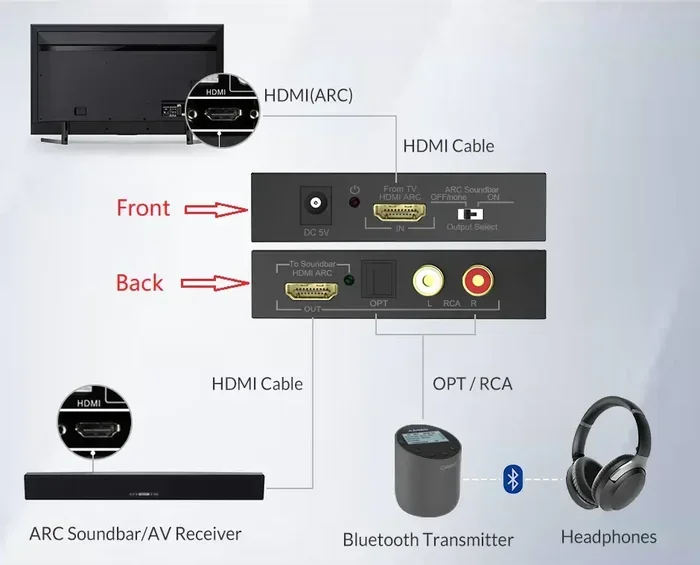
So what can you plug in safely? Soundbars are the number one match. AV receivers work well too. Blu-ray players with audio output support ARC. Some streaming devices like Apple TV and Roku also work. But older devices, simple adapters, or non-ARC gadgets will not. Let us break this down further so you know exactly what to expect.
Devices That Work Great With HDMI ARC
Most modern audio devices are designed to work with HDMI ARC. Here is a quick list of devices that plug in without issues:
- Soundbars: Almost all modern soundbars support HDMI ARC. They are the most common device paired with this port.
- AV Receivers: Home theater receivers use ARC to get audio from your TV. This is perfect for surround sound setups.
- Streaming Devices: Apple TV, Roku Ultra, and Amazon Fire TV Stick 4K support ARC in most cases.
- Gaming Consoles: PlayStation 5 and Xbox Series X can send audio through HDMI ARC.
- Cable Boxes: Most modern cable and satellite boxes support HDMI ARC connections.
Devices That Do Not Work With HDMI ARC
Some devices simply do not have the hardware for HDMI ARC. Plugging them in will not produce any audio return. Here is what to avoid:
- Older DVD or VCR players: These devices are too old to support ARC technology.
- Basic HDMI splitters: Most splitters do not pass through ARC signals. They strip it out completely.
- Non-ARC HDMI cables: The cable itself matters. A standard HDMI cable may not carry ARC data.
- Simple adapters and converters: HDMI to VGA or HDMI to composite adapters usually kill the ARC signal.
- Monitors without speakers: A monitor without built-in audio processing cannot use ARC properly.
What Devices Work Best With HDMI ARC?
Now that we know what works and what does not, let us look at the best devices for HDMI ARC. The right device makes a huge difference in your audio setup. You get clear sound, easy control, and no annoying sync issues. The wrong device gives you headaches and silence.
When choosing a device for your HDMI ARC port, look for the ARC or eARC label on the box. This label tells you the device is compatible. It also tells you what audio formats it can handle. The more formats it supports, the better your audio experience will be.
Soundbars: The Most Popular Choice
Soundbars are the top reason people use HDMI ARC. They are simple to set up. They make TV audio sound much better. Most soundbars made after 2016 support HDMI ARC. When you plug a soundbar into your TV’s ARC port, two things happen. The TV sends audio to the soundbar. And the soundbar turns on automatically when the TV turns on. This is all thanks to HDMI-CEC, a feature we will talk about later.
Some soundbars also support eARC. This is the newer, better version of ARC. eARC supports uncompressed audio and Dolby Atmos. If you want the best sound quality, look for a soundbar with eARC support. It makes a big difference in movies and music.
AV Receivers for Home Theater Setups
If you have a full home theater system, an AV receiver is the way to go. The receiver connects to your TV through HDMI ARC. It then sends audio to your speakers. This setup gives you surround sound. It also lets you control volume with your TV remote. AV receivers are more expensive than soundbars. But they offer much better audio quality and more features.
When shopping for an AV receiver, check the HDMI ports. Make sure at least one port is labeled ARC or eARC. Also check the audio formats it supports. Look for Dolby Atmos, DTS:X, and uncompressed audio support. These features make a big difference in your listening experience.
Streaming Devices and Gaming Consoles
Streaming devices and gaming consoles also work with HDMI ARC. But not all models do. The Apple TV 4K works great with HDMI ARC. The Roku Ultra and Roku Streambar support it too. For gaming, both the PS5 and Xbox Series X use HDMI ARC. These devices send high-quality audio to your soundbar or receiver through the ARC port.
One thing to watch out for is older models. An older streaming stick or console may not support ARC. Always check the specs before you buy. A quick search online can save you a lot of trouble later.
Common HDMI ARC Problems and How to Fix Them
Even with the right device, HDMI ARC can cause problems. This is normal. The technology has quirks. But most issues are easy to fix. Let us look at the most common problems and their solutions.
No Sound Through HDMI ARC
This is the most common complaint. You plug everything in. But you hear nothing. There are a few reasons this happens. First, check if the TV is set to output audio through HDMI ARC. Go to your TV audio settings. Look for “HDMI ARC” or “Audio Output.” Make sure it is turned on. Second, check if the external device is set to receive ARC audio. Some soundbars have an ARC input setting that needs to be enabled.
Third, try unplugging the HDMI cable from both devices. Wait 30 seconds. Plug it back in. This simple power cycle fixes many issues. Fourth, make sure you are using the right HDMI port on your TV. Not all HDMI ports support ARC. Look for the ARC label next to the port number on your TV.
Audio and Video Are Out of Sync
Lip sync issues are frustrating. The words do not match the mouth movements. This happens when there is a delay in the audio processing. Your TV or soundbar might be adding extra processing time. To fix this, look for an “Audio Delay” or “Lip Sync” setting on your TV or soundbar. Adjust it until the audio matches the video.
Another cause is a low-quality HDMI cable. A damaged or old cable can cause signal delays. Try a new high-speed HDMI cable. This often solves sync problems right away. Also, make sure your HDMI cable supports ARC. Not all cables do, even if they look the same.
HDMI ARC Keeps Disconnecting
If your HDMI ARC connection drops randomly, there are a few things to try. First, check the HDMI cable. A loose or faulty cable causes intermittent disconnections. Try a different cable if you have one. Second, make sure both devices have the latest firmware. TV manufacturers and soundbar makers release updates that fix connection bugs. Check for updates in the settings menu of both devices.
Third, disable and re-enable HDMI-CEC on your TV. This setting controls the ARC connection. Sometimes it gets stuck. Turning it off and back on resets the connection. Finally, try plugging the HDMI cable into a different ARC port on your TV. Some ports work better than others.
HDMI ARC vs eARC: What Is the Difference?
You might see two labels on your TV: HDMI ARC and HDMI eARC. They sound similar. But they are quite different. Understanding the difference helps you choose the right setup.
HDMI ARC was introduced in 2009 with the HDMI 1.4 standard. It handles compressed audio formats. This includes Dolby Digital and DTS. For most TV shows and regular movies, ARC works fine. But it has limits. It cannot carry uncompressed audio or advanced formats like Dolby Atmos.
HDMI eARC was introduced in 2017 with HDMI 2.1. The “e” stands for enhanced. eARC can carry uncompressed audio and lossless formats. It supports Dolby Atmos, DTS:X, and multi-channel audio. This is a big deal for home theater fans. If you want the best possible audio quality, eARC is the way to go.
Here is a simple comparison table to help you understand the differences:
| Feature | HDMI ARC | HDMI eARC |
|---|---|---|
| Audio Formats | Compressed formats only | Compressed and uncompressed formats |
| Dolby Atmos Support | No | Yes |
| Bandwidth | Lower bandwidth | Higher bandwidth |
| Cable Requirement | Standard HDMI cable | High-speed HDMI cable |
| Auto-Detect | Sometimes needs manual setup | Usually automatic |
| Introduced | 2009 (HDMI 1.4) | 2017 (HDMI 2.1) |
As you can see, eARC is the better option. But ARC still works well for most people. If you have a basic soundbar and watch regular TV, ARC is enough. If you have a home theater setup and want the best sound, go for eARC.
Quick Tips for Getting the Most Out of HDMI ARC
Getting the most from your HDMI ARC setup is easy. Follow these quick tips and you will have a smooth audio experience every time.
- Always use a high-speed HDMI cable. A cheap or old cable can cause audio dropouts and sync issues. Look for cables rated for HDMI 2.0 or higher.
- Check your TV audio settings first. When you have no sound, the TV settings are the first thing to check. Most problems start there.
- Enable HDMI-CEC on all devices. This setting is called different names by different brands. Samsung calls it Anynet+. LG calls it Simplink. Sony calls it BRAVIA Sync. Turn it on for full control.
- Keep your devices updated. Firmware updates fix bugs and improve compatibility. Check for updates regularly.
- Use the correct HDMI port. Not all ports on your TV support ARC. Look for the ARC label or check your TV manual.
- Power cycle your devices when in doubt. Unplug everything for 30 seconds. Plug it back in. This fixes many temporary glitches.
- Consider eARC for better audio quality. If your TV and soundbar both support eARC, use it. You will notice a big improvement in sound.
Common Mistakes People Make With HDMI ARC
Even smart people make mistakes with HDMI ARC. Here are the most common ones to avoid.
Plugging into the wrong HDMI port. This is the number one mistake. Many people plug their soundbar into a regular HDMI port. The port does not support ARC. Always use the port labeled ARC or eARC on your TV.
Using an old or cheap HDMI cable. A bad cable causes more problems than any other factor. Invest in a good quality high-speed HDMI cable. It makes a real difference.
Forgetting to enable HDMI-CEC. Without CEC enabled, your TV remote cannot control the soundbar or receiver. You have to use two remotes. That is annoying. Make sure CEC is turned on in your TV settings.
Ignoring firmware updates. TV and soundbar manufacturers release updates that fix ARC bugs. If your ARC connection is acting up, check for updates. A simple update might solve the problem.
Assuming all HDMI cables are the same. They are not. Some cables only carry video. Some carry ARC audio. Always check the cable specifications before buying. A cable that says “High Speed HDMI” usually supports ARC.
Expert Insights on HDMI ARC Compatibility
We asked a few audio experts about HDMI ARC compatibility. Their advice is worth listening to. First, they all agree that device compatibility is the biggest factor. A modern soundbar will work with a modern TV almost every time. But older devices may not play nice together. The HDMI standard has changed over the years. Older devices may not understand newer ARC protocols.
Second, the experts stress the importance of cable quality. A good HDMI cable is the foundation of a reliable ARC setup. Do not skimp on this. A high-quality cable costs a few dollars more. But it saves you hours of troubleshooting.
Third, they recommend checking settings before buying new equipment. Many people think their device is broken when it is just a settings issue. Spend five minutes checking audio output settings before you spend money on a new cable or device.
Finally, the experts say to consider eARC if you are buying new gear. eARC is the future of audio over HDMI. It supports the latest audio formats and works more reliably than standard ARC. If your TV and audio device both support eARC, take advantage of it.
Key Takeaways
- Not all HDMI ports support ARC: Only ports labeled ARC or eARC work with audio return channel features.
- Soundbars and AV receivers are the best matches: These devices are designed to work seamlessly with HDMI ARC on most TVs.
- Older devices may need an optical cable instead: Devices without HDMI ARC support will not work through this port.
- HDMI-CEC must be enabled for full control: This setting lets you control audio devices with your TV remote.
- eARC offers better audio quality than standard ARC: It supports newer formats like Dolby Atmos and uncompressed audio.
- Cable quality matters: Using a high-speed HDMI cable prevents audio dropouts and sync issues.
- Simple fixes solve most HDMI ARC problems: Power cycling, cable swaps, and settings checks fix most issues quickly.
Conclusion
So, can you plug anything into HDMI ARC without issues? The answer is clear. No, you cannot. HDMI ARC is a special port designed for specific devices. Soundbars, AV receivers, and modern streaming devices work great. Older gadgets, basic adapters, and non-ARC devices do not work at all. Understanding this saves you time and frustration.
The good news is that setting up HDMI ARC is easy once you know the rules. Use the right port. Use a quality cable. Enable HDMI-CEC. Check your audio settings. Follow these steps and you will enjoy great TV audio every time. If something goes wrong, the fixes are usually simple. A cable swap or a settings check solves most problems.
Remember, HDMI eARC is the better option if you have it. It offers higher audio quality and more features. But standard HDMI ARC still works well for most setups. The key is knowing what works and what does not. Now you have that knowledge. You can set up your audio system with confidence. Enjoy your movies, music, and games with great sound.
Frequently Asked Questions
Can I use a regular HDMI cable for HDMI ARC?
Yes, but it must be a high-speed HDMI cable. Standard cables may not carry the ARC audio signal. Look for cables labeled “High Speed HDMI” or “HDMI 2.0” and above. These cables reliably support ARC connections and give you the best results.
Why is there no sound when I plug my device into HDMI ARC?
This usually happens because the TV audio output is not set to HDMI ARC. Go to your TV settings and check the audio output option. Make sure it is set to HDMI ARC or external speakers. Also check that the connected device has ARC enabled in its own settings.
Can I plug a soundbar into any HDMI port on my TV?
No, you must use the port labeled ARC or eARC. Regular HDMI ports do not support audio return channel features. Check the back of your TV for the ARC label. If you are not sure, consult your TV manual or look up the model online.
Does HDMI ARC work with all TV brands?
HDMI ARC is a universal standard. It works with all major TV brands including Samsung, LG, Sony, TCL, and Vizio. However, the setup steps and menu names may differ slightly between brands. Always check your TV manual for specific instructions.
What is HDMI-CEC and why is it important for ARC?
HDMI-CEC stands for Consumer Electronics Control. It lets devices communicate over HDMI. This means your TV remote can control your soundbar or receiver. Without CEC enabled, you may need a separate remote for your audio device. It also helps the ARC connection stay stable and work automatically.
Can I use an optical cable instead of HDMI ARC?
Yes, optical cables can carry audio from your TV to a soundbar. But optical cables do not support the same features as HDMI ARC. They cannot carry uncompressed audio or Dolby Atmos. HDMI ARC is the better choice for most setups. Use optical only if your TV or device does not have an ARC port.