Can You Get A Ps4 Hdmi Port Fixed With These Simple Tips
Yes, you can get a ps4 hdmi port fixed, and you do not always need to buy a brand new console. Whether the port is loose, damaged, or causing a no signal issue, simple repair methods can save you hundreds of dollars. In this guide, we will show you exactly how to troubleshoot and repair your ps4 hdmi port at home or when to seek professional help. Get ready to bring your playstation 4 back to life!
Have you ever turned on your playstation 4 only to see a blank tv screen? It is a truly frustrating moment, especially when you are ready to game with friends. A broken ps4 hdmi port can ruin your evening plans in an instant. But before you rush out to buy a brand new console, take a deep breath and relax. You might be able to fix this problem all by yourself. Many gamers face the same hdmi port loose or no signal issues every single day. The good news is that console repair does not always mean spending a lot of money or having a degree in electronics. This guide will walk you through everything you need to know. We will cover simple tips, easy home fixes, and the right time to call a helper. By the end, you will feel confident about your playstation 4 repair journey. You will save money and learn a cool new skill too.
Dealing with a damaged hdmi connector is annoying and stressful. You try different cables, but nothing works on the tv. Sometimes the tv screen flickering gives you a little hint. Other times, the console just gives up completely and shows nothing. Understanding why your port failed is the first step toward a fix. Dirt, dust, and physical pressure can all cause serious port damage. A loose hdmi cable issue might also make you think the port is broken. Once you know the real cause, you can find the right solution. Let us dive into the world of ps4 hdmi port troubleshooting and get your game console working again. You will be surprised how easy it can be to bring it back to life.
Key Takeaways
- Home Repair is Possible: You can often fix a loose or dirty ps4 hdmi port without expert help.
- Simple Cleaning Works: Dust buildup is a common cause, and a gentle clean can restore your video output.
- Resoldering is an Option: If the connector is broken, resoldering the hdmi chip can fix the issue.
- Know When to Call a Pro: Severe port damage or lack of tools means professional console repair is the smart choice.
- Prevention is Key: Proper cable management and regular cleaning stop future hdmi port damage.
📑 Table of Contents
Understanding the Ps4 Hdmi Port Problem
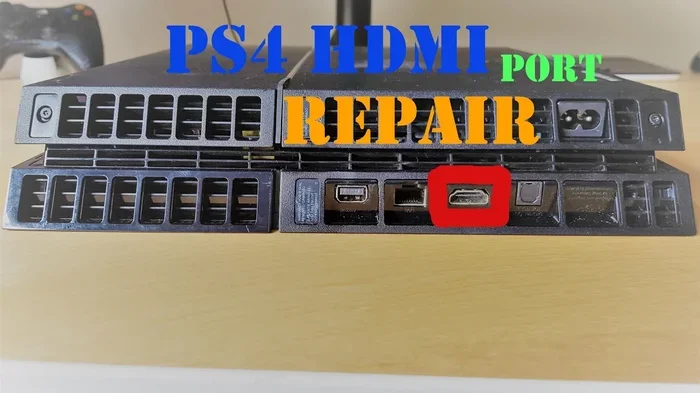
Before you start picking up a screwdriver, you need to understand what is actually wrong. The hdmi port on your playstation 4 is a delicate piece of hardware. It connects your console to your tv or monitor. When this connection fails, you lose your video output completely. There are a few reasons this happens over time. Age is a big factor that many people forget about. Over months and years, the plastic inside the port can wear down. Also, plugging and unplugging cables roughly causes a lot of stress. Kids or pets might bump the console by accident. This physical pressure can bend or break the tiny internal pins. Dust and dirt also love to get inside these small ports. They create a barrier between the cable and the port. This leads to poor contact or a total no signal error. Sometimes the problem is not the port at all. It could be the hdmi cable itself or the tv hdmi input. That is why troubleshooting is so important. You must rule out simple fixes first. A power cycle might just solve your problem in seconds. Unplug the console from the wall, wait a few minutes, and plug it back in. This resets the system and clears small glitches. If the problem stays, you likely have a hardware issue that needs fixing.
Why Does the Hdmi Port Fail?
There are many reasons a ps4 hdmi port fails on a console. The most common reason is physical wear and tear from daily use. Every time you insert a cable, you put pressure on the tiny pins. Over months and years, this pressure adds up. The metal contacts can become loose. They might not touch the cable properly anymore. Another big reason is dust buildup inside the port. Dust acts like an insulator. It stops the electrical connection from happening the right way. You might notice your hdmi port loose cable falling out very easily. This is a clear sign that the grip is gone. The plastic latch inside the port might be broken too. Physical damage is also a huge factor that causes failure. Dropping the console can crack the board inside. Bending the cable at a sharp angle can snap the pins. Even heat can damage the port over time. If your console overheats, the plastic can warp and change shape. This changes the shape of the port. The cable then cannot fit snugly anymore. Understanding these causes helps you choose the right fix. It also helps you prevent the problem from happening again.
Common Symptoms of a Broken Hdmi Port
How do you know if your port is broken? You need to look for clear signs and symptoms. The first sign is a no signal message on your tv screen. Even with a brand new cable, the screen stays completely black. Another sign is tv screen flickering or flashing. The picture might appear for a second and then disappear. This happens when the cable is barely touching the pins inside. You might also see a blurry or distorted image on the screen. This means the connection is intermittent and weak. Some gamers notice the cable falls out very easily. A healthy port should hold the cable firmly in place. If you have to wiggle the cable to get a picture, the port is damaged. A burning smell or visible burn marks mean you have a serious problem. Stop using the console right away in this case. These symptoms point to a bad hdmi connector. You need to act fast to prevent further port damage to the motherboard.
Can You Get A Ps4 Hdmi Port Fixed at Home?
Many people ask, can you get a ps4 hdmi port fixed at home without a professional? The answer is yes, you can do basic fixes yourself. You do not need to be a tech expert or an engineer. You just need patience, a steady hand, and the right tools. Start with the simplest fixes first. Cleaning the port is often enough to solve the problem. If cleaning does not work, you can try resoldering the connector. This is a bit harder but still doable at home. However, you must be very careful. Rushing can make the problem much worse than before. Always work in a clean, well lit space. Static electricity can hurt your console and destroy the board. Use an anti static mat if you have one. Take your time with each step. If you feel frustrated, stop and take a break. Forcing parts will only lead to more port damage. Remember, simple console repair steps can save you a lot of money. Just be gentle and follow the instructions closely. You will be amazed at what you can fix with a little care.
Quick Tips for Success
Here are some quick tips to make your repair a success. First, take your time. Do not rush through the steps. Second, keep a small bowl for the screws. Third, work in a bright area. Fourth, keep a log of what you do. This helps if you need to ask for help online. Fifth, stay calm. If something does not fit, stop and recheck your steps. These tips will make the whole process much easier and less stressful.
Quick Tips Before You Start
Before you dive into fixing your ps4 hdmi port, follow these quick tips. First, unplug the console from the wall. You do not want any power running through it while you work. Second, gather all your tools before you start. Having everything ready prevents delays and frustration. Third, take photos of your console before you open it. This helps you remember where everything goes when you reassemble it. Fourth, work on a soft surface. A towel or anti static mat works great. This prevents scratches and static damage to the board. Fifth, be gentle with every step. The pins inside the port are very fragile and easy to bend. If you bend one, the repair gets much harder. Finally, keep your pets and kids away from the workspace. They might knock things over or get curious about the small parts. These simple tips make a big difference. They keep you safe and protect your game console from accidental harm.
The Tools You Will Need
To fix a ps4 hdmi port, you need the right tools for the job. You do not need a lot of fancy or expensive equipment. A basic toolkit will do the job just fine. First, you need a small Phillips head screwdriver. This opens the console case without scratching it. Second, get a can of compressed air. This blows out dust from the port safely. Third, you need a can of isopropyl alcohol. This cleans the metal contacts perfectly. Fourth, grab a soft brush. A clean toothbrush works well. It helps scrub away stubborn dirt gently. Fifth, you need a soldering iron. This is only if you are replacing the port. Make sure it has a fine tip for small parts. Sixth, get some solder wire and flux. These help the metal stick together when you resolder. Finally, have some tweezers handy. They help hold tiny parts without dropping them. Having these tools ready makes the repair much easier. You will feel more confident when you start working on your hdmi port.
Step-by-Step Guide to Fixing the Port
Now that you have your tools, let us fix the ps4 hdmi port. We will start with cleaning. This solves many problems without any soldering at all. If cleaning fails, we will move to resoldering the connector. Follow the steps carefully. Do not skip any steps. Rushing through a console repair can cause more harm than good. Take your time and be gentle with your playstation 4. Your patience will pay off when the screen lights up again.
Cleaning the Port
Cleaning is the easiest way to fix a hdmi port loose connection. Start by blowing compressed air into the port. Hold the can upright. Spray in short bursts. This removes loose dust and debris safely. Next, dip a soft brush in isopropyl alcohol. Gently scrub the inside of the port. The alcohol dissolves sticky grime and dirt. Let the port dry completely before you plug anything in. This is very important. Water or moisture can short circuit the board and cause more damage. You can also clean the cable end carefully. Dip a cotton swab in alcohol and rub it gently on the pins. A clean cable and port make a strong connection. After cleaning, plug the cable back in. Does the no signal error go away? Many gamers fix their tv screen flickering just by cleaning the port. It is a simple win and takes only five minutes. If the problem continues, you might need to move to the next step.
Resoldering the Hdmi Connector
If cleaning does not work, the port might need resoldering. This means reattaching the metal pins to the circuit board securely. First, open the console case with your screwdriver. Remove the screws carefully. Keep them in a safe spot so you do not lose them. Next, locate the hdmi connector. It is the metal piece where the cable plugs in. You will see small solder points holding it down to the board. Heat your soldering iron to the right temperature. Touch the tip to the solder points gently. The old solder will melt away. Use a solder sucker or wick to remove it. This clears the old connections. Now, place the new or cleaned port back in position. Apply fresh solder to the iron tip. Touch the iron to the pad and the pin. The solder should flow smoothly and create a shiny joint. Let it cool for a few seconds. Do not move the port while it is cooling. Once it is cool, put the console back together. Plug in the power and the hdmi cable. Turn on the console. Check if the video output works perfectly. Resoldering can be tricky, but it is very rewarding when it works.
When to Call a Professional for Console Repair
Sometimes, fixing the ps4 hdmi port at home is not the best choice for everyone. You must know your limits and be honest about your skills. If you have never soldered before, it might be too scary to try. A mistake can break the whole motherboard. In that case, calling a pro is the smart and safe move. Professional repair shops have the right tools and the skills to fix things fast. They can fix a bad hdmi chip easily without breaking anything else. They also have replacement parts ready to go. This saves you a lot of time and stress. But how do you know if it is time to call for help? If the console smells like burning, stop immediately. If the board is visibly cracked, do not try to fix it yourself. If you drop the console and the port is badly bent, a pro is best. You also need to consider the repair cost carefully. Sometimes a pro costs almost as much as a used console. Weigh the options carefully. Look at the value of your playstation 4. If it is an older model, a new console might be better. But for rare or favorite games, a pro fix is worth every penny.
Common Mistakes to Avoid
When you try to fix a ps4 hdmi port, you might make some mistakes. Avoiding these errors will save you time and money. The first mistake is using too much force. If the cable does not go in easily, do not push hard. This will bend the pins. The second mistake is using a dirty cloth. Dirt can get stuck in the port. Always use a clean, dry cloth or a cotton swab. The third mistake is skipping the power down step. Working on a live console can cause electric shock. It can also fry your hdmi chip. The fourth mistake is using the wrong screwdriver. A stripped screw is a nightmare to remove. Use the right size Phillips head. Avoid these mistakes and your console repair will go much smoother.
Expert Insights on Hdmi Port Repair
Experts in console repair have a few insider tips. They say you should always check the cable first. A bad cable looks like a broken port. Use a different cable to rule this out. Another tip is to look at the hdmi input on your tv. Try a different port on the tv. Sometimes the tv port is the problem, not the console. Experts also suggest using a port cover. These little caps protect the port from dust when you are not playing. They are cheap and very effective. Finally, they say to never use a metal tool to clean the pins. Use a plastic toothpick or a soft brush. Metal tools can short the pins and cause permanent port damage. Follow these expert tips to keep your playstation 4 in top shape.
Comparing Repair Options
Let us look at your choices so you can make the best decision. You can fix it at home, or you can pay for professional repair. Both options have pros and cons. A home fix costs very little money. You only pay for solder and basic tools. It also gives you a sense of pride and a new skill. You learned something and saved your game console. But the risk is high if you are not careful. You might break the console further and make it worse. Professional repair is much safer and reliable. The technicians know exactly how to handle the hdmi connector. They guarantee their work and offer warranties. However, it costs more money upfront. You also have to wait for the repair to be done. The table below compares both options clearly.
| Option | Cost | Risk | Best For |
|---|---|---|---|
| Home Repair | Low | High | Simple cleaning or experienced users |
| Professional Repair | Higher | Low | Severe damage or beginners |
Think about your budget and your skills. If you are on a tight budget and like to tinker, try the home fix. If you want peace of mind and have the money, go to a pro. Either way, you are taking a step to save your playstation 4. You do not have to throw away a working console just because of a bad port. There is always a way to bring it back to life. Keep trying and stay positive.
Preventing Future Hdmi Port Damage
Once you fix your ps4 hdmi port, you want to keep it working for a long time. Prevention is always easier than repair. A few simple habits can protect your hdmi port for years to come. First, always pull the cable from the plug, not the cord. Yanking the cable damages the pins inside the port over time. Second, keep the console in a safe and stable place. Do not place it where people can kick it by accident. A sturdy shelf is much better than a wobbly table. Third, dust covers are your best friend. They keep dirt and dust out of the open ports. You can buy them online or make one from a soft cloth. Fourth, check your cables regularly for wear. A worn out cable can scratch the inside of the port. Replace old cables before they cause problems. Fifth, avoid moving the console while a cable is plugged in. The tension can stress the port and loosen the connection. Follow these simple tips and your hdmi input will stay strong. Your playstation 4 will thank you with years of great gaming and no more hdmi port loose issues.
Conclusion
Fixing a broken ps4 hdmi port is definitely possible and not as hard as you might think. You do not have to buy a new console right away and waste your money. Whether you choose to clean the port, resolder the connector, or call a pro, you have great options. Remember that console repair is all about patience, care, and the right approach. Start with the simplest fixes like power cycling and cleaning the dust out. If those do not work, move to more advanced steps like resoldering. Always know when to stop and call for help if you feel stuck. Taking care of your game console prevents future port damage and saves you money. Now that you know how to fix the ps4 hdmi port, you can get back to playing your favorite games without any interruptions. Grab your controller, turn on your tv, and enjoy the gaming experience again. Your playstation 4 is ready to roll and bring you joy for years to come!
Frequently Asked Questions
How much does it cost to fix a ps4 hdmi port?
The cost depends on where you go and how bad the damage is. If you fix it at home, it costs just a few dollars for solder and a new port. If you pay for professional repair, it can range from fifty to one hundred and fifty dollars. Always get a quote before you hand over your game console.
Can a loose ps4 hdmi port be fixed without soldering?
Yes, a loose port can often be fixed without soldering. The most common cause of a loose port is dust buildup. Cleaning the port with compressed air and isopropyl alcohol can tighten the connection. If the plastic latch is broken, you might need a new port, which does require soldering.
Is it worth repairing an old playstation 4?
It depends on the model and your attachment to it. If you have a rare edition or love your games, it is worth it. Repairing a ps4 hdmi port costs much less than buying a new console. However, if your console is very old and has other issues, a new playstation 4 might be the better choice.
What causes the tv screen to flicker with a ps4?
Flickering is usually caused by a bad connection. This could be a loose hdmi cable issue or a damaged hdmi port. Dust inside the port can also cause flickering. Try cleaning the port and using a different cable first before assuming the port is broken.
How long does it take to fix a ps4 hdmi port?
Cleaning the port takes about five minutes. Resoldering the connector takes about thirty minutes to an hour for a beginner. If you take it to a professional repair shop, it might take a day or two depending on their workload. Patience is key to a successful console repair.
Can I use an hdmi adapter instead of fixing the port?
Yes, you can use an adapter as a temporary workaround. An adapter plugs into the broken port and gives you a new one to use. However, this is not a permanent fix. The adapter can be bulky and might not fit well. It is better to fix the actual ps4 hdmi port for a long term solution.