Can You Use A Tablet Without A Data Plan And Still Connect
Yes, you can absolutely use a tablet without a data plan and still stay connected. A Wi-Fi only tablet can handle browsing, streaming, gaming, and productivity tasks when near a wireless network. You can also use mobile hotspots, free WiFi spots, and offline apps to keep your tablet internet options wide open without paying for a cellular plan.
Key Takeaways
- Wi-Fi only tablets work great: You can browse, stream, and stay productive using wireless networks at home, work, or public spaces.
- Mobile hotspots bridge the gap: Tethering your phone gives your tablet internet access anywhere without a separate data plan.
- Offline features are powerful: Many apps now offer offline modes for music, maps, documents, and entertainment.
- Free WiFi is everywhere: Libraries, cafes, airports, and malls offer free internet access for your Wi-Fi tablet.
- Dropping a data plan saves money: Monthly savings can add up fast, making a tablet without cellular a smart budget choice.
- Know your limitations: Without a data plan, you lose internet access outside of WiFi range, so plan ahead.
📑 Table of Contents
- What Does It Mean to Use a Tablet Without a Data Plan?
- How to Connect Your Tablet to the Internet Without a Data Plan
- What Can You Do on a Tablet Without a Data Plan?
- Pros and Cons of Using a Tablet Without a Data Plan
- Common Mistakes People Make When Dropping Their Data Plan
- Expert Tips for Getting the Most Out of Your Wi-Fi Only Tablet
- Is a Tablet Without a Data Plan Right for You?
What Does It Mean to Use a Tablet Without a Data Plan?
Using a tablet without a data plan means your device connects to the internet only through wireless networks. You skip the cellular connection entirely. No SIM card. No monthly carrier bill. Just pure Wi-Fi connectivity.
A Wi-Fi only tablet works like a small laptop that relies on wireless routers for internet access. You cannot browse the web while sitting on a bus in the middle of nowhere. But within range of a wireless network, you get full internet access. Everything works. Videos play. Emails send. Apps load.
This setup works brilliantly for people who spend most of their time at home or in offices. It also suits travelers who plan their WiFi access in advance. The key is understanding what you gain and what you give up.
How a Tablet Connects to the Internet
There are two main ways a tablet connects to the internet. The first is through cellular data. This requires a SIM card and a monthly plan from a carrier like AT&T, Verizon, or T-Mobile. The second way is through WiFi. This uses wireless routers found in homes, offices, and public spaces.
A WiFi only tablet only has the second option. It lacks cellular hardware entirely. That keeps the cost down. It also keeps the device lighter and thinner. Most tablets sold today come in both versions. You pick the one that fits your lifestyle.
How to Connect Your Tablet to the Internet Without a Data Plan
Connecting a tablet without cellular to the internet is simple. You just need access to a wireless network. Here are the most common ways to get online.
Home WiFi Network
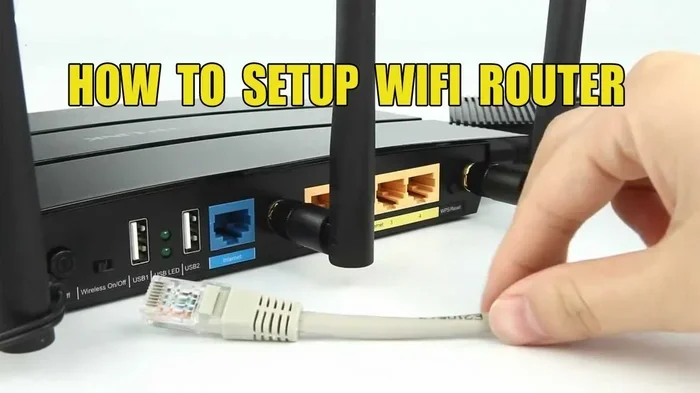
This is the easiest and most reliable method. If you have a home router, your tablet can connect within seconds. Just go to your WiFi settings, pick your network, and enter the password. Most people never think about this because it just works. Your tablet internet options at home are practically unlimited.
Public WiFi Hotspots
Libraries, coffee shops, airports, and malls all offer free WiFi spots. These let you browse the web, check email, and stream content while you are out and about. The downside is that public networks are often slower and less secure. Always avoid entering sensitive information on open networks.
Mobile Hotspot From Your Phone
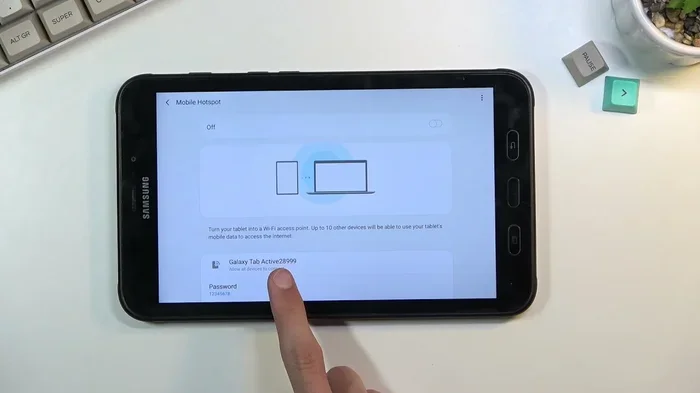
This is a game changer. You can turn your smartphone into a mobile hotspot and share its cellular connection with your tablet. Your tablet gets internet through your phone’s data plan. You do not need a separate data plan for the tablet. This works great for travel or days when you are away from WiFi.
USB Tethering
Some people prefer USB tethering. You connect your phone to your tablet with a cable. The tablet uses your phone’s data connection this way. It is more stable than a wireless hotspot. It also drains less battery on both devices.
What Can You Do on a Tablet Without a Data Plan?
A lot of people worry that dropping a data plan means losing their tablet connectivity entirely. That is not true. There is a wide range of things you can do with a Wi-Fi tablet every single day.
Browsing and Email
Web browsing and email work perfectly on a Wi-Fi only tablet. As long as you are connected to a wireless network, you can read articles, check social media, and reply to emails. These tasks do not require a lot of data. They work well even on slower public WiFi connections.
Streaming Content
Netflix, YouTube, Spotify, and other streaming services work great on a tablet without internet through cellular. Just connect to WiFi before you start watching or listening. Download shows and music ahead of time for offline viewing. Many people download content at home and watch it later without any connection at all.
Gaming
Tablets are fantastic gaming devices. Many games work fully offline. Puzzle games, strategy games, and single-player adventures do not need an internet connection. Online multiplayer games do need WiFi, but they work just fine on a wireless network at home.
Productivity and Work
Tablet productivity is a huge reason people choose a WiFi only tablet. You can write documents, edit spreadsheets, and join video calls. All you need is a wireless network. Cloud services like Google Drive and Dropbox sync your files when connected. You can work on documents offline and sync later when you return to WiFi.
Reading and Learning
E-books, online courses, and educational apps are perfect for a tablet without a SIM card. Download books and lessons while on WiFi. Read and study anytime, anywhere. No data connection needed once the content is downloaded.
Pros and Cons of Using a Tablet Without a Data Plan
Every choice has tradeoffs. Using a tablet without cellular data has clear advantages and some limitations. Let us break them down.
The Advantages
- Lower cost: You save money every month by skipping a cellular plan. Over a year, that adds up to hundreds of dollars.
- Lighter device: Wi-Fi only tablets are often thinner and lighter because they lack cellular hardware.
- Better battery life: Without the cellular radio draining power, your battery lasts longer on a single charge.
- Simpler setup: No SIM card to manage. No carrier contracts to worry about. Just connect to WiFi and go.
- Lower upfront cost: Wi-Fi only models usually cost less than their cellular counterparts.
The Limitations
- No internet outside WiFi range: You cannot browse or stream when you are away from a wireless network.
- Less flexibility: You need to plan ahead when traveling. You must find WiFi spots or use a phone hotspot.
- Dependence on available networks: If you are in an area without free WiFi, you are offline until you find a connection.
- Not ideal for constant connectivity: People who need internet access everywhere may find this setup limiting.
Common Mistakes People Make When Dropping Their Data Plan
Switching to a tablet without a data plan is straightforward. But some people make avoidable mistakes that cause frustration. Here is what to watch out for.
Forgetting to Download Content Ahead of Time
One of the biggest mistakes is assuming you can stream anything, anytime. Without a data plan, you need WiFi to stream. Download movies, music, and podcasts before you leave home. This way you have entertainment ready even when WiFi is not available.
Ignoring Offline App Features
Many apps offer offline modes that people overlook. Google Maps lets you download offline maps. Spotify allows you to save playlists for offline listening. Evernote and Google Docs sync when connected but let you work offline. Take advantage of these features.
Relying on Unstable Public WiFi
Public WiFi is convenient but unreliable. It can be slow, crowded, or suddenly unavailable. Do not count on it for important tasks like video calls or submitting work documents. Have a backup plan, such as a phone hotspot.
Not Setting Up a Mobile Hotspot
Many people forget that their phone can serve as a mobile hotspot. This is your safety net for internet access when WiFi is not around. Set it up before you need it. Test it at home to make sure it works with your tablet.
Expert Tips for Getting the Most Out of Your Wi-Fi Only Tablet
Tablet experts agree that a Wi-Fi only device can serve most users perfectly well. Here is what the pros recommend.
Use Cloud Storage Wisely
Services like Google Drive, iCloud, and OneDrive are your best friends. Upload files when connected to WiFi. Access them from any device. Download copies for offline use when you know you will be away from a network. This keeps your files safe and accessible.
Leverage Offline Maps
If you use your tablet for navigation, download offline maps before you travel. Google Maps and Apple Maps both support this feature. You can navigate without any internet connection. This is especially helpful for road trips or visits to areas with weak WiFi.
Schedule Syncs During WiFi Hours
Set your tablet to sync photos, backups, and app updates only when connected to WiFi. This prevents unexpected data usage and keeps everything up to date. Most tablets have settings for automatic WiFi syncing. Turn them on and let your device handle the rest.
Invest in a Good Portable Charger
Using tablet WiFi connectivity can drain your battery faster than you think. A portable charger ensures you stay powered up during long days away from home. Look for one that can charge multiple devices. This is especially useful when you are using your phone as a hotspot.
Explore WiFi Calling Options
Many carriers now offer WiFi calling. This lets you make phone calls through a wireless network instead of cellular towers. It works great for staying in touch without a dedicated data plan on your tablet. Check if your carrier supports this feature.
Is a Tablet Without a Data Plan Right for You?
The answer depends on your lifestyle and how you use your tablet. A tablet without a data plan is perfect for many people. But it is not the right choice for everyone.
Choose a Wi-Fi only tablet if you spend most of your time at home or in offices with reliable wireless networks. This option works well for students, remote workers, and casual users. It is also ideal for people who primarily use their tablet for entertainment, reading, and light browsing.
Consider a cellular model if you need constant internet access. Frequent travelers, delivery drivers, and people who work outdoors may benefit from built-in data connectivity. But even these users can often get by with a mobile hotspot from their phone instead of paying for a separate tablet plan.
Think about your monthly budget too. A tablet without cellular saves you money every month. Those savings can go toward better apps, cloud storage, or a nicer tablet model. Over time, the financial benefit adds up significantly.
Finally, consider how often you actually need internet access outside your home. If the answer is rarely, a Wi-Fi only tablet is the clear winner. If the answer is often, explore the mobile hotspot route before committing to a costly data plan.
The bottom line is simple. Can you use a tablet without a data plan and still connect? Absolutely. With WiFi networks, mobile hotspots, offline apps, and smart planning, you can stay connected and productive without paying for a separate cellular plan. The key is knowing what you need and choosing the setup that matches your daily routine.
Frequently Asked Questions
Can I use a tablet without a data plan at all?
Yes, you can use a tablet without a data plan as long as you have access to WiFi networks. A Wi-Fi only tablet connects to the internet through wireless routers at home, work, or public spaces. You just cannot browse the web outside of WiFi range without an alternative connection.
How do I get internet on my tablet without paying for data?
You can connect to home WiFi, use public WiFi hotspots, or tether your tablet to your phone’s mobile hotspot. USB tethering is another option that shares your phone’s data connection through a cable. These methods let you stay online without a separate data plan for your tablet.
Can I stream movies on a tablet without a data plan?
Yes, you can stream movies on a Wi-Fi tablet when connected to a wireless network. You can also download movies ahead of time and watch them offline. This is a great way to enjoy entertainment during flights, road trips, or any time WiFi is not available.
Is a Wi-Fi only tablet good for work?
A Wi-Fi only tablet works well for most work tasks. You can write documents, join video calls, and access cloud services when connected to WiFi. Many professionals use their tablets this way every day. The key is planning your WiFi access, especially if you work from multiple locations.
What happens if I need internet and there is no WiFi?
If you need internet and no WiFi is available, you can use your phone as a mobile hotspot. This shares your phone’s cellular data with your tablet. You can also use offline apps and downloaded content until you find a wireless network. Planning ahead helps avoid this situation.
Does a tablet without a data plan still receive updates?
Yes, your tablet receives software and app updates when connected to WiFi. Most tablets are set to update automatically on wireless networks. You can also manually check for updates whenever you are on WiFi. This keeps your device secure and running smoothly without any data plan.
=== CONCLUSION ===
Can you use a tablet without a data plan and still connect? The answer is a clear yes. A tablet without a data plan gives you freedom from monthly carrier bills while keeping you connected through WiFi networks, mobile hotspots, and offline features. You can browse, stream, game, work, and learn without ever needing a cellular connection.
The key is understanding your usage habits and planning ahead. Download content before you travel. Use free WiFi spots when you are out. Set up a mobile hotspot from your phone for backup internet access. These simple steps make a Wi-Fi only tablet a powerful and affordable choice.
Tablet internet options have never been better. Whether you are a student, a remote worker, a casual user, or a budget-conscious shopper, a tablet without a data plan can meet your needs. Embrace the simplicity, enjoy the savings, and discover that staying connected does not require a costly cellular plan. Your Wi-Fi tablet is all you need to stay online and productive in today’s wireless world.