Can You Mount A Projector On A Shelf Easily At Home
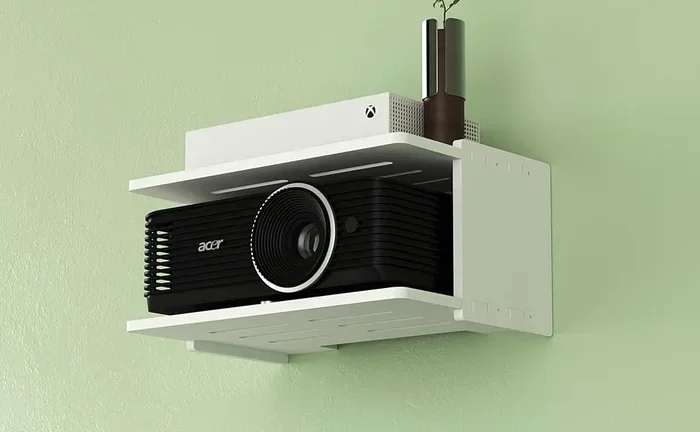
Yes, you can mount a projector on a shelf, and it is one of the easiest ways to set up a home theater. A shelf mount keeps your projector secure, hidden, and at the perfect angle for a big-screen experience. In this guide, we will walk you through everything you need to know about projector shelf mounting, from choosing the right shelf to avoiding common mistakes that ruin picture quality.
Want to turn any room into a home theater? The first question most people ask is, “Can you mount a projector on a shelf?” The short answer is yes. A shelf mount is one of the simplest, most budget-friendly ways to get a big picture without drilling into your ceiling or buying expensive mounting hardware.
Whether you are setting up a bedroom movie nook or a full living room home theater, a shelf can hold your projector securely. But there are a few things you need to know first. Shelf placement affects image quality, ventilation, and even how loud your projector fan sounds. This guide covers everything you need to think about before you start projector shelf mounting.
We will look at the best shelves to use, how to position your projector for the clearest image, and tips to keep your device cool. By the end, you will know exactly how to set up a shelf-mounted projector that looks amazing and lasts for years.
Key Takeaways
- Shelf mounting is simple and affordable: You do not need expensive hardware to place your projector on a shelf.
- Choose the right shelf height and depth: Proper placement prevents shadows and keeps the image sharp.
- Ventilation matters a lot: Projectors generate heat, so your shelf needs airflow to keep the device safe.
- A sheet or wall works as a screen: You do not need a fancy screen to enjoy a big picture from your shelf-mounted projector.
- Cable management keeps your setup clean: Use HDMI cables and cable covers to hide wires neatly.
- Consider a wall mount as an alternative: Sometimes wall mounting gives you better angle control than a shelf.
📑 Table of Contents
- Why Mount a Projector on a Shelf?
- Choosing the Right Shelf for Your Projector
- How to Position Your Projector on a Shelf
- Projector Shelf Setup: Step-by-Step
- Common Mistakes to Avoid When Mounting a Projector on a Shelf
- Projector Shelf vs Wall Mount: Which Is Better?
- Tips for the Best Image Quality on a Shelf Mount
- Best Types of Projectors for Shelf Mounting
- Final Thoughts
Why Mount a Projector on a Shelf?
Mounting a projector on a shelf has several big advantages. First, it costs way less than a ceiling mount or a dedicated projector stand. Second, it keeps your projector out of the way, so it does not become a trip hazard in the middle of the room. Third, a shelf gives you a stable, flat surface that reduces vibration and keeps your image steady.
Here are the main reasons people choose a shelf over other mounting options:
- Cost-effective: You likely already have a shelf at home. No need to buy a special mount.
- Easy to install: No drilling into ceilings or walls required.
- Simple to adjust: You can move the projector easily if you need to change the angle.
- Better cable management: A shelf hides power cords and HDMI cables neatly.
- Works with short throw projectors: Short throw models are perfect for shelf setups because they project a large image from a short distance.
If you have ever wondered about projector placement ideas for a small room, a shelf is one of the best options. It keeps the projector close to the wall or screen, which means you do not need a ton of space behind the device.
Choosing the Right Shelf for Your Projector
Not every shelf works for a projector. The wrong shelf can cause overheating, blurry images, or even damage to your device. Here is what you need to look for when picking a shelf for your projector shelf mount.
Shelf Depth
Your shelf needs to be deep enough to hold the projector without the device hanging over the edge. Most projectors are about 10 to 14 inches deep. Measure your projector first, then choose a shelf that is at least 2 inches deeper than the device. This gives you room for ventilation and cable routing.
Shelf Height
The height of your shelf determines where the projector beam hits your screen or wall. A lower shelf creates a smaller throw angle, while a higher shelf throws the image further down. For the best results, place the shelf so the projector lens is at or slightly below the center of your screen. This keeps the image from being distorted or tilted.
Shelf Material
Wood, metal, and glass shelves all work, but wood and metal are the best choices. Wood is sturdy and does not vibrate easily. Metal shelves are also strong and help with heat dissipation. Glass shelves look nice but can be fragile and may not handle heavier projectors well.
Shelf Weight Capacity
Check the weight limit of your shelf before placing a projector on it. Most projectors weigh between 4 and 15 pounds. A standard bookshelf can easily handle this weight. But if you are using a very large projector, make sure the shelf is reinforced or mounted directly into wall studs.
How to Position Your Projector on a Shelf
Placement is everything when it comes to projector image quality. Even the best projector will look terrible if it is not positioned correctly on a shelf. Here is how to get it right.
Find the Right Throw Distance
Throw distance is the space between the projector lens and the screen. Every projector has a specific throw ratio that tells you how far back it needs to be. You can find this number in your projector manual or on the manufacturer’s website. A short throw projector works great on a shelf because it can produce a large image even when placed close to the wall.
Level the Projector
Use a small bubble level or your phone’s level app to make sure the projector sits flat on the shelf. An unlevel projector creates a crooked image that is hard to fix. If your shelf is slightly uneven, use small rubber pads or adhesive feet under the projector to stabilize it.
Angle the Projector Correctly
Most projectors have keystone correction, which lets you adjust the image shape digitally. However, relying too much on keystone correction reduces image quality. The best approach is to position the projector so the beam hits the screen straight on. If you must angle it slightly, keep the tilt to a minimum.
Keep the Projector Away from the Wall
Leave at least 2 to 3 inches of space between the back of the projector and the wall. This gap allows hot air to escape and keeps the projector from overheating. Some projectors have vents on the back or sides, so check your model and make sure nothing is blocking the airflow.
Projector Shelf Setup: Step-by-Step
Setting up a projector on a shelf is straightforward. Follow these steps for a clean, professional-looking setup.
- Choose your shelf: Pick a sturdy shelf at the right height for your room.
- Measure your throw distance: Check your projector manual and mark the ideal position on the shelf.
- Place the projector: Set the projector on the shelf and use a level to make sure it is even.
- Connect your cables: Run an HDMI cable from your source (laptop, streaming stick, or cable box) to the projector. Use a long enough cable to reach comfortably.
- Connect power: Plug the projector into a power strip. Make sure the power strip is also on the shelf or nearby to avoid visible cords running across the floor.
- Test the image: Turn on the projector and check the image on your screen or wall. Adjust the position or angle if needed.
- Manage your cables: Use cable clips or cable covers to hide wires along the wall or behind the shelf.
Once your projector is set up on the shelf, you can start enjoying content. Want to stream movies? You can project Netflix from your laptop to the projector with a simple HDMI connection or screen mirroring. The setup works great for movie nights, gaming, or even presentations.
Common Mistakes to Avoid When Mounting a Projector on a Shelf
Even a simple setup can go wrong if you overlook a few details. Here are the most common mistakes people make with projector shelf mounting and how to avoid them.
Ignoring Ventilation
Projectors generate a lot of heat. If you place your projector in a closed cabinet or a shelf with no airflow, the device can overheat and shut down. Always make sure there is space around the projector for air to circulate. Do not stack boxes or books right next to the projector on the shelf.
Choosing the Wrong Shelf Height
A shelf that is too low forces you to tilt the projector upward, which creates a distorted image. A shelf that is too high can throw the image above the screen. Measure your room carefully and test the position before you commit to a permanent setup.
Using the Wrong Cable Length
An HDMI cable that is too short forces you to push the projector closer to the wall, which can block vents. An HDMI cable that is too long creates a messy tangle. Measure the distance from your source device to the shelf and buy a cable that fits perfectly.
Forgetting About Ambient Light
A shelf-mounted projector works best in a dim or dark room. If your shelf is near a window or bright light source, the image will look washed out. Consider using blackout curtains as a projector screen backdrop to improve contrast and color richness.
Skipping the Level
An unlevel projector creates a keystone-distorted image that looks tilted. Always use a level during setup, and avoid relying solely on digital keystone correction to fix the problem.
Projector Shelf vs Wall Mount: Which Is Better?
Both shelf mounting and wall mounting have their strengths. Here is a quick comparison to help you decide which option works best for your setup.
| Feature | Shelf Mount | Wall Mount |
|---|---|---|
| Cost | Low (uses existing shelf) | Medium (requires mount hardware) |
| Installation | Very easy | Moderate (drilling required) |
| Adjustability | Easy to move | Fixed position |
| Ventilation | Good with open shelves | Can be restricted |
| Aesthetics | Clean and hidden | Very clean, no shelf visible |
| Best For | Small rooms, rentals, budget setups | Permanent home theaters |
If you are renting your home or want a setup you can change easily, a shelf mount is the clear winner. If you are building a permanent home theater and want the cleanest look possible, a wall mount might be the better choice. Some people even use both: a shelf for the projector and a wall mount for the screen.
For more ideas on projector placement, check out our guide on using a projector on your wall to explore different mounting styles.
Tips for the Best Image Quality on a Shelf Mount
Once your projector is on the shelf, you can take a few extra steps to get the best possible picture.
- Use a high-quality HDMI cable: A good cable ensures a clear signal with no flickering or color issues.
- Clean your projector lens regularly: Dust on the lens makes the image look blurry. Use a soft microfiber cloth.
- Set the projector brightness to match your room: A brighter room needs a brighter projector setting. Dim the lights for the best contrast.
- Consider a dark screen or wall: A matte white wall or a dedicated projector screen gives the best results from a shelf mount.
- Use a streaming device: A small device like a Roku or Fire Stick plugged into the projector makes it easy to access all your favorite apps without needing a laptop.
With the right setup, a shelf-mounted projector delivers a cinematic experience that rivals any commercial theater. The key is taking the time to position everything correctly and keep the device cool and stable.
Best Types of Projectors for Shelf Mounting
Not all projectors are equally suited for shelf use. Here are the types that work best in a shelf setup.
- Short throw projectors: These projectors create a large image from a short distance, making them ideal for shelves placed close to the screen.
- Ultra-short throw projectors: These can sit right on the shelf just inches from the wall and still produce a big, clear image.
- Portable projectors: Lightweight and compact, these are perfect for shelf setups where you might want to move the projector around.
- LED projectors: LED projectors generate less heat than traditional lamp-based models, which makes them safer for enclosed or tight shelf spaces.
If you are looking for a projector that works well on a shelf, prioritize models with good ventilation, a short throw ratio, and a built-in speaker or audio output option. These features make the shelf setup much simpler and more enjoyable.
Final Thoughts
Mounting a projector on a shelf is one of the easiest and most affordable ways to build a home theater. You do not need expensive hardware, special skills, or a lot of space. Just pick the right shelf, position the projector carefully, and manage your cables neatly. The result is a big, bright image that transforms any room into an entertainment space.
Remember to keep your projector ventilated, level it properly, and avoid common mistakes like ignoring throw distance or using the wrong cable. With these tips, your shelf-mounted projector will deliver a fantastic viewing experience for years to come.
If you are curious about other projector setups, you might enjoy learning about projecting Netflix from your laptop or exploring different ways to use a projector on your wall. The possibilities are endless when you have the right setup.
Start with a simple shelf mount, test your setup, and upgrade from there. A great home theater does not have to be complicated or expensive. Sometimes, all you need is a sturdy shelf and the right projector to bring the cinema into your living room.
Frequently Asked Questions
Can any shelf hold a projector?
Most standard shelves can hold a projector as long as they are sturdy enough and deep enough. Check the weight capacity and make sure the shelf material is stable. Avoid flimsy shelves that might vibrate or bend under the weight of the projector.
Do I need a special mount to put a projector on a shelf?
No, you do not need a special mount. A flat, stable shelf works perfectly. If you want extra security, you can use adhesive rubber pads or small brackets to prevent the projector from sliding. Some projector manufacturers also sell shelf mounting kits for added stability.
Will a shelf-mounted projector look good?
Yes, a shelf mount can look very clean and stylish. Choose a shelf that matches your room decor and hide cables with cable covers or raceways. A well-organized shelf setup looks intentional and professional, not messy.
Can I use a projector on a bookshelf?
Absolutely. A bookshelf works great as a projector shelf as long as it is strong enough and deep enough. Just make sure the books or items around the projector do not block any vents. Good airflow is essential for keeping the projector cool.
What is the best shelf height for a projector?
The best shelf height depends on your screen size and room layout. As a general rule, place the projector lens at or slightly below the center of your screen. This creates a straight, undistorted image without needing heavy keystone correction.
How do I keep my projector cool on a shelf?
Leave at least 2 to 3 inches of space behind the projector for airflow. Do not place the shelf inside a closed cabinet. You can also add a small fan behind the shelf to improve ventilation, especially in warm rooms or during long movie sessions.