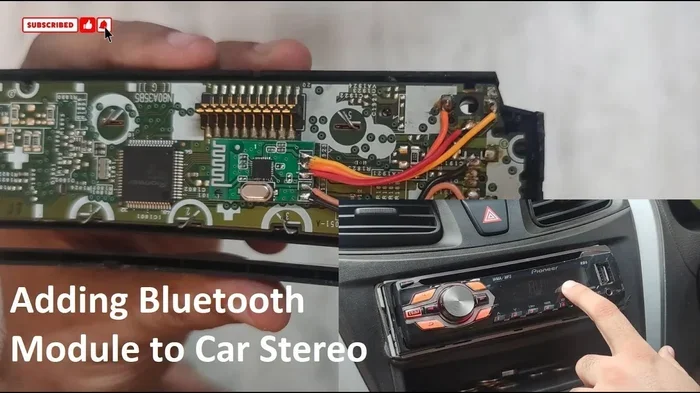
Can You Install A Bluetooth Radio In Your Car Easily
Yes, you can easily install a Bluetooth radio in your car, whether you have a modern vehicle or an older model. This guide walks you through every option, from simple plug-and-play adapters to full aftermarket head unit replacements. You will learn the steps, costs, and tips to get wireless streaming and hands-free calling working in your vehicle right away.
Have you ever been stuck driving an older car and wished you could stream music from your phone? Maybe your current stereo still works fine, but it feels like it belongs in a different decade. The good news is that installing a Bluetooth radio in your car is easier than you might think.
Whether you drive a brand-new sedan or a classic truck, there is a Bluetooth solution that fits your needs and budget. You do not need to be a mechanic or a tech expert to pull this off. In this guide, we will walk you through every option, every step, and every thing you need to know. By the end, you will feel confident enough to tackle the project yourself or make a smart choice if you hire a pro.
Let us dive right in and explore how you can bring wireless connectivity into your vehicle. From simple plug-and-play devices to complete car audio system overhauls, we have got you covered.
Key Takeaways
- Easy Installation Options: You can choose from Bluetooth adapters, FM transmitters, or full head unit swaps depending on your car and budget.
- Affordable Solutions: Many Bluetooth upgrades cost under $100 and take less than an hour to install.
- Better Audio Quality: A dedicated Bluetooth radio setup offers far superior sound compared to basic FM transmitters.
- Hands-Free Safety: Bluetooth integration lets you make and receive calls without taking your hands off the wheel.
- Works in Older Cars: Even classic vehicles without modern stereo systems can get Bluetooth capability with the right adapter.
- DIY-Friendly: Most Bluetooth radio installations are simple enough for beginners with basic tools.
📑 Table of Contents
- Why You Should Install a Bluetooth Radio in Your Car
- Different Ways to Install a Bluetooth Radio in Your Car
- How to Install a Bluetooth Radio: Step-by-Step Guide
- Cost of Installing a Bluetooth Radio in Your Car
- Common Mistakes to Avoid When Installing a Bluetooth Radio
- Expert Tips for the Best Bluetooth Car Radio Experience
- Frequently Asked Questions
- Conclusion
Why You Should Install a Bluetooth Radio in Your Car
Before we get into the how, let us talk about the why. There are many real reasons to add Bluetooth capability to your car stereo. Some of these benefits might surprise you.
Wireless Music Streaming
The biggest draw for most people is wireless music streaming. Instead of fumbling with CDs or dealing with tangled aux cords, you can stream your favorite playlists directly to your car speakers. Services like Spotify, Apple Music, and YouTube Music all work perfectly with a Bluetooth connection.
Hands-Free Calling
Safety matters on the road. With a Bluetooth radio, you can make and receive calls without ever touching your phone. The audio comes through your car speakers, and the built-in microphone picks up your voice. This keeps your hands on the wheel and your eyes on the road.
Better Sound Quality
Older FM transmitters often produce crackly, weak audio. A proper Bluetooth car stereo upgrade delivers much cleaner sound with deeper bass and clearer highs. You will notice the difference the moment you hit play.
Modern Features for Older Cars
If you drive a classic or older vehicle, adding Bluetooth brings it into the modern age. You get features like smartphone integration, voice control, and easy song switching without leaving the driver seat.
Different Ways to Install a Bluetooth Radio in Your Car
Not all Bluetooth upgrades are the same. There are several approaches, and each one suits a different type of driver and vehicle. Let us break them down so you can find the best fit.
Option 1: Bluetooth FM Transmitter
This is the simplest and most affordable route. An FM transmitter plugs into your car’s cigarette lighter or USB port. It broadcasts your phone’s audio to an empty FM radio frequency. You then tune your car radio to that frequency and listen.
Pros:
- Costs as little as $15 to $40
- No permanent changes to your car
- Plugs in and works in seconds
- Fits any car with an FM radio
Cons:
- Audio quality is lower than other options
- Can experience interference from nearby radio stations
- Charges your phone slowly, if at all
- Limited range and connectivity issues in some areas
Who should choose this: People with tight budgets, renters, or anyone who wants a temporary, no-commitment solution. It is the fastest way to get wireless streaming in your car today.
Option 2: Bluetooth AUX Adapter
If your car already has an AUX input, a Bluetooth AUX adapter is a great middle-ground option. This small device plugs into the AUX port and pairs with your phone via Bluetooth. The audio streams directly through your car’s existing speakers.
Pros:
- Much better sound quality than FM transmitters
- Very easy to install, usually plug-and-play
- No need to replace your current stereo
- Compact and hidden from view
Cons:
- Requires an AUX port on your car
- Does not charge your phone
- Limited to audio playback, no hands-free calling on most models
Who should choose this: Drivers whose cars have an AUX jack and want a clean, simple upgrade without replacing the whole stereo system.
Option 3: Bluetooth Car Adapter (Line-Out)
A Bluetooth car adapter with line-out capability connects to your car’s USB port or cigarette lighter. It provides both audio output and a charging port for your phone. This option gives you a cleaner signal than an FM transmitter and more features than a basic AUX adapter.
Pros:
- Good audio quality with minimal static
- Charges your phone while you drive
- Works with most vehicles regardless of stereo type
- Some models include built-in microphones for calls
Cons:
- Slightly more expensive than basic transmitters
- May require some cable management
- Not as seamless as a full head unit replacement
Who should choose this: Drivers who want a balance of quality, features, and ease of installation without committing to a full stereo swap.
Option 4: Replace the Head Unit with a Bluetooth-Enabled Aftermarket Unit
This is the most thorough and permanent upgrade. You remove your current aftermarket head unit or factory stereo and replace it with a new one that has built-in Bluetooth. These units often include USB ports, SD card slots, touchscreen displays, and even backup camera inputs.
Pros:
- Best audio quality of all options
- Full hands-free calling with microphone support
- Access to modern features like Apple CarPlay or Android Auto
- Professional-looking, integrated installation
- Boosts your car’s resale value
Cons:
- Costs more, typically $100 to $400 for the unit alone
- Installation takes more time and effort
- May require a wiring harness adapter or professional help
- Not always reversible without visible changes
Who should choose this: Car enthusiasts, daily commuters, or anyone who wants a permanent, high-quality car audio system upgrade.
How to Install a Bluetooth Radio: Step-by-Step Guide
Now let us get into the practical stuff. Below, we will walk you through the most common installation methods. Each method includes clear steps you can follow at home.
Installing an FM Transmitter (Easiest Method)
Follow these steps to get your Bluetooth FM transmitter up and running:
- Find an empty FM frequency on your car radio. Choose one with very little static. A frequency scanner app on your phone can help.
- Plug the FM transmitter into your car’s 12V socket or USB port.
- Turn on the transmitter and set it to the same empty frequency you found in step one.
- On your phone, go to Bluetooth settings and pair it with the transmitter.
- Start playing music on your phone. You should hear it through your car speakers.
- Adjust the volume on both the transmitter and your car radio for the best balance.
Quick Tip: Place the transmitter close to your car radio for the strongest signal. Avoid hiding it deep in the center console where it might lose connection.
Installing a Bluetooth AUX Adapter (Simple Plug-In)
If your car has an AUX port, this method is a breeze:
- Locate the AUX input in your car. It is usually on the center console or dashboard.
- Plug the Bluetooth AUX adapter into the AUX port.
- Charge the adapter if it has a battery, or leave it plugged in to draw power.
- Go to your phone’s Bluetooth settings and pair with the adapter.
- Set your car radio to AUX mode.
- Play music and adjust the volume to your liking.
Quick Tip: Use a short, high-quality AUX cable for the best signal strength and to avoid signal loss or buzzing.
Replacing the Head Unit (Most Involved Method)
Swapping out your car stereo for a new Bluetooth-enabled unit requires more steps. Here is a general overview:
- Remove the trim panels around your current stereo. Use a trim removal tool or a flat plastic pry tool to avoid scratching.
- Unscrew the mounting bolts or clips holding the factory stereo in place.
- Disconnect the wiring harness behind the stereo. Take a photo first so you remember where each wire goes.
- Unscrew the antenna cable from the back of the factory unit.
- Mount the new Bluetooth head unit using the included brackets or a dash kit.
- Connect the wiring harness adapter to the new unit. Match each wire to its corresponding connection.
- Reconnect the antenna cable to the new stereo.
- Secure the unit in the dash and replace the trim panels.
- Turn on the ignition and test all functions, including Bluetooth pairing, audio, and calls.
Quick Tip: Buy a wiring harness adapter specific to your car model. This makes the connection clean and prevents you from cutting any factory wires.
Cost of Installing a Bluetooth Radio in Your Car
One of the best things about upgrading to a Bluetooth car stereo is that it does not have to break the bank. The cost depends entirely on which method you choose.
| Method | Equipment Cost | Installation Cost | Total Estimate |
|---|---|---|---|
| Bluetooth FM Transmitter | $15 – $40 | $0 (DIY) | $15 – $40 |
| Bluetooth AUX Adapter | $20 – $50 | $0 (DIY) | $20 – $50 |
| Bluetooth Car Adapter | $30 – $80 | $0 (DIY) | $30 – $80 |
| Aftermarket Head Unit | $100 – $400 | $50 – $200 (pro install) | $150 – $600 |
As you can see, you can get wireless music streaming for as little as $15. The head unit replacement is the priciest option, but it also delivers the best long-term value and features.
Common Mistakes to Avoid When Installing a Bluetooth Radio
Even simple projects can go wrong if you skip important steps. Here are the most common mistakes people make when adding Bluetooth to their car stereo.
Choosing the Wrong FM Frequency
With FM transmitters, picking a frequency with heavy radio traffic causes constant interference and static. Always scan for the clearest frequency in your area before setting up.
Ignoring Vehicle Compatibility
Not every adapter works with every car. Before buying, check that the device is compatible with your vehicle’s make, model, and year. A wiring harness adapter can save you a lot of headaches here.
Skipping the Wiring Harness Adapter
When replacing a head unit, never cut factory wires. A wiring harness adapter makes the swap clean, safe, and fully reversible. Skipping this step can damage your car’s electrical system.
Overlooking Audio Quality
Cheap FM transmitters often sacrifice sound quality for convenience. If you care about how your music sounds, invest in a better adapter or go straight for a head unit replacement.
Forgetting to Test Before Final Installation
Always test all Bluetooth functions before you put the trim panels back on. It is much easier to fix a wiring issue when everything is still accessible.
Expert Tips for the Best Bluetooth Car Radio Experience
Want to get the most out of your new Bluetooth car radio? Here are some expert-backed tips that make a real difference.
Keep Your Phone Close
Bluetooth has a typical range of about 30 feet. Keep your phone in a holder or pocket close to the stereo for the strongest, most stable connection. This reduces dropouts and audio lag.
Update Your Firmware
Many Bluetooth adapters and head units receive firmware updates that improve performance and fix bugs. Check the manufacturer’s app or website periodically to keep your device running smoothly.
Use High-Quality Audio Files
Bluetooth streaming works best with higher-quality audio files. If you use a service like Spotify, choose the highest streaming quality your data plan allows. For local files, use FLAC or high-bitrate MP3s for the best audio quality.
Clean Your Connections
Dust and debris in USB ports or AUX jacks can cause connection issues. A quick wipe with a dry cloth or compressed air keeps everything working reliably.
Consider a Signal Booster for Long Drives
If you travel long distances through rural areas with weak FM signals, a Bluetooth adapter with a built-in signal booster can maintain a steady connection where basic transmitters fail.
Frequently Asked Questions
Can I install a Bluetooth radio myself, or do I need a professional?
For FM transmitters and AUX adapters, you can absolutely do it yourself. These are plug-and-play devices that require no tools or technical knowledge. If you are replacing a head unit, the DIY route is still possible with basic tools and some patience. However, if you are not comfortable working with wiring, hiring a professional is a smart choice.
Will a Bluetooth radio drain my car battery?
A Bluetooth radio draws very little power, especially when your car is running. If you leave your phone connected and streaming with the ignition off, it could slowly drain the battery over time. To avoid this, turn off Bluetooth when the engine is not running, or use a device with an automatic shut-off feature.
Does Bluetooth audio quality match a wired connection?
Modern Bluetooth versions, especially Bluetooth 5.0 and above, deliver excellent audio quality that is very close to wired connections. You may notice a slight difference compared to a direct AUX cable, but for most listeners, the difference is barely noticeable. Codecs like aptX and LDAC further improve wireless audio fidelity.
Can I use Bluetooth in a car that does not have a radio at all?
Yes! If your car has no radio system, you can still add Bluetooth audio using a portable Bluetooth speaker, a Bluetooth car adapter with speakers, or by installing a complete aftermarket car audio system with a built-in Bluetooth radio. There are options for every situation.
How long does it take to install a Bluetooth radio in a car?
An FM transmitter or AUX adapter takes less than five minutes to set up. A Bluetooth car adapter might take 10 to 15 minutes with some cable management. A full head unit replacement typically takes one to two hours for a DIYer, or about 30 to 60 minutes at a shop.
Is it legal to use Bluetooth for hands-free calling while driving?
In most regions, hands-free Bluetooth calling is legal and encouraged over holding your phone. However, laws vary by state and country. Always check your local regulations and remember that even hands-free calls can distract you. Pull over if you need to have a long or complex conversation.
Conclusion
Installing a Bluetooth radio in your car is one of the best upgrades you can make for both convenience and enjoyment. Whether you choose a budget-friendly FM transmitter or go all-in with a new aftermarket head unit, the process is straightforward and the results are worth it. You get to enjoy wireless music streaming, hands-free calling, and a modern car audio system that makes every drive more pleasant.
The options are there for every budget and every vehicle type. You do not need to spend hundreds of dollars to get started. Even a simple Bluetooth adapter under $50 can transform your daily commute. Take some time to assess your car, your needs, and your comfort level with DIY projects. Then pick the method that fits you best and get started.
Your car deserves better than tangled wires and outdated technology. A Bluetooth radio upgrade brings your vehicle into the modern era with minimal effort and maximum reward. So go ahead, make the change, and enjoy every song, podcast, and call with crystal-clear wireless sound. You will wonder why you did not do it sooner.