Can I Watch TV On A Projector And Why You Should Try
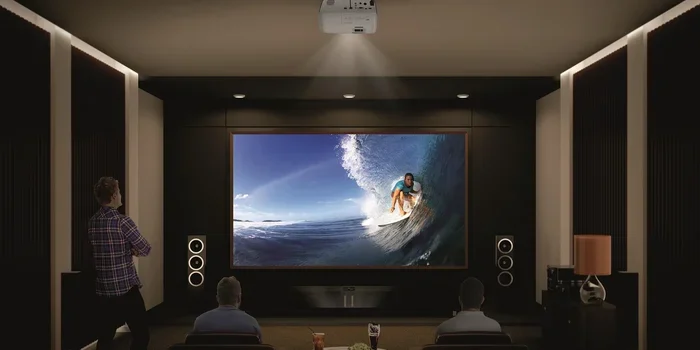
Yes, you can watch TV on a projector and turn any room into a home theater. The answer to “Can I Watch TV On A Projector” is a resounding yes, and the experience is far more immersive than a standard TV. You’ll enjoy a massive screen, cinematic colors, and the flexibility to adjust the image size to your liking.
Many people wonder if they can use a projector as a television. The short answer is yes. You can watch TV on a projector just like you would on a regular screen. All you need is the right connection and a bit of setup. Once you see that huge picture filling your wall, you’ll never go back to a small TV.
Watching TV on a projector changes the way you enjoy shows and movies. The image is larger, brighter, and more detailed. Whether you’re streaming a series or watching the big game, a projector makes everything feel cinematic. This guide will walk you through the how, why, and what to look for.
We’ll cover every step from choosing the right projector to setting up the perfect viewing angle. You’ll learn about brightness, resolution, and sound. By the end, you’ll know exactly how to create your own home theater. Let’s dive in.
Key Takeaways
- You can watch TV on a projector: Any projector with an HDMI input works with cable boxes, streaming sticks, and gaming consoles.
- Big screen immersion: Projectors deliver 100-inch-plus images that make movies and sports feel like a cinema.
- Setup is simple: Just connect an HDMI cable, adjust keystone correction, and position the projector correctly.
- Brightness matters: Choose a projector with at least 2,000 lumens for daytime TV viewing.
- Sound can be upgraded: Pair your projector with a soundbar or surround system for theater-quality audio.
- It’s a game-changer for movie nights: A projector creates a shared experience that brings family and friends together.
📑 Table of Contents
Can I Watch TV On A Projector: What You Need to Know
The first thing you notice is the size. A projector can throw an image 100 inches or more. That’s impossible with most TVs under 85 inches. The result is a wall-sized picture that fills your field of vision.
When you watch TV on a projector, colors often look richer. Many modern projectors support HDR, which boosts contrast and color depth. You’ll see subtle details in dark scenes that a standard TV might miss.
There’s also the sense of immersion. Instead of looking at a box on a stand, you’re surrounded by the image. It feels like you’re inside the scene. This is why so many people choose a projector for movie nights.
The Big Screen Experience
A 100-inch screen is a game-changer. You can sit closer or farther without losing detail. The image stays sharp across the entire surface. Even in a large living room, everyone can see clearly.
Projectors also create a uniform picture. There are no bezels or edges cutting into the image. The whole wall becomes your screen. This seamless look adds to the cinematic feel.
How It Compares to a Regular TV
A regular TV is convenient and bright. It works well in sunny rooms. But a projector offers a much larger image for the same price. A 65-inch TV costs a lot. A projector with the same price can throw a 120-inch picture.
The trade-off is brightness. Projectors need dimmer rooms to look their best. But with the right model, you can watch TV on a projector even during the day. More on that later.
Can I Watch TV On A Projector With Any Source
Yes, you can connect almost any video source to a projector. The key is having the right input ports. Most modern projectors come with HDMI. This is the same port used by cable boxes, streaming sticks, and game consoles.
You can plug in a Roku, Amazon Fire Stick, or Apple TV directly. The projector treats them just like a TV. You’ll see the same menus and apps on the big screen.
Cable Boxes and Streaming Devices
If you have a cable box, just use an HDMI cable. Run the cable from the box to the projector. You’ll get live TV, on-demand shows, and recorded content. The setup is identical to connecting a TV.
Streaming devices are even easier. Plug the stick into the projector’s HDMI port. Connect to WiFi. Open your apps. You can watch Netflix, Hulu, or Disney+ on a projector just like on a phone. The big screen makes everything more enjoyable.
Using Smart TV Apps Directly
Some projectors are smart projectors. They have built-in apps and WiFi. You don’t need a separate streaming stick. You can open YouTube, Netflix, or Spotify right from the projector’s home screen.
This makes watching TV on a projector even simpler. No extra devices to manage. Just pick up the remote and start watching. Look for projectors with Android TV or built-in Roku for the easiest experience.
Setting Up Your Projector for TV Viewing
Setting up a projector for TV is straightforward. You don’t need a professional installer. With a few simple steps, you can have a working setup in minutes.
Choosing the Right Projector
Not all projectors are equal for TV viewing. You need a model that can display clear, bright images. Look for these features when shopping.
- Brightness (lumens): Choose at least 2,000 lumens for daytime viewing. 3,000 lumens or more is ideal.
- Resolution: 1080p (Full HD) is the minimum. 4K projectors offer stunning detail.
- HDMI ports: Make sure it has at least two HDMI inputs for multiple devices.
- Keystone correction: This adjusts the image shape if the projector isn’t perfectly aligned.
- Throw ratio: A short-throw projector can sit close to the wall and still make a big image.
Placement and Screen Setup
Place the projector on a stable table or ceiling mount. The distance depends on the throw ratio. Check the projector’s manual for the exact distance needed for your desired screen size.
Use a plain white wall or a pull-down screen. A smooth surface gives the sharpest picture. Avoid textured walls because they scatter the light and blur the image.
Quick Tip: If you don’t have a screen, a flat white bedsheet works in a pinch. Just make sure it’s pulled tight and wrinkle-free.
Picture Quality and Brightness Matters
Projector picture quality depends on several factors. Brightness and resolution are the most important. You want a clear, vibrant image that doesn’t wash out.
Lumens and Ambient Light
Lumens measure how bright the projector’s light is. More lumens mean a brighter image. For a dark room, 1,500 lumens is enough. For a room with some daylight, aim for 2,500 lumens or higher.
Ambient light is the enemy of projector contrast. A bright room washes out colors and makes the image look faded. To get the best picture, close the curtains and turn off bright lights. This makes watching TV on a projector feel like being in a movie theater.
Resolution and HDR
Resolution determines how sharp the image is. 1080p is standard and looks great on screens up to 100 inches. 4K resolution adds incredible detail. You can see individual blades of grass or pores on an actor’s face.
HDR (High Dynamic Range) expands the range of colors and contrast. It makes bright areas glow and dark areas deepen. Many streaming services now offer HDR content. A projector with HDR support brings this to life on a huge screen.
Sound Options for Projector TV
Most projectors have small built-in speakers. They work, but they don’t deliver great sound. The audio is often tinny and lacks bass. To truly enjoy TV on a projector, you need better sound.
Built-in vs External Speakers
Built-in speakers are fine for casual viewing. But for movies and sports, external speakers make a big difference. You can connect a soundbar, a pair of bookshelf speakers, or a full surround system.
Most projectors have an audio output jack. Some also support Bluetooth. You can pair a wireless soundbar easily. The sound will match the huge picture perfectly.
Creating a Home Theater Sound System
A true home theater uses a surround sound setup. Place speakers behind the viewing area. This creates immersive audio that surrounds you. You’ll hear dialogue clearly and feel the rumble of explosions.
Expert Insight: A simple soundbar with a subwoofer is the easiest upgrade. It fills the room with rich, full sound without complicated wiring. Many soundbars connect via HDMI ARC or Bluetooth.
Is Watching TV On A Projector Worth It
Now that you know the basics, let’s weigh the pros and cons. This will help you decide if a projector is right for your TV watching habits.
Pros and Cons
Here’s a quick comparison of projector vs TV for watching shows.
| Feature | Projector | Standard TV |
|---|---|---|
| Screen Size | 80–150 inches | 40–85 inches |
| Brightness | Best in dark rooms | Works in any light |
| Portability | Easy to move | Fixed in one spot |
| Cost per inch | Lower cost for big screen | Higher cost for large sizes |
| Eye Strain | Less strain with indirect light | Direct light can cause fatigue |
| Setup | Requires placement and focus | Plug and play |
Common Mistakes: Many people buy a cheap projector with low lumens. They try to watch TV on a projector in a bright room and get a washed-out image. Always match the projector’s brightness to your room’s lighting.
Quick Tips for the Best Projector TV Experience
- Use a dark room: Close blinds and turn off overhead lights for the best contrast.
- Clean the lens regularly: Dust on the lens makes the image blurry. Use a soft microfiber cloth.
- Match the throw distance: Measure the distance from the projector to the wall before buying.
- Use a surge protector: Projectors are sensitive to power spikes. A surge protector keeps them safe.
- Adjust the keystone: If the image looks like a trapezoid, use keystone correction to square it up.
Common Mistakes to Avoid
- Choosing a low-lumen projector: This leads to a faint, hard-to-see picture in any room with light.
- Ignoring the throw ratio: Placing the projector too close or too far ruins the image size and focus.
- Forgetting about sound: Projector speakers are weak. Don’t skip the external speaker upgrade.
- Using a textured wall: It scatters the light and makes the image blurry. Use a smooth white surface or a screen.
- Not cooling the projector: Projectors need ventilation. Don’t place them in a closed cabinet.
Expert Insights on Projector TV Viewing
We asked home theater experts for their top tips on watching TV on a projector.
“The secret is ambient light rejection,” says one expert. “Use a projector screen with a special coating that bounces light back to the viewer while absorbing ambient light. This keeps the image vivid even in a room with some daylight.”
Another expert recommends 4K projectors with HDR. “The detail and color range are incredible. Once you see a 4K HDR movie on a 120-inch screen, you’ll never go back to a smaller TV.”
“Also, don’t underestimate the importance of placement,” they add. “A projector mounted slightly above eye level and angled down gives the most comfortable viewing experience. It reduces neck strain and makes the image look perfect.”
Conclusion
So, can you watch TV on a projector? Absolutely. You can turn any room into a home theater with the right setup. The big screen, cinematic colors, and immersive sound make it a fantastic way to enjoy your favorite shows.
Remember to choose a bright projector, set up in a dim room, and invest in good sound. Avoid common mistakes like using a low-lumen model or a textured wall. With these tips, you’ll have a stunning viewing experience every time.
Give it a try. You might be surprised how much you love watching TV on a projector. It’s a simple upgrade that brings the cinema home.
Frequently Asked Questions
Can I Watch TV On A Projector During the Day?
Yes, but you need a bright projector with at least 2,500 lumens. Close the curtains and turn off bright lights to reduce glare. A projector with a high lumen count will keep the image clear even in daylight.
What Kind of Projector is Best for Watching TV?
A smart projector with at least 1080p resolution and 2,000 lumens is ideal. Look for models with HDMI ports and built-in WiFi. 4K projectors offer the best detail, but 1080p is still great for most living rooms.
Do I Need a Special Screen to Watch TV on a Projector?
No, you can use a plain white wall. However, a dedicated projector screen gives a sharper, brighter image. A pull-down screen or a fixed frame screen works well. Avoid textured walls because they scatter the light.
Is Watching TV on a Projector Bad for Your Eyes?
Not really. Projectors use reflected light, which is easier on the eyes than the direct light from a TV. This means less eye strain during long viewing sessions. It’s one of the biggest health benefits of using a projector.
Can I Connect a Cable Box Directly to a Projector?
Yes, just use an HDMI cable. Plug one end into the cable box and the other into the projector’s HDMI port. The projector will display the cable TV guide and all your channels just like a regular TV.
How Far Should the Projector Be from the Wall?
The distance depends on the projector’s throw ratio. Check the manual for the exact measurement needed for your desired screen size. Short-throw projectors can sit just a few feet away and still produce a 100-inch image.