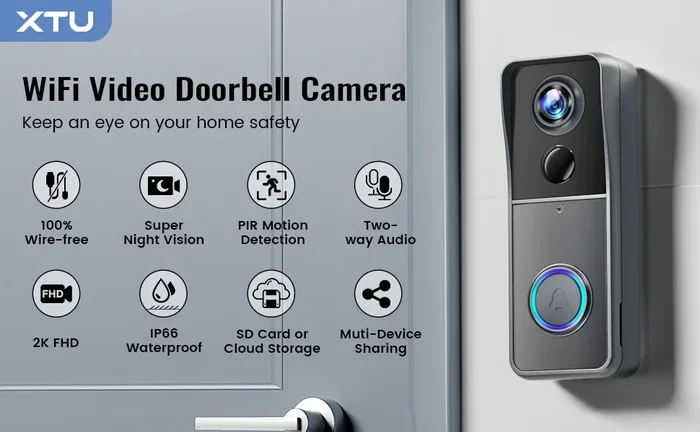
Can You Have A Doorbell Camera Without The Internet
Yes, you can have a doorbell camera without the internet. Many homeowners want a video doorbell but lack reliable WiFi or prefer not to connect it online. An offline doorbell camera still records motion, captures clips, and alerts you locally. You just lose remote access and cloud features. This guide covers everything you need to know about using a doorbell camera without internet and whether it fits your home.
You have a doorbell camera sitting on your porch. But your internet is down. Or maybe you live in a rural area where WiFi barely reaches the front door. The question is simple but important: can you have a doorbell camera without the internet?
The short answer is yes. You absolutely can. A doorbell camera without internet still does a lot of the heavy lifting. It detects motion. It records video. It stores clips right on the device. What it cannot do is send alerts to your phone or let you watch live footage from anywhere in the world. But for many homeowners, that trade-off is totally worth it.
In this article, we will walk through everything you need to know. We will cover how offline doorbell cameras work, which types support this setup, and what features you gain and lose. By the end, you will know exactly whether going offline is the right move for your home. Let us dive in.
Key Takeaways
- Offline doorbell cameras exist: You can install and use a video doorbell without an active internet connection.
- Local storage is key: Offline cameras use SD cards or internal storage instead of cloud servers.
- Motion detection still works: The device detects movement and records clips on its own.
- No remote viewing: Without internet, you cannot watch live footage from your phone.
- Battery and wired options: Both battery powered doorbell cameras and wired models can work offline.
- Privacy advantage: Offline setups mean your data stays on the device and does not leave your home.
- Smart features are limited: No push notifications, no two-way audio streaming, and no smart home integration without internet.
📑 Table of Contents
How Doorbell Cameras Work Without Internet
Most people assume a video doorbell needs the internet to function at all. That is not true. A doorbell camera without internet relies on local processing and local storage. Here is how it works behind the scenes.
What Happens When WiFi Is Unavailable
When your wireless doorbell camera has no internet connection, it switches to standalone mode. The camera sensor still activates when it detects motion or a ring event. The device captures video and saves it to a local storage option, usually an SD card or built-in memory. The doorbell chime inside your home still rings if it is wired to the camera. Everything happens on the device itself.
Think of it like a security camera no WiFi setup. The camera does its job independently. It does not need to upload anything to a remote server. It does not need to connect to a cloud platform. It simply records what it sees and stores it right there.
Local Storage vs Cloud Storage
This is the biggest difference between online and offline doorbell cameras. With cloud storage, your doorbell camera recording gets sent to a remote server over the internet. You can access those clips from any device, anywhere. With local storage, everything stays on the device.
Offline cameras typically use:
- MicroSD cards inserted into the camera unit
- Built-in flash storage that comes with the device
- USB storage devices in some models
Local storage means no monthly cloud subscription. It also means your video data stays on your property. That is a big plus for privacy. But it also means you need to physically retrieve the footage if you want to review it on a larger screen.
Types of Doorbell Cameras That Work Offline
Not all doorbell cameras are created equal. Some need constant internet access. Others can function fully offline. Here is a look at the types that work without a connection.
Battery Powered Doorbell Cameras
A battery powered doorbell camera is one of the easiest to set up without internet. Since there is no wiring involved, you can place it almost anywhere. Many battery powered models support local storage on an SD card. They run on motion detection and do not need a continuous WiFi signal.
Popular options in this category include models from brands like Ring, Reolink, and Eufy. Some of these brands offer specific offline-capable versions. Always check the product specifications before buying.
Wired Doorbell Cameras
A wired doorbell camera connects to your existing doorbell wiring. It draws power from your home’s electrical system. Many wired models also support local storage. Because they have a constant power source, they tend to be more reliable for continuous recording.
Wired cameras also work well as a security camera no WiFi solution. You do not need to worry about battery life. The camera stays on and records whenever motion is detected, even without an internet connection.
SD Card Doorbell Cameras
Some doorbell cameras with SD card support are designed specifically for offline use. The SD card acts as the primary storage. You can remove the card, plug it into a computer, and review your footage. These cameras often come with built-in motion detection and night vision, all without needing the internet.
When shopping for this type, look for cameras that clearly state they support local storage mode or offline recording. Not every IP camera with an SD slot works fully offline. Some still require a brief internet connection for initial setup.
Setting Up a Doorbell Camera Without WiFi
Setting up a doorbell camera without internet is simpler than you might think. You do not need a router or a modem. Here is a step by step guide to get your doorbell camera setup running.
Step by Step Setup Guide
Follow these steps to install your offline doorbell camera:
- Choose your location. Pick a spot near your front door with a clear view of the approach. Make sure it is within reach of your doorbell wiring if you are using a wired model.
- Install the device. Mount the camera using the included screws or adhesive. For battery powered models, insert the batteries and charge them fully before mounting.
- Insert the SD card. If your camera uses a doorbell camera with SD card, insert a formatted microSD card into the slot. Use a card that matches the recommended storage size in the manual.
- Power on the camera. Turn the device on. For wired models, connect it to the existing doorbell wiring. For battery models, the device powers on automatically.
- Configure local settings. Use the on device screen or a temporary Bluetooth connection to set motion sensitivity, recording mode, and date and time. You do not need WiFi for this step on most models.
- Test the system. Walk in front of the camera to trigger motion detection. Check that the doorbell camera recording saves to the SD card. Ring the doorbell to confirm the chime works.
Common Setup Mistakes to Avoid
Here are some pitfalls people run into when setting up a doorbell camera offline:
- Forgetting to format the SD card. An unformatted card can cause recording failures. Always format it in the camera before first use.
- Using the wrong SD card type. Not all microSD cards work well with doorbell cameras. Use high speed, high endurance cards designed for surveillance.
- Placing the camera too high. If the camera is mounted too high, motion detection may miss people approaching the door.
- Skipping the initial WiFi setup. Some cameras require a brief WiFi connection for firmware updates. Even if you plan to use it offline, connect it once during setup.
Features You Can Still Use Without Internet
Going offline does not mean losing everything. A doorbell camera without internet still offers several useful features that keep your home protected.
Motion Detection on the Device
Most offline doorbell cameras include built in motion sensors. These sensors work independently of any network. When someone walks past your door, the camera detects the change in the field of view and starts recording. The motion detection happens right on the device, using its own processor.
You can usually adjust the sensitivity of the motion sensor through the on device menu. This means the camera can be tuned to ignore small animals or swaying trees and focus on human movement.
Local Video Recording
The core function of any video doorbell is recording. Offline cameras excel at this. They capture video clips and save them directly to the SD card or internal storage. The quality of the recording is often the same as it would be with an internet connection.
Many offline cameras support clips ranging from 10 seconds to several minutes. Some also offer continuous recording, which captures everything in a loop. When the storage card fills up, the oldest clips get overwritten automatically.
Doorbell Ring and Chime Functions
If someone presses the doorbell button, the doorbell chime inside your home will still ring. This works through the wired connection between the outdoor camera unit and the indoor chime. The chime does not need the internet to function. It is a simple electrical signal that triggers the sound.
Some models also include a built in speaker on the camera unit itself. This allows visitors to speak directly through the doorbell button, even without WiFi.
Limitations of Offline Doorbell Cameras
While offline doorbell cameras are useful, they come with clear limitations. Understanding these helps you set realistic expectations.
No Live Remote Viewing
The biggest trade off is that you cannot view live footage from your phone or computer. Without internet, the camera has no way to transmit a video stream to a remote device. If you are at work or on vacation, you cannot check what is happening at your front door.
This is the main reason most people connect their smart doorbell to the internet. Remote access is one of the primary benefits of a wireless doorbell camera setup.
No Push Notifications
Online doorbell cameras send instant alerts to your smartphone when motion is detected or the doorbell rings. An offline doorbell camera cannot do this. You will not know someone is at your door until you physically check the camera or review the stored footage.
This makes offline cameras better suited for homes where someone is usually present. If you work from home or have a stay at home caregiver, the lack of push notifications is less of an issue.
Limited Smart Home Integration
Most doorbell cameras without internet cannot connect to smart home ecosystems. That means no Alexa routines, no Google Home triggers, and no integration with smart locks or lights. The camera operates as a standalone device.
If smart home integration is important to you, you may want to keep a basic WiFi connection for that purpose, even if you rely on local storage for your video clips.
Is an Offline Doorbell Camera Worth It?
Deciding whether a doorbell camera without internet is right for you depends on your situation. Let us look at who benefits most from this setup.
Who Should Buy an Offline Doorbell Camera
An offline doorbell camera is a great fit for:
- Rural homeowners with unreliable or slow internet connections
- Privacy focused users who do not want their video data stored on cloud servers
- Budget conscious buyers who want to avoid monthly cloud subscription fees
- Rental property owners who need a simple, no fuss security solution
- People who work from home and are usually present to check the camera directly
Who Should Stick with Online Cameras
On the other hand, you might want to stick with a connected video doorbell if:
- You travel frequently and need remote access
- You rely on push notifications to know when deliveries arrive
- You want two way audio communication from your phone
- You use smart home automation routines triggered by doorbell events
- You have reliable, fast internet and want the full feature set
Final Verdict
A doorbell camera without internet is absolutely a viable option for many households. It gives you core security functions like motion detection, local recording, and doorbell alerts without needing a WiFi connection. The key is understanding what you gain and what you give up.
If your main goal is to have a record of who visits your front door and you do not need remote access, an offline setup works great. If you want the full smart doorbell experience with alerts, live viewing, and cloud storage, you will need internet. The good news is that many cameras today offer a hybrid approach. They can record locally when offline and sync to the cloud when connected.
Before you buy, check the product specifications carefully. Look for terms like local storage support, offline mode, or SD card recording. These confirm the camera can function without the internet. Read user reviews too. Real world experiences often reveal details that product pages miss.
Your home security setup should match your lifestyle and your infrastructure. Whether you go fully offline or use a hybrid approach, the most important thing is that you have a reliable doorbell camera watching your front door. A doorbell camera without internet is better than no doorbell camera at all. Start with what you have, and upgrade as your needs grow.
Frequently Asked Questions
Can I still record video with a doorbell camera if I have no internet?
Yes, you can. Most offline capable doorbell cameras record video clips directly to an SD card or internal storage. The camera detects motion or a ring event and saves the footage locally. You just need to remove the card or access the device to review the clips.
Will my doorbell chime still ring without internet?
If your doorbell chime is wired to the camera, it will still ring. The chime works through a direct electrical connection, not through the internet. Wireless chimes that rely on WiFi to receive the signal will not work offline, but the camera itself will still detect the doorbell press.
Do I need to pay a monthly fee for an offline doorbell camera?
No. One of the biggest advantages of a doorbell camera without internet is that you do not need cloud storage subscriptions. Since footage saves to an SD card or local storage, there is no recurring monthly fee for cloud recording. You may still need to buy an SD card separately.
Can I view footage remotely from a doorbell camera with no internet?
Not directly. Without an internet connection, the camera cannot send a live stream or stored footage to your phone. You would need to physically access the camera or remove the SD card to view the recordings on a computer or TV.
What is the best doorbell camera brand for offline use?
Several brands offer strong offline doorbell camera options. Reolink and Eufy are known for supporting local storage and offline recording. Ring has some models that can work with local storage as well. Always check the product specs to confirm offline functionality before purchasing.
Can I connect a doorbell camera to the internet later if I change my mind?
Yes, most offline capable cameras can be connected to WiFi later. You would simply go through the setup process again with an active internet connection. This would unlock remote viewing, push notifications, and cloud storage options if your model supports them.
=== CONCLUSION ===
The answer to can you have a doorbell camera without the internet is a clear yes. Whether you choose a battery powered doorbell camera or a wired doorbell camera, offline setups give you reliable local recording, motion detection, and doorbell alerts. You give up remote access and smart features, but you gain privacy, independence from internet outages, and no monthly subscription costs.
Understanding how your doorbell camera without internet works helps you make the most of it. Set it up correctly, use a quality SD card, and place the camera at the right height. Regularly check and retrieve your stored footage so you do not miss important events.
A doorbell camera offline setup is a practical, affordable, and privacy friendly way to secure your front door. Do not let a lack of internet stop you from protecting your home. Choose the right camera, follow the setup steps, and enjoy peace of mind knowing your property is watched around the clock.