Can You Convert Ps2 To Usb Here Is Everything You Need
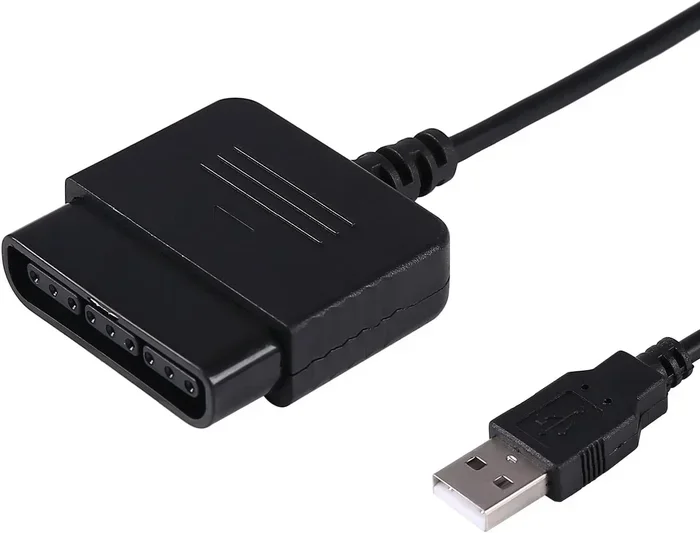
Yes, you can convert a PS2 controller to USB using a dedicated adapter or converter cable. This simple upgrade lets you use your favorite DualShock or third-party PS2 controller on a PC or modern setup without hassle. Whether you are a retro gaming fan or looking for a budget-friendly input device, converting your PS2 controller to USB is straightforward, affordable, and surprisingly effective.
Have you ever dug through a closet and found an old PlayStation 2 controller sitting in a box? Maybe you are cleaning out your gaming setup or trying to save money on a new gaming accessory. Whatever the reason, the question can you convert ps2 to usb comes up a lot among retro gamers and PC enthusiasts.
The short answer is yes. You absolutely can convert a PS2 controller to USB. It is easier than most people think, and it does not require expensive equipment. In this guide, we will walk you through everything you need to know. From choosing the right adapter to setting it up on your PC, we have got you covered.
Whether you want to relive classic retro gaming memories or just need a solid controller for PC gaming, converting your PS2 controller opens up a lot of possibilities. Let us dive in and explore how this works, what you need, and what to watch out for.
Key Takeaways
- USB Adapters Work: A ps2 to usb adapter lets you connect your PS2 controller to a PC or laptop easily.
- DualShock Controllers Are Compatible: Most DualShock 2 controllers work perfectly with USB converters.
- Setup Is Simple: You just plug in the adapter, install drivers, and start playing.
- Third-Party Options Exist: Budget PS2 USB converter cables are widely available online.
- Retro Gaming Is Easier Than Ever: Converting your PS2 gear opens up a world of legacy gaming possibilities on modern devices.
- Check Compatibility First: Not all adapters work with every system, so verify your setup before buying.
📑 Table of Contents
- What Does It Mean to Convert Ps2 To Usb?
- Types of Ps2 To Usb Adapters
- How to Convert Ps2 To Usb Step by Step
- Common Issues and How to Fix Them
- Best Ps2 To Usb Adapters on the Market
- Can You Use Ps2 Controllers on Modern Consoles
- Expert Tips for Getting the Most Out of Your Converted Ps2 Controller
- Quick Tips for Beginners
- Final Thoughts on Converting Ps2 To Usb
What Does It Mean to Convert Ps2 To Usb?
When we talk about converting a PS2 to USB, we mean taking the original PS2 controller connector and making it work through a standard USB port. Your old PlayStation 2 controller uses a round 5-pin DIN plug. A USB port looks completely different. So you need a bridge between the two.
This bridge comes in the form of an adapter or a converter cable. The adapter reads the signals from your PS2 controller and translates them into USB signals that your computer or console can understand. Think of it like a translator between two languages. Both sides speak the same meaning, but they use different words.
Most people who ask can you convert ps2 to usb are trying to use their PS2 controller on a PC. Some want to use it with a retro console or a mini arcade setup. Whatever your goal, the basic process is the same. You need the right adapter, a little patience, and about five minutes of your time.
Why Would You Want to Convert PS2 to USB?
There are several great reasons to make this conversion. Let us break them down quickly.
- Cost Savings: PS2 controllers are cheap, especially used ones. Why spend $50 on a new PC gamepad when you already own a solid controller?
- Comfort and Familiarity: If you grew up with PlayStation, the DualShock layout feels natural in your hands.
- Durability: Many PS2 controllers are built like tanks. They last for years of heavy use.
- Retro Gaming Projects: If you are building a retro gaming setup or a Raspberry Pi arcade, a PS2 controller is a perfect input device.
- Wireless Options: Some adapters let you use your PS2 controller wirelessly, which adds serious convenience.
Types of Ps2 To Usb Adapters
Not all adapters are the same. When you search for a way to convert your PS2 controller, you will find several different options. Let us look at the most common types.
Wired USB Adapters
Wired adapters are the simplest option. You plug your PS2 controller into one end of the cable, and the other end goes into a USB port on your PC. These adapters are plug-and-play in most cases. You do not need to install complicated software.
Wired adapters tend to be the most affordable. You can find them for under $10 on most online marketplaces. They work well for casual gaming and basic setup. The downside is that you are limited by cable length. If your setup is far from your desk, a long cable can get messy.
Wireless USB Adapters
Wireless adapters take the conversion process one step further. They connect to your PS2 controller through a USB receiver, just like a modern wireless gamepad. This gives you more freedom to move around while gaming.
Wireless adapters usually cost a bit more, but they offer a much cleaner setup. You do not have cables running across your desk. Some wireless adapters also include built-in rumble support, which means you get vibration feedback during gameplay. This is a big plus for immersive gaming experiences.
Converter Cables with Built-In Chips
Some converter cables come with built-in microchips that handle the signal translation internally. These are often more reliable than basic adapters. The chip inside does the heavy lifting, so your PC recognizes the controller as a standard USB input device.
These cables are a great choice if you want something that works without installing drivers. They are especially useful for people who are not comfortable with technical setup. Just plug it in and play.
How to Convert Ps2 To Usb Step by Step
Now that you know what kind of adapter to get, let us walk through the actual conversion process. It is simpler than you might think.
Step 1: Choose Your Adapter
First, decide which type of adapter fits your needs. Do you want wired or wireless? Budget-friendly or premium? Once you have your adapter, make sure it is compatible with your specific PS2 controller model. Most adapters work with the standard DualShock 2 controller, but always double-check the product description.
Step 2: Connect the Adapter to Your PS2 Controller
Plug the adapter into the PS2 controller port. The connector should fit snugly. If it feels loose, try a different adapter or check that you have the right model. Some adapters use a pass-through design, which means you can still charge your controller while using it.
Step 3: Connect the Adapter to Your PC
Plug the USB end of the adapter into your computer. Most modern PCs and laptops have USB-A or USB-C ports. If your adapter uses USB-A and your PC only has USB-C, grab a simple adapter. This is a quick fix that costs almost nothing.
Step 4: Install Drivers (If Needed)
Many USB adapters for PS2 controllers are plug-and-play. Your computer should recognize the device right away. However, some adapters require you to install a driver. Visit the manufacturer’s website and download the latest driver for your specific adapter model.
Installing drivers is usually straightforward. Follow the on-screen instructions. Restart your computer if prompted. Once the driver is installed, your PC should recognize the PS2 controller as a connected input device.
Step 5: Test Your Controller
Go to your computer’s game controller settings. On Windows, you can find this in the Control Panel under “Devices and Printers.” Click on your PS2 controller and select “Game Controller Settings.” Then click “Properties” to test each button and axis.
Make sure every button responds correctly. Check the analog sticks and the rumble function if your adapter supports it. If something is not working, try unplugging and replugging the adapter. You can also check the manufacturer’s troubleshooting guide.
Common Issues and How to Fix Them
Converting your PS2 controller to USB is usually smooth, but sometimes you run into problems. Here are the most common issues and how to solve them.
Controller Not Recognized by PC
If your PC does not detect the PS2 controller, first check the USB connection. Try a different USB port. Sometimes USB hubs cause issues, so plug the adapter directly into your computer. Also, make sure your adapter drivers are up to date. Outdated drivers are the number one cause of recognition problems.
Buttons Not Mapping Correctly
Sometimes buttons press the wrong inputs. This usually happens when the adapter uses a generic driver. You can fix this by using controller mapping software. Programs like JoyToKey or DS4Windows let you remap buttons to match your preferences. This is especially helpful if you are using the controller for emulators or specific games.
No Rumble or Vibration
If your controller does not rumble, check whether your adapter supports rumble functionality. Not all adapters transmit vibration signals. If your adapter does support rumble, make sure it is enabled in your game or controller settings. Some games require you to manually turn on controller vibration.
Analog Stick Drift
Analog stick drift happens when the stick registers movement even when you are not touching it. This is a common issue with older controllers. Clean the stick with compressed air. If the problem persists, the controller may need internal maintenance or replacement.
If you are exploring different ways to upgrade your gaming accessories or looking for budget-friendly alternatives to popular cable TV services, check out Alternatives To Dish Network And Directtv for more options on saving money while enhancing your entertainment setup.
Best Ps2 To Usb Adapters on the Market
Not all adapters are created equal. Some stand out from the rest in terms of reliability, price, and features. Here are a few options worth considering.
| Adapter | Type | Price Range | Rumble Support | Best For |
|---|---|---|---|---|
| BoomFish PS2 to USB | Wired | $5 – $10 | Yes | Budget PC gaming |
| Mayflash PS2 Adapter | Wired | $8 – $15 | Yes | Retro gaming setups |
| Retro-Bit Wireless Adapter | Wireless | $20 – $30 | Yes | Clean desk setup |
| Generic No-Name Adapter | Wired | $3 – $7 | Varies | Quick temporary use |
When choosing an adapter, read reviews carefully. Look for adapters with good driver support and solid build quality. A cheap adapter that stops working after a month is not worth the savings. Spend a few extra dollars on a reputable brand, and your PS2 to USB conversion will be much smoother.
Can You Use Ps2 Controllers on Modern Consoles
While this guide focuses on PC use, some people wonder if they can use PS2 controllers on modern consoles like the PlayStation 5 or Xbox Series X. The short answer is no, not directly. Modern consoles use proprietary wireless protocols and digital input systems that are not compatible with PS2 controllers.
However, you can use PS2 controllers on certain retro mini consoles and micro PCs. Devices like the Analogue Pocket or retro mini PCs running emulation software accept USB input from converted PS2 controllers. This makes them a great addition to a retro gaming collection.
If you are serious about playing modern games, consider using a PS2 controller on PC with an emulator. Many classic games run beautifully on modern hardware. The PS2 controller adds an authentic feel that modern controllers simply cannot replicate.
Expert Tips for Getting the Most Out of Your Converted Ps2 Controller
Want to get the best experience from your converted PS2 controller? Here are some expert tips that make a real difference.
- Keep Your Drivers Updated: Visit the adapter manufacturer’s website regularly. Updated drivers fix bugs and improve compatibility with new operating systems.
- Use a USB Extension Cable: If your adapter cable is too short, a quality USB extension cable gives you more flexibility without signal loss.
- Clean Your Controller Regularly: Dust and grime build up inside PS2 controllers over the years. A quick cleaning session keeps everything responsive.
- Pair with a Good Emulator: If you are playing retro games on PC, use a trusted emulator. PCSX2 is the gold standard for PS2 emulation and works great with USB-adapted controllers.
- Label Your Adapter: If you have multiple controllers and adapters, label them. It saves a lot of confusion when setting up your gaming setup.
These small steps go a long way. They keep your converted controller performing at its best for years to come. A little maintenance now saves you headaches later.
Quick Tips for Beginners
If you are new to converting PS2 controllers, keep these quick tips in mind.
- Always buy from a reputable seller. Read customer reviews before purchasing.
- Start with a wired adapter. It is cheaper and easier to troubleshoot.
- Test your controller on multiple games to ensure full compatibility.
- Keep your original PS2 controller as a backup, just in case.
- Do not force the connector. If it does not fit, check the adapter model.
Following these simple tips helps you avoid common mistakes. It also ensures your ps2 to usb adapter works reliably from day one.
Final Thoughts on Converting Ps2 To Usb
So, can you convert PS2 to USB? Absolutely yes. It is one of the easiest and most affordable upgrades you can make for your gaming accessories. Whether you are a die-hard retro fan or just looking for a reliable controller for your PC, a PS2 to USB converter gets the job done.
The process is simple. Buy the right adapter, plug it in, install drivers if needed, and start playing. You do not need advanced technical skills. You do not need expensive equipment. A basic adapter and about ten minutes of your time is all it takes.
What makes this so appealing is the combination of nostalgia and practicality. You get to hold onto a controller that holds memories while making it work with modern technology. That is the beauty of legacy gaming. Old gear does not have to gather dust in a closet. With the right USB adapter, your PS2 controller can be a daily driver for years to come.
Give it a try. You might be surprised at how well your old PS2 controller performs on a modern PC. Once you make the conversion, you will wonder why you did not do it sooner.
Frequently Asked Questions
Can I convert any PS2 controller to USB?
Most standard PS2 controllers, including the DualShock 2, can be converted to USB using a compatible adapter. Third-party controllers may also work, but always check the adapter specifications before purchasing to ensure compatibility with your specific controller model.
Do I need to install drivers for a PS2 to USB adapter?
Many PS2 to USB adapters are plug-and-play and do not require driver installation. However, some adapters may need a specific driver for full functionality. Always check the manufacturer’s website for the latest driver downloads and installation instructions.
Will my converted PS2 controller work on Windows 11?
Yes, most PS2 to USB adapters work on Windows 11. The adapter translates the controller input into a standard USB gamepad signal, which Windows 11 recognizes natively. If you encounter issues, updating your adapter drivers usually resolves them.
Can I use a PS2 to USB adapter with a PlayStation 5?
No, PlayStation 5 does not support PS2 controllers directly through USB adapters. The PS5 uses a proprietary input system. However, you can use a converted PS2 controller on a PC or retro gaming setup for emulated games and retro projects.
How much does a PS2 to USB adapter cost?
PS2 to USB adapters are very affordable. Basic wired adapters cost between $5 and $15. Wireless adapters with extra features typically range from $20 to $30. The price depends on the brand, build quality, and additional features like rumble support.
Is the conversion permanent, or can I use the controller on a PS2 again?
The conversion is not permanent. You can unplug the USB adapter and use your PS2 controller on the original PlayStation 2 console whenever you want. The adapter simply sits between the controller and the USB port, so your controller remains fully functional on both systems.
=== CONCLUSION ===
Converting your PS2 controller to USB is a smart, simple, and satisfying project. It breathes new life into old gear and gives you a reliable controller for PC gaming without spending a fortune. From choosing the right ps2 to usb adapter to troubleshooting common issues, this guide has covered everything you need to know.
Whether you are diving into retro gaming projects or just want a comfortable controller for your PC, the PS2 to USB conversion delivers real results. The process is accessible to beginners and rewarding for experienced gamers alike. Your old PS2 controller still has plenty of life left in it.
So go ahead, grab an adapter, and give your favorite controller a second career. You will be glad you did.