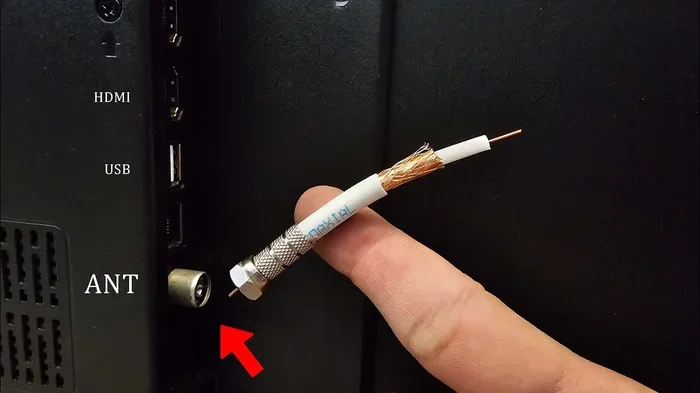
Can You Connect Two TVs With a Coaxial Cable Easily
Yes, you can connect two TVs with a coaxial cable using a simple splitter or a dedicated distribution setup. This guide covers everything from basic tools to advanced signal tips. You will learn how to set up your multiple TV system without calling a technician. The process is easier than most people think and saves money on extra cable runs. Keep reading to find the best method for your home setup.
Have you ever wanted to watch different channels on two TVs at the same time? Maybe you have a TV in the living room and another in the bedroom. Or perhaps you want to share one cable connection between two rooms. Whatever your reason is, connecting two TVs with a coaxial cable is a practical solution. It is simple, affordable, and does not require advanced technical skills.
In this guide, we will walk you through every step. You will learn what equipment you need, how to set things up, and how to avoid common mistakes. We will also compare coaxial cable to other connection methods. By the end, you will feel confident setting up your own multi-TV system. Let us get started.
Key Takeaways
- A coaxial cable splitter is the easiest way to connect two TVs to one cable source.
- Signal loss is a real concern when splitting a coaxial connection between multiple TVs.
- You need basic tools like a coaxial splitter, cables, and possibly a signal amplifier.
- RG6 coaxial cable is the standard for modern TV installations and offers the best performance.
- Common problems include weak signal and pixelation, which can be fixed with a few simple steps.
- HDMI and other alternatives exist, but coaxial remains a reliable and cost-effective option.
- Proper grounding and cable management help prevent interference and extend equipment life.
📑 Table of Contents
- What Is a Coaxial Cable and How Does It Work?
- Can You Connect Two TVs With a Coaxial Cable?
- How to Connect Two TVs Using a Coaxial Cable
- Tools and Equipment You Will Need
- Common Problems and How to Fix Them
- Coaxial Cable vs Other Connection Methods
- Quick Tips for the Best Setup
- Common Mistakes to Avoid
- Expert Insights: Getting the Most From Your Coaxial Setup
- Final Thoughts
What Is a Coaxial Cable and How Does It Work?
A coaxial cable is a type of electrical cable used to transmit radio frequency signals. It has been around for decades and remains one of the most common cables in home entertainment setups. The cable has a central copper conductor surrounded by insulation, a metallic shield, and an outer protective jacket.
Coaxial cables are designed to carry cable TV signals and internet data with minimal interference. The shielding layer protects the inner conductor from electromagnetic noise. This is why coaxial connections deliver a clean and stable signal over long distances. You will find coaxial outlets on walls in most homes with cable TV service.
Types of Coaxial Cables
Not all coaxial cables are the same. The two most common types used in TV setups are RG59 and RG6.
- RG59: This is an older, thinner cable. It works for short runs but has higher signal loss over distance.
- RG6: This is the modern standard. It has a thicker copper core and better shielding. RG6 coaxial cable is the best choice for most home installations.
If you are buying new cable, always go with RG6. It provides better signal quality and handles longer cable runs without noticeable signal loss. For connecting two TVs, you will typically need two to three RG6 cables depending on your setup.
Can You Connect Two TVs With a Coaxial Cable?
The short answer is yes. You can absolutely connect two TVs using a single coaxial cable source. The key is using a device called a coaxial cable splitter. This small box takes one incoming signal and divides it into two or more outputs. Each output then connects to a separate TV.
However, there is a catch. When you split a signal, each TV gets a weaker version of the original signal. This is called signal loss or insertion loss. The more TVs you connect to one splitter, the weaker the signal becomes. For two TVs, the loss is usually manageable. But if you plan to connect three or more TVs, you may need a signal amplifier to boost the strength.
When Does a Coaxial Splitter Work Best?
A coaxial splitter works well in these situations:
- You have a strong incoming cable or antenna signal to begin with.
- The two TVs are relatively close to each other or to the main cable outlet.
- You are using a quality RF splitter rated for the frequency range of your TV signals.
- You are not experiencing pixelation or buffering on either TV after the split.
If your signal is already weak before the split, adding a splitter will make things worse. In that case, consider using a signal amplifier between the wall outlet and the splitter. This boosts the incoming signal so both TVs receive a strong enough picture.
How to Connect Two TVs Using a Coaxial Cable
Setting up two TVs with a coaxial cable is straightforward. You do not need professional help. Follow these steps and you will be watching TV on both screens in no time.
Step 1: Gather Your Tools and Equipment
Before you start, make sure you have everything ready. Here is what you will need:
- One coaxial cable splitter (a 1-input to 2-output splitter)
- Two RG6 coaxial cables (length depends on the distance to each TV)
- A coaxial wall outlet or a cable line coming from your provider
- Coaxial cable stripper or cutter (optional, for custom cable lengths)
- F-type connectors (if your cables do not already have them attached)
- A signal amplifier (optional, if you notice weak signal after splitting)
Having everything ready before you start saves time and frustration. Lay out your tools and cables so they are easy to reach.
Step 2: Turn Off All TVs and the Cable Source
This is a simple but important step. Power off both TVs and unplug the cable source if possible. Working with live connections can sometimes cause signal spikes or damage to equipment. Safety first.
Step 3: Connect the Splitter to the Wall Outlet
Take your first coaxial cable and connect one end to the coaxial wall outlet. Screw it on clockwise until it is snug but do not overtighten. Connect the other end of that cable to the input port on the coaxial splitter. Most splitters have one input port labeled “IN” or “INPUT.”
Step 4: Connect Each TV to the Splitter
Now take your two RG6 cables. Connect one end of each cable to the output ports on the splitter. These ports are usually labeled “OUT 1” and “OUT 2.” Run one cable to TV number one and the other to TV number two. Screw the connectors onto the TV’s coaxial input port, which is often labeled “ANT IN” or “CABLE IN.”
Step 5: Power On and Scan for Channels
Turn on both TVs. Go to the input or source menu on each TV and select the coaxial or antenna input. Run a channel scan on each TV. This tells the TV to search for all available channels through the coaxial connection. If everything is set up correctly, both TVs should display the same channels.
Step 6: Test the Signal Quality
Watch a few channels on both TVs. Check for a clear picture without pixelation or freezing. If the picture looks fuzzy or breaks up, your signal might be too weak. Move to the troubleshooting section below for solutions.
Tools and Equipment You Will Need
Setting up a two-TV coaxial system requires a few basic pieces of equipment. Here is a closer look at what each item does and why it matters.
Coaxial Cable Splitter
The splitter is the centerpiece of your setup. It divides one incoming signal into multiple outputs. For two TVs, a simple 1-to-2 splitter works perfectly. These splitters are inexpensive, usually costing between five and fifteen dollars.
Look for a splitter that is rated for the full frequency range of your TV signals. Most modern cable and antenna signals fall between 5 MHz and 2150 MHz. A good splitter will handle this range without degrading the picture quality.
Signal Amplifier
A signal amplifier is not always necessary, but it helps in certain situations. If your cable signal is already weak, splitting it between two TVs will make it even weaker. An amplifier boosts the signal before it reaches the splitter, compensating for the loss.
You install the amplifier between the wall outlet and the splitter. It typically plugs into a wall outlet for power and has one input and two or more outputs. Some amplifiers also come built into splitters, which is a convenient all-in-one solution.
Coaxial Cables
Always use RG6 coaxial cable for TV installations. RG6 has a thicker conductor and better shielding than RG59. This means less signal loss and a cleaner picture. Buy cables that are long enough to reach from the splitter to each TV without stretching or bending sharply.
Common Problems and How to Fix Them
Even with a simple setup, you might run into issues. Here are the most common problems and their solutions.
Weak or No Signal on One TV
If one TV shows a weak signal while the other works fine, the problem is likely with the cable or connection to that TV. Try swapping the cables between the two TVs. If the problem moves to the other TV, the original cable is faulty. Replace it with a new RG6 cable.
Also check that the connector is screwed on tightly. A loose coaxial connection causes signal dropouts. Tighten it gently with your hand or use a wrench wrapped in a cloth to avoid damaging the connector.
Pixelation or Freezing Picture
Pixelation happens when the signal is too weak or noisy. This is common when using a splitter because each TV gets a divided signal. Here is what you can do:
- Add a signal amplifier before the splitter to boost the incoming signal.
- Replace old or damaged cables with fresh RG6 cables.
- Check all connections for tightness and proper seating.
- Move the splitter closer to the wall outlet to reduce cable run length.
No Channels Found After Scanning
If a TV finds no channels, the most likely cause is that it is on the wrong input. Go to the input or source menu and make sure the TV is set to “Antenna” or “Cable” input. Also try running the channel scan again. Sometimes the first scan misses channels, and a second attempt picks them up.
Signal Drops During Storms
Coaxial cables carrying over-the-air antenna signals can be affected by weather. Heavy rain, wind, and lightning can cause temporary signal drops. This is normal and usually resolves once the weather clears. If the problem persists, check all outdoor connections for moisture damage and ensure your antenna is properly grounded.
Coaxial Cable vs Other Connection Methods
While coaxial cable is a great option, it is not the only way to connect two TVs. Here is how coaxial compares to other popular methods.
Coaxial Cable vs HDMI
HDMI is the gold standard for high-definition video and audio. It carries uncompressed digital signals and supports 4K and even 8K resolution. However, HDMI cables are limited by length. A standard HDMI cable works well up to about 50 feet. Beyond that, you need an active HDMI extender or fiber optic cable.
Coaxial cable, on the other hand, can run much longer without significant signal loss. If your TVs are far apart, coaxial has a clear advantage. However, HDMI provides better picture and sound quality when distance is not an issue.
Coaxial Cable vs HDMI Splitter
An HDMI splitter takes one HDMI source and sends it to multiple TVs. This works great for displaying the same content on both screens. However, HDMI splitters can be expensive, especially for 4K content. They also require powered extenders for long cable runs.
A coaxial setup is much cheaper and simpler. The downside is that coaxial does not carry the same high-definition quality as HDMI. For standard definition or basic cable channels, coaxial works perfectly fine.
Coaxial Cable vs Wireless Streaming
Wireless streaming devices like Chromecast or Roku let you send content from one source to multiple TVs over Wi-Fi. This is convenient and eliminates cables entirely. But wireless streaming depends on a strong and stable internet connection. If your Wi-Fi is weak, the streaming quality will suffer.
Coaxial cable provides a direct, wired connection that is not affected by Wi-Fi congestion or interference. For reliable, consistent viewing, coaxial is hard to beat.
| Feature | Coaxial Cable | HDMI | Wireless Streaming |
|---|---|---|---|
| Max Distance | Up to 100+ feet | Up to 50 feet | Depends on Wi-Fi |
| Signal Quality | Good for SD/HD | Excellent (4K/8K) | Good (depends on internet) |
| Cost | Low | Moderate | Low to moderate |
| Ease of Setup | Very easy | Easy | Very easy |
| Interference Risk | Low | None (digital) | Moderate (Wi-Fi dependent) |
| Best For | Multiple TVs, long runs | Single HD/4K TVs, short runs | Casual streaming, flexibility |
Quick Tips for the Best Setup
Here are some expert tips that make a big difference in your setup quality:
- Use a high-quality splitter. Cheap splitters introduce more signal loss and can degrade your picture. Look for splitters rated for broadband or high-frequency use.
- Keep cable runs as short as possible. Shorter cables mean less signal loss. Plan your cable routes before cutting or purchasing cables.
- Avoid sharp bends in the cable. Coaxial cables should not be bent at angles tighter than 90 degrees. Sharp bends can damage the inner conductor and cause signal problems.
- Use cable clips or ties to keep cables neat and prevent them from being tripped over or pulled loose.
- Label your cables. It sounds simple, but labeling which cable goes to which TV saves confusion during troubleshooting.
- Ground your outdoor antenna. If you use an antenna with a coaxial connection, proper grounding protects against lightning strikes and reduces interference.
Common Mistakes to Avoid
Even a simple setup can go wrong if you make careless mistakes. Here are the most common ones to watch out for:
- Using the wrong type of splitter. A 2-way splitter divides the signal into two equal parts. A 3-way splitter divides it into three parts, and each output gets even weaker. Only use the number of outputs you actually need.
- Overtightening connectors. Cranking down on coaxial connectors too hard can damage the threads or the cable itself. Hand-tighten and then give it a quarter turn with a wrench.
- Ignoring signal loss. Every splitter adds some loss to the signal. If you notice problems after splitting, do not ignore them. Add an amplifier or shorten your cable runs.
- Using old RG59 cable for long runs. RG59 is outdated and loses signal quickly over distance. Always choose RG6 for modern installations.
- Forgetting to run a channel scan. After any change to your coaxial setup, always rescan for channels on each TV. This ensures the TV picks up all available channels through the new configuration.
Expert Insights: Getting the Most From Your Coaxial Setup
Professional installers follow a few best practices that make a huge difference in performance. Here is what the experts know.
First, always check your signal strength before adding a splitter. You can use a signal meter or even your TV’s built-in signal diagnostic tool. If your incoming signal is strong, a basic splitter will work fine. If it is marginal, an amplifier is essential.
Second, invest in a good-quality coaxial cable splitter. The difference between a cheap splitter and a quality one is noticeable. Quality splitters have lower insertion loss and better return loss, meaning more of your signal reaches the TVs and less is reflected back into the line.
Third, consider your multiple TV setup from the start. If you know you will eventually add a third or fourth TV, buy a larger splitter now rather than adding one later. This avoids signal degradation from cascading multiple splitters together.
Finally, keep your cables away from power lines and electrical devices. Coaxial cables can pick up electromagnetic interference from nearby wiring, which shows up as static or ghosting on your screen. Keep coaxial cables at least a few inches away from power cords for cleanest signal quality.
Final Thoughts
Connecting two TVs with a coaxial cable is one of the easiest and most affordable ways to share a cable source between multiple screens. With a splitter, a couple of RG6 cables, and about 20 minutes of your time, you can have both TVs up and running. The process is simple enough for anyone to do, and the results are reliable.
Remember to pay attention to signal quality. If you notice any issues, a signal amplifier or better cables can solve most problems. Avoid the common mistakes we covered, and your setup will work smoothly for years to come.
Whether you are setting up a second TV in the bedroom or creating a multi-room viewing system, coaxial cable gets the job done. It is a proven technology that continues to work well in modern homes. Give it a try, and enjoy your favorite shows on every TV in the house.
Frequently Asked Questions
Do I need a special splitter to connect two TVs with coaxial cable?
You need a basic 1-to-2 coaxial cable splitter, which is widely available and inexpensive. Make sure the splitter is rated for the frequency range of your TV signals. A standard broadband splitter works for most cable and antenna setups.
Will connecting two TVs to one coaxial cable reduce picture quality?
There will be some signal loss when you split a coaxial connection. However, for most setups with two TVs, the quality loss is minimal and not noticeable. If you see pixelation, adding a signal amplifier fixes the problem.
Can I connect more than two TVs with coaxial cable splitters?
Yes, you can use a larger splitter to connect three or more TVs. Keep in mind that each additional output reduces the signal strength further. For three or more TVs, a signal amplifier is highly recommended to maintain good picture quality.
What type of coaxial cable should I use for connecting two TVs?
Always use RG6 coaxial cable for modern TV installations. RG6 has better shielding and a thicker conductor than older RG59 cable. It provides superior signal quality and works well for longer cable runs between the splitter and each TV.
Do I need any special tools to set up a coaxial cable connection between two TVs?
Basic tools are all you need. You will need coaxial cables with F-type connectors already attached, and a coaxial splitter. A cable stripper is helpful if you need to cut custom-length cables, but pre-cut cables with connectors save time and effort.
Can I use a coaxial cable splitter for both cable TV and antenna signals?
Yes, a coaxial cable splitter works for both cable TV and over-the-air antenna signals. The splitter simply divides the incoming RF signal, regardless of the source. Just make sure your splitter handles the full frequency range used by your signal source for the best results.
=== CONCLUSION ===
Connecting two TVs with a coaxial cable is simple, cost-effective, and works reliably in most homes. You just need a coaxial splitter, a couple of RG6 cables, and about 20 minutes. The setup gives you the freedom to watch different channels on multiple screens without complicated equipment or professional installation.
Keep an eye on signal quality, use quality components, and avoid common setup mistakes. With the right approach, your two-TV coaxial system will deliver a great viewing experience for years to come. Start your setup today and enjoy your favorite content on every screen in your home.