Can Usb Loader Gx Play From Sd Card Without Hassle
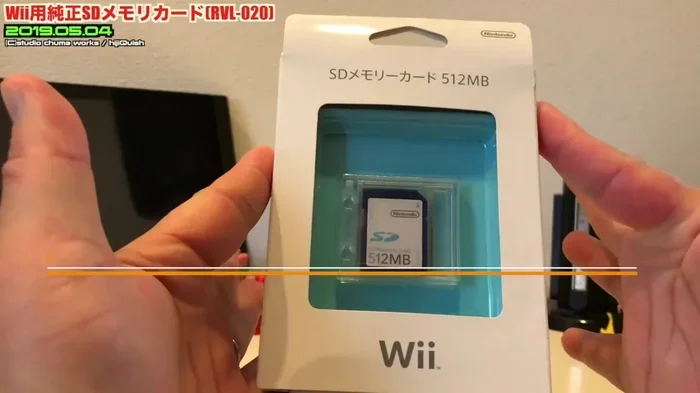
Can USB Loader GX play from SD card? The short answer is yes, but with some important caveats. USB Loader GX supports SD cards and SDHC cards up to 32 GB, letting you store and launch Wii and GameCube backups directly from your console. This guide walks you through every step, from SD card formatting to USB Loader GX settings, so you can get gaming without the headache.
If you own a Wii console and love playing backed-up games, you have probably heard of USB Loader GX. It is one of the most popular homebrew applications for the Wii, and it lets you load game backups from external storage. But here is the question that keeps popping up in forums and chat rooms: can USB Loader GX play from SD card?
The answer is a definite yes. USB Loader GX can read games from both SD cards and USB drives. However, there are a few things you need to know before you dive in. Not all SD cards work the same way, and the setup process has some specific steps you must follow. In this guide, we will walk you through everything you need to know about using USB Loader GX with an SD card. Whether you are a complete beginner or someone who has tried and failed before, this article will help you get it right.
Key Takeaways
- USB Loader GX works with SD cards: You can load Wii and GameCube backups directly from a formatted SD card.
- SDHC cards up to 32 GB are supported: Stick to FAT32 formatting for the best compatibility with your Wii console.
- Setup is straightforward: With the Homebrew Channel and a few patches, you can have your games running in minutes.
- Speed class matters: A faster SD card improves load times and reduces stuttering during gameplay.
- Common issues have simple fixes: Most problems with USB Loader GX and SD cards come down to formatting or outdated software.
📑 Table of Contents
- What Is USB Loader GX and How Does It Work?
- Can USB Loader GX Play From SD Card? The Full Answer
- How to Set Up USB Loader GX with an SD Card
- SD Card Speed Class and Performance Tips
- Common Problems and How to Fix Them
- USB Loader GX SD Card vs USB Drive: Which Is Better?
- Advanced Tips for Power Users
- Final Thoughts on Using USB Loader GX with an SD Card
What Is USB Loader GX and How Does It Work?
USB Loader GX is a homebrew application designed for the Nintendo Wii console. It allows you to load copied or backup copies of Wii and GameCube games from external storage devices. The tool works through the Homebrew Channel, which is a custom software environment you install on your Wii.
Here is how the basic process works. First, you install the Homebrew Channel on your Wii. This requires a softmod, which means you modify the console software without opening the hardware. Once the Homebrew Channel is running, you launch USB Loader GX from it. The loader then reads your game files from the connected storage device and boots the game directly on your Wii.
Why Use an SD Card Instead of a USB Drive?
You might wonder why anyone would use an SD card instead of a USB flash drive or external hard drive. There are a few good reasons:
- Compact size: SD cards are tiny and easy to manage. You can carry one in your wallet.
- No extra cables: The Wii has a built-in SD card slot, so you do not need any additional hardware.
- Quiet operation: SD cards have no moving parts, which means no noise during gameplay.
- Lower power draw: The Wii does not need to power an external device, which can help with stability.
That said, USB drives often offer faster read speeds and larger storage capacities. But for many Wii users, the convenience of an SD card makes it the preferred choice.
Can USB Loader GX Play From SD Card? The Full Answer
Let us get straight to the point. Can USB Loader GX play from SD card? Yes, it absolutely can. USB Loader GX supports both standard SD cards and SDHC cards up to 32 GB. The console itself limits SD card support, so you cannot use a 64 GB or 128 GB card without additional workarounds.
Here is what you need to know about compatibility:
- Standard SD cards: Up to 2 GB. These work flawlessly with USB Loader GX and the Wii console.
- SDHC cards: 4 GB to 32 GB. These are fully supported and are the most common choice for Wii users.
- SDXC cards: 64 GB and above. These are not natively supported by the Wii. You would need a special workaround, which we will cover later.
When you ask, can USB Loader GX play from SD card, the real answer depends on how you format and prepare that card. A properly formatted FAT32 SD card will work perfectly with USB Loader GX. The key is following the right steps, which we will cover in detail.
Supported File Systems
The Wii console only recognizes certain file systems on SD cards. USB Loader GX inherits this limitation, so you must format your card correctly:
- FAT16: Works with SD cards up to 2 GB. Rarely used today.
- FAT32: The most common and recommended format for SD cards up to 32 GB.
- NTFS and exFAT: Not supported by the Wii. If your card uses these formats, the console will not read it.
Always format your SD card to FAT32 before using it with USB Loader GX. This is the single most important step in the entire process.
How to Set Up USB Loader GX with an SD Card
Setting up USB Loader GX to play games from an SD card is not complicated, but it does require attention to detail. Follow these steps carefully and you will be gaming in no time.
Step 1: Format Your SD Card
Before you do anything else, format your SD card to FAT32. You can do this on Windows, Mac, or Linux. On Windows, right-click the SD card in My Computer, select Format, choose FAT32, and click Start. On a Mac, use Disk Utility and select MS-DOS (FAT) as the format.
Quick Tip: Always back up your files before formatting. Formatting erases everything on the card.
Step 2: Install the Homebrew Channel
You need the Homebrew Channel installed on your Wii before you can use USB Loader GX. The Homebrew Channel is a custom launcher that lets you run homebrew applications. You can install it through various Wii softmod methods. The most popular and safest method uses the HackMii Installer.
Once the Homebrew Channel is on your Wii, you are ready for the next step.
Step 3: Download and Install USB Loader GX
Download the latest version of USB Loader GX from a trusted source. You will get a .wad or .elf file. Use the Homebrew Channel or a tool like WAD Manager to install the loader on your Wii. Once installed, you can launch USB Loader GX directly from the Homebrew Channel.
Step 4: Copy Game Files to Your SD Card
Now comes the fun part. You need to copy your Wii or GameCube game backups to the SD card. The standard folder structure matters here:
- Wii games: Place .iso files in the root directory or in a dedicated games folder.
- GameCube games: Place the game files in the apps/USB Loader GX folder on the SD card, or use the standard GameCube folder structure.
Quick Tip: Keep your file names simple. Avoid special characters or spaces in the file names, as they can cause compatibility issues with USB Loader GX.
Step 5: Configure USB Loader GX Settings
Launch USB Loader GX from the Homebrew Channel. Go to the settings menu and configure the following:
- Source: Set this to SD Card so the loader knows where to look for games.
- File System: Select FAT32 to match your card format.
- NAND Emulation: Enable this if you want to save game data to the SD card instead of the Wii console’s internal memory.
- Cover Art: You can enable cover art display if you have downloaded cover images for your games.
Once your settings are configured, USB Loader GX will scan your SD card and display all the games it finds. Select a game and press Start to launch it.
SD Card Speed Class and Performance Tips
Not all SD cards are created equal. When you are using USB Loader GX to play games from an SD card, the speed of the card can make a big difference in your experience.
Understanding SD Card Speed Classes
SD cards come with speed class ratings that indicate their minimum write speed. Here is what you need to know:
- Class 4: Minimum 4 MB/s write speed. Works but may cause slow load times.
- Class 6: Minimum 6 MB/s. A solid choice for most Wii gaming needs.
- Class 10: Minimum 10 MB/s. The recommended class for smooth gameplay.
- UHS-I (U1/U3): Even faster than Class 10. Great if you want the best performance.
For the best experience with USB Loader GX, use a Class 10 or higher SD card. You will notice faster game loading times and fewer stuttering issues during cutscenes or gameplay transitions.
Other Performance Tips
- Avoid full cards: Keep at least 10% of your SD card free. A nearly full card slows down read speeds significantly.
- Use quality brands: SanDisk, Samsung, and Kingston make reliable SD cards that work well with the Wii.
- Defragment occasionally: If you frequently add and remove games, defragmenting your SD card can improve performance.
- Keep the card clean: Wipe the contacts gently with a dry cloth if you notice read errors.
Common Problems and How to Fix Them
Even with the best preparation, you might run into issues when using USB Loader GX with an SD card. Here are the most common problems and their solutions.
SD Card Not Recognized
If your Wii does not recognize the SD card, the first thing to check is the format. Make sure it is FAT32. If it is formatted as NTFS or exFAT, the Wii will not read it. Also, try reinserting the card and making sure it is fully seated in the slot.
Another common cause is a damaged card. Try the card in a different device to see if it still works. If it does not, you may need to replace it.
Games Not Showing Up in USB Loader GX
If USB Loader GX does not display your games, check the folder structure on your SD card. Make sure your .iso files are in the correct location. Also, verify that the files are not corrupted. Re-download the game files if needed.
Sometimes, simply restarting USB Loader GX or the Wii console will force the loader to rescan the SD card and find the missing games.
Slow Load Times or Stuttering
Slow performance is usually a speed class issue. Upgrade to a Class 10 or UHS-I SD card for better results. Also, check that your SD card is not nearly full, as this can significantly slow down read speeds.
If the problem persists, try moving your games to a USB drive instead. USB drives typically offer faster read speeds than SD cards, which can dramatically improve load times.
Error Messages During Game Launch
Error codes when launching games from an SD card can be frustrating. Common errors include error 1001, error 1013, and the dreaded black screen. Most of these issues relate to:
- Outdated cIOS: Make sure you have the latest cIOS installed. This is a custom IOS that USB Loader GX relies on to function properly.
- Incompatible game files: Some game backups are corrupted or incomplete. Re-download the files from a trusted source.
- SD card compatibility: Not all brands and models work perfectly. Try a different SD card if you keep getting errors.
USB Loader GX SD Card vs USB Drive: Which Is Better?
Now that you know can USB Loader GX play from SD card, you might be wondering whether an SD card or a USB drive is the better option. Let us compare the two so you can make an informed decision.
| Feature | SD Card | USB Drive |
|---|---|---|
| Convenience | Plugs directly into the Wii | Requires USB port and sometimes a powered hub |
| Max Capacity | Up to 32 GB natively | Up to several TB |
| Speed | Good with Class 10 cards | Generally faster, especially with SSDs |
| Portability | Very portable | Bulkier and needs a cable |
| Price per GB | Higher for larger capacities | Lower for larger capacities |
| Noise | Silent | Some drives have audible noise |
| Compatibility | Native Wii SD slot support | Requires USB port and proper cIOS |
For most casual Wii homebrew users, an SD card is the simpler and more convenient option. But if you have a large game collection or want the fastest possible load times, a USB drive is the way to go. Many advanced users actually use both, keeping frequently played games on a fast USB drive and smaller titles on an SD card.
Advanced Tips for Power Users
If you are comfortable with more technical aspects of your Wii setup, here are some advanced tips to get the most out of USB Loader GX with your SD card.
Enable NAND Emulation
NAND emulation lets you store your Wii save data on the SD card instead of the console’s internal memory. This is incredibly useful if you run out of internal storage or if you want to back up your saves. To enable it, go to the USB Loader GX settings, find the NAND Emulation option, and turn it on. Your saves will be stored in a dedicated folder on the SD card.
Use Custom Themes and Covers
USB Loader GX supports custom themes and cover art. You can download or create your own theme files and place them in the appropriate folder on your SD card. This makes your game library look polished and professional. You can also download cover art packs for thousands of Wii and GameCube games online.
Keep Your Software Updated
The Wii homebrew community is active and constantly improving tools. Make sure you keep USB Loader GX, your cIOS, and the Homebrew Channel updated to the latest versions. Updates often fix bugs, improve compatibility, and add new features. Check the official USB Loader GX website or community forums for the latest releases.
Final Thoughts on Using USB Loader GX with an SD Card
So, can USB Loader GX play from SD card? Absolutely. With the right preparation, a properly formatted SD card, and a working Homebrew Channel, you can enjoy your favorite Wii and GameCube games directly from an SD card without any hassle. The process is straightforward, the hardware is compact, and the results are satisfying.
Remember to always format your card as FAT32, use a Class 10 or faster card, and keep your software updated. If you run into issues, the troubleshooting steps in this guide should help you resolve them quickly. The Wii homebrew community has created an amazing ecosystem of tools, and USB Loader GX is one of the best examples of what makes this scene so special.
Now that you have all the information you need, grab an SD card, format it, copy your favorite games, and get ready to play. Happy gaming!
Frequently Asked Questions
Can USB Loader GX read SDHC cards?
Yes, USB Loader GX fully supports SDHC cards up to 32 GB. The Wii console itself supports SDHC cards in its built-in SD card slot, and USB Loader GX reads from them without any issues. Just make sure the card is formatted as FAT32 before use.
Why won’t my SD card work with USB Loader GX?
The most common reason is incorrect formatting. If your SD card is formatted as NTFS or exFAT, the Wii will not recognize it. Reformat the card to FAT32 and try again. Also check that the card is not damaged and that it is fully inserted into the Wii’s SD slot.
What is the best SD card for USB Loader GX?
A Class 10 SD card from a reputable brand like SanDisk, Samsung, or Kingston is the best choice. Look for cards with a minimum write speed of 10 MB/s. These cards offer fast load times and reliable performance with USB Loader GX and the Wii console.
Can I use a 64 GB SD card with USB Loader GX?
The Wii does not natively support SDXC cards (64 GB and above). However, some users have had success with workarounds that involve formatting the card to FAT32 using special tools. These methods are not officially supported and may be unstable. Sticking to a 32 GB SDHC card is the safest and most reliable option.
Do I need the Homebrew Channel to use USB Loader GX?
Yes, the Homebrew Channel is required. USB Loader GX is a homebrew application, which means it can only run through the Homebrew Channel. You will need to softmod your Wii and install the Homebrew Channel before you can use USB Loader GX with your SD card.
Is it legal to play backup games with USB Loader GX?
The legality of playing backup games varies by country and depends on your local laws. In many regions, owning a backup copy of a game you already own is considered legal, but distributing or downloading copyrighted game files is not. Always make sure you own the original game before creating or playing a backup copy. This article is for informational purposes only.
=== CONCLUSION ===
Can USB Loader GX play from SD card? Yes, and now you know exactly how to make it work. From formatting your card to configuring the loader settings, every step is within your reach. The combination of USB Loader GX and a well-prepared SD card gives you a simple, reliable way to enjoy your favorite Wii and GameCube games on your console. Follow the tips in this guide, avoid the common mistakes, and you will be up and running in no time. Happy gaming!