Can I Use A Higher Wattage Charger For My Lenovo Laptop
Yes, you can use a higher wattage charger for your Lenovo laptop in most cases. Your laptop only draws the power it needs, so a bigger charger simply provides extra capacity. This means faster charging is possible, and your battery stays safe as long as the voltage matches.
Have you ever grabbed a charger from another laptop and wondered if it would work with your Lenovo machine? Maybe you found a beefier charger at a garage sale or borrowed one from a friend. The question of whether you can use a higher wattage charger for your Lenovo laptop comes up all the time.
The short answer is yes. In most situations, plugging in a charger with a higher wattage rating is perfectly safe. Your laptop is smart enough to take only the power it needs. But there are a few things you should know before you plug in and start charging. Let us walk through everything you need to understand about using a higher wattage charger with your Lenovo laptop.
Key Takeaways
- Higher wattage is generally safe: Your Lenovo laptop pulls only the power it needs from any charger.
- Voltage must match: Always check that the voltage of the new charger matches your laptop’s original specs.
- USB-C chargers offer flexibility: Many modern Lenovo laptops support USB-C power delivery, making charger swaps easier.
- OEM chargers are best: Using a genuine Lenovo charger reduces the risk of compatibility issues.
- Watch for overheating: If your laptop gets unusually hot, disconnect the charger and check the wattage match.
- Check your model’s requirements: Every Lenovo laptop has a specific power rating listed on the bottom label or in the manual.
- Third-party chargers work too: As long as they meet the voltage and connector requirements, they are safe to use.
📑 Table of Contents
Understanding Wattage and Your Lenovo Laptop
What Does Wattage Actually Mean?
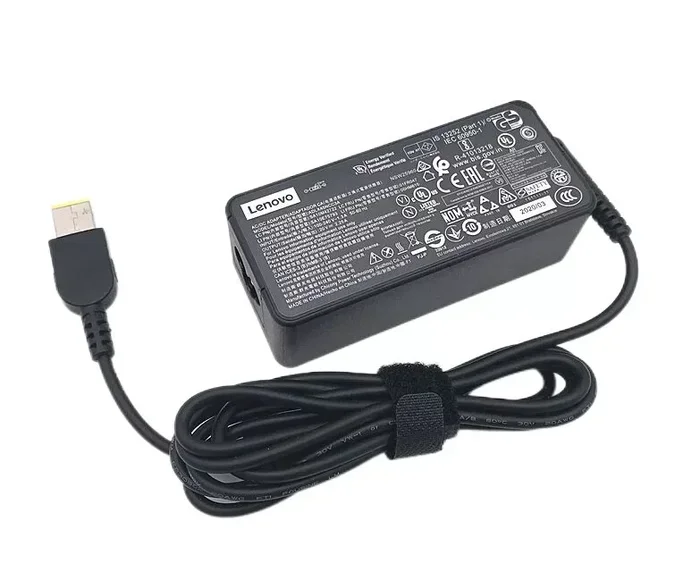
Wattage is a measure of power. It tells you how much electrical energy a charger can deliver to your device. You will usually see this number printed on the side of your charger brick. Common Lenovo charger ratings include 45 watts, 65 watts, 90 watts, and sometimes even 135 watts.
Think of it like a water pipe. A higher wattage charger is like a wider pipe. It can push more water through, but your faucet (your laptop) only opens the valve as much as it needs. The pipe does not force extra water into your faucet just because it can.
Your laptop has a specific wattage rating that tells you how much power it was designed to accept. This number is usually printed on a sticker on the bottom of your laptop or listed in the user manual. When you look up your model number, you can find the exact power requirements for your device.
How Your Lenovo Power Adapter Works
Every Lenovo power adapter converts AC power from your wall outlet into DC power your laptop can use. The charger has two key numbers: voltage and amperage. Wattage is simply voltage multiplied by amperage.
Here is a quick breakdown:
- Voltage (V): This is the electrical pressure. It must match your laptop exactly.
- Amperage (A): This is the current flow. A charger can provide more amperage than your laptop needs.
- Wattage (W): This is the total power output. Higher wattage means the charger can deliver more power if the laptop asks for it.
When you use a charger with a higher wattage, you are giving your laptop access to more power than it needs. But your laptop will only draw what it requires. This is why using a higher wattage charger is generally safe and will not damage your battery.
Can You Safely Use a Higher Wattage Charger?
The Short Answer
Yes, you can safely use a higher wattage charger for your Lenovo laptop. Your laptop’s internal charging circuit controls how much power it accepts. It does not matter if the charger is rated at 65 watts, 90 watts, or even 135 watts. Your laptop will only pull the power it needs.
This is true for almost all modern laptops, including Lenovo ThinkPad and Lenovo IdeaPad models. The charging system is designed with safety in mind. It regulates the incoming power and prevents overloading.
Why Higher Wattage Is Generally Safe
There are a few reasons why using a higher wattage charger works without problems:
- Your laptop controls the draw: The charging circuit inside your laptop decides how much power to pull from the charger.
- Extra capacity is unused: A 90-watt charger connected to a laptop that only needs 45 watts will simply deliver 45 watts.
- No overcharging risk: Modern laptops stop drawing power once the battery is full, regardless of the charger’s wattage.
- Lenovo designs for flexibility: Many Lenovo laptops work with a range of charger sizes, especially newer models with USB-C charging.
The key thing to remember is that voltage must match. If your laptop needs 20 volts, the charger must also provide 20 volts. The amperage and wattage can be higher without any issue.
Which Lenovo Laptops Handle Higher Wattage Best?
ThinkPad Series Compatibility
The Lenovo ThinkPad line is known for its robust power systems. Models like the ThinkPad X1 Carbon, ThinkPad T-series, and ThinkPad L-series often come with 65-watt or 90-watt chargers. These laptops can easily accept a higher wattage charger without any problems.
ThinkPads are built for business use, so they have strong internal power regulation. If you own a ThinkPad, you can confidently use a higher wattage power adapter from another ThinkPad or even from a different Lenovo line. The charging process will remain stable and safe.
Some ThinkPad models also support USB-C power delivery, which adds even more flexibility. You can use a USB-C charger with a higher wattage rating, and your laptop will handle the rest.
IdeaPad and Yoga Series
The Lenovo IdeaPad and Yoga series are consumer laptops that also handle higher wattage chargers well. Most IdeaPad models come with 45-watt or 65-watt chargers. You can plug in a 90-watt charger, and your laptop will charge at its normal rate.
Yoga laptops, with their convertible designs, are no different. They use the same internal charging technology as other Lenovo laptops. A higher wattage USB-C charger works great with Yoga models that support USB-C charging.
One thing to watch for is the physical connector. Older IdeaPad models use a barrel connector, while newer ones use USB-C. Make sure you have the right connector or adapter for your specific model.
| Lenovo Series | Typical Charger Wattage | Supports Higher Wattage? | Connector Type |
|---|---|---|---|
| ThinkPad X1 Carbon | 65W – 90W | Yes | USB-C or Barrel |
| ThinkPad T14/T16 | 65W – 90W | Yes | USB-C |
| IdeaPad 5 | 45W – 65W | Yes | USB-C or Barrel |
| Yoga 7i | 45W – 65W | Yes | USB-C |
| IdeaPad Slim 3 | 45W | Yes | Barrel |
| ThinkPad E Series | 45W – 65W | Yes | Barrel |
Risks and Things to Watch Out For
Overheating Concerns
While using a higher wattage charger is safe, there is one situation where you should pay attention. If your laptop gets unusually hot while charging, something might be off. This is rare, but it can happen if there is a compatibility issue with a third-party charger.
Overheating is not caused by the higher wattage itself. It usually happens when the charger quality is poor or when the voltage does not match. Always use a reputable charger brand, and make sure the voltage specification matches your laptop exactly.
When It Could Cause Problems
There are a few situations where using a different charger could cause issues:
- Mismatched voltage: If the voltage is wrong, it can damage your laptop. Always check the voltage rating before plugging in.
- Low-quality chargers: Cheap knockoff chargers may not regulate power properly. This can lead to unstable charging.
- Damaged cables: A frayed or damaged USB-C cable can cause charging problems, regardless of the charger wattage.
- Old or worn batteries: If your laptop battery is old, a higher wattage charger may charge it faster, which could generate more heat.
As long as you avoid these pitfalls, using a higher wattage charger for your Lenovo laptop should be a smooth and worry-free experience.
How to Choose the Right Charger for Your Lenovo
Checking Your Laptop’s Power Requirements
Before you buy or use any charger, you need to know what your laptop requires. Here is how to find that information:
- Check the label on the bottom of your laptop. Look for the input voltage and wattage rating.
- Look at your current charger. The output voltage and amperage are printed on the brick.
- Use Lenovo Vantage software. This free app from Lenovo shows your laptop’s power specifications.
- Visit the Lenovo support website. Enter your model number to find the official charger specifications.
Once you know your laptop’s requirements, you can confidently choose a charger that meets or exceeds the wattage. Just make sure the voltage matches exactly.
USB-C vs Barrel Connector Chargers
Modern Lenovo laptops increasingly use USB-C for charging. This is great news for flexibility. A USB-C charger with a higher wattage rating can work with any laptop that supports USB-C power delivery.
Older Lenovo models still use the barrel connector. These chargers are less flexible, but the same wattage rules apply. You can still use a higher wattage barrel charger as long as the connector fits and the voltage matches.
If you have a newer Lenovo laptop, consider investing in a good USB-C GaN charger. These are compact, efficient, and available in higher wattages like 65W, 100W, and even 140W. They are a great option for users who want one charger for multiple devices.
Expert Tips and Common Mistakes
Quick Tips for Safe Charging
- Always match the voltage: This is the one rule you must follow. Check the voltage on both your laptop and charger labels.
- Use a quality charger: Stick with reputable brands or genuine Lenovo chargers for best results.
- Monitor your laptop temperature: If it feels unusually hot while charging, unplug it and check the charger.
- Keep your firmware updated: Lenovo sometimes releases updates that improve charging efficiency and safety.
- Avoid charging in hot environments: High ambient temperatures combined with charging can stress your battery.
Common Mistakes to Avoid
- Using a charger with the wrong voltage: This is the biggest risk. Never use a charger with a different voltage rating.
- Ignoring connector compatibility: A charger with the right specs but the wrong connector will not work.
- Assuming all USB-C chargers are the same: Not all USB-C chargers support the power delivery profiles your laptop needs.
- Using a damaged charger: Frayed cables or cracked bricks can be dangerous. Replace them immediately.
- Overlooking amperage: While amperage can be higher, using a charger with very low amperage may result in slow charging.
By following these tips and avoiding common mistakes, you can confidently use a higher wattage charger with your Lenovo laptop without any concerns. Your laptop will charge safely, and you may even notice faster charging times with a beefier charger.
Conclusion
So, can you use a higher wattage charger for your Lenovo laptop? The answer is a clear yes. Your laptop is designed to handle power intelligently. It will only draw what it needs, and a higher wattage charger simply gives it more capacity to work with.
The most important thing to remember is that voltage must always match. As long as the voltage is correct and the charger is of good quality, you can safely use a higher wattage charger with any Lenovo laptop. Whether you own a ThinkPad, IdeaPad, or Yoga series, the same rules apply.
Next time you find yourself with a bigger charger, do not hesitate to use it. Just check the voltage, make sure the connector fits, and enjoy the peace of mind that comes with knowing your Lenovo laptop is charging safely.
Take a moment today to check your laptop’s power requirements. You might be surprised at how flexible your charging options really are. And if you ever have doubts, the Lenovo support team is always ready to help you find the right charger for your specific model.
Frequently Asked Questions
Will a higher wattage charger damage my Lenovo laptop battery?
No, it will not. Your laptop controls how much power it draws from the charger. A higher wattage charger simply provides more capacity, but your laptop only uses what it needs. Your battery stays safe and healthy with a higher wattage charger.
Can I use a 90W charger on a Lenovo laptop that needs 45W?
Yes, you can. As long as the voltage matches, your 45W laptop will only pull 45W from the 90W charger. The extra capacity is simply available if your laptop ever needs it, such as during heavy workloads.
What happens if I use a charger with a higher voltage?
This can be dangerous and may damage your laptop. Always make sure the voltage matches your laptop’s specifications exactly. The amperage and wattage can be higher, but voltage must be the same.
Can I charge my Lenovo laptop with a USB-C phone charger?
It depends on your laptop model. Many newer Lenovo laptops support USB-C charging, but they need a charger that supports the right power delivery profile. A standard phone charger may not provide enough power. Check your laptop’s USB-C charging requirements first.
Is it better to use the original Lenovo charger or a third-party charger?
The original Lenovo charger is always the safest option because it is designed specifically for your model. However, a quality third-party charger that meets the same voltage and wattage specifications will work just as well. Look for reputable brands with proper safety certifications.
How can I find the exact wattage my Lenovo laptop needs?
Check the label on the bottom of your laptop, look at your current charger’s output specs, or use the Lenovo Vantage software. You can also visit the Lenovo support website and enter your model number to find the official power requirements.
=== CONCLUSION ===
Using a higher wattage charger for your Lenovo laptop is safe, practical, and often beneficial. Your laptop’s internal charging system is smart enough to regulate the power it receives. You do not need to stress about using a charger with a higher wattage rating than what came in the box.
Just remember the golden rule: match the voltage, use a quality charger, and check the connector type. With those three things in place, you can charge your Lenovo laptop with confidence using any compatible charger you have on hand.