Are Laptop Keycaps Universal And What You Need To Know
Are laptop keycaps universal? The short answer is no. Laptop keycaps vary by brand, model, and keyboard layout, making universal replacement nearly impossible. Understanding keycap compatibility, mounting styles, and sizing differences will save you time, money, and frustration when searching for replacement keys.
Have you ever snapped a key off your laptop and thought, “How hard can it be to find a replacement?” Well, here is the honest truth. Are laptop keycaps universal? Not even close. The world of laptop keyboards is far more complicated than most people realize. Every brand, every model, and sometimes even every revision uses different keycap designs. What works on a Dell XPS will not fit on a Lenovo ThinkPad. And don’t even get me started on MacBook keys.
This guide breaks down everything you need to know about laptop keycap compatibility. We will cover why keycaps differ, how to find the right replacement, and common mistakes to avoid. Whether you are a casual user or a tech enthusiast, this article has you covered. Let us dive in.
Key Takeaways
- Laptop keycaps are not universal: Each brand and model uses different sizes, shapes, and mounting mechanisms.
- Keycap compatibility depends on several factors: Including mounting style, key size, layout, and profile.
- Scissor-switch and membrane keyboards use different keycaps than mechanical keyboards: They are not interchangeable.
- Measuring your keycaps before purchasing is essential: A simple ruler can prevent costly mistakes.
- OEM and aftermarket keycap sets exist for popular laptop models: But finding an exact match requires research.
- Replacing laptop keycaps yourself is possible with the right tools: A keycap puller and patience go a long way.
- Always check your laptop model number before buying replacement keycaps: This ensures a proper fit.
📑 Table of Contents
- What Are Laptop Keycaps and Why Do They Matter
- The Truth About Laptop Keycap Compatibility
- Factors That Determine Keycap Compatibility
- Can You Replace Laptop Keycaps
- How to Find the Right Keycaps for Your Laptop
- Common Mistakes When Buying Laptop Keycaps
- Keycap Materials: What You Should Know
- Keycap Replacement for Popular Laptop Brands
- When to Seek Professional Help
- Conclusion
What Are Laptop Keycaps and Why Do They Matter
Understanding Keycap Basics
A keycap is the plastic cover on top of each key on your keyboard. It is the part you actually press with your fingers. Keycaps serve two main purposes. They protect the mechanical switch or rubber dome underneath. They also display the letter, number, or symbol you need to type.
Keycaps might look simple, but they are surprisingly complex. The shape, size, material, and mounting style all matter. A keycap that looks similar to another might not fit at all. This is why laptop keyboard keys are not one-size-fits-all.
Why Keycaps Aren’t One-Size-Fits-All
Different laptops use different keyboard architectures. A scissor switch keyboard found in most modern ultrabooks uses a specific keycap design. A mechanical keyboard uses taller, differently shaped keycaps. Even among laptops with the same type of keyboard, the layout can vary. The spacebar, shift keys, and Enter key often have unique sizes across models.
Here is a quick look at why keycap replacement is not straightforward:
- Keycap size varies: The spacebar alone can be 6.25 units, 6.5 units, or even 7 units wide depending on the laptop.
- Mounting mechanisms differ: Some keycaps snap onto a metal plate, while others clip directly onto switches.
- Profiles vary by brand: Apple uses a unique low-profile design. Dell, HP, and Lenovo each have their own shapes.
- legends and printing methods differ: Laser-etched, pad-printed, and double-shot keycaps all behave differently over time.
Quick Tip: Before buying any replacement keycap, note down your exact laptop model number. You can usually find this on a sticker on the bottom of your laptop or in your system settings.
The Truth About Laptop Keycap Compatibility
How Laptop Keyboards Differ from Desktop Keyboards
Desktop keyboards use standard keycap sizes based on the ANSI or ISO layout. This means a keycap from one desktop keyboard will usually fit another. Laptops break this standard. Because laptop keyboards must be compact, the keycap sizes shrink or shift to save space. The result is a keyboard layout that rarely matches any desktop standard.
For example, a standard desktop Enter key is 2.25 units wide. But on many laptops, the Enter key is narrower or shaped differently. This means you cannot swap a desktop keycap onto a laptop keyboard. The keycap mounting style also differs. Desktop keyboards typically use a cross-slot mount. Laptops often use a snap-in or scissor-mount design.
Scissor Switch vs. Mechanical Keycaps
Most modern laptops use a scissor switch mechanism. These keyboards have short key travel and a stable feel. The keycaps for scissor switches are thin and have a specific snap-on design. Mechanical keyboards, on the other hand, use taller keycaps with a cross-slot mount underneath.
Can you swap mechanical keycaps onto a laptop? Almost never. The keycap compatibility between scissor-switch laptops and mechanical keyboards is virtually zero. The mounting mechanism is completely different. The keycap size and profile do not match either. So if you are looking for laptop keyboard repair through keycap replacement, you need to find keycaps designed specifically for your laptop model.
Expert Insight: Some people try to use Cherry MX keycaps on laptop keyboards. This rarely works. Cherry MX keycaps are designed for mechanical switches with a cross-slot mount. Laptop scissor switches use a completely different attachment system. Always match the keycap to the switch type.
Factors That Determine Keycap Compatibility
Keycap Mounting Style
The keycap mounting style is the single most important factor in compatibility. There are two main types found in laptops:
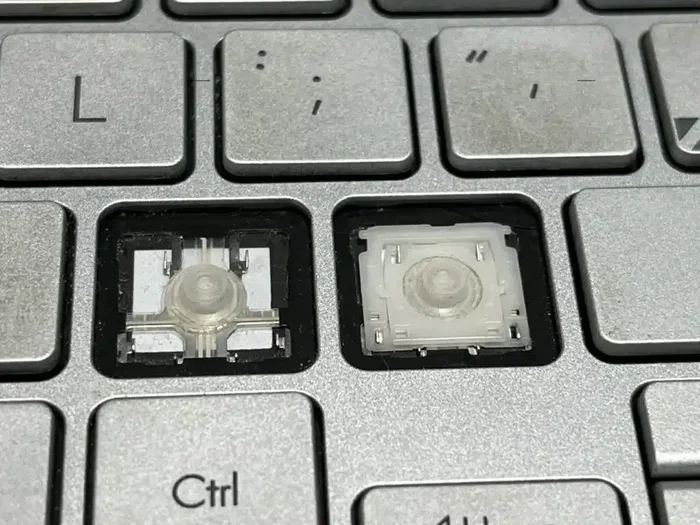
- Scissor-mount keycaps: These have two plastic arms that snap into the scissor mechanism. They are flat and low-profile. Most business laptops and ultrabooks use this style.
- Rubber-dome mount keycaps: Found on older or budget laptops, these simply press down onto a rubber dome. They are slightly thicker than scissor-mount keycaps.
Some high-end gaming laptops use mechanical switches with cross-slot mounts. These accept standard mechanical keycaps. But this is the exception, not the rule. Always identify your laptop’s keyboard switch type before buying replacement keycaps.
Keycap Size and Layout Variations
Even within the same brand, keycap sizes can change from one model to the next. The laptop keyboard layout varies widely. Here are the key areas where sizes differ:
- Spacebar: Ranges from 6 to 7 units wide depending on the model.
- Shift keys: Left and right shift keys often have different sizes.
- Enter key: Can be 2 units, 2.25 units, or an inverted-T shape.
- Backspace: Usually 2 units but can be 1.75 units on some models.
- Function keys: Some laptops group F-keys with media controls, changing the size and shape of those keycaps.
This is why buying a generic keycap set for a laptop is risky. Each key might have a unique size that only fits one specific model.
Keycap Legends and Printing Methods
Keycap legends refer to the letters, numbers, and symbols printed on the keycap. The printing method affects durability and feel. Here are the three most common methods:
- Double-shot injection: The legend is molded into the keycap itself. It will never wear off. This is the gold standard for durability.
- Laser etching: A laser burns the legend into the keycap surface. It lasts a long time but can feel slightly textured.
- Pad printing: Ink is printed onto the keycap. This is the least durable method and will fade over time.
When replacing keycaps, try to match the printing method. A double-shot keycap will feel and look different from a pad-printed one. This matters for both aesthetics and longevity.
Can You Replace Laptop Keycaps
When Replacement Makes Sense
There are several situations where replacing a laptop keycap makes sense. A broken or chipped keycap affects typing feel and looks bad. A worn-off legend makes keys hard to read. And a lost keycap can leave a gap in your keyboard layout.
Before you buy replacements, consider whether repair is the right move. If the underlying switch or mechanism is damaged, replacing the keycap alone will not fix the problem. You may need a full laptop keyboard replacement instead. But if only the plastic cover is damaged, a new keycap is a quick and affordable fix.
Tools You Need for Keycap Replacement
Replacing a laptop keycap is easier than most people think. Here is what you will need:
- Keycap puller: A small tool that gently lifts keycaps without damaging the switch. A wire-style puller works best for laptops.
- Soft cloth: To clean the area under the keycap before reinserting.
- Isopropyl alcohol: For cleaning sticky keys or residue.
- Replacement keycap: Make sure it matches your laptop model exactly.
Here is a simple step-by-step process for replacing a laptop keycap:
- Use the keycap puller to gently remove the damaged keycap.
- Clean the area underneath with isopropyl alcohol and a soft cloth.
- Align the new keycap with the mounting posts.
- Press down evenly until you hear a soft click.
- Test the key by pressing it several times to ensure proper seating.
Common Mistakes: Do not use a flat tool like a screwdriver to pry off keycaps. This can damage the scissor mechanism. Also, never force a keycap into place. If it does not fit, double-check the model number and size.
How to Find the Right Keycaps for Your Laptop
Measuring Your Keycaps
Measuring your existing keycaps is the best way to ensure a proper fit. Use a ruler or caliper to measure the following:
- Keycap width: Measure the top of the keycap from edge to edge.
- Mounting post spacing: Measure the distance between the two plastic arms on the bottom of the keycap.
- Keycap height: Measure from the base to the top. Laptop keycaps are typically shorter than desktop keycaps.
These measurements will help you identify the correct replacement. Write them down and keep them handy when shopping for keycap sets.
Where to Buy Compatible Keycaps
Finding the right keycaps can be tricky. Here are the best places to look:
- Manufacturer websites: Dell, HP, Lenovo, and Apple sell replacement keycaps directly. These are guaranteed to fit.
- Authorized repair centers: They often carry OEM keycaps for popular models.
- Online marketplaces: Amazon, eBay, and specialty keyboard shops sell replacement keycaps. Read reviews carefully.
- Keyboard enthusiast forums: Communities like r/MechanicalKeyboards on Reddit often have guides for specific laptop models.
Always buy from a reputable seller. Cheap, unverified keycaps may not fit properly or may fade quickly. Investing in quality OEM keycaps pays off in the long run.
Quick Tip: Search for your exact laptop model number plus “keycap replacement” on Google. This will often lead you directly to compatible parts. For example, try “Lenovo ThinkPad T14 keycap replacement” for the best results.
Common Mistakes When Buying Laptop Keycaps
Buying the wrong keycap is a common and frustrating mistake. Here are the pitfalls to avoid:
- Assuming all laptop keycaps are the same: Even within the same brand, different models use different keycap designs. A keycap that fits a ThinkPad X1 Carbon may not fit a ThinkPad T14.
- Ignoring the mounting style: A scissor-mount keycap will not work on a keyboard that uses a different mechanism.
- Buying based on appearance alone: Two keycaps can look identical but have different mounting posts or sizes. Always check specifications.
- Skipping model number verification: This is the single biggest mistake people make. Always confirm compatibility before purchasing.
- Choosing the cheapest option: Low-quality keycaps may crack, fade, or fit poorly. Spending a little more saves you from buying twice.
Expert Insight: The best way to avoid mistakes is to contact the laptop manufacturer’s support team. They can tell you the exact keycap part number for your model. This small step saves hours of frustration.
Keycap Materials: What You Should Know
Keycap material affects feel, durability, and appearance. Most laptop keycaps are made from ABS (Acrylonitrile Butadiene Styrene) or PBT (Polybutylene Terephthalate). Here is how they compare:
| Feature | ABS Keycaps | PBT Keycaps |
|---|---|---|
| Feel | Smooth, slightly glossy | Matte, textured |
| Durability | Moderate; legends may wear off | High; legends last longer |
| Heat resistance | Lower; can warp in heat | Higher; maintains shape |
| Cost | Cheaper | More expensive |
| Common use | Most stock laptop keycaps | Premium aftermarket sets |
ABS is the most common material for factory laptop keycaps. It feels smooth but can develop a shiny, greasy feel over time. PBT is more durable and resistant to wear. If you are replacing keycaps and want a premium feel, look for PBT keycaps designed for your laptop model.
Keycap Profiles Explained
The keycap profile refers to the shape of the keycap from the side. Different profiles affect typing comfort and aesthetics. Here are the most common ones you will encounter:
- OEM profile: The standard profile found on most desktop keyboards. Taller and slightly curved.
- Cherry profile: Shorter and more curved. Common on mechanical keyboards.
- Low-profile: Very flat and thin. Used in most modern laptops for a sleek look.
- Apple profile: Unique to Apple laptops. Extremely flat with a rounded shape.
Laptop keycaps almost always use a low-profile design. This keeps the keyboard thin and portable. When replacing keycaps, make sure the profile matches your original. A mismatched profile can change your typing feel significantly.
Keycap Replacement for Popular Laptop Brands
Dell Laptops
Dell uses a standard scissor-switch design across most of its laptop lineup. Keycap compatibility varies between the XPS, Inspiron, and Latitude series. Dell sells replacement keycaps directly on its support website. The part number is usually printed on the keycap itself or in the service manual.
HP Laptops
HP laptops use a similar scissor-switch mechanism. However, keycap sizes and shapes can differ between the Pavilion, Envy, and EliteBook lines. HP’s support page offers replacement keycaps for most models. Always search by your exact model number.
Lenovo ThinkPads
ThinkPads are known for their durable keyboards. Lenovo offers a wide range of replacement keycaps. The keycap mounting style on ThinkPads is consistent within the same generation, but it can change between generations. Check the part number carefully before purchasing.
Apple MacBook
Apple uses a unique butterfly or scissor mechanism depending on the model. MacBook keycaps are not interchangeable with other brands. Apple sells replacement keycaps through its authorized service providers. The process is more involved than on other laptops, and professional installation is often recommended.
Key Takeaways:
- Each laptop brand has its own keycap design: There is no universal fit across brands.
- Even within the same brand, different models use different keycaps: Always verify your exact model.
- Manufacturer support websites are the safest source for replacement keycaps: They guarantee compatibility.
When to Seek Professional Help
Replacing a single keycap is a simple DIY task. But what if multiple keys are damaged? Or if the keyboard mechanism itself is broken? In these cases, professional help may be the better choice. A certified technician can replace the entire keyboard assembly quickly and safely.
Signs that you need professional laptop keyboard repair include:
- Keys that stick or do not return to their original position.
- Keys that produce the wrong character or no character at all.
- Physical damage to the keyboard frame or scissor mechanism.
- Multiple keys that are damaged or missing.
Professional repair may cost more than buying individual keycaps. But it ensures the job is done correctly. For older laptops where replacement parts are hard to find, a full keyboard replacement might be the only practical solution.
Conclusion
So, are laptop keycaps universal? The answer is a clear no. Laptop keycaps vary by brand, model, switch type, and design. Finding the right replacement requires a bit of research and patience. But with the right approach, you can restore your laptop keyboard to working condition without spending a fortune.
Remember to check your laptop model number, measure your keycaps, and buy from a trusted source. Avoid the common mistakes that lead to wasted purchases. And if the damage goes beyond the keycap itself, do not hesitate to seek professional help.
Laptop keycap replacement is a simple process once you know what you are doing. Take your time, do your research, and you will have your keyboard looking and feeling like new in no time. Happy typing.
Frequently Asked Questions
Can I use desktop keycaps on a laptop?
No, desktop keycaps are not compatible with most laptops. Laptop keyboards use different keycap sizes, mounting styles, and profiles. Desktop keycaps are taller and use a cross-slot mount, while laptop keycaps are shorter and use a snap-on or scissor-mount design. Always use keycaps designed for your specific laptop model.
How do I know which keycap size I need?
Measure the keycap with a ruler or caliper. Check the width from edge to edge and the spacing of the mounting posts on the bottom. You can also search online for your laptop model’s keycap specifications. Many keyboard enthusiast websites list exact dimensions for popular laptop models.
Are MacBook keycaps replaceable at home?
MacBook keycaps can be replaced, but the process is more delicate than on other laptops. Apple uses a unique low-profile mechanism that requires careful handling. For newer MacBook models with the scissor switch, replacement kits are available online. However, if you are not comfortable with the process, it is best to seek professional help.
Why do my laptop keycaps keep falling off?
Keycaps can become loose over time due to worn-out mounting clips or a damaged scissor mechanism. If the plastic arms that hold the keycap are bent or broken, the keycap will not stay in place. Replacing the keycap or the scissor mechanism usually fixes this problem.
How much does it cost to replace a laptop keycap?
Individual replacement keycaps typically cost between $1 and $5 each. Full keycap sets for popular laptop models range from $15 to $40. Professional installation for a full keyboard replacement can cost $50 to $150 depending on the laptop model and service provider.
Can I clean my laptop keycaps instead of replacing them?
Yes, regular cleaning can extend the life of your keycaps. Use a soft cloth with isopropyl alcohol to wipe down the keys. For sticky keys, gently remove the keycap and clean the area underneath. Avoid using excessive liquid, as it can damage the keyboard mechanism. Deep cleaning every few months keeps your keyboard looking and feeling great.