Can I Use A Different Brand Of Ink In My Brother Printer
Many Brother printer owners ask, “Can I Use A Different Brand Of Ink In My Brother Printer?” The answer is yes, but you need to understand the risks and benefits. Using non-Brother ink can save money, yet it may void your warranty or affect print quality. This guide explains everything you need to know before switching.
Many Brother printer owners wonder about ink compatibility. They see the price tag on OEM cartridges and think, “There has to be a cheaper way.” The question “Can I Use A Different Brand Of Ink In My Brother Printer” comes up constantly. The short answer is yes, but the full story is more nuanced. Using a different brand of ink can save you money, but it also carries risks. This guide breaks down everything you need to know. You will learn about compatibility, warranty implications, print quality, and how to choose the right alternative ink. We will also walk you through the steps to switch safely. By the end, you will feel confident making the best decision for your printer and your budget.
Just as the 7 basic elements of photography determine the quality of a photo, the ink you choose determines the quality of your print. Light, composition, and exposure make or break an image. Similarly, ink formulation, cartridge type, and printer settings make or break a document. Understanding these basics helps you avoid costly mistakes. So, can I use a different brand of ink in my Brother printer? Let us dive in and find out.
Key Takeaways
- Yes, you can use different brand ink: Brother printers often accept third-party cartridges, but compatibility varies by model.
- Warranty risks exist: Using non-OEM ink may void your printer warranty if the manufacturer proves the ink caused damage.
- Print quality can vary: Alternative inks may offer lower vibrancy or fade faster, but premium third-party brands close the gap.
- Cost savings are real: Third-party ink can cost 50–70% less than OEM cartridges, making it a budget-friendly choice.
- Chip compatibility is critical: Modern Brother cartridges use chips that must match; an incompatible chip will stop the printer from working.
- Proper installation matters: Cleaning the printhead and running alignment tools after switching prevents clogs and streaks.
- Choose reputable brands: Look for third-party inks with warranties, positive reviews, and chip-matched formulations.
📑 Table of Contents
Understanding Your Brother Printer’s Ink System
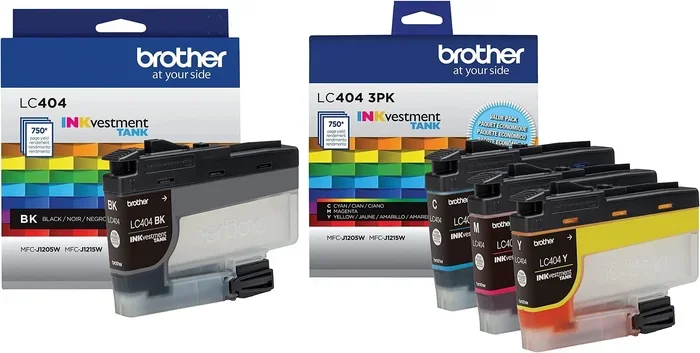
Before you swap inks, you need to know how your Brother printer handles ink. Brother machines use either dye-based or pigment-based inks, depending on the model. Dye inks blend colors smoothly and are great for photos. Pigment inks sit on top of the paper and resist water and fading. Most Brother printers have individual ink tanks for each color. This design lets you replace only the color that runs out. It also means a clogged black tank does not stop you from printing in color.
How Brother Ink Cartridges Work
Brother ink cartridges contain a sponge, ink chamber, and a tiny electronic chip. The chip talks to the printer. It tells the machine which cartridge is installed and how much ink remains. When the chip reads empty, the printer stops using that cartridge. Some users refill cartridges and reset the chip, but this can be tricky. The printer will not recognize a refilled cartridge unless the chip is reset or replaced. This is where third-party ink systems come in.
OEM vs. Third-Party Ink
OEM ink means Original Equipment Manufacturer ink. It is made by Brother. Third-party ink is made by other companies. OEM ink guarantees compatibility and print quality. Third-party ink offers lower prices and sometimes higher page yields. The trade-off is potential quality differences and warranty concerns. Below is a quick comparison.
| Feature | OEM Ink | Third-Party Ink |
|---|---|---|
| Price per cartridge | High | Low to moderate |
| Print quality | Consistent, vibrant | Varies by brand |
| Warranty coverage | Full support | May void warranty |
| Page yield | Standard | Often higher |
| Chip compatibility | Guaranteed | Must match model |
| Availability | Official stores | Online retailers |
Can I Use A Different Brand Of Ink In My Brother Printer
The direct answer is yes, you can use a different brand of ink in many Brother printers. Brother does not lock its printers to only Brother cartridges. The printer recognizes the cartridge by its chip, not by the brand name. If the third-party chip matches the Brother model, the printer will accept it. However, not all third-party inks work perfectly. Some cartridges may trigger error messages. Others may print poorly or leak. Your specific Brother model determines the level of compatibility.
What the Manufacturer Says
Brother’s official stance is that using non-Brother ink may affect performance. The company states that it does not guarantee print quality with third-party cartridges. If a problem occurs, Brother may refuse warranty service. This does not mean the printer will break immediately. Many users switch inks without any issues. The key is to choose compatible cartridges and monitor print results.
The Role of Ink Chips
Ink chips are small circuits on the cartridge. They communicate with the printer’s firmware. Brother printers check the chip to verify the cartridge is genuine and full. Third-party manufacturers often replicate these chips. A matched chip allows the printer to recognize the cartridge. A mismatched chip will cause the printer to display an error like “Ink cartridge not recognized.” Always check that the third-party ink is specifically listed for your Brother model.
Similar to how mastering the 7 basic elements of photography can save a photo, using the right ink can save your print. The chip is the bridge between the cartridge and the printer. Treat it with care, and the switch will be smooth.
Risks and Potential Problems
Switching ink brands is not without risks. Understanding these risks helps you avoid frustration. Most problems are preventable with the right choices and preparation.
Voiding Your Warranty
Using a different brand of ink can void your Brother printer warranty. This happens only if the ink causes damage. Brother must prove that the third-party ink directly caused the malfunction. If the printer fails for an unrelated reason, the warranty still applies. However, many users worry about the hassle of defending their claim. To stay safe, check your printer’s warranty terms before switching.
Print Quality Issues
Third-party inks vary widely in quality. Some produce vibrant, sharp prints. Others look dull or fade quickly. Dye-based alternative inks may bleed on plain paper. Pigment-based alternatives may not match the exact color profile of OEM inks. You might notice a slight color shift in photos. For documents, the difference is often unnoticeable. For professional photography or art prints, stick with high-quality third-party inks or OEM.
Clogging and Printhead Damage
The biggest mechanical risk is printhead clogging. Ink formulations differ between brands. Some third-party inks have thinner viscosity. They can dry faster and clog the tiny nozzles. If the printhead dries out, you may see streaks or missing colors. In severe cases, the printhead can become permanently damaged. Regular use and proper cleaning reduce this risk. Running the printer at least once a week keeps ink flowing.
Benefits of Using Alternative Ink Brands
Despite the risks, many users switch to alternative inks. The benefits often outweigh the downsides, especially for everyday printing.
Cost Savings
The most obvious benefit is cost savings. OEM Brother cartridges can cost $30 to $60 each. Third-party cartridges often cost $10 to $25. For high-volume printers, this adds up quickly. Some users report saving over 60% on ink costs. Compatible ink kits with multiple colors are even cheaper. These savings make a big difference for home offices and schools.
Environmental Impact
Using a different brand of ink can be more eco-friendly. Many third-party brands offer refillable ink tank systems. These reduce plastic waste from disposable cartridges. Some companies also use recycled materials. Lower production footprints mean less environmental harm. If sustainability matters to you, alternative inks offer a greener path.
Availability and Variety
OEM ink sometimes faces supply shortages. Third-party inks are widely available online. You can find specialty inks like high-capacity black or photo-specific sets. This variety lets you tailor your ink to your needs. Need a bulk black ink for text documents? There is a compatible cartridge for that. Need vibrant photo ink? There is a third-party option too.
Just as the 7 basic elements of photography help you capture stunning images, the right alternative ink can help you produce stunning prints at a fraction of the cost. The choice empowers you to balance quality and budget.
How to Choose Compatible Third-Party Ink
Not all third-party inks are created equal. Choosing the right one protects your printer and your prints. Follow these steps to find the best match.
Check Chip Compatibility
Start with the chip. Visit your Brother model’s support page. Note the exact cartridge numbers. Search for third-party inks that list those numbers. The product description should state “compatible with Brother [model].” If the chip is not matched, the printer will reject the cartridge. Some brands offer chip resetters, but a pre-matched chip is simpler.
Ink Formulation Types
Third-party inks come in dye-based and pigment-based formulas. Dye inks offer smooth gradients and vivid colors. They work best for photos on glossy paper. Pigment inks offer sharp text and water resistance. They excel on plain paper and for documents. Some brands offer hybrid inks that blend the best of both. Know your printing needs before you buy.
Reputable Brands to Consider
Look for brands with strong customer reviews and warranties. Popular compatible ink brands include Joleboy, LD Products, and InkTec. These companies often provide satisfaction guarantees. If the ink damages your printer, they may cover the cost. Always buy from authorized retailers to avoid counterfeits. Check for certifications like ISO standards on the product page.
| Brand | Type | Price Range | Warranty |
|---|---|---|---|
| Joleboy | Compatible dye/pigment | $10–$22 | 1-year money-back |
| LD Products | Compatible dye/pigment | $12–$25 | Lifetime guarantee |
| InkTec | Compatible dye/pigment | $9–$20 | 2-year warranty |
| Brother OEM | Original dye/pigment | $30–$60 | Full support |
Step-by-Step Guide to Switching Ink Brands
Switching to a different brand of ink is straightforward. Follow this guide to ensure a smooth transition.
Preparation Before You Start
- Turn off the printer: Wait for the power light to go off completely. Do not open the lid while the printhead is moving.
- Gather your tools: Have the new cartridges, a soft lint-free cloth, and a small tray of warm water ready.
- Check the model number: Confirm the ink cartridge model matches your Brother printer. The model number is on the front or back of the printer.
- Remove old cartridges carefully: Wear gloves if you have sensitive skin. Ink can stain fingers.
Installation Tips
- Open the printer cover and wait for the carriage to move to the center.
- Press the release tab on the old cartridge and pull it straight out.
- Remove the new cartridge from its packaging. Do not touch the copper contacts or the ink nozzle.
- Insert the new cartridge at a slight angle and push until it clicks into place.
- Repeat for each color you are replacing.
- Close the cover and wait for the printer to recognize the cartridges.
Cleaning and Maintenance After Switching
After installing new ink, run the printer’s cleaning cycle. This flushes any old ink from the lines. Print a test page to check for streaks or missing colors. If you see issues, run the alignment tool. Keep the printer in a dust-free area. Avoid leaving it unused for weeks. Regular printing keeps the ink flowing and prevents clogs.
Quick Tips for Best Results
- Use the new ink within 6 months of opening for the best quality.
- Store cartridges upright in a cool, dark place.
- Do not mix OEM and third-party ink in the same printer at the same time if possible.
- Run a deep cleaning once a month if you print infrequently.
- Keep a spare compatible cartridge on hand to avoid downtime.
Common Mistakes to Avoid
Many users run into trouble by skipping simple steps. Avoid these common mistakes to protect your printer.
- Buying the wrong chip version: Brother updates cartridge chips over time. Ensure the third-party ink matches the latest chip version for your model.
- Ignoring error messages: If the printer displays an ink error, do not force the cartridge. Remove it and reinsert it. If the error persists, check the chip contacts.
- Using expired ink: Check the expiration date on the third-party cartridge. Expired ink can thicken and clog the printhead.
- Skipping the cleaning cycle: Always run the cleaning cycle after installing new ink. This prevents air bubbles and ensures smooth flow.
- Leaving cartridges out too long: If you remove a cartridge, seal it with tape and store it upright. Exposing the nozzle to air dries the ink.
Expert Insights
Printer technicians often share the same advice. “The biggest mistake users make is assuming all third-party inks are the same,” says a Brother-certified service expert. “Cheap ink from unknown sellers can damage the printhead in weeks. Invest in a reputable brand with a return policy. The small extra cost saves you from expensive repairs.” Another technician adds, “If you are worried about warranty, use third-party ink for draft prints and OEM for important documents. This hybrid approach gives you the best of both worlds.”
Remember, the question “Can I Use A Different Brand Of Ink In My Brother Printer” has a practical answer. You can, but you must choose wisely. Protect your investment by selecting quality compatible ink, following installation steps, and maintaining your printer regularly. The savings and flexibility are worth the effort when you do it right.
Switching ink brands does not have to be scary. With the right information, you can save money without sacrificing print quality. Keep this guide handy. Refer to it whenever you need to buy a new cartridge. Your Brother printer will keep running smoothly, and your wallet will thank you.
Frequently Asked Questions
Frequently Asked Questions
Will using a different brand of ink void my Brother printer warranty?
Using third-party ink does not automatically void the warranty. However, if Brother can prove the ink caused the damage, they may deny the claim. Always check your specific warranty terms and consider using compatible inks for non-critical prints.
How do I know if a third-party ink cartridge is compatible with my Brother printer?
Check the cartridge model number on your printer or the old cartridge. Search for third-party inks that list that exact model number. The product description should clearly state compatibility with your Brother model. Matching the ink chip is the most important factor.
Can I mix OEM and third-party ink in the same printer?
Yes, you can, but it is not always recommended. Mixing inks can sometimes cause chemical reactions that affect print quality. If you must mix, try to use the same ink type (dye or pigment) and run a cleaning cycle afterward. It is safer to use one brand per cartridge slot.
Why is my third-party ink printing faded or streaky?
Faded or streaky prints often result from low-quality ink or improper installation. The ink may be expired, or the chip may not be fully seated. Run the printer’s cleaning and alignment tools. If the problem persists, try a different brand of compatible ink or check for clogged nozzles.
How long does third-party ink last compared to OEM ink?
Many third-party inks offer higher page yields than OEM cartridges. A compatible black cartridge can print 1,000 to 2,500 pages, while OEM may print 500 to 1,500. Actual yield depends on print coverage, paper type, and how often you print. Store ink properly to maximize shelf life.
Is it safe to refill Brother ink cartridges with third-party ink?
Refilling is possible but carries risks. The ink viscosity must match the original formula. Using the wrong ink can clog the printhead or leak. If you refill, use a high-quality refill kit and follow the instructions carefully. Many users find it safer and easier to buy pre-filled compatible cartridges instead.
=== CONCLUSION ===
The answer to “Can I Use A Different Brand Of Ink In My Brother Printer” is a clear yes, with a few important conditions. You can enjoy significant cost savings, greater availability, and eco-friendly options by choosing compatible third-party ink. Just remember to check chip compatibility, select reputable brands, and follow proper installation steps. Understanding the risks, like potential warranty issues and print quality variations, helps you make informed choices. With the right approach, switching ink brands becomes a simple way to get more from your Brother printer without breaking the bank. Take the time to research, choose wisely, and your printer will reward you with reliable, affordable prints for years to come.