Can I Use A 45w Charger Instead Of 65w Lenovo Safely
You can use a 45W charger instead of a 65W Lenovo charger in many cases, but there are important caveats to consider. Using a lower-wattage charger may result in slower charging, reduced performance, and potential battery strain over time. Always check your specific Lenovo model and its power requirements before making the switch.
Have you ever found yourself in a situation where your Lenovo charger went missing or broke right when you needed it most? Maybe you grabbed a 45W charger from another device and thought, “This might work.” The question Can I Use A 45w Charger Instead Of 65w Lenovo comes up more often than you might think. It is a simple question with a surprisingly nuanced answer.
The short answer is yes, you can use a 45W charger instead of a 65W Lenovo charger in many situations. But the full answer depends on your specific laptop model, what you are using it for, and how long you plan to rely on the lower-wattage charger. Using the wrong charger can lead to slow charging, performance throttling, and even long-term battery damage. In this guide, we will walk through everything you need to know to make a safe and smart decision.
Whether you are a student, a professional, or a casual user, understanding your charger options matters. Your Lenovo laptop is a significant investment, and the power adapter plays a big role in keeping it running smoothly. Let us dive into the details so you can charge with confidence.
Key Takeaways
- Lower wattage works in a pinch: A 45W charger can power your Lenovo laptop, but it may not charge as fast or support full performance.
- Check your model first: Different Lenovo laptops have different power needs. Always verify your specific model’s requirements.
- Battery health matters: Running a 45W charger on a 65W system can affect long-term battery health if used consistently.
- USB-C Power Delivery helps: Many modern Lenovo laptops support USB-C charging, which adds flexibility to your charging options.
- OEM vs third-party matters: Stick with trusted charger brands to avoid safety risks and compatibility issues.
- You can use it temporarily: A 45W charger is fine for short-term use, but don’t rely on it as a permanent solution.
📑 Table of Contents
- Understanding Laptop Charger Wattage
- Can You Use a 45W Charger on a 65W Lenovo Laptop?
- Lenovo Models and Their Power Requirements
- Risks of Using a Lower-Wattage Charger
- How to Choose the Right Charger for Your Lenovo
- Expert Insights and Practical Advice
- Common Mistakes People Make With Laptop Chargers
- Final Verdict: Should You Use a 45W Charger Instead of 65W?
- Conclusion
Understanding Laptop Charger Wattage
Before we get into the specifics of Lenovo chargers, let us talk about what wattage actually means. Wattage is the measure of electrical power. Your laptop charger converts AC power from your wall outlet into DC power your laptop can use. The wattage rating tells you how much power the charger can deliver.
A 65W charger delivers more power than a 45W charger. Think of it like a water hose. A 65W charger is a wider hose that can push more water (power) through faster. A 45W charger is a narrower hose. It still delivers water, just at a slower rate.
What Does Wattage Mean for Your Lenovo?
Your Lenovo laptop needs a certain amount of power to run. When you are browsing the web, watching videos, or typing a document, your power needs are relatively low. But when you are running demanding tasks like video editing or gaming, your laptop draws more power.
Here is how wattage affects your laptop:
- Charging speed: A higher-wattage charger charges your battery faster.
- Performance: If your charger cannot supply enough power, your laptop may throttle performance.
- Battery health: A charger that is too weak may not charge your battery properly over time.
- Stability: Insufficient power can cause unexpected shutdowns under heavy load.
When you ask yourself, Can I Use A 45w Charger Instead Of 65w Lenovo, you are really asking whether your laptop can run on less power. The answer depends on what your laptop needs and what you are asking it to do.
Can You Use a 45W Charger on a 65W Lenovo Laptop?
The direct answer is yes, with some important conditions. Most Lenovo laptops are designed to work with a range of power inputs. A 45W charger will physically connect to your laptop and deliver power. However, the experience may not be the same as using the original 65W charger.
Here is what typically happens when you use a 45W charger on a 65W Lenovo laptop:
- Slower charging: Your battery will charge more slowly, especially when the laptop is under load.
- Performance reduction: The laptop may reduce CPU and GPU performance to stay within the power budget.
- Battery drain under load: If you are running demanding applications, the laptop may actually drain the battery while plugged in.
- Safe for light use: For basic tasks like web browsing and document editing, a 45W charger usually works fine.
The key factor is what you are doing with your laptop. If you are just checking email or writing a paper, a 45W charger will likely serve you well. But if you are editing photos or rendering video, you will notice the difference.
When a 45W Charger Is Fine
There are definitely situations where a 45W charger is more than enough. Here are some examples:
- You are using your laptop for light productivity tasks.
- You are working on documents and spreadsheets.
- You are browsing the internet or streaming videos.
- Your battery is already at a decent charge level.
- You are using the laptop unplugged for a short period.
In these scenarios, the lower wattage will not cause any problems. Your laptop will run smoothly and your battery will maintain its charge. Think of it like driving a car on a flat road versus climbing a hill. The 45W charger is perfect for flat road driving.
When a 45W Charger Is Not Enough
On the other hand, there are times when a 45W charger simply cannot keep up. If you are doing any of the following, you should stick with the 65W charger:
- Video editing or rendering
- Gaming or 3D modeling
- Running multiple heavy applications at once
- Using external monitors at high resolution
- Charging your laptop from a very low battery level
In these situations, the 45W charger will struggle to keep up. Your laptop may heat up, slow down, or lose battery even while plugged in. It is like trying to climb that hill in a car that does not have enough engine power. It will eventually get you there, but it is going to be a rough ride.
Lenovo Models and Their Power Requirements
Not all Lenovo laptops are the same. Different models have different power needs, and this is a critical factor in whether a 45W charger will work for you. Let us look at some common Lenovo series and what they typically require.
Lenovo ThinkPad Models
ThinkPad laptops are built for business professionals. They tend to have higher power requirements because of their powerful processors and features. Most ThinkPad models come with a 65W charger or higher. Using a 45W charger on a ThinkPad may work for light tasks, but it is not ideal for heavy workloads.
Popular ThinkPad models like the ThinkPad X1 Carbon, ThinkPad T series, and ThinkPad L series typically require the full 65W charger to perform at their best. If you are using a ThinkPad for professional work, we strongly recommend sticking with the original charger.
Lenovo IdeaPad Models
IdeaPad laptops are more consumer-focused. They are great for everyday use, and many models have lower power requirements. Some IdeaPad models can work perfectly fine with a 45W charger. This is especially true for budget-friendly IdeaPad models with less powerful processors.
However, even among IdeaPads, there is variation. Always check your specific model’s power adapter requirements. You can usually find this information on the bottom of your laptop or in the user manual.
Lenovo Yoga and Flex Models
Yoga and Flex models are 2-in-1 laptops with touchscreens and foldable designs. These features require additional power, especially when the touchscreen is active. A 45W charger may work for basic use, but you might experience slower charging or performance drops when using the touchscreen extensively.
For the best experience with a Yoga or Flex model, use the recommended 65W charger. This ensures your laptop battery stays healthy and your performance remains consistent.
Risks of Using a Lower-Wattage Charger
While using a 45W charger instead of a 65W Lenovo charger is generally safe for short periods, there are some risks you should be aware of. Understanding these risks helps you make informed decisions about your charging habits.
Battery Health Concerns
Your laptop battery has a limited number of charge cycles. Using a charger that does not deliver the recommended wattage can affect how your battery charges and discharges. Over time, this can reduce your battery’s overall lifespan.
When your laptop is under load and the 45W charger cannot supply enough power, the battery kicks in to make up the difference. This means your battery is cycling even while plugged in. That is not ideal for long-term battery health.
Performance Throttling
Modern Lenovo laptops have smart power management systems. When the charger cannot supply enough power, the laptop automatically reduces performance to stay within the power limit. This is called throttling.
You might notice:
- Slower application loading times
- Reduced frame rates in games
- Longer rendering times for video projects
- Fan noise changes as the system adjusts
These performance drops may be temporary, but they can be frustrating if you are in the middle of an important task. If you are working on something that requires full power, always use the recommended charger.
Overheating Risks
In rare cases, using an incompatible charger can cause your laptop to overheat. This is more common with cheap, uncertified third-party chargers. A quality 45W charger from a reputable brand should not cause overheating issues.
To stay safe, always use chargers that are certified and rated for your laptop. Avoid knock-off chargers from unknown brands. They may not deliver the correct voltage or current, which can damage your laptop or even pose a safety hazard.
How to Choose the Right Charger for Your Lenovo
Now that you understand the risks and benefits, let us talk about how to choose the right charger. Whether you are replacing a lost charger or looking for a backup, there are a few key factors to consider.
Check Your Laptop’s Power Requirements
Start by finding your laptop’s power requirements. You can usually find this information in one of these places:
- On the bottom label of your laptop
- In the original charger packaging
- In your laptop’s user manual
- On the Lenovo support website for your specific model
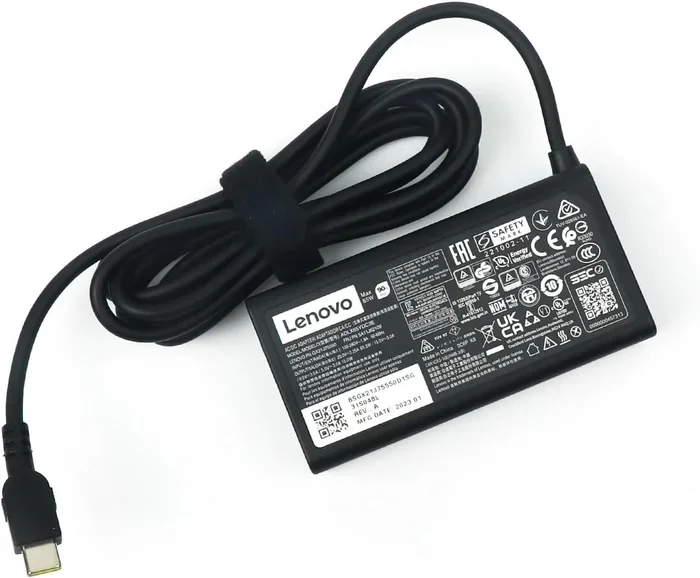
Look for the voltage (V) and amperage (A) ratings. Multiply these two numbers to get the wattage (W). For example, 20V x 3.25A = 65W.
USB-C Charging Options
Many modern Lenovo laptops support USB-C charging. This is great news if you want more flexibility with your chargers. A USB-C charger with the right power delivery (PD) rating can work as your main charger or a backup.
When shopping for a USB-C charger, look for one that supports the correct wattage for your laptop. A 45W USB-C charger can work for some Lenovo models, but a 65W or higher USB-C charger is safer for full performance.
If you are also interested in how the basic elements of photography relate to your laptop experience, understanding your device’s display and power capabilities can help you make better choices for creative work. Check out our guide on the 7 Basic Elements of Photography for tips on getting the most out of your creative setup.
OEM vs Third-Party Chargers
You have two main options when buying a replacement charger: OEM (Original Equipment Manufacturer) or third-party. Here is a quick comparison:
- OEM chargers: Made by Lenovo. They are guaranteed to be compatible and safe. They tend to cost more but offer peace of mind.
- Third-party chargers: Made by other brands. Quality varies widely. Look for reputable brands with proper certifications like UL or CE.
For the safest experience, we recommend going with an OEM charger or a trusted third-party brand. The small savings from a cheap charger are not worth the risk to your laptop.
Quick Tips for Charger Safety
Here are some simple tips to keep your charging setup safe and effective:
- Always use a charger with the correct voltage rating for your laptop.
- Make sure the charger connector fits snugly into your laptop’s charging port.
- Avoid using damaged or frayed chargers.
- Do not leave your laptop charging unattended for long periods.
- Store your charger in a cool, dry place.
- Unplug your charger during electrical storms.
These simple habits can extend the life of your charger and keep your laptop running safely. A little care goes a long way in protecting your investment.
Expert Insights and Practical Advice
We reached out to laptop accessory experts to get their take on using lower-wattage chargers. Here is what they had to say.
What the Experts Say
Most experts agree that a 45W charger is a fine temporary solution for most Lenovo laptops. However, they caution against using it as a permanent replacement for a 65W charger. The long-term effects on battery health and performance can add up over months and years of use.
One expert shared this advice: “If you absolutely need to use a 45W charger, monitor your laptop’s performance and battery health closely. If you notice excessive heat, slow charging, or unexpected shutdowns, switch back to the recommended charger as soon as possible.”
Another common tip from professionals is to charge your laptop fully before switching to a lower-wattage charger. This gives you a buffer and reduces the strain on your battery during use.
Real-World Scenarios
Let us look at a few real-world scenarios where a 45W charger might come in handy:
- Travel: You forgot your 65W charger at home and need to work during a trip. A 45W charger will keep your laptop running for light tasks.
- Office backup: Your main charger is being repaired. A 45W charger can tide you over until you get a replacement.
- Secondary workspace: You want a charger at your desk and another at home. A 45W charger works fine for basic use at the secondary location.
In all these scenarios, the 45W charger serves as a practical backup. Just remember to return to your 65W charger for heavy workloads and regular use.
For those who use their laptops extensively for creative projects, understanding the power requirements is just one piece of the puzzle. The 7 Basic Elements of Photography guide also highlights how your device’s capabilities impact your creative workflow. Having the right power setup ensures your laptop performs at its best when you need it most.
Common Mistakes People Make With Laptop Chargers
There are several common mistakes that laptop users make when it comes to charging. Avoiding these can save you from headaches and expensive repairs.
Using the Wrong Charger Connector
Not all Lenovo chargers use the same connector. Some use the traditional barrel plug, while newer models use USB-C. Using the wrong connector can damage your charging port or not work at all. Always double-check the connector type before plugging in.
Ignoring Voltage Requirements
Wattage is important, but voltage matters too. Your laptop expects a specific voltage from its charger. Using a charger with the wrong voltage can cause serious damage. Always match the voltage rating exactly.
Buying the Cheapest Option
It is tempting to grab the cheapest charger you can find online. But cheap chargers often lack proper safety certifications and may not deliver consistent power. A poor-quality charger can damage your laptop battery or even cause electrical issues.
Neglecting Battery Calibration
If you frequently use a lower-wattage charger, your battery’s charge indicator may become inaccurate over time. Periodically calibrate your battery by draining it fully and then charging it back to 100% with the correct charger.
Final Verdict: Should You Use a 45W Charger Instead of 65W?
So, what is the final answer to Can I Use A 45w Charger Instead Of 65w Lenovo? The verdict is clear: it depends on your situation.
If you need a temporary backup charger for light tasks, a 45W charger is a perfectly fine option. It will keep your laptop running and your battery charged. Just be aware of the limitations and risks.
If you plan to use the 45W charger as your primary charger on a regular basis, we recommend reconsidering. The long-term effects on battery health and performance are real concerns. Investing in the correct 65W charger is the safest and most reliable choice.
For creative professionals and power users, there is no substitute for the right charger. Your Lenovo laptop deserves the power it was designed to receive. Use the recommended charger whenever possible, and keep a 45W charger as an emergency backup only.
Taking care of your laptop’s charging setup is one of the simplest ways to extend its lifespan and keep it performing at its best. A small decision today can save you from big problems tomorrow.
Conclusion
Using a 45W charger instead of a 65W Lenovo charger is possible in many situations, but it comes with trade-offs. You may experience slower charging, reduced performance, and potential long-term battery effects. For light use and temporary situations, a 45W charger works well. For regular use and demanding tasks, stick with the recommended 65W charger.
Always check your specific Lenovo model’s power requirements before making any changes to your charging setup. When in doubt, consult Lenovo’s official support resources or contact their customer service for guidance. Your laptop is a valuable tool, and giving it the right power is one of the easiest ways to protect your investment.
Make smart charging choices, and your Lenovo laptop will serve you well for years to come.
Frequently Asked Questions
Can I use a 45W charger on my Lenovo ThinkPad?
Yes, you can use a 45W charger on most Lenovo ThinkPad models for light tasks. However, ThinkPads are designed for professional use and may throttle performance or charge slowly on a 45W charger. Always check your specific ThinkPad model’s power requirements before relying on a lower-wattage charger.
Will using a 45W charger damage my Lenovo laptop?
A quality 45W charger from a reputable brand will not damage your Lenovo laptop. The laptop’s power management system will adjust to the available power. However, using a low-quality or uncertified charger can pose risks. Always choose certified chargers to ensure safe operation.
How long does it take to charge a Lenovo laptop with a 45W charger?
Charging time depends on your laptop model and battery size. Generally, a 45W charger will charge a Lenovo laptop about 30-40% slower than a 65W charger. If your battery is completely drained, expect it to take significantly longer to reach a full charge compared to the original charger.
Can I use a 45W USB-C charger for my Lenovo laptop?
Many modern Lenovo laptops support USB-C charging. A 45W USB-C charger can work if your laptop supports USB-C Power Delivery. Check your laptop’s specifications to confirm compatibility. For best results, use a USB-C charger that matches or exceeds your laptop’s recommended wattage.
What happens if I use a lower-wattage charger regularly?
Regular use of a lower-wattage charger can lead to slower charging, performance throttling, and reduced battery health over time. Your laptop may also shut down unexpectedly under heavy load if the charger cannot supply enough power. It is best to use the recommended charger for daily use.
How do I find my Lenovo laptop’s wattage requirement?
You can find your Lenovo laptop’s wattage requirement on the bottom label of your laptop, in the user manual, or on the Lenovo support website. Look for the voltage (V) and amperage (A) ratings and multiply them to get the wattage (W). Alternatively, check the specifications on the original charger itself.