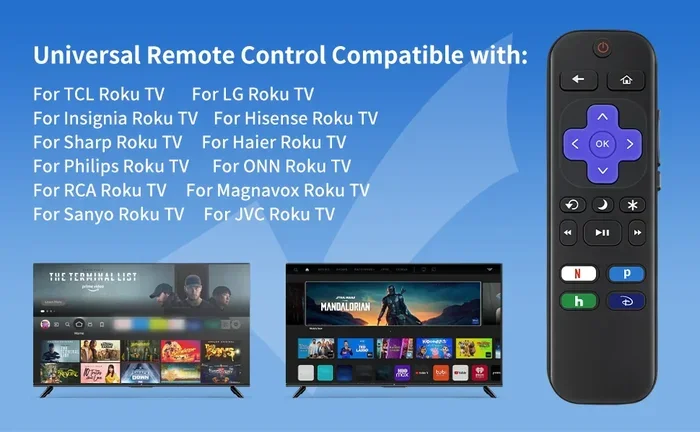
Can I Replace My Tcl Roku Tv Remote With These Options
Yes, you can replace your TCL Roku TV remote, and you have more options than you might think. Whether your remote is lost, broken, or just not working right, you can find a direct replacement, a universal remote, or even use your phone as a remote. In this guide, we walk you through every option so you can get back to watching your favorite shows fast. Replacing a TCL Roku TV remote is easier than most people expect.
Your TCL Roku TV remote stops working at the worst possible time. Maybe the batteries died, or perhaps the remote just gave up after a few years of use. Whatever the reason, you are left staring at your TV screen wondering how to change the channel. The good news is that you have plenty of ways to get back in control. Replacing your TCL Roku TV remote is simpler than you think, and you are not stuck with just one choice. In this guide, we will explore every option available to you.
From official replacement remotes to universal remotes and even using your phone, there is a solution for every budget and situation. We will also cover quick fixes that might save you money. By the end of this article, you will know exactly what to do and where to buy the right replacement. Let us dive in and find the perfect Roku remote replacement for your TCL TV.
Key Takeaways
- Direct Replacement Remotes: You can order an exact match remote from TCL or Roku to keep things simple.
- Universal Remotes Work Great: Many universal remotes support TCL Roku TVs with easy setup codes.
- Use Your Phone as a Remote: The free Roku mobile app turns your smartphone into a fully functional remote.
- Voice Control Options Exist: Smart home devices like Alexa and Google Assistant can control your TCL Roku TV.
- Quick Fixes Solve Many Issues: Battery swaps, resets, and re-pairing often fix problems without buying a new remote.
- Bluetooth Remotes Offer More Range: Newer TCL Roku remotes use Bluetooth for better connectivity.
- Check Your TV Model First: Always confirm compatibility before purchasing any replacement remote.
📑 Table of Contents
Understanding Your TCL Roku TV Remote
Before you buy a replacement, it helps to understand what kind of remote you have. TCL Roku TVs come with different remote types, and each one works a little differently. Knowing this makes it easier to pick the right replacement.
How the Remote Works
Most TCL Roku remotes use either infrared (IR) or Bluetooth technology. Older models rely on IR signals, which means the remote must point directly at the TV. Newer models use Bluetooth, so you do not need a direct line of sight. This is a big deal because it means the remote can work from across the room or even from your pocket.
The Roku voice remote adds another layer of convenience. It has a microphone button that lets you search for shows using your voice. If your remote has this feature, you want a replacement that matches it. Using a basic IR remote will not give you voice control.
Types of TCL Roku Remotes
TCL has used several remote designs over the years. Here are the most common ones you might find:
- Standard Roku Remote: A simple remote with buttons for power, volume, and navigation. It uses IR or Bluetooth depending on the model.
- Roku Voice Remote: Includes a microphone button for voice search. Usually uses Bluetooth for a stronger connection.
- Roku Streaming Stick Remote: A smaller remote designed for the Roku Streaming Stick device. It works with TCL TVs running Roku.
- Enhanced Remote with Headphones: Some newer remotes include a headphone jack for private listening at night.
Check the model number on the back of your current remote or in your TV settings. This number makes finding the right replacement remote for Roku much easier.
Can I Replace My TCL Roku TV Remote With Official Options
The most straightforward path is buying an official replacement remote. These remotes are designed specifically for your TV model, so they work right out of the box. You do not need to worry about compatibility or setup codes.
Buying a Direct Replacement Remote
You can find official TCL and Roku remotes on several online stores. Amazon, Walmart, and the Roku website all carry replacement options. Search for your TV model number, and you will find the exact remote that matches yours.
Official remotes typically cost between $10 and $30. They are more expensive than universal remotes, but they offer the best plug-and-play experience. If you want zero hassle, this is the way to go. Replacing a TCL Roku TV remote with an official match means you get all the same buttons and features you already use.
Ordering from TCL or Roku Support
You can also contact TCL or Roku customer support directly. Both companies sell replacement remotes through their official websites. You will need your TV model number and the remote model number. Customer support can help you find the right one if you are unsure.
This option is especially helpful if your TV is still under warranty. Sometimes TCL will replace the remote for free or at a reduced cost. It is always worth checking before you spend money elsewhere.
Universal Remote Options for TCL Roku TV
Universal remotes are a fantastic budget-friendly choice. These remotes work with many TV brands, including TCL. You do not need to buy a remote made specifically for your TV model.
Top Universal Remotes That Work
Several universal remotes are popular choices for TCL Roku TV owners. Here are some of the best options:
- One For All Remote: A well-known brand that supports a wide range of TV models. Easy to set up with step-by-step instructions.
- GE Universal Remote: Affordable and reliable. Works with most TCL TVs using a simple code search method.
- Inteset Remote: A more advanced universal remote with backlit buttons and programmable features.
- Roku Enhanced Remote (Universal): Roku sells its own universal remote that works with any Roku-compatible TV.
When shopping for a universal remote for TCL TV, check the compatibility list on the packaging. Most remotes list TCL as a supported brand. If it is not listed, the remote may still work, but you should verify before buying.
Setting Up a Universal Remote
Setting up a universal remote is not hard, but it does take a few minutes. Here is a simple step-by-step process:
- Find the setup code for your TCL TV model. You can find this in the remote’s manual or online.
- Enter the code using the remote’s number pad.
- Test the power button to see if the TV turns on.
- If it does not work, try the next code on the list.
- Once the TV responds, save the code by pressing the setup button.
Some universal remotes also offer an auto-search feature. This lets the remote cycle through codes until it finds the right one. It takes a little longer, but it works without needing to look up codes manually.
Quick Tips for Universal Remote Setup
- Keep fresh batteries in the remote during setup.
- Point the remote at the TV sensor while testing.
- Write down the working code in case you need it again.
- If the remote controls the TV but not the volume, you may need a separate code for the soundbar or cable box.
Smartphone and App Alternatives
Did you know your phone can replace your TCL Roku TV remote? This is one of the easiest and most convenient options available. You probably already have everything you need.
Using the Roku Mobile App
The Roku mobile app is free and works with both iOS and Android devices. Once installed, your phone becomes a full-featured remote. You get all the standard buttons plus voice search, text input, and even private listening through your headphones.
Here is how to set it up:
- Download the Roku app from the App Store or Google Play.
- Make sure your phone and TV are on the same Wi-Fi network.
- Open the app and tap the remote icon.
- The app will automatically find your TCL Roku TV.
- Start using your phone as a remote right away.
The Roku app is hands down one of the best TCL Roku TV remote alternatives. It is free, easy to use, and you always have your phone with you. No need to buy a separate remote at all.
Third-Party Remote Apps
Beyond the official Roku app, several third-party apps can control your TV. Apps like Peel, AnyMote, and Sure Universal Remote offer additional features. Some include customizable layouts, macros, and even gesture controls.
However, the Roku app remains the most reliable option. Third-party apps may not support all TCL Roku features, and some require a one-time purchase or subscription. Stick with the Roku app unless you need a specific feature it does not offer.
When Your Phone Remote Is the Best Option
Using your phone as a remote is perfect in several situations:
- Your original remote is lost or broken and you need a quick fix.
- You want a backlit remote for watching TV in the dark.
- You prefer typing with a phone keyboard for search queries.
- You want to control multiple devices from one app.
The only downside is that you need your phone nearby and charged. But for most people, this is not a real problem.
Voice Control and Smart Home Integration
If you use smart home devices, you might already have a way to control your TCL Roku TV without a remote. Voice assistants like Amazon Alexa and Google Assistant can handle many TV functions.
Using Voice Assistants with TCL Roku TV
Most TCL Roku TVs support voice control through smart speakers and displays. You can use an Amazon Echo, Google Nest, or even your phone’s built-in assistant to change channels, adjust volume, and search for content.
Setting this up is straightforward:
- Open the Alexa or Google Home app on your phone.
- Add your TCL Roku TV as a connected device.
- Link your Roku account to the smart home platform.
- Start giving voice commands like “Turn on the TV” or “Play Stranger Things.”
Voice control is a great TCL Roku TV troubleshooting backup. If your remote dies and you cannot find a replacement right away, just ask your smart speaker to turn on the TV. It is a surprisingly handy solution.
Smart Home Remote Options
Beyond voice assistants, some smart home hubs offer dedicated remote controls. Devices like Logitech Harmony hubs can control your TV, soundbar, and streaming device from one elegant remote. These are pricier options, but they work beautifully for people who want a premium setup.
If you already invest in smart home technology, adding TCL Roku TV control to your setup is a natural next step. It makes your entire entertainment system feel more connected and modern.
Common Remote Problems and Quick Fixes
Before you buy a new remote, try these quick fixes. Sometimes the problem is not a broken remote at all. A simple solution might bring your old remote back to life.
Remote Not Responding
The most common cause of a non-responsive remote is dead batteries. Try replacing the batteries with fresh ones. Use name-brand batteries for the best performance, and make sure you insert them in the correct direction.
If new batteries do not help, try cleaning the remote’s sensor. Dust and grime can block the infrared signal. Use a soft cloth and a little rubbing alcohol to gently clean the sensor area on both the remote and the TV.
Pairing Issues with Bluetooth Remotes
If your Roku remote not pairing is the issue, a reset usually fixes it. Here is how to reset most TCL Roku remotes:
- Unplug your TV from the power outlet.
- Wait 30 seconds.
- Plug the TV back in and wait for it to fully start.
- Remove the batteries from the remote.
- Wait 10 seconds, then reinsert the batteries.
- The remote should reconnect automatically.
If the remote still does not pair, you may need to re-pair it through the TV settings. Go to Settings > Remotes > Add New Remote and follow the on-screen instructions.
Remote Works but Buttons Are Sticky
Sticky or unresponsive buttons often come from spills or built-up grime. Try cleaning under the buttons with a cotton swab dipped in isopropyl alcohol. Press each button several times while cleaning to loosen any debris.
If the buttons are physically damaged, cleaning will not help. At that point, you should consider a TV remote replacement rather than trying to fix the old one.
When to Replace Instead of Repair
Not every remote problem is worth fixing. Here are signs it is time to replace your remote:
- The remote physically cracked or broken.
- Multiple buttons stopped working even after cleaning.
- The remote is very old and no longer available for purchase.
- You want new features like voice control or backlit buttons.
Replacing the remote in these cases saves time and frustration. A new remote gives you a fresh start and often better features than your old one.
Frequently Asked Questions
Can I use any universal remote with my TCL Roku TV?
Most universal remotes work with TCL Roku TVs, but you should check the compatibility list first. Look for remotes that explicitly list TCL or Roku as supported brands. Universal remotes from brands like One For All, GE, and Inteset are reliable choices that cover most TCL models.
How do I find my TCL Roku TV model number?
You can find your TV model number on the back of the TV, in the TV settings menu under System > About, or in the original user manual. Write it down before shopping for a replacement remote to make sure you get the right match.
Is the Roku mobile app free to use?
Yes, the Roku mobile app is completely free to download and use. It turns your smartphone into a full-featured remote with voice search, text input, and private listening. You only need a Wi-Fi connection and a TCL Roku TV on the same network.
Can I control my TCL Roku TV with Alexa?
Yes, most TCL Roku TVs support Amazon Alexa voice control. You need to link your Roku account to the Alexa app and enable the Roku skill. Once set up, you can use Alexa-enabled devices to turn on the TV, change channels, and search for content using voice commands.
Why does my Roku remote keep disconnecting from the TV?
Frequent disconnections usually happen because of weak batteries, interference from other devices, or a need to re-pair the remote. Try replacing the batteries first, then move closer to the TV. If the problem continues, reset the remote and re-pair it through the TV settings menu.
What is the difference between an IR remote and a Bluetooth remote for TCL Roku TV?
An IR remote requires a direct line of sight to the TV sensor, while a Bluetooth remote can work from anywhere in the room without pointing directly at the TV. Newer TCL Roku models use Bluetooth remotes for more flexibility. If you buy a replacement, make sure it matches your TV’s remote type for the best experience.
Conclusion
So, can I replace my TCL Roku TV remote? Absolutely. You have more options than ever before, and finding the right one is easier than you might expect. Whether you choose an official replacement remote, a universal remote, a smartphone app, or voice control, you are covered.
Start by checking what kind of remote your TV currently uses. Then decide which option fits your budget and needs best. If you want the simplest solution, go with an official replacement. If you want to save money, a universal remote works great. And if you already use a smartphone or smart speaker, the app or voice control options are free and ready to go.
Replacing your TCL Roku TV remote does not have to be stressful. With the right information and a little patience, you will be back to streaming your favorite shows in no time. Pick the option that works best for you, and enjoy your TCL Roku TV experience without interruption.