Can I Lock My Schlage Lock Remotely Here Is The Answer
Can I Lock My Schlage Lock Remotely? Absolutely, if you have a compatible smart lock model. This guide walks you through everything you need to know about remote lock control, from supported Schlage models to setup steps and best practices. You’ll learn how to manage your door lock from anywhere using your phone, giving you peace of mind and enhanced home security.
Can I Lock My Schlage Lock Remotely? The short answer is yes, and it is easier than you might think. If you own a Schlage smart lock, you can lock or unlock your door from anywhere in the world using your smartphone. This simple capability transforms the way you think about home security and daily convenience. In this guide, we will walk you through everything you need to know about remote locking with Schlage. You will learn which models support it, how the technology works, and how to set it up in just a few minutes.
Remote lock control is not just a cool tech feature. It is a practical tool that keeps your family safe and gives you peace of mind. Imagine locking the front door while you are on vacation or letting a trusted friend in when you are stuck in traffic. With the right Schlage lock, these scenarios become reality. Let us dive into the details and explore how you can take control of your door lock from your phone.
Key Takeaways
- Yes, you can lock remotely: Schlage smart locks with Wi‑Fi or Bluetooth support let you lock your door from anywhere using a mobile app.
- Compatible models are key: Not all Schlage locks have remote features; check for Schlage Sense, Connect, or Encode models.
- Setup is straightforward: Connect the lock to your home Wi‑Fi, download the Schlage Home app, and enable remote access in a few simple steps.
- Enjoy keyless convenience: Lock and unlock with your phone, create guest codes, and set auto‑lock schedules for added security.
- Monitor lock status anytime: Receive real‑time notifications and check if your door is locked or unlocked from your device.
- Battery life matters: Keep an eye on battery levels to ensure your lock stays connected and functional.
- Boost home security: Remote locking adds a layer of protection, especially if you forget to lock up or want to secure the house while away.
📑 Table of Contents
Can I Lock My Schlage Lock Remotely? The Short Answer
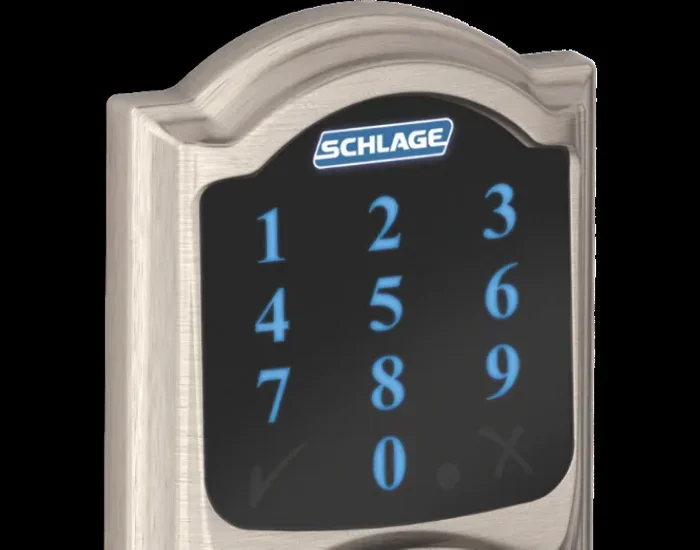
The answer is a clear yes, but only with specific Schlage smart locks. Traditional Schlage deadbolts do not have remote capabilities. You need a model that connects to your home Wi‑Fi network or uses Bluetooth with a bridge device. The most popular options include the Schlage Sense, Schlage Connect, and Schlage Encode series. These locks communicate with the Schlage Home app, which allows you to lock and unlock your door from any internet‑connected device.
If you are unsure whether your current Schlage lock supports remote control, check the product name or model number. Look for words like “Connect,” “Sense,” or “Encode.” These indicate smart features. A standard Schlage keypad lock without Wi‑Fi will not allow remote locking. You will need to upgrade to a smart model to enjoy this convenience.
Remote locking works through a mobile app that talks to your lock over the internet. When you tap the lock icon on your phone, a signal travels from the app to the lock, engaging the deadbolt. This process takes just a few seconds. You can also set schedules, create guest codes, and receive alerts when the lock is used. It is a powerful way to manage access to your home without ever touching a key.
How Remote Locking Works with Schlage
The Technology Behind It
Schlage smart locks use a combination of wireless technologies to enable remote control. The two main methods are Bluetooth and Wi‑Fi. Bluetooth locks have a short range, typically around 30 feet. To lock or unlock from far away, you need a bridge device. The Schlage Connect lock, for example, includes a built‑in Wi‑Fi bridge. This bridge connects your lock to your home network, allowing you to control it from anywhere with an internet connection.
The Schlage Sense lock also uses Bluetooth but pairs with the Apple HomeKit ecosystem. If you have an Apple device, you can use Siri to lock your door with a voice command. You can also control it remotely through the Home app if you have an Apple TV or HomePod hub. This setup acts as a bridge, extending the range of your Bluetooth lock to the cloud.
The Schlage Encode lock is a Wi‑Fi‑enabled model that works directly with the Schlage Home app. It does not need a separate bridge. You simply connect the lock to your home Wi‑Fi network during setup. Once connected, you can lock and unlock your door from your phone, no matter where you are. The app also lets you see the lock status in real time, so you always know if your door is secure.
Keyless Entry and Smart Home Integration
One of the biggest advantages of a Schlage smart lock is keyless entry. You no longer need to carry physical keys. You can unlock your door with a tap on your phone, a fingerprint, or a unique access code. This is especially helpful when your hands are full or when you are expecting guests. You can also integrate your Schlage lock with other smart home devices. For example, you can set a routine that locks the door and turns off the lights when you leave home.
The Schlage Home app supports Amazon Alexa, Google Assistant, and Apple HomeKit. This means you can use voice commands to lock your door. Simply say, “Alexa, lock the front door,” and the deadbolt engages. You can also create custom automations that fit your lifestyle. These smart home integrations make your home more secure and your daily routine smoother.
Which Schlage Locks Support Remote Control
Not every Schlage lock can be controlled remotely. To get the full remote locking experience, you need a model with built‑in Wi‑Fi or a compatible bridge. Here is a look at the Schlage smart locks that support remote control, along with their key features.
| Model | Connection | Remote Control | Keyless Entry | Smart Home Compatible |
|---|---|---|---|---|
| Schlage Sense | Bluetooth + Apple HomeKit | Yes, via Apple Home app | Fingerprint, code, app | Apple HomeKit, Siri |
| Schlage Connect | Wi‑Fi (built‑in bridge) | Yes, via Schlage Home app | Code, app, key | Alexa, Google Assistant |
| Schlage Encode | Wi‑Fi (direct) | Yes, via Schlage Home app | Code, app, key | Alexa, Google Assistant, Apple HomeKit |
| Schlage Encode Plus | Wi‑Fi (direct) | Yes, via Schlage Home app | Code, app, key, fingerprint | Alexa, Google Assistant, Apple HomeKit |
As you can see, the Schlage Connect and Encode models offer the most direct remote control. They connect straight to your home Wi‑Fi network. The Schlage Sense relies on Apple HomeKit for remote access, so you need an Apple hub if you want to control it from outside your home. Choose the model that fits your smart home ecosystem and your need for remote lock control.
When comparing these locks, consider what matters most to you. Do you want fingerprint access? Do you prefer a direct Wi‑Fi connection? The Schlage Encode Plus combines both Wi‑Fi and fingerprint reader, giving you the most flexibility. The Schlage Connect is a great budget‑friendly option that still delivers solid remote features. No matter which model you pick, you will enjoy the peace of mind that comes with knowing you can lock your door from anywhere.
Quick Tips for Choosing the Right Schlage Smart Lock
- Check your home network: Make sure you have a reliable Wi‑Fi connection near your front door. A weak signal can cause lag when locking remotely.
- Think about your ecosystem: If you are all‑in on Apple, the Schlage Sense is a natural fit. For Android or mixed setups, the Schlage Connect or Encode works well.
- Consider battery type: Most Schlage smart locks run on batteries. Choose a model that uses common batteries so replacements are easy to find.
- Look for auto‑lock features: Some models automatically lock the door after a set time. This adds an extra layer of security without any effort.
Setting Up Remote Locking on Your Schlage Lock
Step‑by‑Step Guide
Setting up remote locking is straightforward. Follow these steps to get your Schlage smart lock connected and ready to control from anywhere.
- Install the lock: If you have not already installed your Schlage lock, do so now. Most Schlage smart locks fit standard door preparations and come with clear instructions. Use the included hardware to secure the lock and deadbolt.
- Download the Schlage Home app: Go to the App Store or Google Play Store and search for “Schlage Home.” Download the app and create an account. You will need an email address and a password to get started.
- Power on the lock: Insert the batteries according to the manual. The lock will beep or flash to indicate it is powered on. Wait for the lock to enter pairing mode. This usually happens automatically when you first insert batteries.
- Connect to Wi‑Fi (for Wi‑Fi models): Open the Schlage Home app and follow the on‑screen prompts. The app will ask you to connect the lock to your home Wi‑Fi network. Enter your Wi‑Fi password and wait for the lock to join the network. You should see a confirmation on the app.
- Enable remote access: In the app settings, make sure remote access is turned on. This allows the lock to communicate with the Schlage servers even when you are not on your home network. The app will guide you through this step.
- Test the lock: Try locking and unlocking your door using the app. Stand in another room to confirm the signal reaches the lock. Then, try it from outside your home using cellular data. If the lock responds, you are all set.
The entire setup process takes about 15 to 20 minutes. Once your Schlage lock is connected, you can lock it with a single tap from your phone. You can also invite family members to control the lock through the app. Each person gets their own login, so you can track who locks and unlocks the door.
Common Mistakes to Avoid During Setup
- Skipping the firmware update: After initial setup, the app may prompt you to update the lock’s firmware. Always install these updates. They fix bugs and improve security.
- Using a weak Wi‑Fi password: A simple password can make your lock vulnerable. Use a strong, unique password for your Wi‑Fi network and your Schlage Home account.
- Placing the bridge too far from the router: If your lock uses a separate bridge, keep it within a reasonable distance of your Wi‑Fi router. Thick walls and long distances can weaken the signal.
- Forgetting to enable remote access: If you do not turn on remote access in the app, you will not be able to control the lock when you are away from home.
Benefits of Being Able to Lock Your Door Remotely
Remote locking offers several real‑world benefits that go beyond simple convenience. Let us look at why so many homeowners are choosing Schlage smart locks.
Peace of mind when you are away. Ever left home and wondered if you locked the door? With remote control, you can check the lock status and secure your home in seconds. This is especially valuable when you are on vacation or at work. You no longer have to stress about an unlocked door.
Easy guest access. Need to let a dog walker, house cleaner, or friend into your home? You can create a temporary guest code in the app. Set the code to work only during specific hours or days. When the guest is done, you can delete the code remotely. No need to hide a spare key under a doormat.
Auto‑lock for extra security. Many Schlage smart locks have an auto‑lock feature. You can set the lock to engage automatically after a certain time. For example, you can program the lock to deadbolt after 30 seconds of inactivity. This ensures your door is always secure, even if you forget to lock it manually.
Real‑time alerts and activity logs. The Schlage Home app sends you a notification every time the lock is used. You can see a history of who locked or unlocked the door and when. This is helpful for monitoring kids, babysitters, or service providers. You always know who is coming and going.
Integration with other smart devices. When you lock your Schlage lock remotely, you can trigger other smart home actions. For instance, your smart lights can turn off, your thermostat can adjust, and your security camera can start recording. These automations create a seamless experience that makes your home smarter and safer.
Expert Insights on Remote Locking
Security experts agree that remote lock control adds a valuable layer of protection. “The ability to lock your door from anywhere eliminates the most common vulnerability: human forgetfulness,” says a home security specialist. “With a Schlage smart lock, you can always be sure your door is secure, no matter where life takes you.”
Experts also recommend combining remote locking with other security measures. Use a strong Wi‑Fi password, enable two‑factor authentication on your Schlage Home account, and keep your lock’s firmware up to date. These steps protect your lock from hacking and ensure your home remains safe.
Quick Tips for Getting the Most Out of Remote Locking
- Set up alerts: Turn on push notifications so you know immediately if someone locks or unlocks the door.
- Use the auto‑lock feature: This removes the worry of forgetting to lock up.
- Create permanent and temporary codes: Give regular visitors a permanent code and guests a temporary one that expires automatically.
- Keep spare batteries handy: A low battery can disrupt your remote access. Replace batteries regularly and keep spares in your drawer.
- Test your setup regularly: Once a month, try locking and unlocking remotely to confirm everything works smoothly.
Final Verdict: Is Remote Locking Worth It?
Can I Lock My Schlage Lock Remotely? Yes, and it is absolutely worth it for the right homeowner. Remote lock control gives you convenience, peace of mind, and a modern smart home experience. With a compatible Schlage smart lock, you can secure your door from anywhere in the world using just your phone.
The setup is simple, the benefits are real, and the technology is reliable. Whether you choose the Schlage Sense, Connect, or Encode, you are investing in a smarter way to protect your home. You will never again wonder if you locked the door. You will have the power to check and control your lock with a single tap.
If you value security and convenience, a Schlage smart lock with remote features is a smart choice. It fits easily into any home and works with the smart home ecosystem you already use. Upgrade your door lock today and enjoy the freedom of remote lock control. Your home will thank you.
Frequently Asked Questions
Can I Lock My Schlage Lock Remotely if I do not have Wi‑Fi?
If your Schlage lock uses Bluetooth only, you can still lock it remotely if you have an Apple HomeKit hub like an Apple TV or HomePod. The hub connects your lock to the cloud. Without a hub or Wi‑Fi, remote control is not possible. You will need to be within Bluetooth range to lock or unlock the door.
How do I know if my Schlage lock supports remote control?
Check the model name for words like “Sense,” “Connect,” or “Encode.” These Schlage smart locks include remote features. A standard Schlage keypad or deadbolt without a Wi‑Fi chip will not support remote locking. You can also visit the Schlage website and enter your model number to see its capabilities.
Is it safe to lock my Schlage lock remotely?
Yes, Schlage uses encrypted communication between the app and the lock. Your remote commands are protected by secure servers. To keep your lock safe, use a strong password for your Schlage Home account and enable two‑factor authentication. Regular firmware updates also patch any security vulnerabilities.
Can I grant temporary remote access to someone else?
Absolutely. The Schlage Home app lets you create guest codes and share access remotely. You can set a code to work only on specific dates and times. When the guest no longer needs access, you can delete the code instantly. This is perfect for dog walkers, cleaners, or visiting friends.
What happens if my lock loses power while I am away?
Schlage smart locks send low‑battery alerts to the app well before they run out. You can still unlock the door using a physical key or a mechanical override in most models. To avoid any interruption, keep spare batteries on hand and replace them when the app warns you. The lock will continue to support remote commands as long as it has power.
Can I lock my Schlage lock remotely using voice commands?
Yes, if your Schlage lock is compatible with Amazon Alexa or Google Assistant. You can say, “Alexa, lock the front door,” or “Hey Google, lock my Schlage lock.” The voice command triggers the app, which sends the signal to the lock. You will hear a confirmation beep and see the lock engage on your app screen.