Can I Have A Backpack And A Laptop Bag On A Plane Trip
Yes, you can typically bring both a backpack and a laptop bag on a plane. Most airlines allow one carry-on and one personal item, making a backpack and laptop bag combo perfect. I’ll explain the rules, packing tricks, and TSA tips so you can travel stress-free.
Traveling with a backpack and a laptop bag on a plane is a common question for frequent flyers, digital nomads, and business travelers. You want to stay organized, keep your tech safe, and avoid extra fees. The good news is that yes, you can usually bring both. Most airlines let you carry one larger bag and one smaller personal item. A backpack paired with a laptop bag often falls perfectly into that allowance. I’ll walk you through the rules, packing tricks, and security tips so you can breeze through your next trip.
Whether you’re heading to a coworking space or a weekend conference, knowing the cabin baggage rules saves time and stress. You’ll learn how to choose the right sizes, what to expect at the TSA checkpoint, and how to avoid common pitfalls. This guide covers everything you need to travel with confidence. Let’s dive in.
Key Takeaways
- You can bring both: A backpack plus a laptop bag usually fits the one carry-on, one personal item rule.
- Check your airline: Size and weight limits vary, so always confirm before you fly.
- Pack smart: Use packing cubes and a slim laptop sleeve to keep both bags compact.
- TSA tips: Separate your laptop bag at security to speed up screening.
- Avoid gate check: Proper sizing helps you skip checked baggage fees.
- Digital nomad friendly: This setup keeps your tech gear safe and accessible.
📑 Table of Contents
Can I Have a Backpack and a Laptop Bag on a Plane? The Short Answer
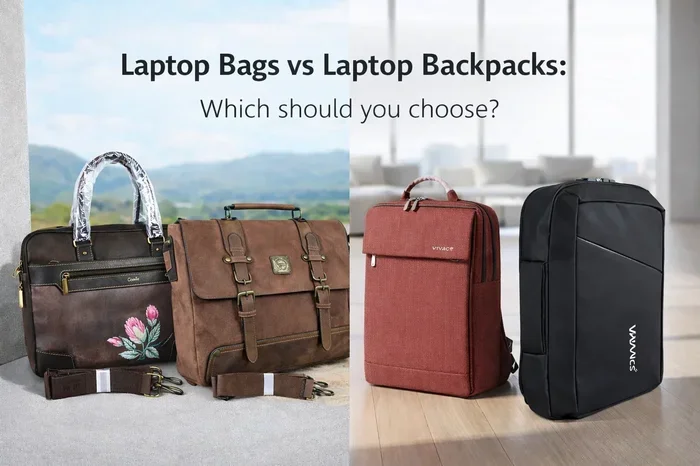
The short answer is yes. You can bring a backpack and a laptop bag on a plane as long as they fit within your airline’s cabin luggage limits. Typically, airlines allow one carry-on bag and one personal item. A backpack often counts as the carry-on, while a laptop bag or messenger bag serves as the personal item. Some travelers even use a slim laptop sleeve inside a larger backpack, but carrying them separately gives you more flexibility.
The key is to check the specific airline cabin baggage rules before you book. Each carrier sets its own size and weight limits. For example, budget airlines might be stricter than major carriers. Always measure your bags and weigh them before heading to the airport. This simple step prevents surprises at the gate.
Why This Combo Works So Well
A travel backpack gives you space for clothes, shoes, and toiletries. The laptop bag keeps your computer, charger, and documents safe and easy to reach. Together, they let you stay organized without lugging a heavy checked baggage item. You stay mobile, keep your gear close, and skip the baggage claim wait. This setup is a favorite among digital nomads and business travelers who value efficiency.
How Airline Cabin Baggage Rules Work
Understanding carry-on luggage rules is the first step. Airlines group cabin items into two categories: carry-on bags and personal items. A carry-on is usually a suitcase or a large backpack that fits in the overhead bin. A personal item is smaller and must fit under the seat in front of you. A laptop bag almost always qualifies as a personal item.
Here’s a quick look at how most major airlines handle this:
| Airline | Carry-On Dimensions | Personal Item Allowance | Backpack + Laptop Bag Fit? |
|---|---|---|---|
| Delta | 22 x 14 x 9 in | Backpack, purse, or laptop bag | Yes, if backpack is within limits |
| American Airlines | 22 x 14 x 9 in | One personal item | Yes, both fit easily |
| United | 22 x 14 x 9 in | Briefcase, laptop bag, or small backpack | Yes, standard combo works |
| Southwest | 24 x 16 x 10 in | One personal item | Yes, generous size limits |
| Spirit (Budget) | 22 x 18 x 10 in | Personal item: 18 x 14 x 8 in | Check sizes carefully |
Always verify the latest rules on the airline’s website. Cabin baggage policies can change. Some airlines also restrict the number of personal items for basic economy tickets. If you’re flying internationally, the rules may differ. A carry-on backpack that meets size limits ensures a smooth boarding experience.
What Counts as a Personal Item?
A personal item is any bag that fits under the seat. Common examples include a laptop bag, a tote, a small backpack, or a purse. The bag must not exceed the airline’s specified dimensions. Most airlines allow personal items up to about 18 inches wide, 13 inches tall, and 8 inches deep. Your laptop bag almost always qualifies, especially if it’s designed for travel. If you’re unsure, measure your bag and compare it to the airline’s guidelines.
Choosing the Perfect Backpack and Laptop Bag Combo
Picking the right backpack and laptop bag pair makes a huge difference. You want both bags to be comfortable, durable, and compliant with size rules. A poorly chosen combo can lead to bulky gear, back pain, or even gate-check fees.
Backpack Considerations
Look for a travel backpack with a capacity of 30 to 40 liters. This size holds a few days of clothing and still meets most carry-on limits. Choose one with a slim profile and good padding. A backpack with a clamshell opening makes packing easier. Avoid oversized hiking packs, as they often exceed airline dimensions. A carry-on backpack with a built-in laptop sleeve can also serve double duty, but carrying them separately gives you more organization options.
Laptop Bag Considerations
Your laptop bag should protect your device while staying compact. A slim sleeve or a padded messenger bag works great. Look for water-resistant material and a secure zipper. The bag should fit your laptop with room for a charger and a few documents. A laptop backpack can also work, but if you’re already carrying a backpack, a slim laptop bag keeps the total weight manageable. Consider a bag with a strap that attaches to your carry-on handle for easy maneuvering.
Top Combos for Different Travel Styles
- Business travelers: A sleek 35L backpack paired with a leather laptop messenger bag.
- Digital nomads: A 40L travel backpack with a waterproof laptop sleeve and a small tech pouch.
- Weekend getaways: A 30L hiking backpack and a compact neoprene laptop case.
- Budget flyers: A basic 35L backpack and a simple padded laptop bag that fits under the seat.
Packing Like a Pro with Two Bags
Packing efficiently is the secret to traveling with a backpack and a laptop bag. You want to maximize space while keeping your gear accessible. A smart strategy prevents overpacking and reduces the need for checked baggage.
Use Packing Cubes
Packing cubes are a game-changer. They compress your clothes and keep them organized. Place cubes in your backpack, and use the laptop bag only for tech and documents. This separation means you can pull out your laptop quickly at the security checkpoint. A compression sack can further shrink bulky items like jackets and sweaters.
Distribute Weight Wisely
Keep heavier items close to your back in the backpack. Place the laptop bag on your shoulder or crossbody for balance. This setup prevents strain on your neck and back. If both bags are heavy, consider a backpack with a hip belt to transfer weight to your hips. You’ll walk through the airport more comfortably.
Quick Packing Checklist
- Travel documents and boarding pass in the laptop bag.
- Laptop, charger, and mouse in a padded sleeve.
- Phone, earbuds, and portable battery in an easy-to-reach pocket.
- One change of clothes and essentials in the backpack.
- Toiletries in a clear, quart-sized bag for TSA.
- Compression sack for dirty laundry or bulky items.
Remember the TSA 3-1-1 rule for liquids. Any liquid container must be 3.4 ounces or less, and all must fit in a single quart-sized bag. This bag goes in a separate bin at security. Keeping it in your laptop bag makes the process smoother.
TSA Security Tips for Traveling with Dual Bags
Going through airport security with a backpack and a laptop bag doesn’t have to be stressful. A little preparation saves time and keeps you organized. The TSA wants to see your electronics clearly, so a few simple steps make a big difference.
Separate Your Laptop Bag at the Checkpoint
Place your laptop bag in a bin by itself. This allows the TSA officer to get a clear view of your computer. If your laptop is inside a backpack, you’ll need to remove it anyway. A dedicated laptop bag speeds up the process. Keep your boarding pass and ID in an easy-to-reach pocket so you can grab them quickly.
Be Aware of Prohibited Items
Both bags go through the X-ray machine. Avoid packing liquids over 3.4 ounces in either bag. Sharp objects, tools, and large electronics accessories may need inspection. If you’re carrying a portable charger, it must be in your carry-on, not checked. A seatback pocket can hold your phone and boarding pass during the flight, so keep those items accessible.
Gate Check vs. Overhead Bin
If your backpack is too large for the overhead bin, the gate agent may ask you to check it at the plane door. This is called gate checking. To avoid this, ensure your backpack meets the airline’s carry-on dimensions. A laptop bag never needs gate checking because it fits under the seat. Choosing a compact, compliant combo keeps both bags with you throughout the flight.
Common Mistakes and Expert Advice
Even seasoned travelers make mistakes when carrying a backpack and a laptop bag. Learning from others helps you avoid the same pitfalls. Here are the most common errors and how to fix them.
Mistake 1: Ignoring Size Limits
Many travelers assume any backpack fits as a carry-on. In reality, airlines measure the outside dimensions, including wheels and handles. A backpack that’s 23 inches tall might not fit in the sizer at the gate. Always measure your bag before you leave home. If you’re between sizes, choose the smaller one. A laptop bag that’s slightly oversized can also cause issues, so stick to the personal item limits.
Mistake 2: Overpacking Both Bags
Having two bags tempts you to pack too much. You might end up with a heavy, unwieldy combo that slows you down. Stick to the essentials. Use a packing cube system to keep things tidy. Remember, you’ll be carrying both bags through the airport and possibly onto a crowded bus or train. Light packing makes the journey enjoyable.
Mistake 3: Forgetting to Check Airline-Specific Rules
Every airline has its own policy for carry-on luggage. Budget carriers often charge for carry-ons and enforce strict size limits. Even major airlines can change their rules seasonally. Always check the airline’s website a few days before your flight. Look for the “Baggage” section and review both carry-on and personal item dimensions.
Mistake 4: Not Labeling Your Bags
It’s easy to grab the wrong bag at the baggage carousel or leave one behind. Attach a colorful luggage tag to both bags. Include your name and phone number. This simple step ensures you can identify your travel backpack and laptop bag quickly. It also helps airport staff return lost items to you.
Expert Tip: The One-Backpack Travel Hack
If you find carrying two bags cumbersome, consider a laptop backpack that meets both needs. Many modern travel backpacks have a dedicated, padded laptop compartment that qualifies as a personal item on its own. You can then carry a small sling or tote as a second personal item. This approach simplifies your setup while still giving you easy access to your tech gear.
Final Thoughts
Traveling with a backpack and a laptop bag on a plane is not only allowed, it’s often the smartest way to stay organized. By understanding airline cabin baggage rules, choosing the right sizes, and packing smart, you can avoid fees and security hassles. A little planning goes a long way toward a smooth, stress-free journey. Next time you board a flight, you’ll know exactly what to expect. Enjoy the freedom of traveling light with your tech gear close at hand.
Frequently Asked Questions
Can I bring a backpack and a laptop bag on a plane if I’m on a basic economy ticket?
It depends on the airline. Many carriers still allow one personal item for basic economy, but they may not permit a separate carry-on. A laptop bag usually counts as your personal item. Check your ticket’s baggage allowance before you fly to avoid surprises at the gate.
What if my backpack is slightly too big for the overhead bin?
The gate agent may ask you to check it at the plane door. This is called gate checking. To prevent this, measure your carry-on backpack against the airline’s size limits. A backpack that fits under the seat as a personal item is always safe. Choosing a compliant travel backpack keeps both bags with you.
Do I need to remove my laptop from the bag at TSA?
Yes, TSA typically requires you to remove laptops and large electronics from their bags. Place them in a separate bin for screening. A dedicated laptop bag makes this quick and easy. Keeping your laptop in a slim sleeve also speeds up the process.
Can I use a laptop backpack as both my carry-on and personal item?
Some travelers use a single laptop backpack that fits both categories, but most airlines require a separate personal item if you also have a carry-on. A backpack and a laptop bag combo gives you more flexibility and keeps your gear better organized. Always confirm the airline’s specific policy.
Are there any liquids restrictions for the laptop bag?
Yes, the same TSA 3-1-1 rule applies. Any liquid, gel, or aerosol in your laptop bag must be 3.4 ounces or less and fit in a quart-sized bag. This includes things like hand sanitizer or travel toothpaste. Keep your liquids in the laptop bag for easy access at security.
How do I choose the best laptop bag for travel?
Look for a bag that is water-resistant, padded, and fits your laptop snugly. A messenger bag or a slim sleeve works well as a personal item. Consider a bag with multiple compartments for chargers and documents. The best laptop bag protects your gear without adding bulk to your carry-on luggage setup.