Can Any Printer Be Used As An Edible Printer At All
Not every printer can handle edible printing. Regular printers use inks and materials that are not food safe. To print on cakes and cookies, you need a dedicated edible printer or a properly converted inkjet printer with edible ink and edible paper. This guide covers everything you need to know about edible image printing and whether your current printer can do the job.
Have you ever looked at a beautifully decorated cake with a stunning photo printed right on the icing and wondered, can any printer be used as an edible printer? It is a great question. Many people assume that any printer can be adapted for food printing. The truth is, it is not that simple. Some printers work well. Others can be dangerous. And a few are actually built for this exact purpose.
In this guide, we will walk through everything you need to know about edible printing. We will cover which printers work, which ones do not, and what materials you need to get started. Whether you are a hobby baker or someone who wants to create custom cakes for special events, this article has you covered. Let us dive in and find out if your printer can handle the task.
Key Takeaways
- Not all printers work for edible printing: Only specific inkjet printers are safe and effective for printing on edible media.
- Edible ink and edible paper are essential: Regular ink and regular paper are toxic and unsafe for food use.
- Laser printers are a no-go: The heat and toner in laser printers make them completely unsuitable for edible printing.
- Converting a printer is possible but risky: You can clean and refill an inkjet printer, but it requires careful handling and food-safe materials.
- Dedicated edible printers give the best results: Brands like Canon and Epson offer models designed specifically for cake and cookie printing.
- Wafer paper and icing sheets are the best edible media: These materials absorb edible ink beautifully and are safe to eat.
- Practice makes perfect: Test prints on regular paper first, then move to edible paper for your final designs.
📑 Table of Contents
What Is an Edible Printer and How Does It Work?
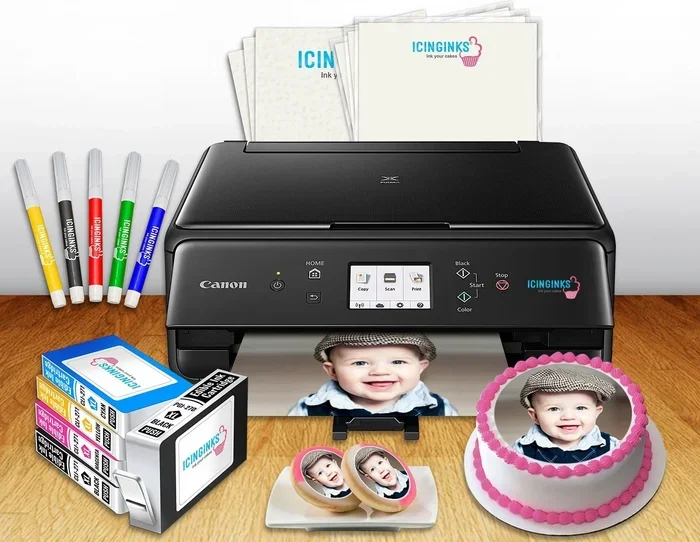
An edible printer is a special printer designed to print food-safe images onto edible paper. The concept is simple. You load edible paper into the printer. You fill it with edible ink. Then you print your design just like you would on regular paper. The result is a beautiful image that can be placed on cakes, cookies, cupcakes, and other treats.
These printers use the same basic technology as standard inkjet printers. But the key difference is the ink. Food grade ink is made from ingredients that are safe to consume. It does not contain harmful chemicals or toxins. This makes it okay to eat the printed image along with the dessert.
How Edible Printing Works
The process of edible image printing is surprisingly straightforward. Here is how it works step by step:
- You design or select an image on your computer.
- You load a sheet of edible paper into the printer.
- You print the image using edible ink.
- You let the print dry for a few minutes.
- You place the printed sheet onto frosted cakes or cookies.
- The image adheres to the surface and becomes part of the dessert.
It sounds almost too easy, right? And in many ways, it is. But the quality of your print depends heavily on the printer and materials you use. This is why not just any printer will do.
Types of Edible Paper You Can Print On
Not all edible paper is the same. There are a few different types, and each has its own strengths:
- Icing sheets: These are thin, flexible sheets made from sugar. They work great on frosted cakes and cupcakes.
- Wafer paper: This is made from potato starch. It is very thin and dries quickly. It is popular for cake pops and chocolate decorations.
- Rice paper: Slightly thicker and chewier. It works well for cookies and hard candies.
- Sugar sheets: These have a slightly sweet taste and a smooth surface. They are ideal for detailed images.
Each type of paper absorbs ink differently. This means your printer settings may need to be adjusted depending on what you are using. More on that later.
Can You Convert Any Printer for Edible Printing?
This is where things get interesting. Many people wonder if they can simply clean out their existing printer and use it for edible printing. The short answer is sometimes. But there are important caveats you need to understand first.
Inkjet vs Laser Printers for Edible Printing
The type of printer you have matters a lot. Here is the breakdown:
- Inkjet printers: These are the only type of printer that can realistically be used for edible printing. They work by spraying tiny droplets of liquid ink onto paper. If you replace the regular ink with edible ink, an inkjet printer can produce beautiful food prints.
- Laser printers: These use heat and toner powder to fuse images onto paper. The toner is not edible. The heat process also raises safety concerns. Laser printers should never be used for edible printing.
So right away, if you have a laser printer, you can rule it out completely. It will not work for this purpose no matter what you try.
Why Most Regular Printers Won’t Work
Even among inkjet printers, not every model is suitable. Here is why:
- Ink cartridges contain chemicals: Standard printer ink is made with synthetic dyes and solvents. These are toxic if ingested.
- Printer internals are not food safe: The internal parts of a printer come into contact with ink. Even after cleaning, residue from regular ink can remain.
- Print quality varies: Some inkjet printers produce blurry or uneven prints on edible paper. You need a model that delivers consistent, high-resolution results.
- Maintenance products are not food safe: Printers often use cleaning solutions that contain harmful chemicals.
This is why many experts recommend buying a dedicated edible printer rather than trying to convert an existing one. It is safer and produces much better results.
The Risks of Using a Non-Food-Safe Printer
Let us be clear about something important. Using a printer that has not been properly cleaned or dedicated to food use can be dangerous. Regular ink contains chemicals that should not be consumed. Even small amounts can cause stomach discomfort or allergic reactions. If you are printing for children or people with sensitivities, this risk increases.
The safest approach is to have a separate printer that is used exclusively for edible printing. Label it clearly. Never put regular ink in it. This eliminates any risk of cross-contamination.
Best Printers for Edible Printing
If you are serious about custom cake design or cookie decorating, investing in the right printer makes a huge difference. Here are the best options available.
Top Picks for Home Bakers
For casual bakers and hobbyists, these printers offer great value and solid results:
- Canon PIXMA iP110: A compact, portable inkjet printer that works well with edible inks. It produces vibrant colors and sharp details.
- Epson Expression Photo HD XP-15000: Known for excellent color accuracy. This printer handles edible paper beautifully.
- Canon SELPHY CP1500: A dedicated photo printer that works well for small edible images. It is easy to use and very reliable.
All of these are inkjet models. They accept third-party edible ink cartridges or can be refilled with food-safe ink.
Professional-Grade Options
For bakeries and professional cake decorators, these printers offer higher volume and better quality:
- Epson SureColor P600: A wide-format printer that produces gallery-quality images on edible paper. Perfect for large cakes and event desserts.
- Canon imagePROGRAF PRO-1000: Delivers exceptional color depth and detail. Ideal for high-end custom cake businesses.
- Roland VersaUV LEF2-300D: A UV flatbed printer that can print directly on edible films and specialty media.
These professional models come with a higher price tag. But for serious bakers, the quality and consistency are worth the investment.
Edible Inks and Papers: What You Need to Know
Your printer is only half the equation. The other half is the materials you print with. Using the wrong ink or paper can ruin your prints and even make them unsafe to eat.
Choosing the Right Edible Ink
Edible ink is not the same as regular ink. It is specially formulated to be food safe. Here is what you need to know:
- Food grade certification: Always look for inks that are certified food grade. This means they have been tested and approved for contact with food.
- Ingredients matter: Quality edible inks are made from water, food coloring, and natural sweeteners. Avoid inks with artificial preservatives or synthetic chemicals.
- Brand compatibility: Some edible inks work only with specific printer brands. Check compatibility before purchasing.
- Refillable systems: Many bakers prefer refillable edible ink systems. These are more economical and produce consistent results over time.
Popular edible ink brands include Magic Edibles, Temptations, and Edible Ink Superstore. Each offers different color ranges and compatibility options.
Types of Edible Media for Printing
The edible paper or medium you choose affects the final look of your print:
- Icing sheets: Best for smooth, frosted cakes. They adhere easily and have a slightly sweet taste.
- Wafer paper: Ideal for chocolate work and cake pops. It is thin, lightweight, and nearly tasteless.
- Fondant sheets: These can be printed on and then wrapped around cakes. They add a professional finish.
- Parchment-style edible sheets: Versatile and easy to cut. Great for cookies and cupcakes.
Each medium has different absorption rates. Test prints on a small piece first to see how the ink spreads and dries.
Common Mistakes People Make with Edible Printing
Even experienced bakers make mistakes when they first start with edible image printing. Here are the most common errors and how to avoid them.
Using the Wrong Materials
The biggest mistake is using regular printer paper or regular ink for edible projects. This is a serious food safety issue. Always use certified edible paper and food safe ink. There are no shortcuts here.
Another mistake is using low-quality edible paper. Cheap paper can curl, tear, or produce blurry images. Invest in good quality materials for the best results.
Ignoring Printer Maintenance
Even dedicated edible printers need proper care. Here are some maintenance tips:
- Clean the print heads regularly according to the manufacturer’s instructions.
- Store edible ink cartridges in a cool, dry place.
- Run a cleaning cycle before every use to ensure smooth ink flow.
- Never let edible ink dry inside the printer. This can clog the print heads.
Skipping Test Prints
Always do a test print on regular paper before printing on edible media. This lets you check colors, alignment, and sizing without wasting expensive edible materials. It is a simple step that saves time and money.
Wrong Printer Settings
Using the wrong print settings can ruin your edible prints. Set your printer to the highest quality mode. Use matte or photo paper settings. Adjust the color saturation if needed. Every printer and paper combination is slightly different, so experiment to find the best settings.
Final Thoughts on Using a Printer for Edible Projects
So, can any printer be used as an edible printer? The honest answer is no. Not every printer is suitable for this purpose. Inkjet printers are your best option, and dedicated edible printers give you the safest and highest-quality results. Laser printers should be avoided entirely.
The good news is that edible printing is more accessible than ever. Affordable inkjet printers and food-safe inks are widely available. With the right setup, you can create stunning custom cakes, cookies, and treats that look professional and taste great.
Start small. Buy an entry-level inkjet printer. Get a few sheets of edible paper and a set of edible ink cartridges. Practice with simple designs. As you gain confidence, you can upgrade to better equipment and tackle more complex projects.
The world of custom cake design and food printing is creative, fun, and incredibly rewarding. With the right tools and a little practice, you can turn ordinary desserts into edible works of art. Your friends and family will be amazed by what you can create.
Remember to always prioritize food safety. Use only certified food-grade materials. Keep your edible printer separate from your regular printer. And most importantly, have fun with it. The best part about edible printing is seeing people enjoy the treats you have created with your own hands.
Now that you know what it takes, you are ready to start your edible printing journey. Grab your printer, load up some edible paper, and let your creativity flow. Happy printing!
Frequently Asked Questions
Can I use my regular inkjet printer for edible printing?
Yes, but only if you thoroughly clean it and switch to food safe ink. Many bakers convert existing inkjet printers for edible use. However, having a dedicated printer is the safest and most reliable option.
Is edible ink safe to eat?
Yes, certified edible ink is made from food-grade ingredients and is safe to consume. Always check that the ink you buy is specifically labeled as food safe and edible.
What is the best edible paper for printing?
Icing sheets and wafer paper are the most popular choices. Icing sheets work best on frosted cakes, while wafer paper is ideal for cookies and cake pops. Both produce vibrant, high-quality prints.
Can a laser printer be used for edible printing?
No. Laser printers use heat and toner powder, neither of which is food safe. They should never be used for any edible printing projects.
How long do edible prints last on a cake?
Edible prints can last several days on a properly frosted cake. Keep the cake in a cool, dry place. Avoid direct sunlight or moisture, which can cause the print to fade or dissolve.
Do I need special software to print edible images?
No special software is required. You can use any standard photo editing or design program. Just make sure your image has a high resolution for the best print quality.
=== CONCLUSION ===
The question can any printer be used as an edible printer comes down to the type of printer, the ink, and the paper. Not every printer can handle edible printing, but the right setup can produce amazing results. Stick with inkjet printers, use certified food safe ink, and choose high-quality edible paper. With these essentials in place, you are ready to create beautiful, delicious custom desserts that will impress everyone. Start experimenting today and discover the joy of edible image printing for yourself.