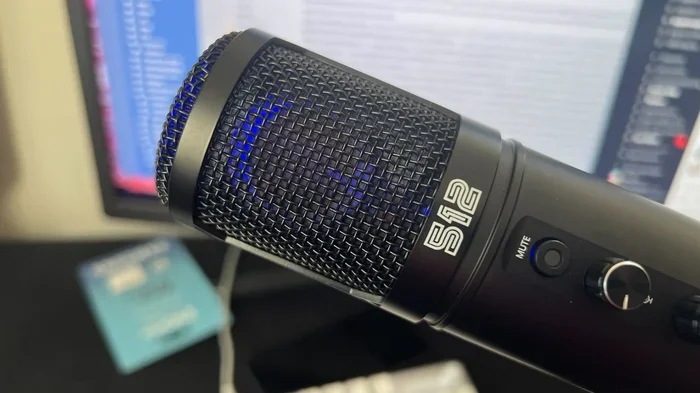
Can A Mic Work Through Usb Everything You Need To Know
Yes, a microphone can absolutely work through USB, and it is one of the simplest ways to record great audio. A USB microphone connects directly to your computer, phone, or tablet without needing extra gear. In this guide, you will learn how USB mics work, their pros and cons, and which type is right for your setup.
Key Takeaways
- USB mics are plug-and-play devices that connect directly to computers and mobile devices without extra equipment.
- USB microphones offer convenience and simplicity for podcasters, streamers, and home recording enthusiasts.
- Not all USB mics sound the same — condenser and dynamic USB mics deliver different audio qualities.
- You can use a USB mic with phones and tablets using OTG adapters or compatible apps.
- USB audio interfaces bridge the gap between traditional XLR mics and USB connectivity for better sound.
- Latency and driver issues can affect USB mic performance but are easy to fix with the right setup.
- Choosing the right USB mic depends on your use case — podcasting, gaming, music, or video calls.
📑 Table of Contents
Can A Mic Work Through USB The Complete Guide
So you want to know can a mic work through USB? The short answer is yes. A USB microphone connects straight to your computer or device using a simple USB cable. No fancy cables. No extra boxes. No complicated setup. You plug it in, and it works.
But there is more to it than just plugging in. Not all USB mics deliver the same sound. Some are perfect for podcasting. Others shine during gaming or video calls. And some are built for music production. In this guide, we will walk you through everything you need to know about USB audio and how a USB mic fits into your recording setup.
Whether you are a beginner or someone looking to upgrade your current gear, this article covers it all. Let us dive in.
What Is a USB Microphone
A USB microphone is a mic that has a built-in audio converter. This converter turns your voice into digital audio signals that a computer can read. Traditional mics need an external audio interface to do this job. A USB mic does it all inside one compact device.
Think of it like this. A regular mic is like a raw ingredient. It needs a kitchen (the audio interface) to become a finished dish (digital audio). A USB microphone is like a pre-made meal. It is ready to eat right out of the box. You just plug it into a USB port and start recording.
This is why so many people love plug and play audio gear. You do not need to install complex software or buy extra equipment. Just connect and go. That is the beauty of USB audio technology.
How Does a USB Mic Work
Inside every USB microphone is a tiny sound card. This sound card is called an analog-to-digital converter or ADC. When you speak into the mic, the condenser or dynamic element picks up your voice. Then the ADC converts that analog signal into digital data.
The digital data travels through the USB cable to your computer. Your computer recognizes the mic as an audio input device. From there, any recording software, video call app, or streaming tool can use it.
Some USB mics also have built-in headphone jacks. This lets you monitor your audio in real time. You hear yourself without any delay. This feature is called direct monitoring and it is super helpful for podcasters and singers.
The entire process happens fast. In most cases, there is no noticeable latency. That means what you say comes through your headphones almost instantly. This makes USB microphones great for live streaming and real-time communication.
Types of USB Microphones
Not all USB mics are created equal. There are a few main types you should know about. Each type works differently and suits different needs.
USB Condenser Microphones
A USB condenser mic is the most popular type. It uses a thin diaphragm that vibrates when sound hits it. These mics are very sensitive. They pick up detail and clarity like nothing else. That is why they are the go-to choice for podcasting and voiceovers.
However, condenser mics can also pick up background noise. They hear everything in the room. If your space is noisy, this can be a problem. But with proper mic placement and a quiet room, a USB condenser sounds amazing.
USB Dynamic Microphones
A USB dynamic microphone works differently. It uses a coil and magnet system. These mics are less sensitive than condensers. They focus on the sound right in front of them. Background noise stays low.
Dynamic USB mics are great for loud environments. Gamers, streamers, and people in busy rooms love them. They also tend to be more durable. If you are rough on your gear, a dynamic USB mic can handle the wear and tear.
USB Headset Microphones
A USB headset mic combines headphones and a microphone in one unit. These are super convenient for calls and casual recording. They are affordable and easy to use. Many office workers and students use USB headsets for daily video calls.
The downside is sound quality. Headset mics usually do not match the clarity of a standalone USB microphone. But for everyday use, they get the job done well.
Can You Use a USB Mic with Any Device
Here is a common question. Can a mic work through USB on all devices? The answer is mostly yes, but with some exceptions.
USB microphones work great with desktop computers and laptops. Most modern computers recognize them instantly. You do not need to install drivers in most cases. The device shows up as a plug and play audio input.
But what about phones and tablets? Many USB mics work with mobile devices too. You may need an OTG adapter (On-The-Go) for Android phones. iPhones and iPads usually support USB mics with a Lightning to USB or USB-C adapter.
Some apps may not recognize a USB mic on mobile devices. But popular apps like Zoom, OBS, and many recording apps work fine. Always check compatibility before buying.
Pros and Cons of USB Microphones
Every piece of gear has strengths and weaknesses. Here is a quick look at what makes USB microphones great and where they fall short.
The Advantages
- Plug and play setup — no extra gear needed.
- Simple connection — just plug into a USB port.
- Portable and lightweight — easy to carry around.
- Built-in audio conversion — no external interface required.
- Affordable options — many great mics under $100.
- Great for beginners — no technical knowledge needed.
- Low latency — real-time monitoring is smooth.
The Disadvantages
- Limited sound customization — less control than XLR setups.
- No upgrade path — you cannot swap out internal components.
- Cable length limits — longer USB cables can cause signal issues.
- Computer dependent — you need a powered device to use them.
- Some mics lack features — like phantom power for certain condenser capsules.
- Driver conflicts — rare but can happen on some systems.
USB Mic vs XLR Mic What Is the Difference
This is one of the most common debates in audio gear. Let us break it down clearly.
A traditional XLR microphone uses a three-pin cable. It connects to an audio interface or mixer. That interface converts the analog signal to digital. This setup gives you more control over your sound.
A USB microphone skips the interface entirely. It has everything built in. This makes it simpler and faster to set up.
So which is better? It depends on your needs. If you want simplicity and speed, go with a USB mic. If you want professional-grade control and flexibility, choose an XLR setup with a quality audio interface.
Many people start with a USB microphone and later upgrade to XLR. That is a perfectly normal path. The important thing is to start somewhere and improve over time.
How to Set Up a USB Microphone
Setting up a USB microphone is incredibly easy. Follow these steps and you will be recording in minutes.
- Plug the USB cable into your mic and your computer.
- Wait for recognition — most computers detect the mic instantly.
- Select the mic as your input device in your sound settings.
- Adjust input volume so your voice levels are healthy.
- Open your recording software and test the audio.
- Speak into the mic and check for clarity and volume.
That is it. No drivers to install in most cases. No software to configure. Just a simple USB connection and you are good to go.
Quick tip: Place your mic about 6 to 8 inches from your mouth. This gives you the best sound quality and reduces plosive sounds like “p” and “b” pops.
Best Uses for USB Microphones
USB microphones are versatile. They work well in many situations. Here are the most popular use cases.
Podcasting
Podcasting is one of the biggest reasons people buy a USB mic. The simplicity is unbeatable. You plug in, open your recording app, and start talking. No cables running everywhere. No extra gear cluttering your desk.
Many popular podcasters use USB microphones for their shows. The sound quality is more than good enough for spoken word content. Brands like Blue Yeti, Audio-Technica, and Rode make excellent USB podcasting mics.
Streaming and Gaming
Streamers need a mic that is reliable and easy to use. A USB mic fits perfectly. You connect it to your PC, select it in OBS or Streamlabs, and you are live.
Dynamic USB mics are especially popular among gamers. They reject background noise well. So your viewers hear your voice clearly, even if your room is not perfectly quiet.
Video Calls and Remote Work
If you work from home, a USB microphone can improve your video calls dramatically. Built-in laptop mics sound thin and echoey. A dedicated USB mic gives you clear, professional sound.
Your coworkers will notice the difference. Your voice will sound crisp and natural. It is a small upgrade that makes a big impact.
Music Recording
Some musicians use USB mics for recording vocals and instruments. While they do not match professional studio gear, they are great for demos and home recordings.
Many USB condenser mics capture vocals beautifully. They are a solid starting point for singer-songwriters and bedroom producers.
Common USB Mic Problems and How to Fix Them
Even though USB microphones are simple, you may run into some issues. Here are the most common problems and quick fixes.
Mic Not Recognized by Computer
If your computer does not detect the mic, try a different USB port. Avoid USB hubs — plug directly into the computer. Also check if the cable is fully seated.
Poor Sound Quality
Low-quality audio often comes from mic placement. Move the mic closer to your mouth. Use a pop filter to reduce harsh sounds. Record in a quiet room with soft surfaces to reduce echo.
Audio Cutting In and Out
This usually happens with long or damaged USB cables. Use a shorter, high-quality cable. Also avoid plugging the mic into a USB extension — go directly into the computer.
High Latency
If you hear a delay when monitoring, check your audio settings. Lower the buffer size in your recording software. Some USB mics have a direct monitoring feature that bypasses this issue entirely.
Driver Issues
Rarely, a USB mic needs a driver update. Visit the manufacturer website and download the latest driver. Restart your computer after installing. This usually fixes recognition problems.
Expert Tips for Getting the Best Sound from Your USB Mic
Want to get the most out of your USB microphone? Here are some pro tips that make a real difference.
- Use a mic stand or boom arm. This keeps the mic stable and at the right height.
- Record in a treated room. Soft furnishings absorb echo and improve clarity.
- Speak consistently at the same distance. This keeps volume levels even.
- Use a pop filter. It protects your mic from harsh plosive sounds.
- Update your audio drivers. This ensures compatibility and smooth performance.
- Close unnecessary apps. Free up system resources for better audio processing.
- Test different USB ports. USB 3.0 ports often provide cleaner power than USB 2.0.
These small changes can dramatically improve your recording setup. You do not need expensive gear to sound professional. A good USB mic and proper placement go a long way.
How to Choose the Right USB Microphone
With so many options on the market, choosing the right USB mic can feel overwhelming. Here are a few things to consider before you buy.
Think about your use case. Are you podcasting? Streaming? Recording music? Making video calls? Different mics excel in different areas. A USB condenser is great for vocals. A dynamic USB mic is better for noisy environments.
Set a budget. You can find excellent USB microphones at many price points. You do not need to spend a fortune. Even budget options under $50 deliver solid performance for everyday use.
Check compatibility. Make sure the mic works with your device. Most USB mics work with Windows and Mac. But mobile support varies. Read the product description carefully.
Read reviews. Other users share real-world experiences. Look for feedback on sound quality, build quality, and ease of use. This helps you avoid bad purchases.
Consider extra features. Do you need a headphone jack for monitoring? A mute button? Adjustable gain? These features add convenience and improve your recording experience.
Can You Convert a Regular Mic to USB
Yes, you can. If you already own a traditional XLR microphone, you can make it work through USB. You need a device called an audio interface. This box connects your XLR mic to your computer via USB.
The audio interface acts as a bridge. It takes the analog signal from your mic and converts it to digital. Popular options include the Focusrite Scarlett series and the Behringer U-Phoria line.
This is a great option if you want better sound quality than a USB mic but do not want a full studio setup. An audio interface gives you room to grow. You can upgrade your mic later without changing your connection method.
So while a USB mic is all-in-one, an XLR mic with an interface offers more flexibility. Both paths work. Choose the one that fits your goals and budget.
The Future of USB Microphone Technology
USB microphone technology keeps getting better. Manufacturers are adding new features every year. We are seeing mics with built-in AI noise cancellation. Some offer wireless USB connectivity. Others include smart features like automatic gain control.
The digital audio world is moving toward simpler, more accessible solutions. USB mics are at the forefront of this shift. As technology improves, we can expect even better sound quality from these compact devices.
For now, USB microphones are more than enough for most users. Whether you are a content creator, a remote worker, or a musician, there is a USB mic that fits your needs.
Conclusion
Can a mic work through USB? Absolutely. A USB microphone is one of the easiest and most effective ways to capture great audio. Whether you are podcasting, streaming, recording music, or taking video calls, a USB mic delivers solid performance with minimal setup.
These mics are affordable, portable, and incredibly user-friendly. You do not need technical skills to get started. Just plug in, configure your settings, and you are ready to go.
If you are new to audio gear, a USB microphone is the perfect place to start. It removes the complexity of traditional setups while still delivering impressive sound quality. As you grow, you can always explore more advanced options like XLR mics and audio interfaces.
Start simple. Start with USB. And enjoy the process of creating great audio content.
Frequently Asked Questions
Can I use a USB mic with my phone?
Yes, most USB microphones can work with smartphones using an OTG adapter for Android or a Lightning/USB-C adapter for iPhones. Check your phone’s compatibility before purchasing, and note that some apps may not support external USB mics on mobile devices.
Do USB mics need drivers?
Most USB mics are plug and play and do not require drivers. However, some models may need a driver update for full compatibility with certain operating systems. Always check the manufacturer website for the latest driver support.
Is a USB mic good for music recording?
Yes, a USB microphone can record music, especially for demos and home recordings. However, professional studios often prefer XLR mics with dedicated audio interfaces for maximum control and sound quality. USB mics are excellent for beginners and intermediate musicians.
What is the difference between a USB mic and a Bluetooth mic?
A USB mic connects directly to your device with a cable and delivers digital audio with minimal latency. A Bluetooth mic uses wireless signals, which can introduce slight delays. For recording and streaming, a USB mic is generally more reliable and consistent.
Can I use a USB mic for live streaming?
Absolutely. USB microphones are popular among streamers because they are easy to set up and deliver clear audio in real time. Many streamers use dynamic USB mics because they reject background noise well and sound great on platforms like Twitch and YouTube.
Do USB mics work on Mac computers?
Yes, USB microphones work seamlessly on Mac computers. macOS recognizes most USB mics as audio input devices automatically. You may need to select the mic in your sound settings or recording software, but no additional setup is typically required.


One Comment