Can 5g Wifi Go Through Walls and Still Reach Every Room
Can 5g wifi go through walls and still reach every room? The short answer is yes, but with limitations. 5g wifi signal penetration depends on wall materials, distance, and interference. Understanding how wireless connection signals behave helps you optimize your home networking setup and eliminate wifi dead zones for better network coverage throughout your home.
Have you ever walked into a room and noticed your wifi suddenly drops? You are not alone. Many people struggle with 5g wifi signals that seem to vanish the moment they pass through a wall. If you have ever wondered whether 5g wifi can go through walls and still deliver reliable internet to every room, you are in the right place.
The truth about 5g wifi signal penetration is more nuanced than you might think. Yes, 5g wifi signals can pass through walls. But how well they do depends on several factors that most people overlook. In this guide, we will break down everything you need to know about wireless connection performance through different wall types. You will learn what weakens your signal, how to improve network coverage, and what steps you can take to get strong internet speed in every corner of your home.
Whether you live in a small apartment or a large house with thick walls, understanding how 5g wifi behaves indoors helps you make smarter decisions. Let us dive into the details and find practical solutions that actually work.
Key Takeaways
- 5g wifi can penetrate walls: But signal loss varies greatly depending on the wall type and thickness.
- Building materials matter most: Concrete, brick, and metal block 5g wifi signals far more than drywall or wood.
- Router placement is critical: Central positioning dramatically improves wireless coverage in every room.
- Mesh networks solve coverage problems: They extend 5g wifi range without sacrificing speed or stability.
- Signal strength drops with distance: Every wall adds obstacles that weaken your wireless connection.
- Multiple solutions exist: From wifi extenders to powerline adapters, you have options to boost coverage.
📑 Table of Contents
- What Is 5g Wifi and How Does It Work?
- Can 5g Wifi Actually Go Through Walls?
- What Affects 5g Wifi Signal Through Walls?
- Wall Types and Their Impact on 5g Wifi Signals
- How to Improve 5g Wifi Coverage in Every Room
- When to Consider Alternative Solutions
- Common Mistakes That Weaken 5g Wifi Signals
- Expert Insights on 5g Wifi Wall Penetration
- Key Takeaways
- Conclusion
What Is 5g Wifi and How Does It Work?
Understanding the Basics
5g wifi refers to wireless signals that operate on the 5ghz frequency band. This is different from the older 2.4ghz band that many routers still use. The 5ghz band offers faster bandwidth and less congestion from neighboring networks. However, it has a shorter range and struggles more with physical obstacles.
Think of 5g wifi like a flashlight beam. It is bright and fast, but it does not bend easily around corners. When you point it at a wall, some light passes through, but much of it gets blocked or absorbed. The same principle applies to your wireless connection signals.
Modern routers often support both 2.4ghz and 5ghz bands. The 2.4ghz band travels farther and penetrates walls better, but it is slower. The 5ghz band delivers faster internet speed but has a harder time getting through solid objects. This trade-off is at the heart of the wifi penetration challenge.
Why 5g Wifi Matters for Home Use
Most people choose 5g wifi because of the speed advantage. Streaming 4K video, video conferencing, and online gaming all benefit from the higher bandwidth that 5ghz offers. If your wireless devices are close to the router, 5g wifi delivers an excellent experience.
The problem arises when you move rooms. Walls, floors, and furniture all act as barriers. Your signal strength weakens with each obstacle. This is why many households experience wifi dead zones in bedrooms, bathrooms, or basements that are far from the router.
Can 5g Wifi Actually Go Through Walls?
The Science Behind Signal Penetration
Yes, 5g wifi signals can pass through walls. But they lose strength in the process. Radio waves at 5ghz have shorter wavelengths compared to 2.4ghz waves. Shorter wavelengths mean less ability to bend around obstacles and more absorption by dense materials.
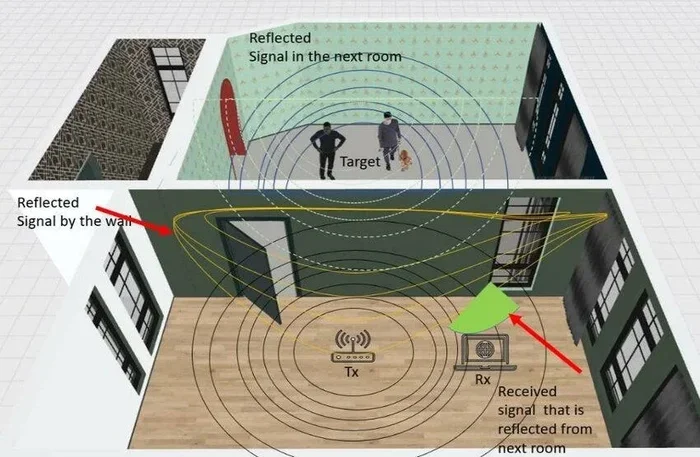
When a 5g wifi signal hits a wall, three things can happen. The signal reflects off the surface. It absorbs into the material. Or it passes through, but at reduced power. The amount of signal that makes it through depends on what the wall is made of and how thick it is.
In ideal conditions, a 5g wifi signal can travel through one or two standard drywall walls with minimal loss. But add more walls, thicker materials, or metal components, and your wireless connection quality drops fast.
Real-World Performance Expectations
In a typical home with standard drywall partitions, 5g wifi can reach most rooms without major issues. You might notice a slight speed reduction after passing through two or three walls. But the connection usually remains stable enough for browsing, streaming, and video calls.
In homes with thicker or denser wall materials, the story changes completely. A single concrete wall can reduce your signal strength by half or more. Multiple concrete walls can make 5g wifi nearly unusable in distant rooms. This is a common problem in older buildings and apartment complexes.
The key takeaway is that 5g wifi go through walls is possible, but the results vary widely. Your home layout and construction materials play a huge role in determining real-world network coverage.
What Affects 5g Wifi Signal Through Walls?
Wall Materials and Their Impact
The single biggest factor in 5g wifi signal penetration is the type of wall the signal must pass through. Different materials block radio waves to different degrees. Here is a quick look at common wall types and how they affect your wireless connection:
- Drywall (gypsum board): Minimal signal loss. 5g wifi passes through easily with only slight reduction in signal strength.
- Wood paneling: Low to moderate signal loss. Wood is relatively transparent to 5ghz radio waves.
- Brick: Moderate to significant signal loss. Brick absorbs more energy and weakens your wireless devices connection.
- Concrete: Heavy signal loss. Concrete is one of the worst materials for wifi penetration at 5ghz frequencies.
- Metal studs or metal panels: Severe signal loss. Metal reflects radio waves almost entirely, creating major wifi dead zones.
- Glass windows (tinted): Some signal loss. Tinted or low-e glass can partially block 5ghz signals.
- Water pipes and aquariums: Unexpected signal loss. Water absorbs 5ghz radio waves very effectively.
Understanding your wall materials helps you predict where 5g wifi will struggle. If your home has concrete or brick interior walls, you should plan your router placement accordingly.
Distance and Physical Obstacles
Even without walls, distance weakens your 5g wifi signal. Radio waves spread out as they travel, losing power over distance. This is called free-space path loss. When you add walls into the mix, the effect compounds quickly.
A 5g wifi signal that travels through three drywall walls and covers 40 feet may arrive at your device with much less power than the same signal traveling 15 feet through open air. Both distance and obstacles contribute to weaker signal strength.
Furniture, appliances, and even large bookshelves also affect your wireless connection. While these objects cause less loss than walls, they still contribute to signal interference in your home networking environment.
Interference From Other Devices
Signal interference is another hidden enemy of 5g wifi performance. Microwaves, cordless phones, baby monitors, and even neighboring wifi networks can all create congestion on the 5ghz band.
When your wireless devices already struggle to receive a weak signal through walls, added interference makes the problem worse. The result is slower speeds, dropped connections, and frustrating buffering.
To minimize interference, keep your router away from other electronics. Also, use your router’s admin panel to select the least congested channel in your area. This simple step can noticeably improve your network coverage.
Wall Types and Their Impact on 5g Wifi Signals
Drywall vs. Concrete: A Closer Look
Most modern homes use drywall for interior walls. Drywall is made of gypsum plaster sandwiched between paper sheets. It is relatively thin and light, which means 5g wifi signals pass through it with ease.
Concrete is a completely different story. Concrete walls are dense, thick, and often contain metal rebar. All of these factors work against your 5g wifi signal penetration. A concrete wall can reduce your signal strength by 50% or more. In a home with multiple concrete walls, achieving full network coverage with a single router becomes very challenging.
If you live in a home with concrete interior walls, you will likely need additional equipment to extend your wireless connection to every room. We will cover solutions for this shortly.
Brick and Stone Walls
Brick and stone walls fall somewhere between drywall and concrete in terms of signal blocking. A single brick wall might reduce your 5g wifi signal by 20% to 40%. Multiple brick walls can create serious wifi dead zones in your home.
Older homes often feature stone or brick interior walls for structural support. If your home has these, consider placing your router in a central location and using additional equipment to boost wireless coverage in distant rooms.
Metal and Mirror Challenges
Metal is the worst enemy of 5g wifi signals. Metal studs, metal lath, and metal wall panels reflect radio waves almost completely. This means that a wall with metal components can block your wireless connection entirely, not just weaken it.
Large mirrors also pose a problem. The metallic coating on mirror backs reflects 5ghz signals. You may notice poor wifi performance on the other side of a large bathroom mirror or a mirrored wall.
If your home has many metal or mirrored surfaces, standard router placement may not be enough. You will need creative solutions to ensure every room gets reliable network coverage.
How to Improve 5g Wifi Coverage in Every Room
Router Placement Tips
Where you place your router has a massive impact on 5g wifi performance. Follow these tips to get the best wireless connection throughout your home:
- Place the router in a central location. This minimizes the number of walls the signal must pass through to reach each room.
- Keep the router elevated. Mount it on a shelf or wall at waist height or higher. Signals travel better downward than through floors.
- Avoid hiding the router in closets or cabinets. Enclosed spaces block signals and reduce signal strength.
- Keep the router away from metal objects. Metal furniture, appliances, and filing cabinets all interfere with 5g wifi signals.
- Stay away from water sources. Fish tanks, water heaters, and pipes can absorb 5ghz signals and weaken your wireless devices connection.
These simple placement changes can dramatically improve your home networking without spending a single dollar.
Using Mesh Networks for Whole-Home Coverage
If your router alone cannot cover your entire home, a mesh wifi system is the best solution. A mesh network uses multiple nodes placed around your home to create a seamless wireless connection everywhere.
Each mesh node acts as a mini router, extending your 5g wifi signal to rooms that would otherwise be out of range. Unlike traditional wifi extenders, mesh systems use a single network name and handle handoffs smoothly as you move between rooms.
Mesh networks are especially helpful in homes with thick walls or multiple floors. They ensure that your internet speed stays consistent no matter where you are. Popular mesh systems from brands like Google Nest, Eero, and TP-Link Deco make setup easy and affordable.
WiFi Extenders and Boosters
A wifi extender is another option for improving network coverage through walls. An extender receives your existing 5g wifi signal and rebroadcasts it to areas with weak coverage.
However, extenders come with a trade-off. They typically cut your bandwidth in half because they use the same radio to receive and transmit. This means you get wider coverage but slower speeds in the extended area.
If you choose a wifi extender, place it in a spot where it still receives a strong signal from your main router. This ensures the rebroadcast signal is strong enough to serve your wireless devices in the dead zone.
Quick Tips for Better Signal
Here are some fast, actionable tips to boost your 5g wifi signal right now:
- Restart your router regularly. A simple reboot clears cached data and refreshes your wireless connection.
- Update your router firmware. Manufacturers release updates that improve signal strength and fix bugs.
- Use the 5ghz band for close-range devices. Keep 2.4ghz for devices that are far from the router or behind multiple walls.
- Reduce connected devices. Too many devices on one network can slow down your internet speed for everyone.
- Consider a dual-band router. These let you split devices between 2.4ghz and 5ghz bands for optimal performance.
When to Consider Alternative Solutions
Powerline Adapters
Powerline adapters use your home’s existing electrical wiring to transmit internet data. You plug one adapter near your router and another in the room that needs better network coverage. This bypasses wall-related signal loss entirely.
Powerline adapters work well in homes where 5g wifi simply cannot reach certain rooms due to thick walls or interference. They provide a stable wired-like connection without running ethernet cables across your home.
Keep in mind that powerline performance depends on your home’s electrical wiring quality and circuit layout. They work best when both adapters are on the same electrical circuit.
Ethernet Backhaul
For the best possible internet speed and reliability, nothing beats a wired ethernet connection. Running ethernet cables through your walls provides a direct, interference-free link to your router.
If you are building or renovating, consider installing ethernet ports in key rooms. This future-proofs your home networking setup and gives you the most reliable wireless connection possible when paired with a quality router.
Upgrading Your Equipment
Older routers may not support the latest 5g wifi standards. Upgrading to a modern Wi-Fi 6 or Wi-Fi 6E router can significantly improve signal penetration and overall network coverage. These newer routers handle interference better and deliver faster speeds even through obstacles.
Also consider the age and capability of your wireless devices. An older phone or laptop with an outdated wifi card may struggle to maintain a strong connection, regardless of your router’s quality.
Common Mistakes That Weaken 5g Wifi Signals
Many people unknowingly make choices that hurt their 5g wifi performance. Here are the most common mistakes to avoid:
- Placing the router in a corner or basement. This limits signal spread and creates wifi dead zones in the far parts of your home.
- Ignoring firmware updates. Outdated router software can cause poor signal strength and security vulnerabilities.
- Using the wrong frequency band. Forcing all devices onto 5ghz when they are far from the router leads to weak connections.
- Overloading the router. Connecting too many devices at once strains your bandwidth and slows everyone down.
- Believing all walls are equal. Assuming every wall blocks signals the same way leads to poor placement decisions and frustration.
Avoiding these mistakes alone can make a big difference in your daily wireless connection experience.
Expert Insights on 5g Wifi Wall Penetration
Networking professionals agree that 5g wifi wall penetration is one of the most common challenges in home networking. The key is to work with your home’s layout rather than against it. Here is what experts recommend:
“The best thing homeowners can do is test their signal strength in different rooms before buying any equipment,” says a senior network engineer. “A simple wifi heat map app on your phone reveals exactly where your 5g wifi struggles and where it works well.”
Another expert adds that mesh systems have become more affordable and easier to set up than ever before. “For most homes with more than two or three rooms, a mesh wifi system is the most reliable way to ensure full network coverage without running cables.”
The bottom line is that there is no one-size-fits-all answer to whether 5g wifi can reach every room in your home. It depends on your specific space, materials, and needs. But with the right approach, you can get strong, reliable coverage in virtually any layout.
Key Takeaways
- 5g wifi can go through walls: But signal strength decreases with each wall it passes through, especially dense materials like concrete or brick.
- Wall type is the biggest factor: Drywall barely affects signals, while concrete, metal, and brick significantly reduce 5g wifi signal penetration.
- Router placement makes a huge difference: A central, elevated position improves wireless coverage and reduces the number of walls the signal must cross.
- Mesh networks are the best solution for large homes: They extend network coverage seamlessly without the speed loss that wifi extenders cause.
- Distance compounds wall-related signal loss: The farther your device is from the router, and the more walls it must pass through, the weaker your internet speed will be.
- Multiple solutions exist for weak coverage: Powerline adapters, ethernet backhaul, and equipment upgrades all offer viable paths to better wireless connection quality.
Conclusion
So, can 5g wifi go through walls and still reach every room? Yes, it can. But the quality of that connection depends heavily on your home’s construction, your router placement, and the solutions you choose to deploy.
5g wifi offers incredible speed and performance, but it demands thoughtful setup to work well throughout an entire home. Understanding how wall materials affect your signal strength is the first step toward solving coverage problems.
Whether you use a mesh network, a wifi extender, powerline adapters, or simply better router placement, the goal is the same: reliable network coverage in every room. With the right approach, you can enjoy fast internet speed and a stable wireless connection no matter where you are in your home.
Take action today. Test your current signal strength in each room, identify your problem areas, and choose the solution that fits your home and budget. A little effort now saves you from frustration later and ensures your 5g wifi delivers the performance you deserve.
Frequently Asked Questions
Can 5g wifi go through concrete walls?
5g wifi can pass through concrete walls, but with significant signal loss. Concrete is dense and often contains metal rebar, which reflects and absorbs 5ghz radio waves. You may experience very slow speeds or dropped connections on the other side of a concrete wall. Using a mesh wifi system or wifi extender can help bridge this gap.
How many walls can 5g wifi pass through?
A standard 5g wifi signal can typically pass through two to three drywall walls with acceptable signal loss. Beyond that, signal strength drops significantly. With denser materials like brick or concrete, even one wall can cause major degradation. Your wireless devices will feel the impact through slower speeds and weaker connections.
Is 5g wifi better than 2.4ghz wifi for wall penetration?
No, 2.4ghz wifi penetrates walls better than 5g wifi. The longer wavelength of 2.4ghz signals allows them to pass through obstacles more easily. However, 5ghz offers faster internet speed and less interference. The best approach is to use both bands wisely, connecting close-range devices to 5ghz and far-range devices to 2.4ghz.
Does a mesh wifi system help with wall-related signal loss?
Yes, absolutely. A mesh wifi system places nodes throughout your home, creating multiple signal sources. This means your wireless devices connect to the nearest node rather than relying on a single router to push signals through multiple walls. The result is stronger network coverage and more consistent signal strength in every room.
Can metal studs in walls block 5g wifi completely?
Metal studs can severely weaken or even block 5g wifi signals on the other side. Metal reflects radio waves, creating a barrier that is very difficult for 5ghz frequencies to penetrate. If your walls contain metal studs, you will likely notice a dramatic drop in internet speed and connection quality in those rooms.
What is the best way to test 5g wifi signal strength in different rooms?
You can use a free wifi analyzer app on your phone to measure signal strength in each room. Walk around your home and note the signal readings in areas where you experience problems. This helps you identify wifi dead zones and decide where to place your router or additional equipment for the best wireless connection throughout your home.