Can Oscilloscopes Be Pc Based Everything You Should Know
Can oscilloscopes be pc based? Yes! PC based oscilloscopes let you use your computer to test electronics. They save space and money compared to big benchtop machines. Read on to learn the benefits, types, and how to choose the right one for your lab.
Key Takeaways
- PC based oscilloscopes are real: They use your computer screen and software to display signals.
- USB scopes are popular: They offer great portability and easy setup for any workspace.
- Cost-effective choice: They save money by using your existing PC instead of a built-in display.
- Key features matter: Always check bandwidth, sampling rate, and memory depth before buying.
- Great for many users: Students, hobbyists, and field engineers all benefit from this technology.
- Software is powerful: Updates and math tools make your lab equipment smarter over time.
📑 Table of Contents
What Is a PC Based Oscilloscope?
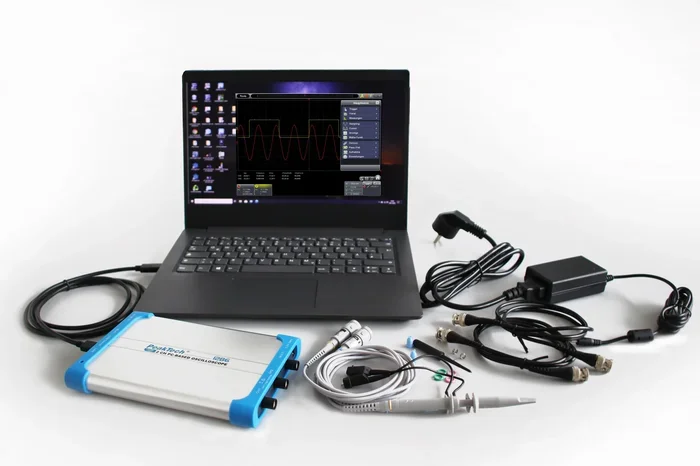
A PC based oscilloscope is a test tool that uses your computer to show signals. Instead of a built-in screen, it sends data to your monitor. This setup is also called a USB oscilloscope or a digital storage oscilloscope with a PC link. You get the power of a benchtop oscilloscope in a small package. The device captures electronic circuits signals and shows them on your laptop or desktop. This makes test and measurement much more flexible. You can work from your couch or a crowded workshop.
These tools are great for signal measurement. They help you see how voltage changes over time. You can look at waveforms just like you would on a big machine. The hardware interface connects to the PC. Then, the software application does the heavy lifting. It draws the graph and gives you numbers. This means you can update your lab equipment without breaking the bank. Many hobbyists love this approach. It keeps their workbench free for other things. You do not need a big room to do great work.
But what exactly does the device do? It takes electrical signals and turns them into pictures. You can see spikes, dips, and steady lines. This helps you find problems in your gear. The whole process is very fast. You get answers in seconds. That is why so many people are switching to a PC based oscilloscope today. It is a smart way to do signal measurement at home. The flexibility is unbeatable. You can use it in a garage, a classroom, or a big factory.
These scopes have a short but interesting history. In the past, scopes were huge and heavy. They took up the whole bench. You needed a special desk just for them. Now, the PC based oscilloscope flips that idea. The computer does the work. The scope just captures the data. This change happened because of better chips and faster ports. USB 3.0 made it possible to move lots of data quickly. Now, anyone can have a powerful digital storage oscilloscope at home. The test and measurement world is more open than ever.
How Do PC Based Oscilloscopes Work?
Understanding how these tools work is easy. First, you connect the probe to the circuit. The probe sends a tiny voltage to the device. The device has an analog-to-digital converter. This part turns the real-world signal into digital data. It samples the signal very fast. The sampling rate decides how smooth your waveform looks. A high rate means a clear picture. A low rate means a choppy line. You want a high rate for clean data.
Next, the device sends this data to your PC. It uses a PC interface like USB. Your computer receives the data points. The software application on your screen puts them together. It draws the lines and fills in the gaps. This process happens in seconds. You can then measure things like rise time and fall time. The data acquisition system makes sure nothing is lost. You get a clear picture of what is happening inside your electronic circuits. The whole loop from probe to screen takes just milliseconds.
The Role of the Hardware
The hardware is the physical box. It holds the probes and the circuit board. It also has the converter chip. Some devices plug right into a slot inside your PC. These are called internal PCI cards. Others are small boxes that sit on your desk. They connect to the outside of your laptop. Both methods work well for signal measurement. The key is to pick the right one for your space. A PCI card is great for a fixed desk. A USB box is perfect for a moving portable device. The hardware does the first job of changing the signal. Then it hands the job to your computer.
The Role of the Software
The software is just as important as the box. It runs on your computer. You can use it to zoom in on a waveform. You can also save the data for later. Many programs let you measure bandwidth and vertical resolution. They also add math functions. You can see the Fourier transform right on your screen. This makes debug tools much more powerful. A good software application turns a simple box into a smart lab. You can do things that old machines could not do.
Here are some cool things the software can do:
- Zoom in on tiny details of a waveform.
- Save screenshots for your reports.
- Export data to a spreadsheet for analysis.
- Run math functions like addition or subtraction.
- Trigger on specific signal patterns automatically.
- Compare signals from different channels side by side.
The software is what makes a PC based oscilloscope so special. You can update it over time. You get new features without buying new gear. This is a huge win for your lab equipment budget.
Types of PC Based Oscilloscopes
Not all PC based oscilloscopes are the same. You have a few choices. Each type fits a different need. Let us look at the main kinds you can buy. Picking the right type helps you get the best results for your test and measurement tasks. It also helps you stay within your budget.
USB Oscilloscopes
USB scopes are the most popular type. They are small and easy to carry. You plug them into any laptop with a USB port. They are perfect for field work. If you need portable device testing, this is the way to go. They connect to the hardware interface fast. The software application runs right on your computer. You do not need extra power supplies. They draw power right from the USB port. This makes them very handy for test and measurement on the go.
Most USB scopes come with a probe lead. You just clip it to your circuit. The signal travels back through the wire. The digital storage oscilloscope inside captures the data. You can see the results on your big monitor. This is much easier than squinting at a tiny screen. Many makers offer free updates to their software application. This keeps your lab equipment feeling new for years. You can use them on a bench or in the field. They are truly versatile debug tools.
Internal PCI Cards
PCI cards go inside your desktop PC. They use the motherboard for power and data. This means they are very fast. They can handle high sampling rates easily. They are great for permanent lab setups. If you do not need to move your gear, PCI is smart. They offer deep memory depth. This helps when you are looking at rare events. They are a solid choice for serious signal measurement tasks.
Because PCI cards live inside the tower, they stay cool. They do not need a separate box. This saves desk space. The hardware interface is very direct. There are no long cables to get in the way. You get fast and clean data acquisition. If you have a big desktop setup, this is a great path. It turns your PC into a powerful benchtop oscilloscope without the bulk.
Wireless and Bluetooth Options
New tech has brought us wireless scopes. These connect to your PC without any wires. They use Bluetooth or Wi-Fi to send data. This adds a lot of freedom. You can measure electronic circuits that are hard to reach. Just be careful. Wireless links can sometimes drop data. Make sure your lab equipment has a strong connection. For most debug tools, a USB cable is still more reliable. Wireless is nice, but wires are steady. Pick the connection type that fits your job.
Mixed Signal Oscilloscopes
Some PC based oscilloscopes can read both analog and digital signals. These are called mixed signal scopes, or MSOs. They have analog channels and digital channels. This is great for modern circuits. Many devices use both types of signals. You can see the analog waveform and the digital logic at the same time. This saves you from buying two separate tools. It is a perfect debug tools combo for electronic circuits that use microcontrollers.
PC Based vs Traditional Benchtop Oscilloscopes
You might wonder how a PC based oscilloscope compares to an old-school box. The truth is, both have good points. A benchtop oscilloscope has its own screen. It works all by itself. A PC scope needs your computer to run. Let us look at the main differences. This will help you choose the right tool for your needs.
Cost Differences
PC scopes are usually cheaper. You are just buying the probe and the box. Your computer acts as the screen. This saves a lot of money. A big benchtop machine can cost thousands. A good USB oscilloscope costs much less. It is a great way to start test and measurement without spending a fortune. Students and makers love this fact. You do not need a big budget to get started. You can buy a solid scope for under a few hundred dollars.
Performance Comparison
Benchtop scopes used to be better. But modern PC scopes are catching up fast. They offer the same bandwidth and vertical resolution. The sampling rate on a USB scope can be very high. The only real difference is the screen size. A PC monitor can be as big as you want. You can zoom in more easily on a PC. Below is a quick look at how they compare.
| Feature | PC Based Oscilloscope | Benchtop Oscilloscope |
|---|---|---|
| Screen Size | Uses your PC monitor | Built-in small screen |
| Price | Lower cost | Higher cost |
| Portability | Very portable | Heavy and bulky |
| Processing Power | Uses PC CPU | Built-in processor |
| Setup Time | Plug and play | Standalone ready |
Which One Should You Pick?
If you move around a lot, pick a PC based oscilloscope. If you have a fixed lab, a benchtop box might be fine. Think about your workspace. Think about your budget. Both tools do the same core job. They both show you waveforms and help you fix problems. The choice just depends on your style. Either way, you get great signal measurement power.
Key Features to Look For
When you buy a PC based oscilloscope, you need to know what to look for. Not all scopes are made equal. Some are fast. Some are cheap. Some have great software. Here are the features that really matter for your signal measurement tasks. Do not rush this decision. Take your time and compare the specs.
Bandwidth and Sampling Rate
Bandwidth tells you the highest frequency the scope can read. If you measure a fast signal, you need high bandwidth. The sampling rate is how many times the scope looks at the signal per second. A high sampling rate gives you a smooth waveform. For most hobbyists, 100 MHz is plenty. For pros, you might need 500 MHz or more. Always match the scope to your electronic circuits. Do not buy more than you need. Here is a simple rule of thumb:
- Check the highest frequency of your device.
- Choose a scope with 5 times that frequency.
- This ensures you see the real signal shape.
- Ignore the marketing numbers on the box.
Following this rule keeps your money safe. It stops you from paying for speed you will never use.
Memory Depth and Trigger Functions
Memory depth is how much data the scope can save. Deep memory lets you look at long signal histories. You can find rare bugs in your electronic circuits. The trigger function is also key. It tells the scope when to start looking. You can trigger on a rising edge or a falling edge. This helps you freeze the right part of the signal measurement. Good debug tools need both deep memory and smart triggers. Without these, you might miss the problem entirely. Always check the memory specs before buying.
Vertical Resolution
Vertical resolution decides how fine the detail is. It is measured in bits. An 8-bit scope gives 256 steps. A 12-bit scope gives 4096 steps. More bits mean a smoother graph. It is like going from standard TV to HD TV. If you work with small PC interface signals, high resolution is a must. You want to see every tiny bump in the waveform. Low resolution hides small details. This can lead to missed problems. Always aim for at least 8 bits for clear views.
Software and Compatibility
The software application is your control center. It should be easy to use. Look for software that works on Windows or Mac. Some scopes come with their own apps. Others let you write your own scripts. This is great for data acquisition. Check if the lab equipment supports the programming language you know. A good app makes the scope feel fast. A bad app makes it feel slow. Always test the software before you buy. A smooth interface saves you a lot of frustration.
Probe Types and Safety
Do not forget the probe! The probe connects your circuit to the scope. A bad probe can ruin your signal measurement. It can also add noise. Most scopes come with a standard passive probe. This probe has a ground clip and a tip. For high-speed signals, you need a better probe. Active probes are faster and lighter. They do not load down your circuit. Always check the probe bandwidth. If your probe is too slow, you will miss the real waveform. Safety is also important. Never measure high voltage without the right probe. Protect your PC interface and yourself.
Are PC Based Oscilloscopes Right for You?
Now you know what a PC based oscilloscope is. But should you buy one? The answer depends on your needs. Let us look at who benefits most from this tech. This guide will help you decide if it is the right move for your test and measurement setup.
Quick Tips for Buyers
Before you spend your money, keep these tips in mind. First, always check the bandwidth of the scope. Do not buy more than you need. Second, make sure your PC has the right ports. A USB 3.0 port is best for fast data. Third, read the software application reviews. A bad app can ruin a good scope. Fourth, think about your workspace. A small USB scope is perfect for a crowded desk. Fifth, look for good support. A good test and measurement tool should come with a helpful manual. These tips will save you time and money.
Common Mistakes to Avoid
Many people make mistakes when buying a scope. One big mistake is ignoring memory depth. Low memory means you miss rare events. Another mistake is picking the wrong probe. A bad probe can ruin your signal measurement. Do not forget to check the vertical resolution. Low resolution hides small details. Some users also ignore the software application updates. Always pick a brand that supports its lab equipment with new debug tools. Avoid these traps, and you will have a great experience. Do not let a bad choice slow down your projects.
Here are a few more pitfalls to watch out for:
- Buying a scope with too little bandwidth.
- Forgetting to check the sampling rate needs.
- Using cheap probes that add noise to your signal measurement.
- Ignoring the data acquisition speed of the device.
- Not reading the software application system requirements.
Expert Insights
We asked a few pros what they think about PC based oscilloscopes. They all agree that USB scopes are changing the game. One expert said, “You do not need a big box anymore.” The digital storage oscilloscope market is shifting to PCs. Another pro pointed out that portable device testing is much easier now. You can fix a machine on the factory floor. You just plug in your laptop and start working. The hardware interface is so good today that you do not lose any accuracy. It is a great time to be a maker or a tech.
Experts also love the software application side. They say that updates make old scopes feel new. You can get new trigger functions and math tools. This is something a benchtop oscilloscope can never do. Your lab equipment grows with you. As your skills grow, your scope grows too. That is the real power of a PC based oscilloscope. It is an investment that keeps paying off.
Final Thoughts on PC Based Oscilloscopes
To sum it up, a PC based oscilloscope is a smart choice for many people. It saves space and money. It gives you a big screen and powerful software application. Whether you are a student or a pro, this tool has a lot to offer. It makes signal measurement simple and fun. You can see every detail of your waveform clearly. So go ahead and explore the world of USB oscilloscopes. Your next great project is waiting. Happy measuring!
Frequently Asked Questions
Can oscilloscopes be pc based and still be accurate?
Yes, they can be very accurate. Modern PC based oscilloscopes use fast converters and smart software application tools. They match the accuracy of big benchtop machines. The key is to buy a scope with good specs. Check the bandwidth and vertical resolution to be sure.
What is the main benefit of a PC based oscilloscope?
The biggest benefit is that you use your existing computer. You do not need to buy a separate screen. This saves a lot of space and money. It also makes signal measurement easier because you can zoom in on a big monitor.
Are USB oscilloscopes good for professional work?
Yes, many professionals use them every day. They are great for field work and fixing machines on the spot. As long as you pick a scope with the right bandwidth and sampling rate, they handle pro tasks well.
Do I need a fast computer to use a PC based oscilloscope?
You need a reasonably modern PC. A fast PC interface like USB 3.0 helps a lot. The computer needs to handle the data acquisition speed. Most laptops made in the last five years work perfectly fine.
Can I use a PC based oscilloscope for digital circuits?
Absolutely. You can measure electronic circuits with both analog and digital parts. If you need to see both types of signals, look for a mixed signal scope. These PC based oscilloscopes have digital channels too.
How do I choose the right software for my scope?
Look for software that is easy to use and updates often. Good software application tools make debug tools much better. Check if the maker offers free updates. This keeps your lab equipment working well for years.