How Can You Tell If Someone Is Using Incognito Mode
Incognito mode is a popular private browsing feature that keeps your search history and cookies hidden. But can you really tell if someone else is using it? The short answer is yes. There are several clear signs and network monitoring techniques that can reveal incognito mode activity. In this guide, we break down the most reliable methods to spot private browsing on shared devices and networks.
You share a computer or a Wi-Fi network with someone. You suspect they are browsing privately. But how can you tell if someone is using incognito mode? This is a question many people ask, whether they are concerned about family members, employees, or even their own online privacy.
Incognito mode is a feature built into every major web browser. It promises a cleaner, more private browsing experience. But the truth is that private browsing does not make you invisible. There are ways to detect it. And understanding those methods can help you protect your network and your peace of mind.
In this article, we will walk you through the real signs of incognito mode usage. We will cover everything from visual clues on the browser to advanced network monitoring techniques. By the end, you will know exactly what to look for and how to stay informed about internet usage on your devices.
Key Takeaways
- Incognito mode does not make you invisible: It only hides data on your local device, not from your network or ISP.
- Look for browser window clues: Incognito windows often have a dark theme or distinctive icon that gives them away.
- Router logs can reveal hidden activity: Even in incognito mode, your Wi-Fi router still records connected domains.
- DNS queries and network monitoring tools: These are powerful ways to detect private browsing on a shared network.
- Browser profiles and system artifacts: Temporary files and memory traces can expose incognito mode usage.
- Parental controls and monitoring software: These tools can track browser activity regardless of the mode used.
- No method is 100% foolproof: But combining several techniques gives you a much clearer picture of what is happening on your network.
📑 Table of Contents
- What Is Incognito Mode and How Does It Work?
- Common Signs That Someone Is Using Incognito Mode
- How Network Administrators Can Detect Private Browsing
- Can You Track Incognito Browsing on Your Own Network?
- Myths About Detecting Incognito Mode
- Protecting Your Network While Others Use Incognito Mode
- Key Takeaways
What Is Incognito Mode and How Does It Work?
Before you can detect incognito mode, you need to understand what it actually does. Incognito mode is a privacy mode available in browsers like Chrome, Firefox, Safari, and Edge. When you open a private browsing window, the browser stops saving certain data locally.
Here is what incognito mode does:
- It does not save your browsing history. When you close the window, the visited pages disappear from your local history.
- It deletes cookies and site data. This means websites cannot track you across sessions using stored cookies.
- It clears form data. Anything you type into forms, like passwords or search terms, is not saved.
- It does not store cached files. Images and temporary files are removed once you close the window.
But here is the critical part. Incognito mode does not hide your activity from your internet service provider. It does not hide you from your employer if you are on a work network. And it does not make you invisible to the websites you visit. Your IP address is still visible. Your DNS queries are still recorded. And your network administrator can still see what you are doing.
What Incognito Mode Does Not Do
Many people misunderstand what private browsing actually protects. It does not encrypt your traffic. It does not change your IP address. And it does not prevent network monitoring tools from tracking your activity. This gap between what people think incognito mode does and what it actually does is exactly why it is possible to detect.
For example, if you are on a home network, your Wi-Fi router still logs every domain you connect to. Even if you close every incognito window, those records remain. This is why detecting private browsing is not as hard as some people believe.
Common Signs That Someone Is Using Incognito Mode
Now that you understand how incognito mode works, let us look at the real-world signs. These are the things you might notice on a shared computer or device that suggest someone is browsing privately.
1. The Dark-Colored Browser Window
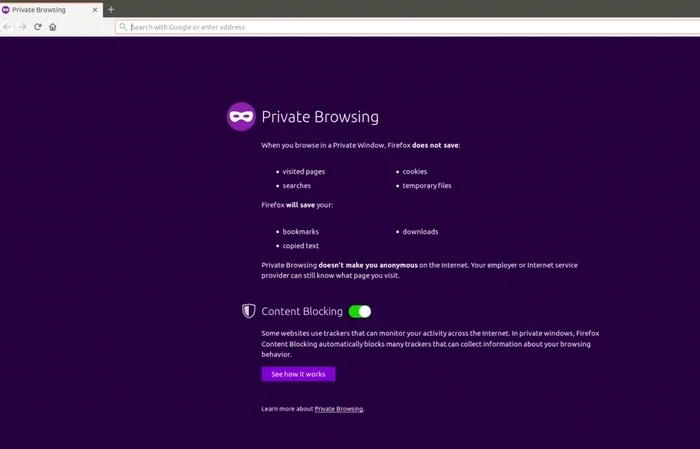
Most browsers use a distinctive dark theme for their incognito window. In Chrome, the window has a dark background with a hat and glasses icon. Firefox shows a purple mask icon. Safari displays a darker smart search field. If you walk past a computer and see a dark browser window, that is a strong indicator of private browsing.
This is the easiest and most obvious sign. You do not need any technical skills to notice it. Just a quick glance at an open browser window can tell you a lot.
2. No Browsing History
If you check someone’s browser history and find it completely empty or suspiciously sparse, that could be a sign. In normal browsing, history builds up quickly. But in incognito mode, the history is wiped the moment the window closes. So an empty history on a device that is clearly used often is a red flag.
However, be careful. Some people clear their regular history too. An empty history alone is not proof. But combined with other signs, it starts to paint a picture.
3. No Cookies or Saved Logins
When someone uses incognito mode, cookies are deleted after each session. This means they would need to log into every website every time they visit. If you notice that a person who usually stays logged into social media or email is suddenly logging in every time, that could mean they are using private browsing.
This sign is subtle but useful, especially if you share a device with someone who typically stays signed in to multiple accounts.
4. Unusual Browser Extensions or Profiles
Some people install separate browser profiles for private browsing. If you notice multiple browser profiles on a shared device, or if the browser has extensions that claim to enhance online privacy, that is worth noting. These tools are often used alongside or instead of built-in incognito mode.
How Network Administrators Can Detect Private Browsing
Detecting incognito mode on a personal device is one thing. But what about on a shared network? Can you tell if someone is using private browsing when you are the network administrator? The answer is yes, and the methods are more powerful than you might think.
Router Logs and DNS Records
Your Wi-Fi router keeps logs of every domain that connects to it. This is true whether someone is browsing in regular mode or incognito mode. The router does not care what mode the browser is in. It simply records the DNS queries that pass through it.
If you have access to your router’s admin panel, you can review these logs. You might see domains visited that do not match the regular browsing patterns of the people on your network. This is one of the most reliable ways to detect private browsing activity.
For those who get their internet connection set up differently, such as getting internet in my home without a phone line, the same router logging principles apply. The method of connection does not change what the router can track.
Network Monitoring Software
Tools like Wireshark, GlassWire, or built-in router dashboards can monitor network traffic in real time. These tools show you every connection made by every device on your network. They can reveal which websites are being visited, how much data is being transferred, and when the activity is happening.
Network monitoring does not depend on browser settings at all. It works at the network level, which means incognito mode has no effect on it. If someone is visiting websites that they would not normally visit, these tools will show it clearly.
Parental Control and Device Monitoring Apps
If you are a parent or a manager, you likely have access to parental controls or device monitoring software. These tools operate at the operating system level. They can track browser activity regardless of whether the browser is in incognito mode or not.
Popular tools include Bark, Qustodio, and Norton Family. These apps can capture screenshots, log keystrokes, and monitor app usage. They bypass the limitations of private browsing entirely because they work outside the browser.
Can You Track Incognito Browsing on Your Own Network?
The short answer is yes. If you own the network and the devices, you have more options for tracking incognito mode activity than you might realize. Let us explore some practical methods.
Checking Your Router’s Admin Panel
Every router has an admin panel. You can access it by typing your router’s IP address into a browser. Once inside, look for a section called “Logs,” “Activity,” or “Connected Devices.” There, you will find records of every domain that has been accessed through your network.
This method works regardless of whether someone is using incognito mode. The router sees the request before the browser even processes it. So private browsing does not hide anything from the router.
Using DNS Query Logs
DNS queries are like a phonebook for the internet. Every time you visit a website, your device asks a DNS server to translate the domain name into an IP address. These queries are logged. And incognito mode does not prevent them.
If you have access to your DNS server or your router’s DNS settings, you can review these logs. They will show you exactly which domains were queried, even if the browser itself kept no record.
Similarly, if you are exploring ways to stay connected without traditional setups, you might look into options like getting Wi-Fi without an internet provider. While these methods are about connectivity, they still rely on the same underlying network infrastructure that can be monitored.
Monitoring Bandwidth Usage
Another approach is to watch your network’s bandwidth usage. Incognito mode does not reduce the amount of data transferred. If someone is streaming videos or downloading large files in private browsing, your bandwidth monitor will still show the spike in usage.
Tools like your router’s built-in bandwidth tracker or third-party apps like NetLimiter can help you spot unusual data usage patterns. These patterns can indicate private browsing sessions, especially if they happen at odd hours.
Myths About Detecting Incognito Mode
There is a lot of misinformation out there about incognito mode and detection. Let us clear up some common myths.
Myth 1: Incognito Mode Makes You Completely Anonymous
This is the biggest myth. Incognito mode only hides your activity from other people who use the same device. It does not hide you from your ISP, your employer, or the websites you visit. Your IP address is still visible, and your network traffic is still traceable.
Myth 2: You Cannot Detect Incognito Mode at All
While incognito mode does hide local traces, it does not hide everything. Router logs, DNS records, and network monitoring tools can all reveal private browsing activity. The idea that incognito mode makes detection impossible is simply not true.
Myth 3: Only Tech Experts Can Detect Private Browsing
Some detection methods are simple. Looking for a dark browser window or checking for an empty history takes no technical skill at all. More advanced methods like router log review or DNS monitoring require some knowledge, but they are still accessible to most people with a little guidance.
Even if you are not a tech expert, you can still monitor internet usage on your network. Simple tools and router dashboards are designed to be user-friendly. And if your Wi-Fi and Bluetooth connections are both active, you can use network management apps to keep an eye on connected devices more easily. You can learn more about managing both connections at once by checking out our guide on Wi-Fi and Bluetooth on at the same time.
Protecting Your Network While Others Use Incognito Mode
If you suspect someone on your network is using incognito mode for reasons you are not comfortable with, there are steps you can take. These steps can help you maintain visibility and control over your network.
Set Up Network-Level Monitoring
The most effective way to stay informed is to set up network monitoring at the router level. Most modern routers offer built-in tools for this. You can see which devices are connected, what domains they are accessing, and how much data they are using.
This approach works whether someone is using incognito mode or not. It gives you a complete picture of internet usage on your network without relying on browser-level data.
Use DNS Filtering Services
DNS filtering services like OpenDNS or Cloudflare Gateway let you control and monitor which domains are accessed through your network. They can block inappropriate content and provide detailed logs of all DNS queries.
These services are especially useful for families who want to ensure safe internet usage for children. They work independently of browser settings, so incognito mode cannot bypass them.
Keep Your Devices Secure
If you share devices with others, make sure your own online privacy is protected too. Use strong passwords, enable two-factor authentication, and consider using a VPN to encrypt your traffic. A VPN adds a layer of protection that goes beyond what incognito mode can offer.
And if you are ever concerned about the security of your network setup, remember that even alternative connections do not compromise your ability to monitor network activity. The monitoring happens at the router level, independent of device-level settings.
Key Takeaways
- Incognito mode does not make you invisible: It only hides data on your local device, not from your network or ISP.
- Look for browser window clues: Incognito windows often have a dark theme or distinctive icon that gives them away.
- Router logs can reveal hidden activity: Even in incognito mode, your Wi-Fi router still records connected domains.
- DNS queries and network monitoring tools: These are powerful ways to detect private browsing on a shared network.
- Browser profiles and system artifacts: Temporary files and memory traces can expose incognito mode usage.
- Parental controls and monitoring software: These tools can track browser activity regardless of the mode used.
- No method is 100% foolproof: But combining several techniques gives you a much clearer picture of what is happening on your network.
Frequently Asked Questions
Can my internet provider see my incognito browsing?
Yes. Incognito mode does not hide your activity from your ISP. Your internet service provider can still see every domain you visit, even in private browsing mode. The only thing incognito mode hides is local data on your device.
Does incognito mode hide my IP address?
No. Your IP address remains visible to every website you visit and to your network administrator when using incognito mode. If you want to hide your IP, you need a VPN or a proxy service, not just private browsing.
Can my employer see what I browse in incognito mode on a work computer?
Yes, they can. If you are on a company network, your employer can monitor network traffic and see which domains you access. Incognito mode does not prevent employer monitoring. Many companies also use device monitoring software that tracks all activity regardless of browser mode.
Is there any way to make incognito mode completely undetectable?
Not entirely. While incognito mode removes local traces like history and cookies, your network traffic is still visible at the router level. DNS queries are still logged. And if monitoring software is installed on the device, it can capture activity regardless of browser mode.
What is the difference between incognito mode and a VPN?
Incognito mode only hides your browsing data locally on your device. A VPN encrypts your entire internet connection and masks your IP address from websites and your ISP. A VPN provides real privacy, while private browsing just keeps your local traces clean.
Can I use incognito mode safely on a shared family computer?
You can, but keep in mind that incognito mode does not protect you from network-level monitoring. If other family members have access to the router or monitoring software, they can still see your browser activity. For true privacy on a shared device, combine incognito mode with a VPN and secure device passwords.
=== CONCLUSION ===
So, can you tell if someone is using incognito mode? The answer is a clear yes. From the dark-colored browser window to empty history logs, there are several signs to watch for. And when it comes to network-level detection, the tools are even more powerful. Router logs, DNS records, and network monitoring software can all reveal private browsing activity, no matter what mode the browser is in.
Incognito mode is a useful feature for keeping your local browsing clean. But it is not a magic cloak. It does not hide you from your network, your ISP, or the websites you visit. Understanding this gap is the first step toward better online privacy and smarter network management.
If you share devices or a network with others, take the time to set up monitoring tools and stay informed. Knowledge is your best defense. And now that you know how to spot incognito mode activity, you are better equipped to manage your internet usage with confidence.