Does Google Nest Wifi Go Through Walls And Further
Google Nest Wifi can penetrate walls, but the signal weakens depending on wall material and distance. Most users experience solid coverage through standard drywall, but thick concrete or brick walls reduce range significantly. This guide explains how far Google Nest Wifi reaches and what you can do to boost signal through obstacles.
Google Nest Wifi has become one of the most popular mesh wifi systems for home use. People love its simple setup, sleek design, and reliable performance. But one question keeps coming up: does Google Nest Wifi go through walls?
The short answer is yes, but with some important caveats. The signal can pass through most common building materials, but the strength drops depending on what stands in its way. If you have thick concrete walls or multiple floors, you may notice some dead zones.
In this guide, we will break down exactly how Google Nest Wifi handles walls, what affects its signal, and what you can do to get the best coverage possible. Whether you live in a small apartment or a large multi-story home, this article has you covered.
Key Takeaways
- Google Nest Wifi signal can pass through standard drywall and common household materials with minimal loss.
- Thick walls like concrete and brick significantly reduce wifi range and signal strength.
- Mesh nodes help extend coverage and eliminate dead zones caused by walls.
- Router placement matters a lot for getting the best signal through barriers.
- The 2.4GHz band penetrates walls better than the 5GHz band.
- Simple tips like adjusting antenna position can improve wall penetration.
- Google Nest Wifi performs well for most homes but may need extra hardware for large or multi-story spaces.
📑 Table of Contents
- How Google Nest Wifi Works
- Can Google Nest Wifi Penetrate Walls
- Factors That Affect Wifi Signal Through Walls
- How To Improve Google Nest Wifi Coverage Through Walls
- Google Nest Wifi Vs Traditional Routers For Wall Penetration
- Real-World Performance: What Users Experience
- Final Verdict: Does Google Nest Wifi Go Through Walls
How Google Nest Wifi Works
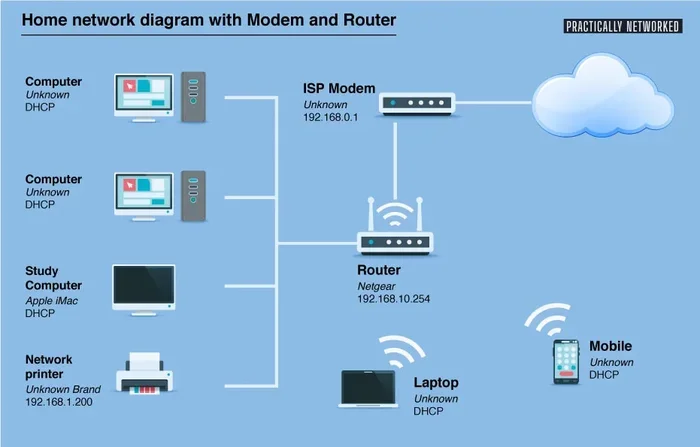
Google Nest Wifi uses a mesh network system to spread internet throughout your home. Instead of relying on one single router, it uses a main router and optional point devices. These points work together to create one unified network.
The main router connects to your modem. Then each point device talks to the router and to each other. This creates a web of coverage that fills in gaps. The system uses both 2.4GHz and 5GHz bands to deliver internet to your devices.
The Role Of Each Nest Wifi Point
Each Nest Wifi point acts as both a router and a satellite. It receives the signal from the main unit and rebroadcasts it. This is why mesh systems are so effective for larger homes. The points talk to each other wirelessly to pass data along.
When you add more points, you extend the range. But each hop between points can reduce speed slightly. So placing your points wisely matters a lot. You want enough points to cover your space without too many jumps.
Can Google Nest Wifi Penetrate Walls
Yes, Google Nest Wifi signals can travel through walls. But how well depends on the type of wall material. Standard interior walls made of drywall let most of the signal pass through. You will likely get good coverage in the next room.
However, not all walls are the same. Some materials block wifi signals much more than others. Understanding this helps you set realistic expectations for your home network.
Drywall And Standard Interior Walls
Most homes in the US use drywall for interior walls. These are thin and light. A Google Nest Wifi signal passes through drywall with very little loss. You can expect solid speeds in rooms separated by one or two drywall walls.
If your home has standard wood-frame construction with drywall, the Nest Wifi should handle it well. Most users report good coverage through two or three interior walls before noticing any slowdown.
Brick, Concrete, And Stone Walls
Brick and concrete are much tougher for wifi signals. These materials are dense and heavy. They absorb and block wireless signals more effectively than drywall. If you have brick exterior walls or concrete interior walls, expect a bigger signal drop.
Stone walls are also problematic. Natural stone varies in thickness and density. Some stone walls are thin and let some signal through. Others are thick and block most of it. If your home has stone or concrete walls, you may need extra points to maintain strong coverage.
Metal And Mirrors
Metal is the enemy of wifi signals. Metal studs in walls can block or reflect signals. Large mirrors also interfere because they have a metal backing. If your home has metal studs or lots of mirrors, you might see more dead zones.
This is not unique to Google Nest Wifi. All wifi systems struggle with metal obstacles. But knowing where these barriers exist helps you plan your setup better.
Factors That Affect Wifi Signal Through Walls
Several factors determine how well your Nest Wifi signal travels through walls. Understanding these helps you troubleshoot slow spots and improve coverage.
Wall Material And Thickness
The material is the biggest factor. As we discussed, drywall is friendly to wifi. Concrete and brick are not. Thicker walls also weaken signals more than thin ones. A single thick concrete wall can reduce your signal strength by half or more.
If you are building or renovating, keep this in mind. Plan your router and point placement around the thickest walls in your home.
Distance From The Router
Distance matters a lot for wifi performance. The further your device is from the router, the weaker the signal. Walls add extra distance in a sense because the signal has to pass through them. So a device two rooms away through drywall gets a better signal than a device one room away through concrete.
Google Nest Wifi has a range of about 1,500 to 2,000 square feet per point in open space. Through walls, that number drops. Keep this in mind when deciding how many points you need.
Interference From Other Devices
Other electronic devices can interfere with your wifi signal. Microwaves, baby monitors, and cordless phones all operate on similar frequencies. This interference can weaken your signal before it even reaches a wall.
To reduce interference, keep your router away from other electronics. Also, try to use the less crowded 2.4GHz band for devices that are far away or behind walls.
Number Of Walls Between Device And Router
Every wall adds some signal loss. One or two standard walls usually do not cause big problems. But three or more walls can create noticeable slowdowns. The signal loses strength with each barrier it passes through.
If your device is in a room with three walls between it and the nearest Nest point, you may see slower speeds. Adding another point can help bridge that gap.
How To Improve Google Nest Wifi Coverage Through Walls
If you are struggling with weak signals behind walls, there are several things you can do. Most of these are simple and free.
Place Your Router And Points Strategically
Where you put your router and points makes a huge difference. Place the main router in a central location in your home. Avoid corners, closets, and cabinets. These spots trap the signal and limit its reach.
For points, place them halfway between the router and the area with weak coverage. You do not need to put them right next to the dead zone. A point placed in a hallway between two rooms can serve both spaces well.
Try to keep line of sight between points when possible. While mesh points can communicate through walls, they work best with a clear path. This reduces signal loss and keeps your speeds up.
Use The 2.4GHz Band For Distant Devices
Google Nest Wifi uses both 2.4GHz and 5GHz bands. The 2.4GHz band has a longer range and penetrates walls better. The 5GHz band is faster but has a shorter range and struggles more with obstacles.
If a device is far away or behind several walls, connect it to the 2.4GHz band. You will get a more stable connection even if the top speed is lower. For devices close to the router, use 5GHz for the fastest speeds.
Add More Nest Wifi Points
The easiest way to improve coverage through walls is to add more points. Each point extends the network and fills in gaps. If you have a large home or thick walls, consider adding an extra point.
Google Nest Wifi works best when points are spaced about 30 to 40 feet apart. This gives each point enough range to talk to the next one without too much signal loss. If your home has many walls, you may need points closer together.
If you are exploring other mesh options, you might also check whether you can connect Deco mesh wifi to existing router for hybrid setups.
Adjust The Antenna Position
Google Nest Wifi has internal antennas, but orientation still matters. Place the router upright on a flat surface. Do not lay it flat or bury it behind furniture. Vertical placement helps the signal spread horizontally across your home.
Also, keep the router elevated. A shelf or table works well. Avoid placing it on the floor where furniture and walls block the signal from spreading properly.
Reduce Interference And Optimize Your Network
Minimize interference from other devices. Keep the router away from microwaves, cordless phones, and Bluetooth speakers. Change the wifi channel if you live in a dense area with many neighboring networks.
You can also restart your router and points regularly. This clears the cache and refreshes the connection. A simple restart can often fix slow speeds and weak signals.
Consider A Wifi Extender For Problem Areas
If adding more Nest points is not an option, a wifi extender can help. An extender picks up the existing signal and rebroadcasts it. This can push coverage into stubborn dead zones behind thick walls.
Some users also explore whether they Can Deco Be Used As Wifi Extender as an alternative solution. While not a Google product, it shows how extenders can fill coverage gaps in tricky spots.
Google Nest Wifi Vs Traditional Routers For Wall Penetration
How does Google Nest Wifi compare to a traditional single router when it comes to going through walls?
A traditional router sends signal in all directions from one point. It works fine for small spaces. But in larger homes, the signal weakens quickly as it passes through walls. A single router might struggle with more than two thick walls.
Google Nest Wifi uses multiple points to create a stronger, more reliable network. Each point acts as a mini router. This means devices can connect to the nearest point instead of struggling to reach the main router. The result is better coverage through walls.
However, a traditional router with external antennas might outperform a single Nest Wifi point in some wall-penetration scenarios. External antennas can be adjusted for better direction. But a mesh system with multiple points still wins for overall whole-home coverage.
For most homes, the mesh system approach of Google Nest Wifi is the better choice. It handles walls more gracefully and provides a more consistent experience throughout the house.
Real-World Performance: What Users Experience
So what does this look like in real homes? Most Google Nest Wifi users report good performance through standard walls. In homes with mostly drywall construction, the system handles two to three walls without major issues.
Users in brick or concrete homes report more challenges. They often need three or more points to maintain solid speeds in every room. But even in these tougher environments, the mesh system still performs better than a single traditional router.
Some users have shared that placing points in hallways or stairwells helps a lot. These open areas give the signal a clearer path between rooms. It is a simple trick that makes a real difference.
If you live in an area with extreme weather or thick building materials, you might also wonder if Google Wifi can overheat in certain conditions, which could further affect performance through walls.
Final Verdict: Does Google Nest Wifi Go Through Walls
So, does Google Nest Wifi go through walls? Yes, it does. The signal passes through standard drywall and common building materials with ease. For most homes, the coverage is more than enough.
But thick walls like concrete, brick, and stone reduce the signal significantly. The more walls and the thicker they are, the more the signal weakens. This is true for all wifi systems, not just Google Nest Wifi.
The good news is that the mesh design of Google Nest Wifi helps compensate. By adding points, you can extend coverage into every room, even those behind tough walls. Proper placement and band selection also make a big difference.
If you have a standard home with drywall, Google Nest Wifi will likely serve you well. If you have a home with many thick walls, plan for extra points and strategic placement. With the right setup, you can enjoy strong wifi coverage almost everywhere in your home.
For those looking to extend coverage to outdoor areas like a shed or workshop, you might also find it useful to learn whether you can extend my wifi to my shed using similar mesh principles.
Take some time to test your setup. Walk around your home with your phone and check the signal in different rooms. You will quickly see which walls cause the most problems. Then adjust your points and placement accordingly. A little planning goes a long way toward getting the best performance from your Google Nest Wifi system.
Frequently Asked Questions
Can Google Nest Wifi signal pass through concrete walls?
Yes, but the signal weakens significantly. Concrete is dense and blocks a lot of wireless signals. You may need additional Nest Wifi points to maintain good speeds in rooms separated by concrete walls. The 2.4GHz band handles concrete better than 5GHz.
How many Nest Wifi points do I need for a multi-story home?
For a two-story home, at least two points are recommended. One on each floor works well for most layouts. If your home has thick walls between floors, consider adding a third point for reliable coverage on both levels.
Does Google Nest Wifi work better through drywall or brick?
Google Nest Wifi works much better through drywall than brick. Drywall is thin and allows signals to pass through easily. Brick is thick and dense, which blocks and absorbs wifi signals more effectively.
Why is my wifi slow behind certain walls?
Thick walls, metal studs, and concrete reduce wifi signal strength. The further your device is from the router, the weaker the connection. Interference from other electronics can also contribute to slow speeds behind walls.
Can I use Google Nest Wifi points as extenders?
Yes, each Nest Wifi point extends the network coverage. They work as both routers and satellites in the mesh system. Simply place a point in an area with weak signal, and it will boost coverage in that zone.
Does the 2.4GHz band penetrate walls better than 5GHz?
Yes, the 2.4GHz band has a longer range and penetrates walls better. The 5GHz band is faster but has a shorter range and struggles more with obstacles. Use 2.4GHz for devices that are far away or behind multiple walls.
=== CONCLUSION ===
Google Nest Wifi handles walls better than most people expect. Standard drywall poses little challenge, and the mesh design ensures solid coverage throughout most homes. Thick concrete or brick walls are the main culprits for signal loss, but even those can be managed with the right setup.
The key is understanding your home. Know your wall materials. Place your points strategically. Use the right frequency band for the right situation. With these steps, you can get strong wifi almost everywhere in your house.
Google Nest Wifi does go through walls, and with proper planning, it delivers reliable coverage for most households. Start with the tips in this guide, test your setup, and adjust as needed. You will be enjoying fast, stable wifi in every room before you know it.