Does Delta Have Free Onboard Wi Fi For Passengers
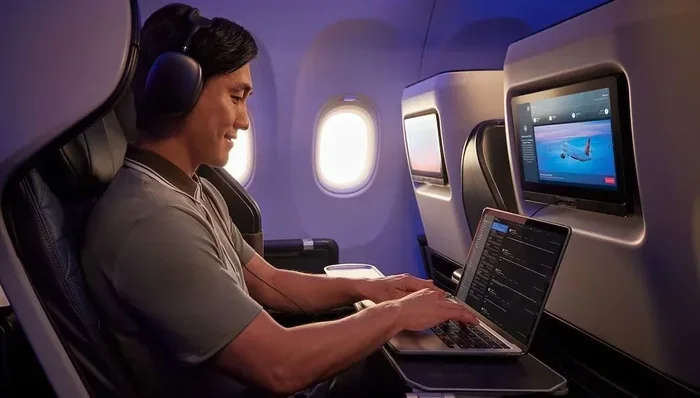
Yes, Delta offers free basic Wi-Fi on most flights, but streaming and faster speeds may require a paid plan. Delta Air Lines provides several Wi-Fi options, from a free limited tier to premium packages for streaming and work. Knowing how to connect and what to expect can make your flight much more productive and enjoyable.
Does Delta Have Free Onboard Wi Fi For Passengers?
p
If you have ever been stuck on a long flight with nothing to do, you know how important inflight Wi-Fi can be. So, does Delta have free onboard Wi-Fi? The short answer is yes, but with some important details you should know. Delta Air Lines offers Wi-Fi on most of its flights, and there is a free basic option. However, if you want to stream movies, join video calls, or browse at full speed, you will likely need a paid plan.
p
In this guide, we will break down everything you need to know about Delta Wi-Fi. We will cover what is included for free, how much paid plans cost, how to connect, and tips to get the best experience. Whether you are a frequent flyer or planning a one-time trip, this guide has you covered. Let us dive in and explore the world of Delta onboard internet.
h2
How Delta Wi-Fi Works
p
Delta Air Lines uses satellite and air-to-ground technology to deliver internet to its planes. This means your device connects to a network while the aircraft is in the air, much like how you connect to Wi-Fi at home or in a café. The system routes your data through satellites or ground towers to the internet.
h3
The Technology Behind Delta Inflight Wi-Fi
p
Delta uses two main types of inflight connectivity. The first is satellite-based Wi-Fi, which connects to orbiting satellites. This works well over oceans and remote areas. The second is air-to-ground Wi-Fi, which uses towers on the ground. This tends to be faster but only works over land.
p
Newer Delta aircraft are equipped with the latest Wi-Fi 6 technology. This provides faster speeds and better performance when many passengers are online at the same time. Older planes may still use older systems that are slower and less reliable. If you want the best experience, checking the aircraft type before booking can help.
h3
What You Can Do With Free Delta Wi-Fi
p
Delta’s free basic Wi-Fi allows you to do several things. You can send and receive messages through apps like iMessage, WhatsApp, and Facebook Messenger. You can also browse websites that use minimal data. Email checking works well on the free tier too.
p
However, the free plan has limits. Streaming video and music usually do not work on the basic tier. Video calls and large file downloads are also restricted. Think of it as a way to stay in touch, not a replacement for your home internet.
h2
Delta Wi-Fi Plans And Pricing
p
Delta offers several Wi-Fi plans to suit different needs and budgets. Understanding these options helps you choose the right one for your trip. Prices can vary based on flight length and route.
h3
Free Basic Plan
p
The free plan is available on most Delta flights. It gives you access to messaging and light browsing at no cost. This is a great way to stay connected without spending extra. If you only need to check email or send texts, the free tier is all you need.
h3
Delta Wi-Fi Day Pass
p>For those who need more speed and data, Delta offers a day pass. This plan typically costs between $7 and $17 for domestic flights. It gives you full-speed access for the duration of your flight. You can stream videos, browse freely, and use data-heavy apps without restrictions.
h3>Delta Wi-Fi Monthly Plan
p>Frequent travelers might prefer the monthly plan. This costs around $49.95 per month and gives you unlimited Wi-Fi on Delta flights. If you fly often, this plan can save you a lot of money compared to buying day passes every time. It is a solid option for business travelers and road warriors.
h3>Delta Wi-Fi Premium Plan
p>Delta also offers a premium tier for the fastest speeds. This plan is ideal for passengers who need to work online, join video conferences, or stream in high definition. Pricing for the premium plan is higher but delivers a much better experience on busy routes.
h2>How To Connect To Delta Wi-Fi
p>Connecting to Delta Wi-Fi is straightforward. You do not need to be a tech expert to get online. Here is a simple step-by-step guide to help you connect quickly.
h3>Step-By-Step Connection Guide
p>First, turn on your device’s Wi-Fi before or just after takeoff. Wait for the list of available networks to appear. Look for a network named “Delta Wi-Fi” or something similar. Select it and open your web browser.
p>Your browser should redirect you to the Delta Wi-Fi portal. This is where you can choose your plan. If you want the free option, select it and follow the prompts. If you are buying a paid plan, enter your payment details and confirm. Once connected, you should see a confirmation screen.
p>If the portal does not open automatically, try typing “delta.com” into your browser. This should trigger the login page. You can also check how to find your Wi-Fi password in settings if you are having trouble connecting to any network.
h3>Tips For A Smooth Connection
p>Here are some quick tips to make connecting easier. Always enable Airplane Mode first, then turn Wi-Fi back on. This forces your device to search for available networks. Clear your browser cache before connecting if the portal does not load. Also, try using a different browser if one does not work.
p>Some passengers find that connecting early, right after takeoff, gives them the best speeds. As more people come online during the flight, the network can slow down. Getting connected early helps you avoid the congestion.
h2>Delta Wi-Fi Speed And Performance
p>One of the most common questions about Delta Wi-Fi is about speed. How fast is it really? The answer depends on several factors, including the aircraft, the route, and how many people are online.
h3>What Affects Delta Wi-Fi Speed
p>Several things can impact your Wi-Fi speed on Delta. The type of aircraft is a big factor. Newer planes with Wi-Fi 6 equipment offer much faster speeds than older models. The route also matters. Flights over large bodies of water may use satellite connections that are slower than ground-based systems.
p>The number of passengers using the network at the same time is another key factor. On a full flight, everyone shares the same bandwidth. This can slow things down significantly. Morning flights tend to be less crowded, which can mean better speeds.
h3>Real-World Speed Expectations
p>On the free basic plan, expect speeds suitable for messaging and email. These are typically slow but functional. On paid plans, speeds can range from 10 to 50 Mbps on good connections. This is enough for streaming standard definition video and browsing comfortably.
p>For comparison, if you are looking for a home internet solution, you might check out portable Wi-Fi options that can give you much faster and more reliable speeds on the ground.
h3>Delta Wi-Fi Speed Test Results
p>Passengers have reported varying results when doing a Delta Wi-Fi speed test. Some report speeds comparable to home broadband. Others experience very slow connections, especially on older aircraft or full flights. Overall, Delta has been improving its network over the years, and most passengers report a usable experience.
h2>Does Delta Wi-Fi Work On International Flights
p>Yes, Delta offers Wi-Fi on most international routes as well. However, the options and pricing may differ from domestic flights. International flights tend to be longer, so having a good Wi-Fi plan is even more important.
h3>Wi-Fi On Delta International Routes
p>Delta’s international fleet is generally well-equipped with modern Wi-Fi technology. Long-haul flights between the US and Europe, Asia, or Latin America typically have Wi-Fi available. The free basic plan is usually offered on these routes too.
p>Paid plans for international flights may cost more due to the longer duration and the use of satellite connections. Prices can range from $15 to $30 or more depending on the route. Always check Delta’s website or app for the latest pricing on your specific international flight.
h3>Cross-Country And Transpacific Flights
p>On very long flights, such as transpacific routes, Wi-Fi becomes even more valuable. Having the ability to work, stream, or stay in touch with family can make a 12-hour flight much more bearable. Delta continues to expand its Wi-Fi coverage to more international destinations each year.
h2>Comparing Delta Wi-Fi To Other Airlines
p>How does Delta’s Wi-Fi stack up against the competition? Let us compare Delta to a few other major airlines to give you a clearer picture.
h3>Delta vs. Other Major Carriers
p>Many airlines now offer free basic messaging Wi-Fi, following Delta’s lead. Airlines like JetBlue, Alaska, and Southwest also provide free tiers. However, the speed and reliability can vary widely between carriers. Delta is generally considered above average in terms of Wi-Fi quality and coverage.
p>Some budget airlines charge for all Wi-Fi access, even for basic messaging. Full-service carriers like Delta, United, and American offer a free basic tier. Delta’s paid plans are competitively priced compared to these other major airlines.
h3>Is Delta Wi-Fi Worth The Price
p>For the free basic tier, Delta Wi-Fi is absolutely worth it. Messaging and email for free is a great perk. For the paid plans, value depends on your needs. If you need to work during a long flight, a day pass can be well worth the cost. If you just want to browse casually, the free tier should suffice.
h2>Common Delta Wi-Fi Problems And Solutions
p>Even with good technology, Wi-Fi issues can happen. Here are some common problems and how to fix them.
h3>Wi-Fi Not Showing Up
p>If Delta Wi-Fi does not appear in your network list, try toggling Airplane Mode on and off. Make sure your Wi-Fi is turned on in your device settings. Sometimes restarting your device helps. If the network still does not appear, the aircraft may not have Wi-Fi on that particular route.
h3>Slow Or Unstable Connection
p>Slow speeds are common during peak times. Try disconnecting and reconnecting to get a fresh connection. Close apps that use background data. If you are on a paid plan and still experiencing issues, contact Delta’s Wi-Fi support through their app or website.
h3>Payment Not Going Through
p>If your payment for a Wi-Fi plan fails, check your card details. Make sure you have a stable connection to the Delta portal. Try using a different payment method if possible. Sometimes switching to the Delta app instead of a browser resolves payment issues.
h2>Tips To Get The Most Out Of Delta Wi-Fi
p>Want to make the most of your Delta Wi-Fi experience? Here are some practical tips that can help.
h3>Download Content Before Your Flight
p>One of the best ways to ensure entertainment during your flight is to download content beforehand. Download movies, shows, music, and podcasts to your device before you board. This way, you do not rely on Wi-Fi at all for entertainment. You can still use the free Wi-Fi for messaging and browsing.
h3>Use The Free Tier Wisely
p>If you are on the free plan, prioritize your activities. Start with messaging and email. Then try light browsing. Save any large downloads or streaming for when you land or when you have a paid plan. This approach helps you stay productive without spending extra.
h3>Keep Your Device Charged
p>Staying online can drain your battery quickly. Bring a portable charger or make sure your phone is fully charged before the flight. Some outlets may be available on the aircraft, but they are not always easy to access. A charged device ensures you stay connected throughout the flight.
h3>Check Delta’s App For Updates
p>Delta’s app provides real-time updates about Wi-Fi availability on your flight. Before boarding, check the app to see if Wi-Fi is available and what plans are offered. The app also makes it easy to purchase Wi-Fi directly from your seat.
h2>Frequently Asked Questions
h3>Is Delta Wi-Fi really free?
p>Yes, Delta offers a free basic Wi-Fi tier on most flights. This free plan allows messaging and light browsing. However, streaming, video calls, and high-speed browsing require a paid plan. The free tier is a great way to stay in touch without spending extra.
h3>How much does Delta Wi-Fi cost?
p>Delta Wi-Fi pricing varies by flight and plan. Day passes typically cost between $7 and $17 for domestic flights. International flights may cost more. Monthly plans are available for around $49.95. Always check Delta’s website or app for the most current pricing.
h3>Can I stream Netflix on Delta Wi-Fi?
p>Streaming Netflix and other services usually requires a paid Wi-Fi plan on Delta. The free basic plan does not support streaming. Delta also has its own in-flight entertainment system with free movies and shows that do not require Wi-Fi at all.
h3>Does Delta Wi-Fi work during takeoff and landing?
p>Yes, Delta Wi-Fi is available from gate to gate on most flights. You can connect as soon as the crew announces that Wi-Fi is available, which is usually after takeoff. Some aircraft allow connection even before takeoff.
h3>What should I do if Delta Wi-Fi is not working?
p>First, try toggling Airplane Mode on and off. Restart your device and check that Wi-Fi is enabled. Clear your browser cache and try again. If the issue persists, contact Delta’s Wi-Fi support team through the Delta app or website for assistance.
h3>Can I use a VPN on Delta Wi-Fi?
p>Yes, you can use a VPN on Delta Wi-Fi. However, a VPN may slow down your connection further, especially on the free tier. If you need a VPN for work, a paid Wi-Fi plan will give you better speeds to handle the extra encryption overhead.
h2>Final Thoughts
p>So, does Delta have free onboard Wi-Fi? Yes, and it is better than ever. Delta Air Lines has invested heavily in inflight connectivity, giving passengers more options than ever before. Whether you need a quick way to check messages for free or a fast connection to get work done, Delta has a plan for you.
p>The free basic tier is a nice perk that sets Delta apart from many competitors. For those who need more, the affordable paid plans deliver solid speeds and reliable connections. As Delta continues to upgrade its fleet and network, the Wi-Fi experience will only get better.
p>Next time you board a Delta flight, you will know exactly what to expect from the Wi-Fi. Download your content, grab your device, and enjoy staying connected at 35,000 feet. Safe travels and happy browsing!
Key Takeaways
- Free Basic Wi-Fi: Delta offers a free basic Wi-Fi tier on most domestic and international flights, allowing messaging and light browsing.
- Paid Plans Available: Delta sells Wi-Fi passes for faster speeds, streaming, and video calls at various price points.
- Easy Login Process: Connecting to Delta Wi-Fi is simple through the Delta Wi-Fi portal or your device settings.
- Speed Varies: Wi-Fi speeds depend on the route, aircraft type, and number of users on the network.
- Not All Flights Are Equal: Some older aircraft or short regional routes may not have Wi-Fi available.
- Pro Tips Help: Downloading content before your flight and using the free tier wisely can save you money.
Frequently Asked Questions
What is Does Delta Have Free Onboard Wi Fi?
Does Delta Have Free Onboard Wi Fi is an important topic with many practical applications.