Does Delta Airlines Have Free Wi Fi On The Plane Today
Does Delta Airlines have free Wi-Fi on the plane? The answer is yes — but with some important details. Delta offers free basic messaging on most flights, and certain fare classes or Delta Sky Miles members can access full internet for free. Delta Wi-Fi speeds have improved significantly, and the airline now offers several connectivity options. Whether you are a casual texter or a streamer, there is a Delta Wi-Fi plan that fits your needs.
Does Delta Airlines Have Free Wi-Fi on the Plane Today?
Traveling by air no longer means disconnecting from the world. Delta Air Lines has invested heavily in in-flight Wi-Fi over the past few years. Today, most Delta planes offer wireless internet access. But the big question remains: does Delta Airlines have free Wi-Fi on the plane?
The short answer is yes, with some conditions. Delta provides free basic messaging on nearly all its flights. This means you can send iMessages, WhatsApp texts, and use Facebook Messenger without paying a dime. For full internet access, things get a bit more nuanced. Your fare class, Delta Sky Miles status, and credit card benefits all play a role.
In this guide, we break down everything you need to know about Delta Wi-Fi in 2024. We cover pricing, speed, how to connect, and insider tips to maximize your inflight connectivity. Whether you are a frequent flyer or planning a one-off trip, this guide has you covered.
Delta Airlines Wi-Fi Plans Explained
Delta offers several Wi-Fi plans to suit different needs and budgets. Understanding these plans helps you choose the right option before you board.
Free Messaging
Delta provides free basic messaging on most domestic and international flights. This is the most accessible Delta Wi-Fi option. You can use apps like iMessage, WhatsApp, and Facebook Messenger. The free messaging tier does not support browsing, streaming, or video calls. It only covers text-based communication.
This is a great perk for travelers who just want to stay in touch. You can send quick messages to family or colleagues without spending a cent. The free messaging option works on most Delta aircraft equipped with Wi-Fi.
Delta Wi-Fi Day Pass
For those who need more than messaging, Delta offers a day pass. The Delta Wi-Fi day pass typically costs around $7 to $19 depending on the route and aircraft. This plan gives you full internet access for the duration of your flight. You can browse the web, check email, and use social media.
The day pass is ideal for occasional travelers. If you fly a few times a year, paying per flight makes sense. You do not need to commit to any subscription or membership.
Monthly and Annual Plans
Delta also offers monthly and annual Wi-Fi plans. The monthly plan costs around $49.95 per month. The annual plan is priced at approximately $499.95 per year. These plans work across multiple Delta flights and even partner airlines.
If you fly Delta frequently, these plans offer great value. They save you money compared to buying day passes every time. Frequent travelers and business flyers benefit the most from these plans.
Delta Sky Miles and Credit Card Benefits
Here is where things get exciting for Delta loyalists. Delta Sky Miles Medallion members receive complimentary Wi-Fi benefits. Medallion members at Silver, Gold, and Platinum levels get free full internet on Delta flights. The level of complimentary access increases with your status.
Additionally, certain Delta credit cards include free Wi-Fi as a perk. The Delta SkyMiles Reserve American Express card, for example, offers complimentary Wi-Fi. The Delta SkyMiles Gold American Express card also provides free Wi-Fi benefits. If you hold one of these cards, you can skip the Wi-Fi purchase entirely.
How to Connect to Delta Wi-Fi
Connecting to Delta Wi-Fi is straightforward. Follow these steps to get online during your flight.
Step 1: Enable Airplane Mode and Wi-Fi
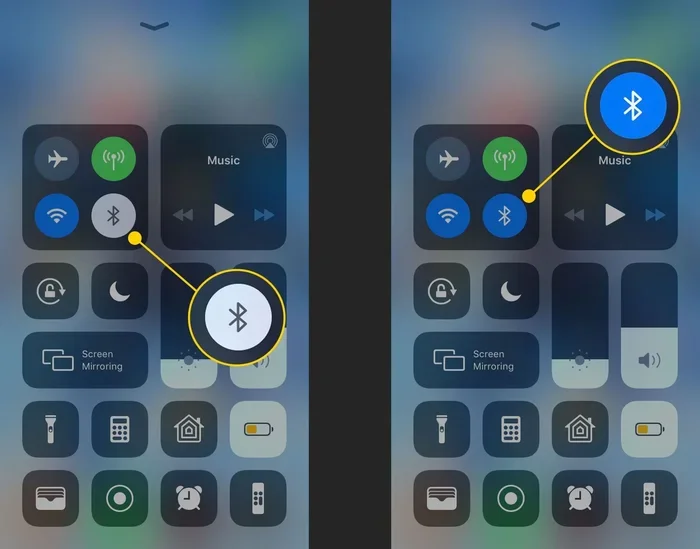
Once the captain turns off the seatbelt sign, turn on your device’s Wi-Fi. Make sure airplane mode is active, but Wi-Fi is toggled on. This allows your device to search for the inflight network.
Step 2: Select the Delta Network
Look for the network named “Delta Wi-Fi” on your device. Select it from your list of available networks. Your browser should automatically redirect to the Delta Wi-Fi portal.
Step 3: Choose Your Plan
On the Delta Wi-Fi portal, you will see the available plans. Select the plan that fits your needs. If you qualify for free messaging or complimentary access, choose the free option.
Step 4: Start Browsing
After purchasing or selecting your plan, you should be connected within seconds. You can now browse the web, check email, and use messaging apps.
Pro tip: Some devices connect automatically if you have used Delta Wi-Fi before. Clear your browser cache if you experience connection issues.
Delta Wi-Fi Speed and Performance
Wi-Fi speed on Delta flights varies based on several factors. The aircraft type, route, altitude, and number of users all affect performance.
Delta uses two main Wi-Fi technologies. The first is ground-based connectivity, which works similarly to your phone’s cell signal. The second is satellite-based connectivity, which offers broader coverage especially over oceans and remote areas.
Most modern Delta aircraft feature satellite Wi-Fi. This provides faster and more reliable speeds. Delta has been upgrading its fleet with newer Wi-Fi systems. The airline installed Viasat and Panasonic satellite systems across its fleet.
In general, expect speeds between 10 and 20 Mbps on most flights. This is sufficient for browsing, email, and standard-definition streaming. HD streaming may be slower during peak usage times. Late-night flights and early morning flights tend to have faster speeds. Fewer passengers means less congestion on the network.
Delta Wi-Fi vs Other Airlines
How does Delta Wi-Fi compare to other major airlines? Let us take a quick look.
Delta offers free basic messaging, which puts it ahead of many competitors. American Airlines also offers free messaging but charges for full access. United Airlines provides a similar tiered system with free messaging and paid full access.
Delta’s Wi-Fi pricing is competitive with industry standards. The day pass price is in line with what other major carriers charge. Delta’s credit card perks give it an edge for loyal cardholders.
One area where Delta excels is fleet modernization. Delta has been aggressively upgrading its Wi-Fi infrastructure. The airline aims to provide Wi-Fi on 100% of its mainline fleet. This commitment to connectivity sets Delta apart from many competitors.
Tips for Getting the Most Out of Delta Wi-Fi
Maximize your inflight internet experience with these practical tips.
Download Content Before Your Flight
Even with Delta Wi-Fi, speeds can fluctuate. Download movies, shows, and music before you board. This ensures you have entertainment regardless of connection quality. Most streaming services allow offline downloads on mobile devices.
Use the Free Messaging Option When Possible
If you only need to send texts, stick with the free messaging tier. There is no need to pay for full access if texting is all you need. This saves money and avoids frustration with slower speeds.
Charge Your Devices Before Boarding
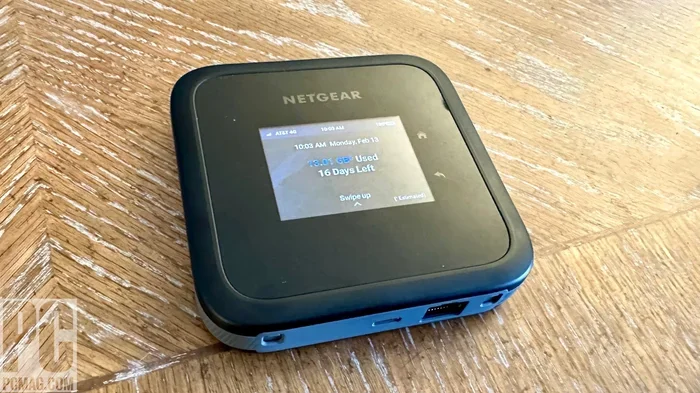
Using Wi-Fi drains your battery faster. Make sure your phone, tablet, or laptop is fully charged before departure. Portable Wi-Fi hotspots can also serve as a backup option for some travelers. Consider carrying a portable charger as well.
Plan Your Work Around Connection Quality
If you need to work, plan your tasks accordingly. Send emails and write documents during peak Wi-Fi hours. Save video calls and large file uploads for when the plane is less crowded. Being flexible with your tasks helps you stay productive.
Consider Your Device Setup
Using a laptop or tablet provides a better Wi-Fi experience than a small phone. A larger screen makes browsing and working more comfortable. If you travel often, consider getting a Wi-Fi card for your laptop to ensure compatibility with inflight networks.
Common Delta Wi-Fi Mistakes to Avoid
Avoid these common mistakes to have a better inflight internet experience.
Assuming Wi-Fi Is Available on Every Flight
Not all Delta flights have Wi-Fi. Regional jets and some older aircraft may lack connectivity. Check the aircraft type when booking your flight. Delta’s website and app show Wi-Fi availability for most routes.
Not Purchasing Wi-Fi Early
Wi-Fi prices sometimes increase closer to departure. Purchase your Wi-Fi plan as soon as you board or even before. This ensures you do not miss out on connecting during critical moments.
Forgetting to Log Out
If you do not log out after your session, your device may auto-connect on future flights. This can lead to unexpected charges. Always log out after your Wi-Fi session ends.
Relying on Wi-Fi for Critical Communications
Inflight Wi-Fi is not guaranteed to be fast or stable. Do not rely on it for time-sensitive communications. Send important messages before or after your flight instead.
Expert Insights on Delta Wi-Fi
Delta has made significant strides in inflight connectivity. The airline recognized that modern travelers expect internet access at 30000 feet. Delta’s investment in satellite technology has transformed the flying experience.
Industry experts note that Delta’s Wi-Fi rollout is among the most comprehensive in the airline sector. The airline’s partnership with Viasat and Panasonic has provided a strong foundation. Delta continues to upgrade its fleet with the latest connectivity hardware.
From a user perspective, Delta Wi-Fi receives mixed but generally positive reviews. Many passengers praise the free messaging option. Others appreciate the reliability of the satellite connection. Some users report slow speeds during peak hours, which is common across the industry.
The Future of Delta Wi-Fi
Delta is continuously working to improve its inflight internet experience. The airline is exploring new technologies to boost speed and reliability. Future Delta aircraft may feature even faster Wi-Fi systems.
One trend to watch is the integration of Wi-Fi with in-flight entertainment systems. Delta is moving toward streaming entertainment directly to passenger devices. This reduces the need for seatback screens and personal device compatibility issues.
Delta may also expand its free Wi-Fi offerings in the future. As competition among airlines intensifies, free connectivity could become a standard perk. For now, Delta’s current Wi-Fi options provide good value for most travelers.
Final Thoughts
So, does Delta Airlines have free Wi-Fi on the plane today? Yes, it does — at least for basic messaging. Delta’s Wi-Fi ecosystem offers something for every type of traveler. Casual texters enjoy free messaging, while frequent flyers can leverage credit card perks and Sky Miles benefits.
Delta Wi-Fi has come a long way in recent years. The airline has invested in modern satellite technology and competitive pricing. Whether you need to work, stream, or simply stay connected with loved ones, Delta has a Wi-Fi plan for you.
Before your next Delta flight, check your fare benefits and credit card perks. You might be eligible for free full Wi-Fi without even knowing it. Prepare your devices, download essential content, and enjoy a more connected flying experience.
Staying online at 30000 feet is no longer a luxury. It is becoming a standard expectation. Delta Air Lines is meeting that expectation with a range of inflight Wi-Fi options that cater to diverse needs and budgets.
Frequently Asked Questions
Is Delta Wi-Fi completely free on all flights?
Delta offers free basic messaging on most flights. However, full internet access requires a paid plan unless you are a Medallion member or hold a qualifying Delta credit card. Always check your specific flight’s Wi-Fi availability before boarding.
How much does Delta Wi-Fi cost?
Delta Wi-Fi pricing varies. The day pass typically costs between $7 and $19. Monthly plans are around $49.95, and annual plans are approximately $499.95. Medallion members and certain credit card holders may access Wi-Fi for free.
Can I stream Netflix or YouTube on Delta Wi-Fi?
Yes, you can stream on Delta Wi-Fi with a paid plan. However, speeds may vary depending on the flight and number of users. Standard-definition streaming works well, but HD streaming may be slower during peak usage times. Downloading content before your flight is always a smart backup plan.
Does Delta Wi-Fi work on international flights?
Yes, Delta Wi-Fi is available on most international flights. Satellite-based connectivity ensures coverage over oceans and remote routes. Pricing and plan options may differ slightly for international flights compared to domestic routes.
How do I know if my Delta flight has Wi-Fi?
Check the Delta app or website before your flight. The aircraft type and Wi-Fi availability are listed on your booking details. Most mainline Delta aircraft are equipped with Wi-Fi, but some regional jets may not have it.
Can I use my own device to connect to Delta Wi-Fi?
Absolutely. You can connect your phone, tablet, or laptop to Delta Wi-Fi. Just make sure your device Wi-Fi is enabled and airplane mode is on. The Delta Wi-Fi portal will guide you through the connection process once you select the Delta network.
Key Takeaways
- Free Messaging: Delta offers free basic messaging on most domestic and international flights.
- Delta Sky Miles Perks: Medallion members and certain credit card holders get complimentary full Wi-Fi.
- Wi-Fi Plans: Delta offers several paid plans ranging from basic browsing to high-speed streaming.
- Easy Connection: Connecting to Delta Wi-Fi is simple through the Delta Wi-Fi portal or inflight portal.
- Speed Varies: Wi-Fi speed depends on the aircraft type, route, and number of users on board.
- Preparation Helps: Downloading content before your flight ensures entertainment even without internet.
Frequently Asked Questions
What is Does Delta Airlines Have Free Wi Fi On The Plane?
Does Delta Airlines Have Free Wi Fi On The Plane is an important topic with many practical applications.