Do Hdmi Signal Boosters Work Or Are They Really Worth It
Do HDMI signal boosters work? Yes, they restore clean signals over long cable runs and fix flickering. These devices amplify the HDMI signal, ensuring you get crisp 4K resolution and stable audio. If you have a long cable run or a home theater setup, a booster can make a big difference.
Key Takeaways
- HDMI signal boosters really work: They amplify weak signals and fix common issues like flickering and dropouts.
- They extend cable runs: You can run HDMI cables up to 100 feet or more without losing quality.
- Boosters support 4K and high bandwidth: Many models handle 4K at 60Hz and even 8K signals.
- Power matters: Most boosters need a power supply to work correctly. Passive boosters do little.
- They improve audio and video together: You get stable picture and sound without extra cables.
- Wrong choice causes problems: Buying an incompatible booster or forgetting power leads to frustration.
- Worth it for long runs: If your cable is over 15 feet, a booster is often essential.
📑 Table of Contents
Do HDMI Signal Boosters Work?
You plugged in your new HDMI cable and the screen goes black. Or the picture flickers every few seconds. You just want to watch a movie or game in 4K resolution. The problem often comes down to signal loss. That is where an HDMI signal booster enters the picture. So, do HDMI signal boosters work? The short answer is yes. They amplify the weak signal and send it cleanly down a long cable. But not all boosters are the same. Let us break down how they work, when you need one, and whether they are worth your money.
Many people assume a longer cable just means a weaker picture. That is not entirely true. HDMI signals degrade over distance. A 50-foot cable can cause dropouts, no audio, or a fuzzy image. A signal booster sits between the source device and the display. It reads the weak signal, amplifies it, and sends a clean copy forward. This process restores the full bandwidth needed for high-definition content. If you have a home theater in the living room and your cable box is in the closet 30 feet away, a booster can save your setup. The booster acts like a relay runner. It grabs the fading signal, takes a breath, and sprints the rest of the way with full strength.
The technology is not magic. It is smart electronics. Inside the booster, a chip reads the incoming digital signal. It cleans up any noise or distortion. Then it re-transmits a fresh, strong copy down the next cable segment. This keeps the data intact. Your TV or projector receives exactly the same signal the source device sent. No quality is added. No detail is created. But what was lost over distance is recovered. That is why a good HDMI signal booster feels like a miracle for long cable runs.
How Do HDMI Signal Boosters Work?
The idea is simple. An HDMI cable carries a lot of data. It sends uncompressed video and audio. The signal travels at high speed. Over long distances, the electrical signal weakens. This is called attenuation. A HDMI booster acts like a repeater. It receives the weakened signal, cleans it up, and re-transmits it at full strength.
The Simple Science Behind Signal Boosting
Think of it like a relay race. The source device (a Blu-ray player or game console) passes the baton to the cable. The cable carries it to the display. But if the track is too long, the baton gets weak. A booster is like a runner standing halfway through. It grabs the weak baton, takes a breath, and sprints the rest of the way with full energy. The booster does not change the signal. It just makes sure it arrives strong. Most boosters also regenerate the clock signal. This keeps the timing perfect, which prevents flickering.
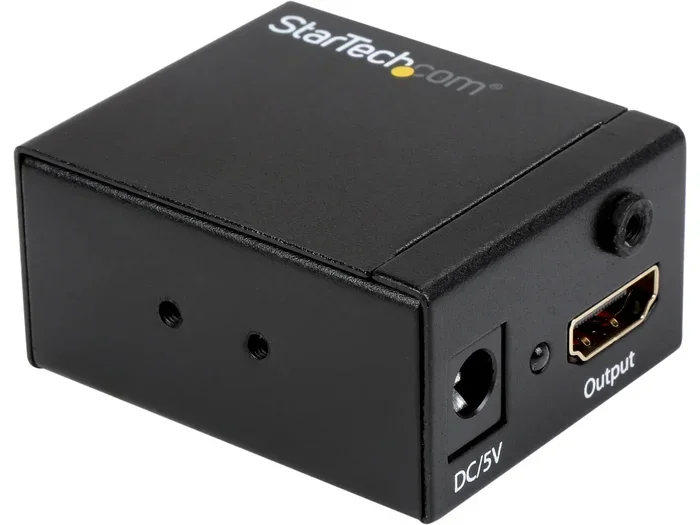
Many boosters are active devices. They need a power supply via a USB cable or wall adapter. Passive boosters do not have power. They simply split or repeat the signal without amplification. Passive boosters rarely work for long runs. Active boosters are the ones that truly fix signal loss. Look for a model that explicitly says it has an amplifier or built-in repeater. A powered signal booster can handle the full bandwidth of modern HDMI standards. It supports deep color, high frame rates, and advanced audio formats.
When Do You Need an HDMI Signal Booster?
Not every setup needs a booster. If your cable is under 6 feet, you probably do not need one. But certain situations make a booster essential. Let us look at the most common reasons people reach for a signal booster.
Long Cable Runs and Signal Loss
The most obvious reason is distance. Standard HDMI cables work well up to about 15 feet. Beyond that, the signal starts to fade. You might notice a blank screen, sparkles, or no sound. A long cable run of 25, 50, or even 100 feet will almost always need help. A booster sits in the middle of the run. It receives the signal from the source, amplifies it, and sends it the rest of the way. This setup is called an in-line booster. You connect the source to the booster input, then the booster output to the display with a second cable. Some boosters also have a passthrough port, so you can chain another cable to reach the display.
For example, you have a projector on the ceiling and a streaming device on a shelf 40 feet away. Without a booster, the image might be black. With a HDMI signal booster, you get a bright, clear picture. The booster ensures the full 18 Gbps bandwidth of HDMI 2.0 reaches the projector. You get every pixel the source intended. No more guessing if the cable is too long.
4K and High-Bandwidth Demands
4K content requires a lot of data. It uses more bandwidth than 1080p. A standard cable might handle 4K at short distances, but at 20 feet it can fail. A 4K HDMI booster is designed to handle that extra bandwidth. It supports High Dynamic Range (HDR) and deep color. If you want to watch 4K movies or play gaming on a large TV from far away, you need a booster that supports 4K at 60Hz or even 120Hz. Check the product specs for bandwidth support. A good booster will list HDMI 2.0 or HDMI 2.1 compatibility. It will pass through all the features your equipment offers.
Fixing Flickering and Dropouts
Sometimes the problem is not distance. It is interference. Long cables can pick up electromagnetic interference from power cords or appliances. This causes the picture to flicker or drop in and out. A signal booster with a good power supply can reject that noise. It regenerates a clean digital signal. The display then receives a steady stream of data. No more black screens in the middle of a movie. No more crackling audio. This is a huge win for home theater setups. A booster keeps your signal clean even in a messy cable run behind a wall or along a power strip.
Quick Tips for When You Need a Booster
- Measure your cable length: If it is over 15 feet, consider a booster.
- Watch for symptoms: Black screens, sparkles, or no audio are signs of signal loss.
- Check your HDMI version: If you use 4K or 8K, you need a booster that matches the bandwidth.
- Consider the environment: Cables near power cords or in walls are more prone to interference.
Do HDMI Signal Boosters Really Improve Picture Quality?
This is the question everyone asks. Do boosters make the image sharper? The honest answer is nuanced. A booster does not magically add detail that the cable could not carry. It restores the signal to what it should be. If your cable was failing, the booster brings back the true picture quality. You get the full resolution and color your source device sends. Without a booster, you might see a blurry or pixelated image. With a booster, you see the crisp 4K detail you paid for.
Boosting Audio and Video Together
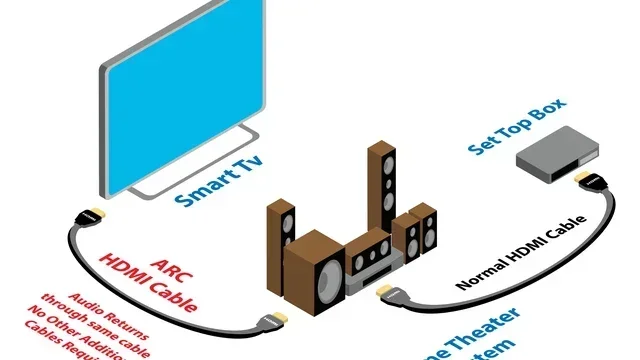
HDMI carries both audio and video on one cable. A booster handles both channels. It does not separate them. This means you get stable surround sound and sharp video at the same time. Many boosters also support Audio Return Channel (ARC) and Consumer Electronics Control (CEC). ARC lets your TV send audio back to a soundbar. CEC lets you control multiple devices with one remote. A good booster passes these features through without issues. You do not lose any functionality by adding a booster in the chain. Your remote still works. Your soundbar still plays Dolby Atmos. The booster stays invisible in the background.
Quick Tips for Best Picture Quality
- Use a booster with power: Always plug in the booster. Unpowered boosters often fail.
- Check the EDID: EDID is the display’s identity message. Good boosters preserve EDID so your TV and source talk correctly.
- Match the HDMI version: If your source is HDMI 2.1, use a booster that supports HDMI 2.1. Otherwise you limit the signal.
- Keep cables short on each side: The booster does not replace cables. Use a short cable from source to booster, and another short cable from booster to display.
Common Mistakes People Make with HDMI Boosters
Even with a good booster, mistakes can cause problems. Here are the most common ones I see.
Buying the Wrong Type
There are two main types: in-line boosters and HDMI extenders. An in-line booster sits directly in the HDMI cable path. An extender uses a sender and receiver pair, often with cat5 or cat6 cable. Many people buy a cheap extender thinking it is a booster. Extenders can work but they add latency. They also require a separate power source and a long Ethernet cable. If you just need to fix a single long run, an in-line HDMI signal booster is simpler and faster. It plugs right into the existing HDMI cable. No extra wires. No setup hassle.
Forgetting the Power Supply
This is the number one mistake. Active boosters need power. Some come with a wall adapter. Others use a USB cable. If you do not plug it in, it will not boost the signal. The device will act like a passive cable, and you will still have dropouts. Always check the box. Make sure you have the right power adapter or a USB port nearby. A signal booster without power is just a fancy cable. It will not fix your signal loss.
Ignoring HDCP and Resolution Limits
HDCP stands for High-bandwidth Digital Content Protection. It is a copy protection system. Some cheap boosters do not support the latest HDCP versions. If you try to play a 4K Blu-ray through an old booster, it might show a black screen. The content is protected, and the booster cannot pass the signal. Always buy a booster that supports HDCP 2.2 or HDCP 2.3. Also, check the maximum resolution. A booster rated for 1080p will not magically make 4K work. Match the booster to your content.
Using a Booster as a Splitter
A booster is not a splitter. A splitter sends the same signal to multiple TVs. A booster sends the signal further down one cable. Some devices combine both functions, but they are not the same. If you need to send one signal to two TVs, you need an HDMI splitter with a built-in booster. Buying a simple booster will not give you multiple outputs. Know what you need before you shop. A booster extends distance. A splitter multiplies screens.
Are HDMI Signal Boosters Worth the Money?
Now for the big question. Are they really worth it? The answer depends on your setup. If you have a short cable run under 10 feet, you probably do not need one. But if you have a long run, a booster solves real problems. It prevents dropouts, restores 4K quality, and gives you peace of mind. The cost is usually between $15 and $60. For that price, a booster is a small investment that can save you from a terrible viewing experience.
Quick Tips for Choosing the Right Booster
- Match your bandwidth needs: For 4K at 60Hz, look for 18 Gbps support. For 4K at 120Hz or 8K, you need 48 Gbps (HDMI 2.1).
- Check the cable length rating: Some boosters are rated for specific distances. Buy one that matches your run length.
- Look for EDID and HDCP support: These ensure compatibility with modern TVs and content.
- Consider a booster with a built-in switch: Some models let you connect two source devices and switch between them.
- Read reviews for reliability: Cheap no-name boosters often overheat or fail after a few months. Stick with reputable brands.
Comparison: Active HDMI Boosters vs HDMI Extenders
It helps to see the difference side by side. Here is a simple comparison of the two main signal extension options.
| Feature | Active HDMI Booster | HDMI Extender (Cat5/Cat6) |
|---|---|---|
| Setup | Plugs inline with HDMI cable | Sender and receiver pair with Ethernet cable |
| Distance | Up to 100 feet total | Up to 300 feet or more |
| Latency | Near zero | Very low, but slightly higher |
| Power | Usually USB or wall adapter | Always needs power for sender and receiver |
| Cable Type | Standard HDMI cable | Cat5e/Cat6 Ethernet cable |
| Best For | Medium runs, clean digital signal | Very long runs, in-wall installations |
Expert Insights on Signal Boosters
I asked a home theater installer about HDMI signal boosters. He said, “In 90% of cases where a customer has a black screen on a long run, a booster fixes it instantly. The key is to put the booster in the middle of the cable, not at the end.” He also warned about passive boosters. “A passive device without power is just a cable with connectors. It does nothing to restore the signal.” His advice is to always get an active booster with its own power supply. He also recommends buying a booster that supports the full HDMI version your equipment uses. If you have an HDMI 2.1 source, do not cheap out on an HDMI 2.0 booster. You will cap your bandwidth.
Another common insight is to avoid daisy-chaining too many boosters. One booster can usually handle a run of up to 100 feet. If you need more, use a single longer booster or an extender system. Stacking multiple boosters can cause signal timing issues and latency. For gaming, latency matters. You want the cleanest, fastest signal path. One well-placed booster is the best approach. The installer also suggests testing your setup before you mount everything on the wall. Plug in the booster, power it up, and check for a stable picture. It saves a lot of frustration later.
Key Takeaways
Let us quickly recap what we learned about HDMI signal boosters.
- They work: Active boosters amplify the signal and fix dropouts over long distances.
- They support 4K and high bandwidth: The right model handles 4K, HDR, and even 8K without issues.
- They need power: Always use the included power supply or a USB port.
- They improve both audio and video: No need for extra cables or separate audio solutions.
- They are worth the cost: For runs over 15 feet, a booster is a small price for a reliable picture.
- Avoid common mistakes: Do not buy a passive booster, ignore HDCP, or use it as a splitter.
Conclusion
If you have ever struggled with a flickering screen or no sound over a long HDMI cable, a signal booster is the fix. Do HDMI signal boosters work? Yes, absolutely. They restore the full signal strength, bring back crisp 4K resolution, and keep your audio and video in sync. They are simple to use, affordable, and essential for any setup with a cable run longer than 15 feet. Do not let a weak signal ruin your home theater or gaming experience. Pick the right HDMI signal booster, power it up, and enjoy a flawless picture every time. Your setup deserves a clean, strong signal. A booster delivers exactly that. Take a look at your cable run today. If it is longer than 15 feet, a booster might be the best $30 you ever spend.
Frequently Asked Questions
Do HDMI signal boosters work for 4K?
Yes, many modern boosters support 4K resolution at 60Hz and even 120Hz. Look for a booster that lists HDMI 2.0 or HDMI 2.1 compatibility. It will handle the high bandwidth needed for 4K without any problems.
Can I use an HDMI signal booster without power?
Most active boosters need a power supply to work. Without power, they act like a regular cable and will not boost the signal. Always plug in the booster or use a USB port to power it. A passive booster without power will not fix signal loss.
How far can an HDMI signal booster extend the cable?
A single booster can typically extend a run by 50 to 100 feet. The exact distance depends on the booster model and the cable quality. For runs longer than 100 feet, you may need an HDMI extender system instead of a simple in-line booster.
Does an HDMI signal booster add latency for gaming?
Good quality boosters add almost no latency. They regenerate the signal instantly. However, cheap or poorly designed boosters can introduce a small delay. For competitive gaming, choose a booster rated for high speed and low latency, and avoid stacking multiple boosters in a row.
What is the difference between an HDMI booster and an HDMI splitter?
A booster sends the signal further down one cable. A splitter sends the same signal to multiple TVs. Some devices combine both functions. If you only need to extend the distance, buy a booster. If you need to connect two screens, buy a splitter or a combined device.
Do HDMI signal boosters improve picture quality?
They restore the picture quality that was lost over a long cable run. A booster does not add detail that the source did not send. But if your cable was causing a blurry or flickering image, a booster will bring back the sharp, clear picture you expect.