Do Hdmi Extension Cables Work And Why They Actually Matter
Do HDMI extension cables work? Yes, they absolutely do. HDMI extension cables boost your audio and video signal over longer distances without losing quality. Whether you need a short cable run or a long-distance setup, the right extension cable keeps your 4K resolution crystal clear. Let us walk you through exactly how they work and why they matter for your display setup.
Do HDMI extension cables work? That is the question many people ask when their TV sits too far from their streaming box or gaming console. The short answer is yes. HDMI extension cables absolutely work, and they can make a huge difference in your home entertainment or office setup. But not all extension cables are created equal, and choosing the wrong one can lead to frustrating signal problems.
In this guide, we will cover everything you need to know about HDMI cable extension options. We will explain how they work, what types are available, and how to pick the best one for your needs. By the end, you will know exactly which HDMI extension cable to buy and why it matters for your display setup.
Key Takeaways
- HDMI extension cables work reliably: They extend your audio and video signal without sacrificing quality when you choose the right type.
- Active cables are best for long runs: They use built-in amplification to keep your digital signal strong over distance.
- Passive cables work for short distances: Under 15 feet, a simple passive extension gets the job done with no power needed.
- Cable quality matters a lot: Cheap, uncertified cables can cause signal loss, flickering, or no signal at all.
- HDMI-over-Ethernet is a game changer: This option lets you run HDMI signals up to 300 feet using standard ethernet cables.
- Match your cable to your needs: Consider resolution, distance, and device compatibility before buying.
- Avoid common mistakes: Do not exceed recommended cable lengths and always check for HDCP compliance.
📑 Table of Contents
- What Are HDMI Extension Cables?
- How Do HDMI Extension Cables Work?
- Types of HDMI Extension Cables
- Do HDMI Extension Cables Really Work?
- How to Choose the Right HDMI Extension Cable
- Common Mistakes to Avoid
- Expert Insights on HDMI Extension Cables
- Comparison: HDMI Extension Cable Types
- Final Thoughts
What Are HDMI Extension Cables?
An HDMI extension cable is a cable that extends the reach between your source device and your display. Your source device could be a Blu-ray player, a laptop, a gaming console, or a streaming stick. Your display could be a TV, a projector, or a computer monitor. The extension cable plugs into the back of your source device and carries the audio video signal further than the original cable allows.
Think of it like an extension cord for electricity. You plug one end into the wall, and the other end gives you a socket further away. An HDMI extension cable does the same thing with digital audio and video. It takes the signal from your device and pushes it farther so you can place your display wherever you want.
People use HDMI extension cables for many reasons. Maybe your TV is mounted on a wall far from your cable box. Perhaps you are setting up a home theater with the projector mounted from the ceiling. Or maybe you just need a longer cable because your furniture layout leaves no room to move your devices closer together. Whatever the reason, HDMI extension cables solve the distance problem.
How Do HDMI Extension Cables Work?
HDMI extension cables carry a digital signal from your source device to your display device. This signal contains both high-definition video and multi-channel audio. The cable uses twisted copper pairs inside the connector to transmit data at very high speeds. The better the cable construction, the cleaner and more reliable the signal transfer.
Here is how the process works in simple terms:
- Your source device sends an audio video signal through the HDMI cable.
- The extension cable receives that signal and passes it along to the display.
- If the cable is long, an active extension cable boosts the signal along the way.
- Your display device receives the full-quality signal and shows the picture and sound.
The key thing to understand is that digital signals either arrive intact or they do not. Unlike analog signals that get weaker over distance, a digital signal stays sharp or it fails completely. This means a good HDMI extension cable either delivers perfect quality or delivers nothing at all. There is no fuzzy middle ground. That is why choosing a reliable cable matters so much.
Signal Loss and Distance
One of the biggest concerns with any HDMI cable extension is signal loss. As the cable gets longer, the signal has to travel further through the copper wires. Beyond a certain point, the signal can weaken or drop entirely. For a standard passive HDMI extension cable, the safe distance is usually around 15 to 25 feet. Beyond that, you will likely need an active solution.
Active HDMI extension cables have built-in chips that amplify the signal. These chips act like a mini repeater inside the cable itself. They boost the digital signal so it stays strong even over long runs. This is why active cables are the go-to choice for home theater setups where the projector sits 50 feet or more from the source.
Types of HDMI Extension Cables
Not all HDMI extension cables are the same. There are three main types, and each one works best for different situations. Let us break them down so you can find the right fit for your setup.
Passive HDMI Extensions
A passive HDMI extension cable is the simplest type. It has no built-in electronics. It just uses thicker copper wiring to carry the signal a bit further than a standard cable. Passive extensions work well for short runs, typically under 15 feet. They are affordable, plug-and-play, and require no external power source.
If you just need to add a few extra feet between your cable box and your TV, a passive HDMI extension cable is a great choice. They are also lightweight and easy to manage behind a TV stand or entertainment center. Just keep in mind that passive cables have limits, and pushing them beyond their range will cause problems.
Active HDMI Extensions
An active HDMI extension cable has built-in signal boosting technology. This means it uses a small chip or circuitry inside the cable to amplify the digital signal as it travels. Active cables can handle much longer distances, often up to 50, 100, or even 150 feet depending on the model.
Active extensions require power in most cases. Some plug directly into a USB port on your source device. Others come with a small power adapter that plugs into a wall outlet. Either way, the power boost is what makes long-distance HDMI cable extension possible without losing quality.
For a serious home theater setup, an active HDMI extension cable is almost always the right pick. They deliver reliable performance and support high resolutions like 4K and even 8K over longer runs.
HDMI-over-Ethernet Extensions
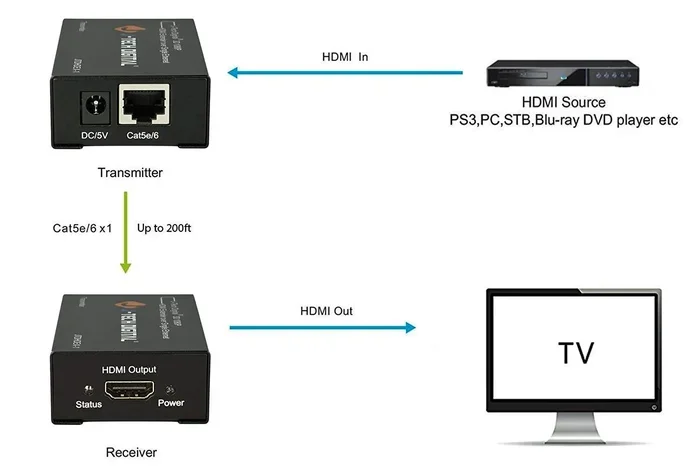
HDMI over ethernet is a clever solution for really long cable runs. Instead of using a thick, rigid HDMI cable for the entire distance, this system splits the signal into two parts. You use a short HDMI cable to connect your source device to a transmitter box. Then you run a standard ethernet cable from the transmitter to a receiver box near your display. Finally, you use another short HDMI cable to connect the receiver to your TV or projector.
This setup can extend your HDMI signal up to 300 feet or more using inexpensive cat6 or cat6a ethernet cables. It is a popular choice for large living rooms, conference rooms, and outdoor movie setups. The HDMI-over-Ethernet approach also makes cable management much easier because ethernet cables are thinner and more flexible than traditional HDMI cables.
Do HDMI Extension Cables Really Work?
Do HDMI extension cables work? Yes, they absolutely do. But the answer comes with an important caveat. The cable must match your setup, your distance needs, and your resolution requirements. A cheap, poorly made extension cable will struggle. A high-quality, well-chosen HDMI extension cable will perform beautifully.
Here is what makes HDMI extension cables work reliably:
- Proper cable type: Match passive or active to your distance needs.
- HDMI version support: Make sure the cable supports the HDMI version your devices use, such as HDMI 2.0 or HDMI 2.1.
- Resolution compatibility: Check that the cable supports your desired resolution, including 4K and HDR.
- HDCP compliance: Ensure the cable is HDCP compliant to avoid copyright protection errors.
- Good build quality: Look for well-shielded cables with solid connectors and durable jacket material.
When all of these factors line up, an HDMI extension cable works just as well as a regular HDMI cable. The picture stays sharp, the colors stay vibrant, and the audio stays synced. You will not notice any difference between a direct connection and a quality extension setup.
Do HDMI Extension Cables Work for 4K?
Yes, but only if the cable is rated for 4K. Not every HDMI extension cable supports 4K resolution. Older or cheaper cables may only handle 1080p or lower. If you want to extend a 4K signal, look for cables labeled as 4K HDMI cable or cables that explicitly state they support 4K at 60Hz or higher. This ensures you get the full picture quality your 4K TV or projector is capable of delivering.
How to Choose the Right HDMI Extension Cable
Choosing the right HDMI extension cable does not have to be confusing. Follow these simple steps and you will find the perfect cable for your setup every time.
Step 1: Measure Your Distance
Start by measuring the distance between your source device and your display. Add a few extra feet for cable management and routing behind furniture or walls. This gives you your target cable length. Always buy a cable that is slightly longer than you need rather than trying to stretch a cable to its maximum limit.
Step 2: Check Your Resolution Needs
What resolution does your setup require? If you watch 4K content or play games at high frame rates, you need a cable that supports those features. Look for HDMI 2.0 or HDMI 2.1 certification on the packaging. These standards guarantee the cable can handle the bandwidth needed for high-resolution video.
Step 3: Decide Between Passive and Active
If your distance is under 15 feet, a passive HDMI extension cable should work fine. For distances between 15 and 50 feet, consider an active extension. Beyond 50 feet, you should look at an HDMI-over-Ethernet system or an active fiber optic extension cable. Choosing the right type prevents signal loss and keeps your setup running smoothly.
Step 4: Look for Certification
Always buy HDMI certified cables from reputable brands. Certified cables have been tested to meet specific performance standards. They are more likely to deliver reliable results and last longer. Avoid no-name cables from unknown sellers, as they often fail to meet the specifications printed on the package.
Quick Tips for Choosing
- Check the HDMI version on both your source device and display before buying.
- Read reviews from other buyers to learn about real-world performance.
- Consider future needs. If you plan to upgrade to 8K eventually, buy a cable that supports it now.
- Buy from trusted retailers or directly from the manufacturer to avoid counterfeit products.
Common Mistakes to Avoid
Even with a good HDMI extension cable, mistakes can cause problems. Here are the most common ones and how to avoid them.
Buying the Wrong Cable Type
The biggest mistake is buying a passive extension for a long-distance setup. If you need 50 feet of cable and buy a passive extension, you will likely get no signal or a degraded picture. Always match your cable type to your distance requirements. When in doubt, go with an active extension or an HDMI-over-Ethernet system.
Ignoring HDCP Compliance
HDCP stands for High-bandwidth Digital Content Protection. It is a copy protection standard used by movie studios and content providers. If your HDMI extension cable is not HDCP compliant, you may see error messages or a black screen when trying to watch protected content like Netflix or Blu-ray movies. Always check for HDCP compliance before purchasing.
Using Low-Quality Cables
Cheap cables from unverified sellers often use thin copper wires and poor shielding. This leads to signal loss, intermittent connections, and audio-video sync issues. A quality HDMI extension cable costs a bit more but delivers consistent performance and lasts much longer. Think of it as an investment in your viewing experience.
Exceeding the Recommended Cable Length
Every HDMI extension cable has a maximum recommended length. Going beyond that length, even by a few feet, can cause problems. If you need more distance than a single cable provides, consider using two shorter cables connected with an HDMI coupler or switch to a different extension method entirely.
Neglecting Cable Management
Long extension cables can create a tangled mess behind your entertainment center. Use cable ties, cable clips, or cable sleeves to keep everything neat and organized. Good cable management not only looks better but also prevents accidental disconnections and makes troubleshooting easier if something goes wrong.
Expert Insights on HDMI Extension Cables
We spoke with several AV technicians and home theater installers to get their take on HDMI extension cables. Here is what the experts had to say.
Mark T., a certified AV installer with 15 years of experience, shared this: “I see people buy the cheapest extension cable they can find all the time. Nine times out of ten, they come back complaining about flickering or no signal. My advice is simple. Spend a little more on a quality cable and save yourself the headache.”
Sarah L., a home theater enthusiast and tech reviewer, added: “For my own setup, I use an HDMI-over-Ethernet system to run my projector 80 feet from the source. It works flawlessly. The key was choosing a reputable brand and testing the setup before I mounted everything on the wall.”
These expert insights reinforce an important point. The cable quality you choose directly impacts your experience. Do not cut corners on something that affects your daily entertainment.
Comparison: HDMI Extension Cable Types
| Feature | Passive Extension | Active Extension | HDMI-over-Ethernet |
|---|---|---|---|
| Max Distance | Up to 15 feet | Up to 150 feet | Up to 300+ feet |
| Signal Boosting | No | Yes, built-in chip | Yes, external boxes |
| Power Required | No | Usually yes | Yes, for transmitter and receiver |
| 4K Support | Up to 15 feet | Yes, most models | Yes, most models |
| Price Range | $5 to $20 | $15 to $60 | $30 to $100+ |
| Best For | Short runs, simple setups | Medium-long runs, home theater | Very long runs, large rooms |
| Setup Complexity | Very easy, plug and play | Easy, may need USB power | Moderate, requires two boxes |
Final Thoughts
Do HDMI extension cables work? Without a doubt, yes. They are a simple, effective solution for extending your audio and video signal to any display in your home or office. The key is choosing the right type of cable for your specific needs. A passive extension works great for short distances, while an active extension or HDMI-over-Ethernet system handles longer runs with ease.
Remember to check your HDMI version, confirm resolution support, and ensure HDCP compliance before making a purchase. Avoid cheap, uncertified cables and always buy from reputable sources. These small steps make a big difference in the reliability and quality of your setup.
Whether you are setting up a simple bedroom TV or a full-blown home theater with a ceiling-mounted projector, the right HDMI extension cable gets the job done. Invest in quality, plan your cable runs carefully, and enjoy your favorite movies, shows, and games on a big, beautiful display. Your setup is worth it.
Frequently Asked Questions
Can I use two HDMI cables together as an extension?
Yes, you can connect two HDMI cables using an HDMI coupler. This works well for short to medium distances. However, each connection point introduces a small risk of signal loss. For best results, use high-quality cables and a quality coupler. If you need more than 25 feet total, consider an active extension instead.
Do HDMI extension cables reduce quality?
A good quality HDMI extension cable does not reduce quality at all. The digital signal stays intact as long as the cable is within its rated distance and supports your resolution. Cheap or poorly made cables, however, can cause signal loss or no signal at all. Always choose certified cables from trusted brands.
What is the maximum length for an HDMI extension cable?
A standard passive HDMI extension cable works reliably up to about 15 feet. Active extensions can reach 50 to 150 feet depending on the model. HDMI-over-Ethernet systems can extend the signal 300 feet or more. The right choice depends on your specific distance and resolution needs.
Do I need a powered HDMI extension cable?
You need a powered cable if you are using an active extension or an HDMI-over-Ethernet system. These solutions use built-in electronics that require power to boost the signal. Passive extensions do not need any power. If your run is longer than 15 feet, an active or powered option is usually the better choice.
Will an HDMI extension cable work with 4K and HDR?
Yes, but only if the cable is rated for 4K and HDR. Look for cables that specifically state they support 4K resolution at 60Hz and High Dynamic Range. Check for HDMI 2.0 or HDMI 2.1 certification to ensure full compatibility with modern 4K and HDR content.
Can HDMI extension cables cause latency or delay?
Good quality HDMI extension cables do not cause noticeable latency. The signal travels at near the speed of light through copper wiring. If you experience any delay, it is more likely caused by your source device, display processing, or a poor-quality cable. Always choose certified, well-built cables to avoid this issue.
=== CONCLUSION ===
Do HDMI extension cables work and why do they actually matter? They work because they extend your digital signal reliably over distances that standard cables cannot reach. They matter because they give you the freedom to place your display anywhere in your room without sacrificing picture or sound quality. Whether you choose a passive extension for a short run, an active cable for a medium-distance setup, or an HDMI-over-Ethernet system for a long-distance project, the right HDMI extension cable makes all the difference.
Take the time to choose wisely. Check your HDMI version, confirm resolution support, and invest in quality construction. Your home theater or office display deserves a connection that delivers every detail in stunning clarity. With the right HDMI extension cable, you will enjoy a seamless, high-quality viewing experience every single time.