Do Hdmi 2 1 Cables Make A Really Noticeable Difference
Do HDMI 2.1 cables make a difference? Absolutely yes. HDMI 2.1 cables unlock 4K 120Hz, 8K resolution, VRR, and eARC that older cables simply cannot support. If you own a next-gen console or a 4K 120Hz TV, upgrading to certified HDMI 2.1 cables is one of the easiest upgrades you can make.
You have probably seen the term HDMI 2.1 cables everywhere lately. Maybe you just bought a new 4K TV or a gaming console and noticed the label. The big question is simple: do HDMI 2.1 cables really make a noticeable difference? The answer might surprise you.
The truth is that HDMI 2.1 cables bring real, measurable improvements over older versions. They are not just a marketing trick. These cables unlock features like 4K 120Hz, smoother gaming, and better audio quality. If you have invested in a modern display or gaming console, using the right cable matters more than you think.
In this article, we will break down everything you need to know. We will look at what HDMI 2.1 cables actually do, compare them to older versions, and help you decide if upgrading is worth it. By the end, you will have a clear picture of what these cables bring to the table.
Key Takeaways
- HDMI 2.1 cables unlock 4K 120Hz and 8K resolution that older HDMI 2.0 cables simply cannot handle
- VRR and ALLM features require HDMI 2.1 for proper functionality and smooth gaming
- Next-gen consoles like PS5 and Xbox Series X benefit greatly from proper HDMI 2.1 cable connections
- The bandwidth jump from 18 Gbps to 48 Gbps is the core reason HDMI 2.1 cables make a real difference
- eARC support delivers better audio including Dolby Atmos passthrough through HDMI 2.1 cables
- Not all HDMI 2.1 cables are equal – always look for Ultra High Speed HDMI certification
- Fiber optic HDMI cables are the best choice for longer cable runs without signal loss
📑 Table of Contents
What Is HDMI 2.1 and Why It Matters
HDMI 2.1 is the newest version of the HDMI standard. It was released to handle the demands of modern displays and next-gen gaming. The most important change is the massive increase in HDMI 2.1 bandwidth. While HDMI 2.0 maxes out at 18 gigabits per second, HDMI 2.1 jumps to 48 gigabits per second. That is nearly three times the data capacity.
Why does this matter for everyday users? More bandwidth means your cable can carry higher resolution signals at faster frame rates. It also means support for new features that simply did not exist with older versions. The HDMI 2.1 specification was designed with the future in mind, making it a long-term investment for your entertainment setup.
The Big Bandwidth Upgrade
Think of bandwidth as a water pipe. A wider pipe carries more water at once. Similarly, a wider bandwidth pipe carries more video and audio data. The jump from 18 Gbps to 48 Gbps is like going from a garden hose to a fire hose.
This extra capacity is what makes 8K resolution and 4K 120Hz possible over a single cable. Without this bandwidth, your display simply cannot receive the full signal. That is why the right HDMI 2.1 cables are so important for getting the most out of your equipment.
Key HDMI 2.1 Features You Should Know
Here are the main features that set HDMI 2.1 cables apart from older versions:
- 4K 120Hz support – Delivers smooth motion for fast-paced content and console gaming
- 8K resolution – Supports ultra-high-definition displays for future-proof setups
- Variable Refresh Rate (VRR) – Reduces screen tearing and stuttering during gameplay
- Auto Low Latency Mode (ALLM) – Automatically optimizes your display for gaming
- eARC support – Passes uncompressed audio including Dolby Atmos to your sound system
- Dynamic HDR – Adjusts HDR settings on a frame-by-frame basis for better contrast
Each of these features depends on the higher bandwidth and updated protocol that HDMI 2.1 cables provide. An older cable will simply not be able to carry these signals.
Do HDMI 2.1 Cables Make A Difference in Gaming
This is the section most people want to read about. And the answer is a resounding yes. Gaming is one of the areas where HDMI 2.1 cables make the biggest visible difference. Modern consoles and PCs are capable of incredible performance, but only if your cable can keep up.
4K 120Hz and High Frame Rate Gaming
One of the most noticeable improvements is the jump to 4K 120Hz. With HDMI 2.0, you are limited to 4K at 60 frames per second. That was fine for a while, but console gaming has moved on. The PlayStation 5 and Xbox Series X are built to output at 4K 120Hz, and HDMI 2.1 cables are the only way to get that signal to your TV.
The difference between 60fps and 120fps is dramatic. Motion feels smoother. Controls feel more responsive. Fast-moving scenes in shooters and racing games look significantly better. If you have a high frame rate capable display, you are leaving performance on the table with an older cable.
Even for PC gaming, HDMI 2.1 cables make a real difference. High-end graphics cards can now push frames at rates that HDMI 2.0 simply cannot handle. Upgrading your cable unlocks a smoother and more immersive experience that you will notice immediately.
VRR and ALLM: The Features That Change Everything
Variable Refresh Rate is one of the most important HDMI 2.1 features for gamers. VRR synchronizes your TV or monitor’s display refresh rate with your game console or PC’s frame output. The result is a tear-free, stutter-free image. You notice it the moment you turn it on.
Auto Low Latency Mode is equally valuable. When you start a game, ALLM automatically switches your display to its gaming mode. This reduces input lag without you having to change any settings manually. It is a small feature that makes a big difference in responsiveness.
Both VRR and ALLM rely on the HDMI 2.1 protocol and bandwidth. An HDMI 2.0 cable cannot support these features properly. This alone is a strong reason to consider upgrading to HDMI 2.1 cables if you are a serious gamer.
HDMI 2.0 vs HDMI 2.1: The Real Differences
It helps to see the comparison side by side. Many people wonder if the upgrade from HDMI 2.0 to HDMI 2.1 is really worth it. The table below lays out the key differences clearly.
| Feature | HDMI 2.0 | HDMI 2.1 |
|---|---|---|
| Maximum Bandwidth | 18 Gbps | 48 Gbps |
| Max 4K Resolution | 4K at 60Hz | 4K at 120Hz |
| Max 8K Resolution | Not supported | 8K at 60Hz |
| VRR Support | No | Yes |
| ALLM Support | No | Yes |
| eARC Support | Limited | Full eARC |
| Dynamic HDR | No | Yes |
| Cable Length Impact | Minimal at short lengths | Signal quality matters more at longer runs |
As you can see, the differences are substantial. The HDMI 2.0 vs HDMI 2.1 comparison makes it clear that HDMI 2.1 is not just a minor update. It is a generational leap that opens up entirely new possibilities for your home entertainment setup.
Many people ask whether HDMI 2.1 cables are backward compatible. The good news is yes. An HDMI 2.1 cable works with older devices. You simply will not get the advanced features unless both your source and display support them. This makes HDMI 2.1 cables a safe and future-proof choice for any setup.
When You Actually Need an HDMI 2.1 Cable
Not everyone needs HDMI 2.1 cables right now. The need depends on your equipment and what you want to get out of it. Let us look at when these cables are essential and when you can still get by with an older version.
Scenarios Where HDMI 2.1 Shines
You should definitely invest in HDMI 2.1 cables if any of these apply to your setup:
- You own a PS5 or Xbox Series X and want to game at 4K 120Hz
- Your TV or monitor supports 4K 120Hz or 8K resolution
- You use VRR or ALLM features on your display
- You want full eARC support for Dolby Atmos passthrough to your soundbar or receiver
- You are building a next-gen gaming setup and want to future-proof your connections
- You watch a lot of high-dynamic-range content and want the best HDR format support
- You want to take full advantage of your gaming console or high-end PC
In these situations, HDMI 2.1 cables are not optional. They are necessary to unlock the full potential of your equipment. Using an older cable would be like buying a sports car and putting economy tires on it. You would not get the performance you paid for.
When HDMI 2.0 Is Still Fine
On the other hand, you may not need HDMI 2.1 cables right away if:
- Your TV or monitor only supports 4K at 60Hz
- You mainly watch regular TV, browse the web, or do basic streaming
- Your current setup does not support VRR or ALLM
- You are not using a next-gen console or a high-end gaming PC
For casual viewing and standard use, HDMI 2.0 cables still work perfectly well. There is no urgent need to upgrade if your equipment does not take advantage of the new features.
Quick Tips
Before buying any HDMI 2.1 cables, check your display and console specifications. Look for 4K 120Hz support, VRR, and eARC. If your devices support these features, an HDMI 2.1 cable will make a real difference. If not, you can save your money for now and upgrade later when you are ready.
How to Pick the Right HDMI 2.1 Cable
Not all cables that claim to be HDMI 2.1 are the same. This is where many people get confused. Let us walk through what to look for when shopping for HDMI 2.1 cables.
Ultra High Speed HDMI Certification
The official certification for HDMI 2.1 cables is “Ultra High Speed HDMI.” This label guarantees the cable can handle the full 48 Gbps bandwidth. Look for this certification on the packaging or product listing. It is your assurance that the cable meets the HDMI 2.1 specification.
Beware of cables that claim HDMI 2.1 compatibility but do not carry the Ultra High Speed certification. These cables may work at lower bandwidths but will fail when you try to push 4K 120Hz or other advanced features. Always check for the official logo before purchasing.
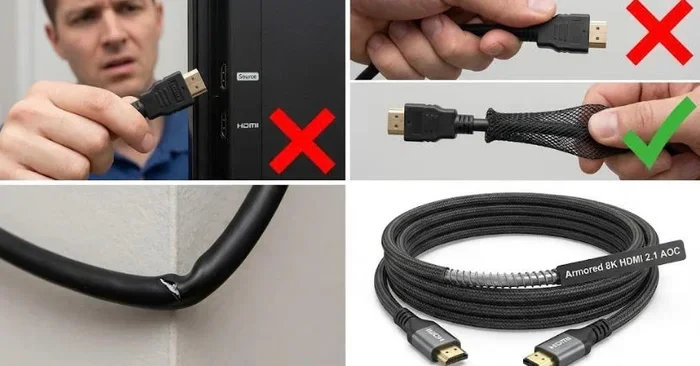
Getting the right HDMI cable certification is one of the most important steps. Cheap unverified cables can cause flickering, signal drops, or no signal at all. Spending a little extra on a certified cable saves you from frustration down the road.
Fiber Optic vs Copper HDMI 2.1 Cables
There are two main types of HDMI 2.1 cables on the market:
- Copper cables – Affordable and works well for runs up to about 6 feet. These are great for most home setups where your devices are close together. A solid copper 48G cable is the go-to choice for most people.
- Fiber optic HDMI cables – More expensive but can handle much longer runs without signal loss. These are ideal if your devices are far apart or if you need a cable longer than 10 feet. A fiber optic HDMI cable maintains full signal quality over distance.
For most people, a quality copper HDMI 2.1 cable will do the job perfectly. Fiber optic cables are worth considering if you have a large entertainment center or need to run cables across a room.
Expert Insights on HDMI 2.1 Cables
Industry experts consistently recommend HDMI 2.1 cables for anyone building or upgrading a modern home entertainment setup. According to HDMI Licensing administrators, the Ultra High Speed certification ensures that a cable can handle all HDMI 2.1 features including 4K 120Hz, VRR, and eARC.
One common piece of advice from experts is to avoid cable runs longer than 3 meters (about 10 feet) with copper cables unless you are using a certified signal booster. Beyond that distance, signal degradation becomes a real concern. This is where fiber optic HDMI cables shine, maintaining full bandwidth over much longer distances.
Another expert tip is to check all your ports. Both your source device and your display need HDMI 2.1 ports to access the full benefits. A great HDMI 2.1 cable will not help if one of your devices only has an HDMI 2.0 port. Always verify your hardware first.
Common Mistakes When Buying HDMI 2.1 Cables
Here are some pitfalls to avoid when shopping for HDMI 2.1 cables:
- Buying the cheapest option – Very cheap cables may not meet the 48 Gbps standard and can cause flickering or no signal at all
- Ignoring cable length – Signal quality degrades over longer distances. Stick to certified cables for runs over 6 feet
- Trusting fake certifications – Some sellers print fake Ultra High Speed labels. Buy from reputable brands and authorized retailers
- Assuming all ports are HDMI 2.1 – Check that both your source device and display have HDMI 2.1 ports, not just the cable
- Overlooking eARC requirements – For full Dolby Atmos passthrough, make sure your cable supports eARC, which is part of the HDMI 2.1 standard
Avoiding these mistakes will save you money and frustration. A proper HDMI 2.1 cable should work flawlessly from the moment you plug it in.
Final Thoughts: Are HDMI 2.1 Cables Worth It
So, do HDMI 2.1 cables make a difference? The evidence is clear. They unlock features that simply cannot work with older cables. From smoother gaming at 4K 120Hz to better audio through eARC and Dolby Atmos passthrough, the benefits are real and visible.
If you have a modern TV, a next-gen console, or a gaming PC that supports these features, HDMI 2.1 cables are absolutely worth it. They are a small investment that makes a big impact on your daily entertainment experience. On the other hand, if your setup does not use these advanced features, there is no rush to upgrade.
The bottom line is this: HDMI 2.1 cables are not just for enthusiasts anymore. They are becoming the standard, and prices continue to drop. If you are setting up a new system or replacing old cables, going with certified HDMI 2.1 cables is a smart choice that will serve you well for years to come. Do not let an outdated cable hold back your gear.
Frequently Asked Questions
Can I use an HDMI 2.0 cable with an HDMI 2.1 device?
Yes, you can. HDMI 2.1 cables are backward compatible with older devices. However, you will only get the features your older device supports. To access 4K 120Hz, VRR, and other advanced features, both your source and display must support HDMI 2.1.
Do I need HDMI 2.1 cables for PS5?
Yes, if you want to experience the full potential of your PS5. The console supports 4K 120Hz and VRR, which require HDMI 2.1 cables to work. Using an HDMI 2.0 cable will limit your PS5 to 4K at 60Hz, which is a noticeable difference in smoothness.
Are expensive HDMI 2.1 cables worth it?
You do not need to spend a fortune. A certified Ultra High Speed HDMI cable from a reputable brand is all you need. The price difference between a good HDMI 2.1 cable and an HDMI 2.0 cable is small. What matters is the certification, not the price tag.
How long can an HDMI 2.1 cable be?
Copper HDMI 2.1 cables work best at lengths up to about 6 feet (2 meters). Beyond that, signal quality can degrade. For longer runs, a fiber optic HDMI cable is the best choice. It maintains the full 48 Gbps bandwidth over much greater distances without signal loss.
Does HDMI 2.1 improve picture quality?
Yes, but indirectly. HDMI 2.1 cables do not change the picture quality on their own. Instead, they allow your device to output higher resolutions and frame rates that older cables cannot carry. The result is a sharper, smoother image when paired with a compatible display.
Can I plug an HDMI 2.1 cable into an HDMI 2.0 port?
Yes, you can. The cable will work, but it will operate at the capabilities of the older port. You will not get the full benefits of HDMI 2.1 features unless both the cable and the port support the standard. Always check both ends of your connection.