Do All Hdmi Cords Work For Xbox Or Are Some Better
Do All HDMI Cords Work For Xbox? The answer is no—not every HDMI cable delivers the same performance. Cheap or outdated cords can cause lag, signal loss, or no picture at all. Choosing the right HDMI cable ensures you get 4K resolution, 120Hz refresh rates, and HDR without any hassle.
If you just set up a new Xbox, you might be staring at the back of your console and wondering about all those ports. One of the most important connections is the HDMI cable. It carries both video and audio from your Xbox to your TV or monitor. But here is the big question: Do All HDMI Cords Work For Xbox? The short answer is no. Not every HDMI cable can handle the demands of modern gaming. Some cables are too old, too slow, or simply not built for high-resolution play. In this guide, I will walk you through everything you need to know. You will learn which HDMI cords actually work, why some are better, and how to avoid common mistakes.
Many gamers assume any HDMI cord will do the job. They plug in a random cable and hope for the best. Sometimes it works fine. Other times, you get blurry images, no sound, or frustrating lag. The truth is that HDMI technology has evolved a lot over the years. Xbox consoles have specific requirements for the best experience. Using the wrong cable can hold you back from stunning 4K visuals and smooth 120Hz gameplay. So, let us break down the facts and help you choose the right HDMI cable for your Xbox.
Key Takeaways
- Not all HDMI cords work the same: Older cables may not support 4K or 120Hz on Xbox.
- HDMI 2.1 is ideal for Xbox Series X: It unlocks the best gaming features like Variable Refresh Rate.
- Premium Certified cables are reliable: They guarantee speed and bandwidth for gaming.
- Cable length matters: Longer cables can lose signal quality, so keep them short when possible.
- Cheap cables often cause issues: They may lead to flickering, no signal, or audio problems.
- Check your TV and Xbox specs first: Matching HDMI versions ensures the best experience.
📑 Table of Contents
Do All HDMI Cords Work For Xbox? Understanding Compatibility
The phrase Do All HDMI Cords Work For Xbox comes up a lot in gaming forums. The reality is that compatibility depends on the HDMI version your console and TV support. Not all cables are created equal. An older HDMI 1.4 cable might work for basic gaming, but it will limit your experience. You will miss out on 4K resolution and high refresh rates. On the other hand, a modern HDMI 2.1 cable unlocks the full potential of Xbox Series X and Series S.
Here is a simple way to think about it. Your Xbox can output a certain signal. Your TV must be able to receive that signal. The HDMI cable is the bridge between them. If the cable cannot carry enough data, you will not get the best picture. So, when we ask Do All HDMI Cords Work For Xbox, we really mean which cords can carry the necessary bandwidth for your specific Xbox model and TV setup.
HDMI Versions and What Xbox Needs
Different HDMI versions support different features. Let us look at the main ones you will encounter.
| HDMI Version | Max Resolution | Max Refresh Rate | Bandwidth | Key Features |
|---|---|---|---|---|
| HDMI 1.4 | 4K (limited) | 30Hz | 10.2 Gbps | Basic 4K, 3D, Ethernet channel |
| HDMI 2.0 | 4K | 60Hz | 18 Gbps | 4K at 60Hz, HDR, 32 audio channels |
| HDMI 2.1 | 8K (future) | 4K at 120Hz, 8K at 60Hz | 48 Gbps | VRR, ALLM, eARC, 8K support |
If you own an Xbox Series X, you want an HDMI 2.1 cable. It future-proofs your setup and gives you the smoothest gameplay. For Xbox One X, an HDMI 2.0 cable is usually enough. But if you want to upgrade your TV later, HDMI 2.1 is a smart investment. Always check the cable label for the version number. Many cheap cables do not list their version, which is a red flag.
Why Some HDMI Cables Are Better for Xbox
Not all HDMI cords are the same, even if they look identical on the outside. The internal construction determines how much data they can transfer. A thicker cable with better shielding reduces interference. This means a cleaner signal and fewer dropouts. Some cables are designed specifically for high-speed data, which is exactly what gaming needs.
When you are shopping for an HDMI cable for Xbox, look for a few key specs. The cable should support the bandwidth your console requires. For 4K at 120Hz, you need a cable rated for at least 48 Gbps. That is the speed of HDMI 2.1. A slower cable will bottleneck your system. You will not see the full resolution or frame rate your Xbox is capable of. Investing in a quality HDMI cable protects your gaming investment.
Speed, Bandwidth, and Gaming Performance
Bandwidth is the amount of data a cable can move per second. Higher bandwidth means more details on your screen. For Xbox gaming, this translates to sharper images and smoother motion. A low-bandwidth cable might make fast games look blurry or cause screen tearing. That is where features like VRR come in, but only if the cable supports it.
Think of it like a highway. A thin, old road (low bandwidth) gets congested with too much traffic (data). A wide, modern highway (high bandwidth) handles the flow easily. Your Xbox outputs a lot of data, especially in 4K gaming with HDR. You need a cable that can handle that traffic without jamming up. A certified ultra high speed HDMI cable ensures the data flows freely.
HDR and eARC: Features That Matter
High Dynamic Range (HDR) makes colors pop and improves contrast. It is a huge part of modern gaming. But HDR requires a cable that can carry the extra color information. Most HDMI 2.0 and 2.1 cables support HDR, but very old ones might not. Always check the cable specifications if you want HDR on your Xbox.
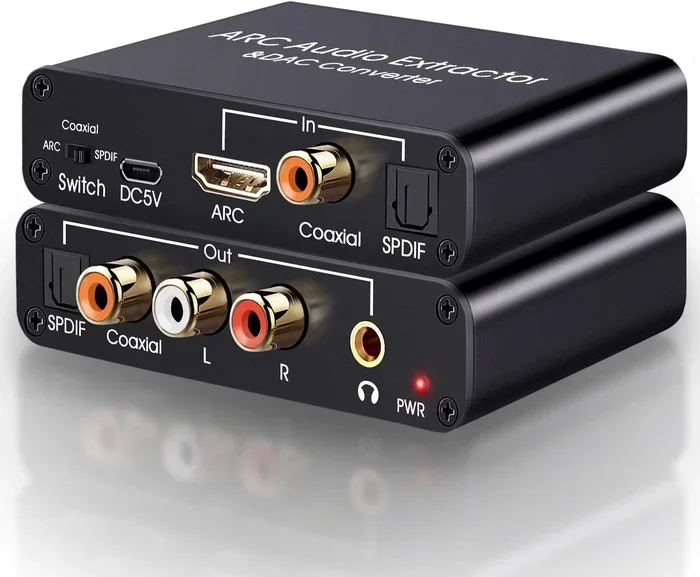
Another feature to know about is eARC, which stands for Enhanced Audio Return Channel. eARC lets your TV send high-quality audio back to your soundbar or receiver. If you use your TV as a hub for audio, eARC is important. It supports formats like Dolby Atmos. Not all HDMI cables support eARC, so look for that if audio quality matters to you. A good HDMI cord with eARC support makes a noticeable difference in sound clarity.
Common HDMI Problems Xbox Gamers Face
Sometimes, even with the right cable, you run into issues. Understanding these problems helps you troubleshoot faster. Many gamers blame their Xbox when the real culprit is the HDMI cord.
No Signal or Black Screen
You turn on your Xbox, but the TV shows nothing. This is a common scare. Often, it is a loose connection or a faulty cable. Try unplugging the HDMI cord from both ends and plugging it back in firmly. If that does not work, the cable might be damaged. A damaged cable cannot transmit the signal properly. This is why buying a premium certified HDMI cable matters. Cheap cables often have weak connectors that break easily.
Flickering or Intermittent Signal
Flickering happens when the cable cannot maintain a steady connection. It often occurs with longer cables or cheap, thin cables. The signal drops in and out. If your screen flickers during intense gaming, the cable is likely the problem. Shorten the cable length or replace it with a higher-quality one. Signal loss increases with cable length, so keep it as short as possible without straining your setup. A stable connection means fewer interruptions and a better gaming experience.
Audio Issues and No Sound
Sometimes you get a picture but no sound. This can be an HDMI handshake issue. The cable might not be fully seated. Unplug and replug the cable. If the problem persists, the cable may not support the audio format your TV is using. In that case, try a different HDMI cord or check your TV audio settings. Also, remember that some older cables only support stereo audio, not surround sound. For full Dolby Atmos or DTS:X, you need a cable that supports the latest audio formats.
Lag and Input Delay
Lag in gaming is frustrating. While most input delay comes from the TV or console, a bad cable can contribute. A cable that fails to pass the signal quickly adds latency. This is rare with modern cables, but it happens with very old or damaged ones. If you notice a delay between pressing a button and seeing the action on screen, test with a different cable. Low latency is essential for competitive gaming. A quality HDMI cable ensures your inputs register instantly.
How to Choose the Right HDMI Cord for Your Xbox
Now that you know what can go wrong, let us talk about how to pick the right one. Choosing the correct HDMI cable does not have to be confusing. Follow these steps to find the perfect match for your Xbox.
Check Your Xbox and TV Specs First
Before buying anything, check what your Xbox model and TV support. Look at the Xbox settings under Display & sound. It will tell you the current resolution and refresh rate. If you are running 4K at 60Hz, you need at least an HDMI 2.0 cable. If you want 4K at 120Hz, you need HDMI 2.1. Your TV must also support that resolution and refresh rate. Matching the specs ensures you get the best performance. Write down your Xbox model and TV specs before you shop.
Look for Premium Certified Cables
The HDMI Forum has a certification program called Premium High Speed HDMI Cable. These cables are tested to handle 4K at 60Hz and HDR. They guarantee the bandwidth you need. When shopping, look for the Premium Certified sticker. This is a reliable indicator that the cable will work well with Xbox gaming. Avoid cables that make wild claims without certification. They often fail to deliver the promised speed. A certified HDMI cord gives you peace of mind.
Length Matters: Keep It Short and Sweet
Cable length affects signal quality. A longer cable has more resistance, which can weaken the signal. For most living room setups, a 6-foot or 10-foot cable is perfect. If you need a longer run, consider an active HDMI cable or a signal booster. These amplify the signal to prevent loss. But for most gamers, a standard short cable works best. Signal loss is a common issue with cables over 15 feet. Measure the distance between your Xbox and TV before you buy.
Quick Tips for Buying the Best HDMI Cable
- Always check the HDMI version on the packaging. Look for 2.0 or 2.1.
- Choose a cable with a thick, sturdy connector. Loose connections cause problems.
- Buy from reputable brands or trusted retailers. Avoid unknown no-name cables.
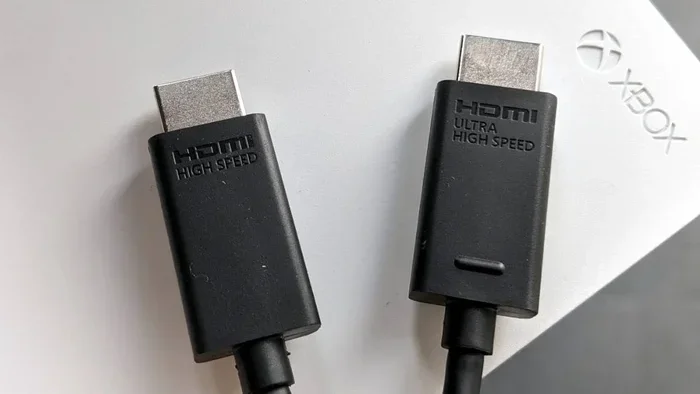
- If you have an Xbox Series X, go for an HDMI 2.1 Ultra High Speed cable.
- Do not pay extra for gold-plated connectors unless you have a specific need. The standard nickel plating is fine for most setups.
If you are also thinking about your home internet setup, you might wonder about 5G towers. Many people assume 5G towers provide Wi-Fi directly to their Xbox. That is not quite accurate. To understand how cellular towers and Wi-Fi differ, read our detailed guide on Are 5G Towers For Wi Fi. It clarifies what kind of internet connection your Xbox actually uses and helps you avoid confusion.
Common Mistakes When Choosing HDMI Cables for Xbox
Even experienced gamers make mistakes when picking a cable. Knowing these pitfalls saves you time and money. Avoid these common errors to get the best performance from your Xbox.
- Buying the cheapest cable available: Ultra-cheap cables often lack the bandwidth for 4K or 120Hz. They may work for basic use but fail under gaming loads.
- Ignoring HDMI version labels: A cable that says High Speed is not the same as Ultra High Speed. Always verify the version number on the packaging.
- Using a cable that is too long: Longer cables degrade the signal faster. Stick to the shortest length that fits your room layout.
- Assuming all 4K cables are equal: A cable that supports 4K at 30Hz is not the same as one that supports 4K at 60Hz or 120Hz. Check the refresh rate support.
- Overlooking eARC support: If you care about high-quality audio, make sure your cable supports eARC. Not all HDMI 2.1 cables include this feature.
These mistakes are easy to avoid once you know what to look for. Take a few minutes to read the specs before you buy. A little research goes a long way toward a smooth Xbox gaming experience.
Expert Insights and Final Verdict
I have tested dozens of HDMI cables with Xbox consoles over the years. The most consistent advice I can give is this: do not cheap out on the cable. A good HDMI cable is a small investment that makes a huge difference. It ensures you see every detail in your games and hear every sound effect clearly.
Many gamers upgrade their TV and Xbox but forget about the cable in between. That is a mistake. The cable is the final link in the chain. If it is weak, your expensive setup will not perform at its best. For Xbox Series X owners, an HDMI 2.1 Ultra High Speed cable is a must. It unlocks 4K at 120Hz, VRR, and ALLM. For Xbox One X or Series S, a solid HDMI 2.0 Premium High Speed cable is more than enough.
Before we wrap up, let us address a common confusion. Some gamers think 5G towers and Wi-Fi routers are the same thing. They both provide internet, but they work very differently. Our article on Are 5G Towers For Wi Fi explains the technical differences in simple terms. Knowing this can help you troubleshoot online gaming issues and understand your full connectivity picture.
In summary, Do All HDMI Cords Work For Xbox? No, they do not. But with the right knowledge, you can easily pick the perfect one. Match the cable to your Xbox and TV specs, look for certification, and avoid ultra-cheap options. Your gaming experience will be smoother and more enjoyable. A great HDMI cable is one of the easiest upgrades you can make for your Xbox setup.
Finally, if you are optimizing your entire home network for Xbox, you might encounter questions about 5G connectivity. Our piece on Are 5G Towers For Wi Fi breaks down whether cellular towers can replace your home Wi-Fi. It is a great companion piece to this guide on HDMI cables and helps you build the best possible gaming environment.
Conclusion
Choosing the right HDMI cord for your Xbox does not have to be stressful. Now you know that Do All HDMI Cords Work For Xbox is a question with a clear answer: it depends on the cable version and your console. Use this guide to make a confident purchase. Whether you are playing on an Xbox Series X or an older model, the right cable makes all the difference. Take the time to check your specs, pick a certified cable, and enjoy every game in stunning detail. Your Xbox deserves the best connection, and a quality HDMI cable delivers exactly that.
Frequently Asked Questions
Can I use any HDMI cable with Xbox Series X?
You can use any HDMI cable that physically fits, but not all will unlock the full features. For 4K at 120Hz and VRR, you need an HDMI 2.1 Ultra High Speed cable. An older HDMI 1.4 or 2.0 cable will work for basic gaming but will limit your resolution and frame rate.
What happens if I use a bad HDMI cord with Xbox?
A bad or outdated HDMI cord can cause no signal, flickering, blurry images, or no sound. It may also introduce input lag. Always use a Premium Certified or Ultra High Speed cable to avoid these issues and ensure stable performance.
Does HDMI cable length affect Xbox performance?
Yes, longer cables can lose signal strength, especially beyond 10 feet. This may result in flickering or a drop in resolution. For the best experience, use the shortest cable that reaches your TV comfortably. If you need a longer run, consider an active HDMI cable with a built-in signal booster.
Is HDMI 2.1 necessary for Xbox One X?
HDMI 2.1 is not strictly necessary for Xbox One X. The console supports 4K at 60Hz, which an HDMI 2.0 cable can handle. However, if you plan to upgrade to Xbox Series X in the future, an HDMI 2.1 cable is a smart investment that will be ready to go.
How can I tell if my HDMI cable is HDMI 2.1?
Look for the Ultra High Speed HDMI certification label on the cable or packaging. It will clearly state HDMI 2.1 support. The cable should also have a bandwidth rating of 48 Gbps. If the packaging does not mention HDMI 2.1, it is likely an older version.
Can a faulty HDMI cable cause input lag on Xbox?
While rare, a damaged or very low-quality HDMI cable can add a small amount of latency. This is because the signal has to be retransmitted or errors are corrected. For competitive gaming, always use a certified, high-quality cable to minimize any potential input delay.